For a first gaming PC in 2026, a prebuilt built around a GeForce RTX 5060 is the sweet spot for most 1080p and light 1440p players, while an RTX 5050 system suits the tightest budgets and an RTX 5060 Ti 16GB system suits buyers who want the machine to last longer. The graphics card matters more than anything else in the spec sheet, so this guide starts there, then covers the parts that separate a sound starter PC from a weak one.
As an Amazon Associate we earn from qualifying purchases at no extra cost to you.



Our Top Picks
Pros & cons
- 16GB of RAM supports smooth multitasking alongside gaming
- WiFi 6 and Bluetooth 5.0 connectivity are built in
- Free lifetime tech support backs the 1-year parts and labor warranty
- Radeon RX 560 4G is an entry-level card for modern titles
- 512GB SSD may need a storage upgrade for large libraries


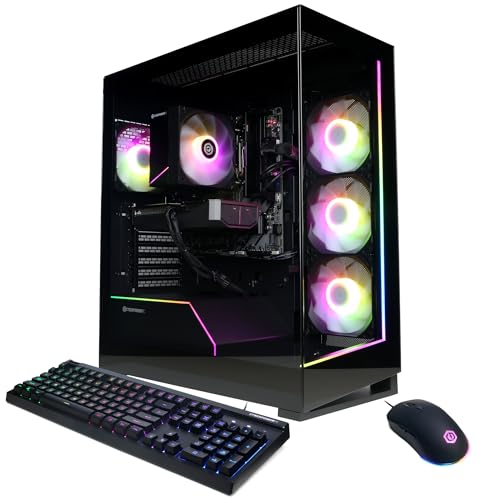

Top 3 picks at a glance
Starter Gaming PC Options at a Glance
| Tier | Graphics card (maker-listed) | Best for | Main limit |
|---|---|---|---|
| Entry | GeForce RTX 5050: 8GB GDDR6, 2,560 CUDA cores, 130W TGP, 550W PSU suggested | 1080p esports titles, older games, tight budgets | 8GB of video memory runs out in newer titles at high texture settings |
| Core pick | GeForce RTX 5060: 8GB GDDR7, 3,840 CUDA cores, 145W TGP, 550W PSU suggested | 1080p high refresh, 1440p with DLSS | Still 8GB, so texture settings may need trimming |
| Step up | GeForce RTX 5060 Ti 16GB: 4,608 CUDA cores, 128-bit bus, 180W TGP, 600W PSU suggested | 1440p, longer useful life, heavier texture packs | Higher system cost; fewer prebuilts offer it |
What a Starter PC Needs
A starter machine has to play today’s games well and leave room to improve later. That means a modern graphics card, a CPU that does not hold it back, memory in a dual-channel pair, a fast SSD, and a power supply with enough headroom. Roundups from several outlets in 2026 agree on one point: an RTX 5060 system is the practical entry point, and the market for cheaper machines has been squeezed by memory costs, so very low-priced systems often cut corners somewhere else.
Graphics card first
NVIDIA lists the RTX 5060 with 8GB of GDDR7 on a 128-bit bus and the RTX 5060 Ti in both 8GB and 16GB versions. If a listing says only “RTX 5060 Ti”, check which memory size it carries. The 16GB version is the one worth paying a premium for, because texture-heavy games are the first place 8GB cards struggle. The RTX 5050 sits below, with 8GB of GDDR6 and a 130W power rating, and the maker lists a 550W system supply for it.
CPU and memory
Roundups describe typical RTX 5060 prebuilts as pairing the card with a six-core class processor such as the Core i5-14400F, or a Ryzen 5 or Ryzen 7 part, and 16GB of DDR5. Reviewers advise treating 16GB as the practical floor and preferring two sticks over one so memory runs in dual channel. A single stick can reduce memory bandwidth and quietly cost frame rates.
Storage
A 1TB NVMe drive is the usual baseline in starter systems. Modern game installs are large, and a 500GB drive fills after a handful of titles. Many cases and boards have a second M.2 slot, so a drive can be added later.
Power supply and case
NVIDIA lists a 550W system supply for the RTX 5060 and 5050 and 600W for the RTX 5060 Ti, with a single 8-pin PCIe connector or an adapter. The wattage alone is not the whole story. Reviewers who dissect prebuilts keep flagging unbranded or low-efficiency supplies as the most common cost-cutting move, so look for a named brand and an 80 Plus rating on the spec sheet. Airflow matters too: a case with a mesh front keeps a mid-range card cooler than a solid panel.
Prebuilt Families Named by Reviewers
The following systems come up repeatedly in 2026 roundups. Configurations change between retailers and batches, so treat the descriptions as what outlets report, not a guarantee, and read the exact parts list on the product page you are buying from.
| System family | Typical configuration reviewers describe | Why it gets mentioned | Watch for |
|---|---|---|---|
| Skytech Archangel / Nebula | Core i5-14400F, RTX 5060, 16GB DDR5 | Named a budget choice; one guide credits the Nebula with a Gold-rated 650W supply | Confirm the PSU and RAM kit on the exact listing |
| CyberPowerPC Gamer Xtreme | Core i5-14400F, RTX 5060, 16GB DDR5, 1TB SSD | Budget pick with a complete parts list | Roundups note a basic power supply and cooler |
| iBUYPOWER RTX 5060 series | Often a Ryzen 7 7700 with 32GB DDR5 | Picked as the best for most people in one guide | Shipping damage and slow support are the reported risks |
| MSI Codex Z2 / R2 | R2 pairs an i5-14400F with an RTX 5060 and a Gold-rated supply | The Z2 is suggested for first-time buyers in one roundup | Compare the cooler and case airflow |
| Thermaltake LCGS Quartz | RTX 5060 gaming at the lowest entry cost of the group | Called a value standout | Check expandability inside the case |
| KOTIN with Ryzen 5 9600X | Newer AMD platform | Most modern socket for later CPU upgrades | Less known brand; read warranty terms closely |
Pick the Right Tier for You
| Pick this if you… | Choose |
|---|---|
| play mostly esports and older games at 1080p and want the lowest outlay | An RTX 5050 system with a named-brand PSU |
| want one balanced machine for 1080p high refresh and some 1440p | An RTX 5060 system with 16GB or 32GB of dual-channel DDR5 |
| play newer, texture-heavy games and plan to keep the PC several years | An RTX 5060 Ti 16GB system |
| like to tinker and upgrade later | A system on a newer platform such as the Ryzen 9000 line, with open M.2 slots |
| worry about support if something fails | A larger brand with a clear warranty, even if the parts list is slightly weaker |
Fit and Compatibility Notes
- Monitor not included. Roundups point out that none of the systems in their lists include a monitor. Budget for a 1080p high-refresh monitor.
- Power connector. NVIDIA lists one 8-pin cable or a 300W-plus PCIe Gen 5 cable for the 5060 family, which most supplies in these systems provide.
- Upgrade path. A proprietary motherboard or power supply, which some large-brand systems use, can limit later swaps. Standard ATX parts are easier to replace.
- Wi-Fi and ports. Look for built-in Wi-Fi or a spare PCIe slot if the desk is far from a router, and enough USB ports on the front panel.
Alternatives to a Prebuilt
Build it yourself
Choosing parts can give a better supply, case and memory kit for the same spend, but it takes time and needs care with fitting and BIOS settings. It also means sourcing every part separately, which memory-market swings have made less predictable in 2026.
Refurbished or previous-generation systems
Some retailers sell refurbished desktops with older cards. One guide cautions against stretching for older “deal” systems when a current RTX 5060 machine is within reach, mainly because of driver support and feature gaps such as DLSS 4 on newer cards.
Gaming laptop or handheld PC
If space or travel matters, a laptop with an RTX 5060 class GPU is an option, but laptop chips run at lower power limits than desktop cards and cannot be upgraded.
Common Mistakes to Avoid
- Buying a single-stick memory configuration, which can reduce performance.
- Assuming every RTX 5060 Ti has 16GB; some models carry 8GB.
- Ignoring the power supply brand and rating.
- Skipping the warranty details, which differ widely between system builders.
- Forgetting a monitor, speakers or headset in the plan.
Warranty and Support
Warranty terms vary a lot between system builders. Look for how long parts are covered, whether the builder handles the whole system, and what happens if a part fails in transit. Roundups mention shipping damage and long support wait times as risks with some online builders, so read recent buyer reports of the brand before ordering.
Frequently Asked Questions
Is an RTX 5060 prebuilt enough for a first gaming PC?
For most buyers, yes. Reviewers describe it as a solid 1080p high-refresh card that can handle 1440p with upscaling. Its 8GB of memory is the main limit, so texture settings may need lowering in the newest games.
Is 8GB of video memory a problem in 2026?
It can be in newer titles at high texture settings, which is why the 16GB RTX 5060 Ti is often suggested for longer use. For esports titles and older games, 8GB remains workable.
How much system memory does a starter PC need?
Sixteen gigabytes of DDR5 is the practical minimum, and 32GB gives headroom. Make sure it is two sticks so it runs in dual channel.
Should I worry about the power supply in a prebuilt?
Yes. NVIDIA lists 550W for the RTX 5060 and 600W for the RTX 5060 Ti, but the quality of the unit matters as well. Look for a named brand and an efficiency rating, and ask the seller if the listing does not say.
Will I need to buy anything else?
Almost certainly a monitor, and possibly a keyboard, mouse and headset, since prebuilt listings often leave these out or include only basic ones.
Can I upgrade a starter PC later?
Often yes. Systems with standard ATX parts, a spare M.2 slot and a supply with headroom allow a graphics card or storage upgrade. Proprietary cases and boards can limit this, so check before buying.
Related guides
More from Amazon
Programs that pair well with the guide above. Offers and eligibility are set by Amazon and may change.
Free shipping on eligible items, Prime Video and more. Eligible new members can start with a free trial.
Start a Prime free trialAd-free music streaming. Eligible new subscribers can start with a free trial.
Try Music Unlimited freeA Prime membership for ages 18-24 with a trial period. Eligibility is set by Amazon.
See Prime for Young AdultsAudiobooks and podcasts to listen to on the go. Eligible new members can start with a free trial.
Try Audible freeAs an Amazon Associate we earn from qualifying purchases.