Performance pads turn a basic two-deck controller into an instrument. With the right pad modes you can fire hot cues, chop loops, trigger samples and punch in effects without touching the laptop, which keeps a bedroom practice session or a small party set flowing instead of stalling while you hunt through menus with a mouse.
The four controllers below all put backlit performance pads with effects and hot-cue modes at the centre of the layout, but they differ in pad count, jog wheel size, software bundle and how their effects are triggered. One is built for scratch battles, one leans on paddle effects, one coaches beginners with light guides, and one splits its loyalty between two software ecosystems, so the best pick depends on how you like to perform.
Top 3 picks at a glance


Quick Picks
As an Amazon Associate we earn from qualifying purchases.
| Product | Best for | Key spec from title |
|---|---|---|
| Pioneer DJ DDJ-FLX4 | Learning on rekordbox and Serato | 8 back-lit Performance Pads with Pad FX |
| Numark Mixtrack Pro FX | Big jog wheels and paddle effects | 16 performance pads and dual FX paddles |
| Pioneer DJ DDJ-REV1 | Scratch and battle-style routines | Performance Pads and Lever FX in the mixer |
| Hercules DJControl Inpulse 500 | Guided learning and live sets | 16 backlit RGB pads with 8 pad modes |
How to Choose
Count Pads and Pad Modes, Not Just Pads
Eight pads per deck is the current standard, and every controller here meets it, but the modes behind those pads matter more than the count. Hot Cue mode is the baseline for jumping around a track, while Pad FX, sampler, loop and slicer modes decide how much remixing you can do live. Check the listing for the exact mode list, because some controllers reserve extra modes for the paid tier of their software. If your style leans on finger drumming and live remixing, prioritise a controller whose effects and sampler modes work in the bundled software version.
Decide How Effects Should Be Triggered
Effects reach your fingers in three ways on these controllers: pad modes that fire an effect while you hold or toggle a pad, dedicated FX buttons or knobs in a mixer section, and paddles or levers you flick for short bursts. Pads suit rhythmic, on-the-beat effects work. Paddles and levers suit scratch DJs who want one hand free. Knob-based sections suit smooth filter sweeps across a transition. None is universally better, so match the trigger style to the routines you actually practise, and check whether the effects come from the software or from hardware built into the unit.
Match the Software Bundle to Your Library
Each controller unlocks specific software: rekordbox and Serato DJ Lite on the Pioneer units, Serato DJ Lite on the Numark, and both Serato DJ Lite and DJUCED on the Hercules. The bundled tier is usually a Lite edition, which covers mixing, hot cues and basic pad modes but may gate extra effects, recording or additional decks behind an upgrade. If your music library and playlists already live in one ecosystem, staying in it saves a rebuild. Also confirm your laptop meets the software requirements and that the controller unlocks the performance mode you need without extra licences.
Check Jog Wheels and the Audio Interface
Jog wheel size and touch response shape how scratching and pitch bending feel. Larger capacitive jogs give finer control for scratch routines, while smaller wheels keep a controller portable for parties. Just as important is the built-in audio interface: a controller with its own sound card sends a master output to speakers and a separate cue feed to headphones, which a laptop headphone socket cannot do cleanly. Look for the output list in the specifications, including balanced or RCA master outs, both headphone socket sizes, and a microphone input if you plan to talk over sets.
The 4 Best Options
Pioneer DJ DDJ-FLX4
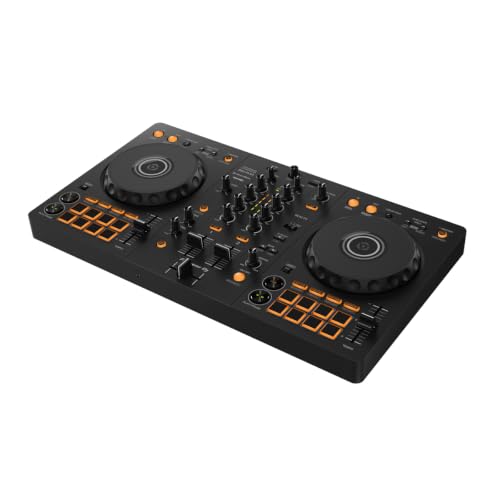
The DDJ-FLX4 is the easiest starting point for pad-based performance because its eight back-lit rubber Performance Pads cover Hot Cues, Pad FX, Beat Jump and the sampler in both rekordbox and Serato DJ Lite. Smart Fader automatically adjusts volume, bass and tempo as you move the crossfader, and Smart CFX applies effects with a single knob, so beginners can sound polished while they learn the pad modes properly. It runs over USB power and unlocks rekordbox performance mode on a computer, making it a tidy fit for bedroom practice that later moves to parties.
Specs
- 2-deck DJ controller for rekordbox and Serato
- 8 back-lit rubber Performance Pads
- Pad modes include Hot Cues, Pad FX, Beat Jump and sampler
- Smart Fader and Smart CFX mixing features
- Works with rekordbox, Serato DJ Lite and djay
- USB powered, USB cable included
- Item model number: DDJ-FLX4
Best for: Beginners who want Pad FX and hot cues in both rekordbox and Serato.
Watch out for: The bundled software tiers are Lite editions, so confirm the pad modes you want are not gated behind a paid upgrade.
Numark Mixtrack Pro FX
The Mixtrack Pro FX puts sixteen multi-function backlit performance pads under your fingers, eight per deck, with quick-access mode buttons for Hot Cues, Auto Loop, Sample and Fader Cuts, the last of which mimics fast crossfader flare moves from the pads. Six dedicated software effects buttons with dual paddle triggers handle transitions, and the large 6-inch jog wheels give scratch practice a more turntable-like feel than most entry controllers. A built-in 24-bit audio interface covers master and headphone outputs, and Serato DJ Lite is the bundled software, so the whole package is aimed at performers who want effects front and centre.
Specs
- 2-deck Serato DJ controller with mixer and audio interface
- 16 performance pads, 8 per deck
- Pad modes: Hot Cues, Auto Loop, Sample and Fader Cuts
- Six quick-launch FX with dual paddle triggers
- Large 6-inch jog wheels
- 24-bit digital audio interface
- Dedicated instant loop controls
Best for: Party and open-format DJs who want paddle-triggered effects and big jog wheels.
Watch out for: It is built around Serato, so check the current Serato DJ Lite feature list if you plan to rely on advanced pad modes.
Pioneer DJ DDJ-REV1
The DDJ-REV1 rearranges the usual layout into battle style: the tempo sliders sit horizontally above the decks like turntables in battle configuration, and the Performance Pads move into the mixer section alongside the Lever FX paddles, mirroring a professional DJM-S mixer. Pad modes cover Hot Cue, Auto Loop, Tracking Scratch and the sampler, and the Scratch Bank mode loads scratch samples from the pads. Tracking Scratch automatically returns the track to its cue point as you move the jog wheel, which lowers the learning curve for scratch routines. It pairs with the free Serato DJ Lite software and uses larger jog wheels than earlier entry Pioneer controllers.
Specs
- 2-deck Serato DJ controller, battle-style layout
- Performance Pads and Lever FX in the mixer section
- Pad modes include Hot Cue, Auto Loop and Tracking Scratch
- Scratch Bank sample loading from the pads
- 60mm horizontal tempo sliders
- Larger scratch-ready jog wheels
- Works with free Serato DJ Lite software
- Item model number: DDJ-REV1
Best for: Scratch and open-format DJs who want a battle layout with lever effects.
Watch out for: The battle layout places the pads in the mixer section, which feels unfamiliar if you learned on a standard deck layout.
Hercules DJControl Inpulse 500

The DJControl Inpulse 500 spreads sixteen backlit RGB pads across two decks, with eight pads per channel and multiple pad modes covering hot cues, loops, slicer and sampler work, plus a dedicated Filter/FX area for transitions. Its 5.5-inch touch-reactive platters carry beatmatch light guides that coach manual tempo matching, and the built-in audio interface provides both jack and RCA master outputs and two headphone sockets for venue flexibility. Retractable feet lift the unit away from spilled drinks at parties. It includes both DJUCED and Serato DJ Lite software, giving new DJs two ecosystems to learn in before committing to one.
Specs
- 2-deck USB DJ controller for Serato DJ and DJUCED, both included
- 16 backlit RGB pads, 8 per deck
- Pad modes include Hot Cue, Loop and Slicer
- Built-in audio interface with hardware input mixer
- Filter/FX area for transitions
- Large jog wheels with touch detection for scratching
- Master outputs: 2 x 1/4-inch jack and 2 x RCA
- Headphone outputs: 3.5mm and 1/4-inch stereo jacks
- Retractable and extendable feet
- Item model number: 4780909
Best for: New DJs who want guided beatmatching, RGB pad feedback and flexible outputs.
Watch out for: Confirm the pad mode list in DJUCED versus Serato DJ Lite, because the available modes differ between the two bundled programs.
Which One Fits Your Situation
You Are Learning Your First Pad Routines
Start with a controller whose pads cover hot cues, a sampler and an effects mode in the free software tier, and whose layout matches the tutorials you will follow. Guided features such as beatmatch lights or automatic fader assistance shorten the early learning curve, but make sure you can switch them off as your timing improves, so the controller still challenges you six months in.
You Play House Parties and Small Venues
Prioritise a built-in audio interface with both RCA and jack master outputs, two headphone socket sizes, and a microphone input if you host as well as mix. Retractable feet or a raised rear edge help on sticky bar tables. Pad-wise, quick loop and sampler modes matter more here than deep slicer modes, because reading a room rewards fast, simple moves over complex routines.
You Want to Scratch and Battle
Choose the battle layout: horizontal tempo sliders, pads in the mixer section and lever or paddle effects you can fire without moving your hands from the faders. Large jog wheels with reliable touch detection matter more than extra pad modes, and a tracking scratch helper is worth having while you build technique. Check that the crossfader feel suits scratching before you commit.
You Mix in a Gaming Room or Stream Setup
A compact USB-powered controller keeps a desk shared with a gaming PC tidy, and software that runs alongside streaming tools avoids audio routing fights. RGB pads are genuinely useful in a dim room, and a controller that unlocks two software options lets you test which library workflow suits your stream before you invest in an upgrade tier.
Common Mistakes
- Buying for pad count alone and ignoring which pad modes the bundled software tier actually unlocks.
- Assuming every controller works with every DJ program, when most unlock one or two named applications.
- Forgetting the audio interface: a controller without its own sound card cannot split master and headphone cue feeds properly.
- Choosing a battle layout for general mixing, or a standard layout for scratch practice, then fighting the layout for months.
- Skipping the output check and arriving at a venue with no matching master output for the house speakers.
Frequently Asked Questions
Do effects pads work in the free software tiers?
Usually the core modes do: hot cues, basic pad effects, loops and the sampler are part of the Lite tiers these controllers bundle. Advanced effects packs, extra pad modes or recording can sit behind a paid upgrade, and the exact split changes between rekordbox, Serato and DJUCED, so check the current feature list for the program you plan to use before buying.
How many pads does a beginner actually need?
Eight pads per deck is the practical standard and covers hot cues, loops, samples and an effects or slicer mode with room to spare. Sixteen pads on a two-deck controller simply means eight per deck rather than a bigger performance surface. Beginners rarely use every mode at once, so layout comfort and clear mode buttons matter more than chasing higher pad counts.
Can these controllers work without a laptop?
No. All four are USB controllers that rely on DJ software running on a computer for music playback, effects processing and library browsing. The built-in audio interfaces handle the sound output, but the laptop is still the engine. If you need to play from USB drives with no computer attached, you are looking at a standalone all-in-one system instead, which is a different product category.
What else do I need besides the controller?
You need a laptop that meets the software requirements, headphones for cueing, and powered speakers or an amplifier for the master output. Most of these controllers are USB powered and include a USB cable, but audio cables for your speakers are rarely in the box. A microphone is optional and only relevant if the controller has a mic input you plan to use for hosting or streaming.
Related guides
More from Amazon
Programs that pair well with the guide above. Offers and eligibility are set by Amazon and may change.
Free shipping on eligible items, Prime Video and more. Eligible new members can start with a free trial.
Start a Prime free trialAd-free music streaming. Eligible new subscribers can start with a free trial.
Try Music Unlimited freeA Prime membership for ages 18-24 with a trial period. Eligibility is set by Amazon.
See Prime for Young AdultsAudiobooks and podcasts to listen to on the go. Eligible new members can start with a free trial.
Try Audible freeAs an Amazon Associate we earn from qualifying purchases.