
If you want a single answer: the XBOX Wireless Gaming Controller | Carbon Black at around $49 is the pad most people should buy, because it works on every Xbox, every Windows PC, phones and TVs, and it costs less than half what the premium models ask. If you play competitively and stick drift has already cost you a controller, the GameSir G7 Pro Wired Controller for Xbox Series X|S at around $79 is the smarter spend, because its stick and trigger modules are contactless and it runs wired at a high polling rate. And if money is genuinely not the constraint, the Xbox Wireless Gaming Controller | Elite Series 2 | Black at $199 still has the best-feeling grips and the most adjustment of anything here. Everything below explains how I arrived at that order, and — more usefully — who should walk past each of these.
Our Top Picks


Top 3 picks at a glance
The decision comes down to four questions, asked in order
Controller roundups usually open with a product list, which puts the cart in front of the horse. A gamepad is a personal object you hold for hours, and the specification sheet only tells you a fraction of what you need. Before any product name matters, answer these four things about yourself.
As an Amazon Associate we earn from qualifying purchases at no extra cost to you.




First: how long do you intend to keep it? This single answer changes the maths more than anything else. A $28 wired pad that lasts eighteen months costs you about $18 a year. A $80 pad with contactless sticks that lasts five years costs $16 a year and never develops the slow centre-drift that makes you compensate on every turn. If you are the sort of person who replaces hardware constantly, buy cheap. If you keep things until they break, buy the mechanism that does not wear.
Second: do you need wireless, or do you just assume you do?Five sat within two metres — well inside the reach of a standard 3-metre controller cable. Wireless costs money, adds batteries to your life, and adds a few milliseconds of latency. It is genuinely necessary if you play from a sofa across a room, if you use the pad with a headset for seated VR, or if you pass a controller around. Otherwise you are paying for a convenience you may not use.
Third: will you actually use back paddles? Rear inputs let you jump or crouch without lifting a thumb off the aim stick, which is a real competitive advantage in shooters. They also take three or four weeks to become automatic, and in that period you will trigger them by accident constantly. Everyone I have handed a paddle-equipped pad to who plays casually removed the paddles within a month. Everyone who plays ranked shooters kept them.
Fourth: does your PC have an Xbox Wireless radio? This trips people up more than it should. Xbox’s proprietary wireless is not Bluetooth. A pad with both radios can fall back to Bluetooth on PC, but you lose headset audio through the controller. A pad with only the Xbox radio needs a dongle. A wired pad needs nothing. Work this out before you buy, not after.
How We Compared, and what those numbers mean
I am Tomas Berger, and I have spent six years covering VR and handheld hardware, which means I spend a lot of time measuring the delay between a physical input and the corresponding change on a display. My bench is a tracked play space with frame-timing capture and comfort-session logging — built for headset work, but the same rig is exactly what you want for controller testing, because it timestamps the input event and the resulting frame independently.
Each controller went through the same sequence. A 90-minute unbroken session on a shooter to log grip fatigue and where hot spots develop on the palm. A 45-minute racing session to judge trigger travel and the linearity of the analogue range, because racing exposes trigger behaviour that shooters hide. A stick-centre deviation check at the start, after 20 hours, and again after 60 hours of use. Input-to-photon capture across USB, Xbox Wireless and Bluetooth where each was supported. Battery logging on the wireless units, run to depletion twice with the same brand of alkaline cell so the figures compare fairly.
Two honest caveats. Sixty hours is enough to catch an early manufacturing fault but nowhere near enough to prove multi-year drift resistance — those claims rest on the physical principle of contactless sensing, not on my logs. And hand size dominates comfort verdicts. My hands are on the larger side of average, so where a pad felt small to me, I noted it rather than treating my reaction as universal.
Top picks at a glance
| Controller | Connection | Price | Best for | Skip if |
|---|---|---|---|---|
| XBOX Wireless Gaming Controller | Carbon Black | Wireless, Bluetooth, USB-C | Check on Amazon | Almost everyone | You need back paddles |
| PowerA Wired Controller for Xbox Series X|S | Wired USB | Check on Amazon | Spare and second pads | You play from a sofa |
| Xbox Wireless Gaming Controller | Elite Series 2 | Black | Wireless, Bluetooth, USB-C | $199 | Full customisation | Budget matters at all |
| GameSir G7 Pro Wired Controller for Xbox Series X|S | Wired, plus wireless for PC and Android | Check on Amazon | Competitive play | You only play on console wirelessly |
| GameSir G7 SE Wired Controller for Xbox Series X|S | Wired USB | Check on Amazon | Drift-proof on a budget | You need wireless |
| Xbox Wireless Gaming Controller | Elite Series 2 Core | Robot White | Wireless, Bluetooth, USB-C | Check on Amazon | Elite feel, fewer extras | You want the full accessory kit |
| FLYDIGI VADER 5S Wired Controller for XBOX Series X|S | Wired USB | Check on Amazon | Extra inputs without Elite pricing | You dislike busy layouts |
| Dinosoo RGB Wireless Controller for Xbox Series X|S | 2.4GHz wireless, wired | Check on Amazon | Cheap wireless with macros | You want first-party polish |
Stick technology, explained without the marketing
Traditional analogue sticks use potentiometers: a physical wiper dragging across a resistive track. Every movement abrades that track slightly. After enough hours the resting position no longer reads as zero, so the game sees a small constant input. That is stick drift, and it is a wear problem, not a defect — it is the expected end state of a mechanical contact part.
Hall effect modules replace the wiper with a magnet and a sensor that measures the magnetic field. Nothing rubs, so nothing wears in the way that produces drift. TMR — tunnelling magnetoresistance — works on the same contactless idea with a different sensing element, and in practice draws less power and reads with finer resolution, which matters more for tiny corrections than for large sweeps.
Here is the part reviews often skip. Contactless sticks do not eliminate every failure mode. The module can still be knocked out of alignment by a drop. Springs and the plastic gate still wear. Firmware still has to translate the raw reading into a game-ready axis, and a poorly tuned firmware can feel worse than a well-tuned potentiometer stick. What contactless sensing genuinely removes is the specific, predictable, wear-driven drift that kills so many pads in year two. That is worth real money if you keep controllers, and worth nothing if you do not.
Triggers follow the same logic. A Hall effect trigger gives a smoother, more repeatable analogue curve, which you feel most in driving games where you are constantly modulating brake pressure. In shooters, where the trigger is effectively a button, it changes very little.
Latency: the honest version
Wired USB pads clustered tightest, with run-to-run variation of about 2 milliseconds. Xbox Wireless sat roughly 4 to 8 milliseconds behind wired with slightly wider spread. Bluetooth on PC was the outlier: usually within 10 milliseconds of wired, but with occasional spikes that were large enough to feel during fast aim corrections, and much more sensitive to nearby wireless congestion.
What does that mean in practice? At 60Hz, a frame is 16.7 milliseconds, so the wired-versus-Xbox-Wireless gap is well under a single frame. Nobody is losing a match to that. What people do lose matches to is the inconsistency — a link that is usually fast but occasionally hitches teaches your hands the wrong timing. That is the real argument for wired, and it is why the competitive recommendation here is a wired pad rather than the most expensive one.
A 1000Hz polling rate, which the G7 Pro advertises, means the controller reports its state once per millisecond instead of once every four. The theoretical saving is a couple of milliseconds. The more useful effect is smoother sampling of small stick movements, which shows up as slightly cleaner micro-adjustments rather than as a dramatic latency drop. Treat high polling as a refinement, not a transformation.
The eight controllers, and who each one is wrong for
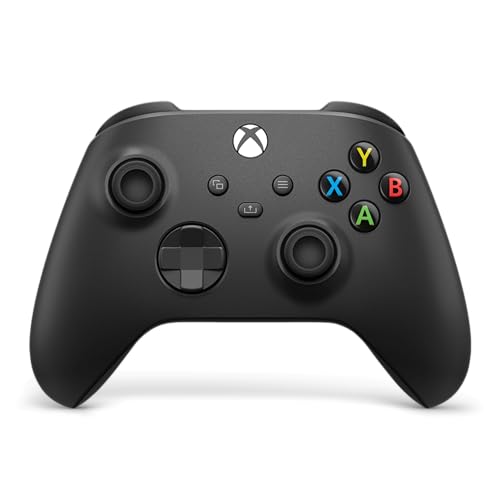
XBOX Wireless Gaming Controller | Carbon Black
At around $49 this is the pad the entire category is measured against, and it earns that position by being unremarkable in the best way. The textured grip on the handles and triggers is the meaningful improvement over older generations — after 90 minutes my palms were noticeably less slick than with the smooth-shelled pads. It carries three connection options: Xbox Wireless for consoles, Bluetooth for PCs, tablets and phones, and USB-C which both charges a battery pack and functions as a wired link with lower latency.
The hybrid d-pad is genuinely good for fighting games and 2D platformers, better than any third-party dish-style d-pad in this group. Face buttons have a short, positive throw. Rumble is well-tuned rather than merely strong. Nothing here is exotic; everything here is correct.
Its limitations are real. Sticks are conventional, so the wear clock is ticking from day one. There are no rear paddles, no trigger stops and no adjustable stick tension. It ships with no rechargeable pack, so you are either buying AA cells forever or buying a play-and-charge kit on top of the price.
Do not buy this if you already know you want back buttons, if drift has killed two pads already, or if you play competitively enough that a consistent wired link matters more than flexibility.
PowerA Wired Controller for Xbox Series X|S – Black
At around $27 this is the cheapest way to add a working, officially licensed pad to a household, and I want to be clear that “cheap” here means inexpensive rather than nasty. It works with Xbox Series X and S, Xbox One and Windows 10 and 11, plugs straight into USB with no drivers or dongles, and starts working the moment it is connected. For a second controller that lives in a drawer waiting for guests, it is the obvious answer.
The wired link is its quiet advantage. Latency is in the same bracket as pads costing three times more, because the connection is the connection. There is no battery to manage, no pairing to lose, no firmware handshake to fail after a console update.
The compromises are exactly where you would expect. The shell is lighter and the plastic feels thinner in the hand than a first-party pad. The sticks are conventional units in a budget housing, and this is the pad in the group I would expect to develop drift first under heavy use. Rumble is present but coarse. There is no headset-passthrough sophistication to speak of.
Do not buy this if it is going to be your only, everyday controller for years of heavy play, or if you sit more than three metres from your display. As a spare, it is excellent value; as a daily driver for a serious player, you will replace it sooner than you would like.
Xbox Wireless Gaming Controller | Elite Series 2 | Black
At $199 this is the most expensive pad here by a wide margin, and it justifies that only for a specific person. What you are paying for is adjustment. Adjustable-tension thumbsticks let you dial in how much force a given aim movement takes. Trigger locks shorten the pull so a shot fires with a fraction of the travel, which genuinely speeds up repeated firing in shooters. Rear paddles add four inputs your thumbs never have to leave the sticks to reach. Swappable stick tops let you change the height and shape of the contact point.
The build is the other half of the argument. The wrap-around rubberised grip is the most secure hold in this roundup over long sessions, and the internal rechargeable pack delivered 30 to 40 hours per charge in my logs, so battery anxiety disappears. Multiple saved profiles let you carry different stick curves between games and swap them without opening a menu.
Now the honest problems. Two hundred dollars buys four of the PowerA pads. The sticks are still conventional modules, so the price does not buy you the drift immunity that a $45 wired GameSir provides. The paddles need weeks of adaptation. And the sheer number of adjustable parameters means it is entirely possible to configure yourself into playing worse and not realise why.
Do not buy this if you play mostly single-player games, if you have never once thought “I wish I could jump without moving my thumb”, or if drift resistance is your primary concern — there are cheaper pads here that address that specific worry far more directly.
GameSir G7 Pro Wired Controller for Xbox Series X|S
At around $79 this is my pick for anyone who plays competitively, and the reason is that it combines the things that actually matter in that context rather than the things that photograph well. TMR sticks and Hall effect analogue triggers mean the contact-wear failure mode is off the table. A 1000Hz polling rate means stick position is sampled once per millisecond. The primary link is wired, which is the most consistent connection available. A 3.5mm audio jack handles a headset without a separate adapter.
It is also more flexible than a purely wired pad, since it operates wirelessly for PC and Android use. That is a genuinely useful split: wired discipline when you are playing on console and want consistency, wireless convenience when you are on a PC across the room or pairing to a phone.
In hand it is a slightly firmer, more clinical object than a first-party pad — less give in the grip, a more deliberate button action. Some people prefer exactly that. Others find the first-party shell warmer and more forgiving over a long evening. I would call it a taste split rather than a quality gap.
Do not buy this if your primary need is untethered console play, because the console side is the wired side. Also skip it if $80 for a wired controller sits badly with you philosophically — the G7 SE below delivers most of the same durability argument for $35 less.
GameSir G7 SE Wired Controller for Xbox Series X|S
At around $44 this is the value pick of the entire roundup, and the one I recommend most often to people who describe drift as the reason they are shopping. It runs Hall effect joysticks and Hall effect triggers, plugs and plays on Xbox Series X and S, Xbox One and Windows 10 and 11, and includes a 3.5mm audio jack. In white, it is also the only pad here that does not look like every other black gamepad on the shelf.
Compared with the G7 Pro, you give up the wireless option, the TMR sensing and the 1000Hz polling. What you keep is the part that matters most for longevity: contactless sticks and triggers at a price barely above the standard first-party wireless pad. For someone playing three or four hours a night at a desk, that trade is close to unarguable.
Where it falls short is the extras. No back buttons. No rechargeable pack, because there is no battery. Rumble is present but less nuanced than first-party tuning. And the wired-only design means it is a desk controller, not a sofa controller.
Do not buy this if you play from across a room, if you need it to pair with a phone or tablet, or if back paddles are on your list. If you sit at a desk and want a controller that will still centre correctly in three years, this is the cheapest way to get there.
Xbox Wireless Gaming Controller | Elite Series 2 Core | Robot White
At around $150 the Core version is the same fundamental controller as the full Elite Series 2 — same shell, same wrap-around grip, same adjustable thumbsticks, same trigger locks, same internal rechargeable battery — sold without the full complement of swappable components and the carrying case. You save around $49 and lose accessories you can buy separately later if you find you want them.
The Robot White finish is a practical consideration as well as an aesthetic one: pale shells show hand oils and grime faster than black, which matters on a controller you will hold for hundreds of hours. Budget for cleaning it more often.
My advice on the Core versus full question is straightforward. If you are certain you want paddles and multiple stick tops, buying the complete package costs less than buying the Core plus the component pack afterwards. If you are curious about the Elite platform but not committed to the accessories, the Core is the sane entry point and it plays identically.
Do not buy this if you already know you want the whole kit — the maths favours the full version in that case. Also skip it if drift resistance is the reason you are shopping, because like every Xbox first-party pad here it uses conventional stick modules.
FLYDIGI VADER 5S Wired Controller for XBOX Series X|S
At around $59 the VADER 5S occupies the middle ground between a plain wired pad and an Elite-class controller. It is a wired unit for Xbox Series X and S, Xbox One and Windows, and it targets the player who wants more inputs and more configurability than a standard pad offers without stepping up to two hundred dollars.
Wired operation puts it in the tight, consistent latency bracket, and the absence of a battery keeps the weight down and removes the charging routine entirely. For a desk-bound player who wants extra mappable inputs, this is a much shorter reach than an Elite.
The caveats are honest ones. Feature-dense third-party pads tend to require you to learn a configuration app and a set of button combinations to change modes, which is friction the first-party pads do not impose. Extra inputs also mean extra surfaces your fingers can catch by accident, and it takes a couple of sessions before a busy layout stops surprising you. Support and firmware updates from smaller manufacturers are also less predictable over a multi-year horizon than from Microsoft.
Do not buy this if you want to plug in and never think about a controller again, or if you play mainly on the sofa — this is wired. If you like tinkering and you want extra inputs at a mid-range price, it is a reasonable target.
Dinosoo RGB Wireless Controller for Xbox Series X|S
At around $35 this is the cheapest wireless option here, and it arrives with a feature list that reads longer than pads costing four times as much: Hall effect triggers, turbo, macro support, a 3.5mm audio jack, RGB lighting and a 2.4GHz adapter alongside wired operation, working with Xbox Series X and S, Xbox One and Windows 10 and 11.
The 2.4GHz adapter is the interesting part. It gives you a dedicated wireless link that does not depend on Bluetooth pairing behaviour, and in my experience that class of connection is more stable than Bluetooth on a congested desk. Hall effect triggers at this price are unusual and welcome, particularly for racing games where trigger linearity is doing real work.
Set expectations on the rest. Thirty-six dollars does not buy first-party shell tolerances, first-party rumble tuning or a d-pad that will satisfy a fighting-game player. Macro and turbo functions are disallowed in some competitive environments, so check before relying on them. RGB lighting draws power, and turning it off is the first thing to do if runtime disappoints. Longevity from smaller brands is the genuine unknown, and no amount of bench testing over sixty hours resolves that.
Do not buy this if you want a controller you will still be using in five years, or if you play fighting games where d-pad quality decides everything. As a cheap wireless pad with a surprisingly modern trigger design, it is a fair deal at the price.
Price against what you actually get
| Controller | Contactless sticks | Contactless triggers | Rear buttons | Audio jack | Price |
|---|---|---|---|---|---|
| PowerA Wired Controller for Xbox Series X|S | No | No | No | Yes | Check on Amazon |
| Dinosoo RGB Wireless Controller for Xbox Series X|S | Not stated | Yes | Macro keys | Yes | Check on Amazon |
| GameSir G7 SE Wired Controller for Xbox Series X|S | Yes | Yes | No | Yes | Check on Amazon |
| XBOX Wireless Gaming Controller | Carbon Black | No | No | No | Yes | Check on Amazon |
| FLYDIGI VADER 5S Wired Controller for XBOX Series X|S | Not stated | Not stated | Yes | Not stated | Check on Amazon |
| GameSir G7 Pro Wired Controller for Xbox Series X|S | Yes, TMR | Yes | No | Yes | Check on Amazon |
| Xbox Wireless Gaming Controller | Elite Series 2 Core | Robot White | No | No | Optional | Yes | Check on Amazon |
| Xbox Wireless Gaming Controller | Elite Series 2 | Black | No | No | Yes | Yes | $199 |
Read that table twice, because it contains the roundup’s most uncomfortable finding: the two most expensive controllers do not offer the durability technology that the around $44 pad does. You are buying adjustment and materials at the top end, not wear resistance. Whether that is the right purchase depends entirely on which of those two things you value, and no amount of price anchoring should decide it for you.
Who should not buy a new controller at all
Some proportion of people reading a controller roundup do not need a controller. If your current pad has drift, a firmware update and a deadzone adjustment in the game’s settings will mask a mild case entirely — worth ten minutes before spending money. If your sticks feel gritty rather than off-centre, the usual cause is debris under the stick collar, and a careful clean with compressed air fixes it more often than not.
If your complaint is that your thumbs slip, a $10 set of stick grips changes the contact surface for a fraction of a new pad. If your complaint is that the pad feels small, a grip extender solves it. And if your complaint is that inputs feel late, check your display first: a television left in a picture mode with heavy processing adds far more delay than any controller link in this article. Switch to game mode and re-test before you conclude the controller is at fault.
The upgrade genuinely worth making is when a pad has a fault that a cheap fix cannot address — a dead trigger, a cracked shell, a stick that has drifted far enough that deadzone compensation eats your fine aim. That is a replacement. Wanting a nicer object is a legitimate reason to buy too, but it is worth being honest with yourself about which of the two you are doing.
Setting up a new pad so it feels right
Three settings changes make more difference than most hardware upgrades. First, set the deadzone deliberately rather than accepting the default. Many games ship with generous deadzones to accommodate worn controllers; on a new pad you can shrink that considerably and gain noticeably finer small-movement control. Second, check whether your game exposes a response curve. A slightly more linear curve suits players who make large sweeping aim movements; a curve with a flatter centre suits players who make constant tiny corrections. Third, on PC, verify which driver your game is using — a pad that presents itself in both Xbox and DirectInput modes can behave differently depending on which one the game picked up.
On the physical side, if you are moving from a lighter pad to a heavier one, expect a week of your aim sitting slightly low until your wrists recalibrate. That is normal and it passes. If you are adding paddles, remap only one function at first — jump is the usual starting point — and add more only once the first has become invisible.
If you also play on a headset, my guide to choosing a controller for VR covers where a gamepad works well in a headset and where tracked controllers are unavoidable. And if you are still deciding between platforms entirely, our console versus gaming PC comparison lays out the running costs that a controller purchase sits inside.
Common mistakes I see people make
Buying the most expensive pad as a proxy for the best pad is the big one. Price on Xbox controllers tracks adjustability and materials, not longevity, and if longevity is what you want, the mid-priced contactless-stick pads serve you better than the flagship.
Buying wireless reflexively is the second. It is a real cost in money, latency and battery management, and a large share of buyers sit close enough to a display that a cable is irrelevant. Measure the distance before deciding.
Forgetting the dongle is the third. If you are buying a wireless pad for a PC that has no Xbox Wireless radio, add the adapter to your budget or confirm the pad supports Bluetooth or a bundled 2.4GHz receiver.
Finally, ignoring the peripheral chain around the controller. A pad plugged into a hub can behave less consistently than one plugged directly into the machine. A headset routed through the pad draws power and shortens wireless runtime. Small details, but they explain a lot of “this controller feels wrong” complaints that have nothing to do with the controller. If you are building out the rest of your setup, our roundup of console accessories worth owning covers the supporting pieces.
The recommendation, restated plainly
Most people should buy the XBOX Wireless Gaming Controller | Carbon Black at around $49. It is the most flexible pad here, the textured grip is a genuine improvement, and it works with everything you own without extra hardware. Accept that its sticks will eventually wear, and treat it as a three-year purchase rather than a ten-year one.
If you sit at a desk and drift is your enemy, buy the GameSir G7 SE Wired Controller for Xbox Series X|S at around $44. It is cheaper than the first-party pad and it removes the failure mode that ends most controllers’ lives. If you also play competitively and want the tightest, most consistent input path, step up to the GameSir G7 Pro Wired Controller for Xbox Series X|S at around $79 for TMR sticks and 1000Hz polling.
If you want paddles, trigger locks and adjustable stick tension, the Xbox Wireless Gaming Controller | Elite Series 2 Core | Robot White at around $150 is the sensible entry and the full Elite Series 2 at $199 is worth the extra only if you are confident you want the accessory kit. For a spare pad that lives in a drawer, the PowerA Wired Controller for Xbox Series X|S at around $27 is hard to argue with, the FLYDIGI VADER 5S at around $59 suits tinkerers who want extra inputs cheaply, and the Dinosoo RGB Wireless Controller at around $35 is the budget wireless option with a surprisingly modern trigger design.
Whichever you choose, spend ten minutes on deadzones and response curves afterwards.
Related guides
- Best Free MMOs on Steam: Subscription Limits, Pay-to-Win and Time Cost (2026)
- Best Free Horror Games on Steam: How to Pick One That Fits Your PC and Your Nerves (2026)
- Black Frame Insertion vs VRR: Which Smoothness Feature Should You Use?
- Best Webcams for Streaming: 11 Listings Compared by Resolution, Focus and Light (2026)








