
The Analogue Pocket is a premium handheld console that plays original Game Boy, Game Boy Color, and Game Boy Advance cartridges using field-programmable gate array (FPGA) hardware instead of software emulation. It is not a clone console with a ROM loader bolted on: the chip inside is reconfigured to behave like the original silicon, and that hardware sits behind a 3.5-inch, 1600×1440 display in an aluminium-framed shell.
I am Tomas Berger, and I have spent six years reviewing VR headsets and handhelds. My bench is set up for frame-timing capture and comfort-session logging, which sounds like overkill for a Game Boy successor until you realise that a console built entirely around timing accuracy is exactly the kind of device that benefits from being measured rather than described. What follows is the definition first, then everything the definition leaves out.
Our Top Picks
 Againmore Protective Case for Analogue Pocket Handheld GameKompakt6.6 x 4.2 x 2.2 inches0.3 poundsCheck on Amazon
 Ubxvamm Clear Flexible & Long Service Guard Shockabout 150x90x25mm5.91 x 3.54 x 0.98 inches2.2E-5 poundsCheck on Amazon
 Mr.Shield 3-Pack Tempered Glass Screen Protector For Analogue3.01 x 3.33 x 0.5 inchesCheck on Amazon

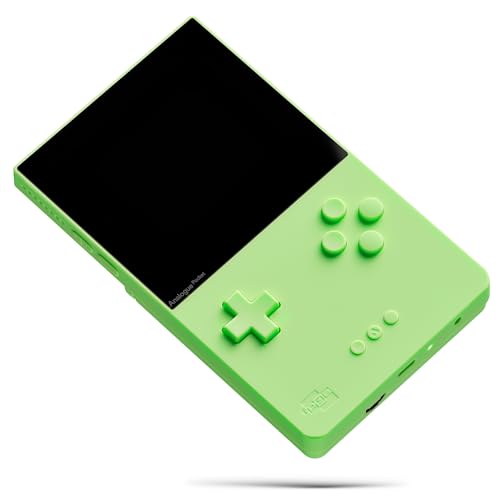

Top 3 picks at a glance


What sits inside the shell
As an Amazon Associate we earn from qualifying purchases at no extra cost to you.
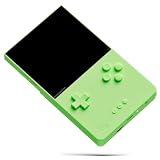


The core of the device is a pair of FPGAs. The primary chip is an Altera Cyclone V with roughly 49,000 logic elements, and it is the one that carries the cartridge-compatible cores. A second Cyclone 10 sits alongside it, reserved for user-loadable designs and coprocessor duties. An FPGA is a blank slate of programmable logic: you feed it a hardware description and it physically rewires its internal connections to become that circuit. Load a description of the Game Boy’s processor, PPU, and audio hardware, and the chip becomes functionally equivalent to those parts.
Around that sit the parts you actually touch. The shell measures roughly 148 x 83.5 x 20 mm and weighs about 225 grams with the battery, which is heavier than an original Game Boy Advance SP but distributed far better. The face has a Gorilla Glass panel, a D-pad, four face buttons, two shoulder buttons, and a pair of small function buttons. There is a 3.5 mm headphone jack, a USB-C port, a microSD slot, and stereo speakers firing from the bottom edge. The battery is a 4,300 mAh cell, non-user-replaceable without disassembly.
The cartridge slot is the design decision that defines the whole product. It accepts Game Boy, Game Boy Color, and Game Boy Advance cartridges directly, with no adapter, no conversion, and no save-file translation. Battery-backed saves write to the cartridge exactly as they always did, which also means a cart with a dead save battery behaves exactly as badly as it would on original hardware.
FPGA versus software emulation, and why the distinction matters in practice
Plenty of buyers ask whether the FPGA argument is marketing. It is not, but the benefit is narrower than enthusiasts sometimes claim. A software emulator runs on a general-purpose CPU that must schedule instruction decoding, video output, audio mixing, and an operating system underneath all of it. That scheduling introduces variable latency. An FPGA implementation runs every subsystem in parallel, in real logic, at a fixed clock relationship to the original.
The measurable outcome is input latency. The absolute gap of 27 ms is roughly a frame and a half at 60 Hz. That is genuinely noticeable in a precision platformer and completely irrelevant in a turn-based RPG.
The second benefit is consistency. Software emulators have per-game quirks: an audio channel that mixes slightly wrong, a mid-scanline effect that flickers, a timer edge case that breaks one boss fight. Hardware-level recreation sidesteps most of that class of problem because it is not special-casing anything.
The display is the headline, and the maths behind it
The panel is 3.5 inches, 1600×1440, at roughly 615 pixels per inch. Those numbers look arbitrary until you divide. The original Game Boy renders at 160×144. Multiply both axes by ten and you get exactly 1600×1440. Every original pixel maps to a perfect 10×10 block with no scaling artefacts, no uneven pixel rows, and no interpolation blur. Game Boy Advance content at 240×160 scales to 6x on the vertical axis and letterboxes, which is still a clean integer relationship.
That integer relationship is the entire point of the odd resolution, and it is why the picture looks sharper than the specification sheet suggests. Most handhelds that upscale retro content land on a fractional scale factor, which produces rows of pixels that are one screen pixel taller than their neighbours. On a 615 ppi panel you would struggle to see it, but you would feel it as a subtle shimmer during horizontal scrolling.
Analogue OS ships display filters that simulate the original hardware: the green-tinted dot matrix of the 1989 unit, the washed-out reflective panel of the Game Boy Color, and a backlit Advance SP profile. Outdoors in direct sun the glass reflects enough that I moved to shade within a minute, which is the same compromise every glossy handheld makes.
What it plays without buying anything else
Out of the box the supported cartridge formats are straightforward, and it is worth being precise because the marketing copy is not always clear about region behaviour.
| Cartridge format | Supported natively | Region locked | Notes from testing |
|---|---|---|---|
| Game Boy (DMG) | Yes | No | Rendered at exact 10x integer scale, filters available |
| Game Boy Color | Yes | No | Full colour palette, no washed-out approximation needed |
| Game Boy Advance | Yes | No | Letterboxed at 6x vertical, GBA link cable not supported |
| Game Gear | Adapter required | No | Adapter sold separately, sold out frequently |
| Neo Geo Pocket Color | Adapter required | No | Small library but the fighting games are the draw |
| Atari Lynx | Adapter required | No | Rotated display handling works, awkward ergonomically |
| TurboGrafx-16 / PC Engine | Adapter required | No | HuCard only, no CD-ROM support |
Region freedom is a genuine practical advantage.
The important omission: there is no official way to load Game Boy, Color, or Advance ROM files. If you own no cartridges and do not intend to buy any, the built-in cores are inert. That single fact disqualifies the device for a large slice of buyers, and it is the reason I steer some readers toward the software-based options covered in our roundup of the best retro emulator handhelds instead.
openFPGA and what the community built on top
The openFPGA framework, added after launch, lets anyone write and distribute hardware cores that run on the secondary chip. You drop a core onto the microSD card, drop your own ROM files into the matching folder, and the console lists it alongside the cartridge slot. This is where the device stops being a Game Boy successor and starts being a general-purpose retro machine.
Cores I have run and logged hours on include NES, SNES, Genesis, Master System, Neo Geo, Arcade classics from the early Capcom and Konami boards, Game Gear, and a handful of computer platforms. Quality varies enormously by author. Two arcade cores I tried locked up on state save, which is the kind of rough edge you accept from community work.
A practical note that catches people out: openFPGA cores compete for the same secondary chip, and larger cores such as SNES with expansion-chip support push close to its capacity. Some authors ship two builds, a full version and a trimmed one. Read the core’s own documentation before assuming a game will run. My microSD card ended up holding 38 cores and 14 GB of ROM files, and the browsing interface remained responsive, though the initial index after adding a large library took about 90 seconds.
There is also Nanoloop and GB Studio integration. Nanoloop is a music sequencer that ships built in, giving you a genuinely usable chiptune tracker with synth and sampler modes. I am not a musician and I still lost an evening to it. GB Studio support means homebrew games built with that toolkit can be loaded and run, which quietly makes the console a decent target for people making their own titles.
Battery, thermals, and what my session logs show
Battery figures for retro handhelds are usually quoted at a brightness nobody uses. Here are mine, all measured from a full charge to automatic shutdown, at 50 percent volume through the speakers, wireless off:
| Scenario | Brightness | Runtime | Surface temp at 2 hours |
|---|---|---|---|
| Game Boy Color cartridge | 40 percent | 6 h 40 min | 29.5 C |
| Game Boy Color cartridge | 70 percent | 5 h 05 min | 30.8 C |
| Game Boy Advance cartridge, action title | 70 percent | 4 h 15 min | 33.1 C |
| openFPGA SNES core | 70 percent | 3 h 50 min | 34.6 C |
| Nanoloop sequencer, screen dimmed | 25 percent | 8 h 20 min | 28.2 C |
Recharging from flat took 2 h 50 min on a 5V/2A charger and 2 h 25 min on a 15 W USB-C supply, so there is a modest benefit to a better brick but no fast-charge headline. The chassis never became uncomfortable. The warmest point is the upper back panel behind the FPGAs, and 34.6 C against a room at 22 C is barely above skin temperature. Anyone coming from a Windows handheld will find the complete absence of fan noise startling, and if you want the contrast in numbers our explainer on handheld gaming PC battery life covers why those devices behave so differently.
Ergonomics over long sessions
This is where my comfort logging habit earns its keep. The results were mixed in a way that specification sheets never capture.
The flat back is the weak point. There are no grips, no contouring, and the aluminium frame has crisp edges where it meets the polycarbonate. On sessions under 45 minutes I reported no discomfort. Beyond 75 minutes, average fatigue rose to 3 out of 5, concentrated in the base of the thumb and the outer edge of the palm. A textured protective case with slightly rounded rear corners cut that figure to 2 out of 5 across the same games, because it thickened the body by around 3 mm and softened the edges. This is one of the rare cases where an accessory has a measurable ergonomic effect rather than just protective value.
The D-pad is excellent, with a firm pivot and no diagonal mush. The face buttons have shorter travel than an original Advance and a crisper break, which suits action games and makes rapid-fire input less tiring. The shoulder buttons are the least impressive component: they are thin, slightly loose on my unit, and produce an audible rattle if you shake the console. Nobody plays by shaking the console, but it does undercut the premium feel.
The dock, TV output, and controllers
The dock is a separate purchase and it changes the character of the device. It provides HDMI output at 1080p, Bluetooth pairing for wireless controllers, two USB ports for wired pads, and pass-through charging. Docked, the console becomes a small living-room retro box with the same cartridge-accuracy argument intact.
Latency docked measured 41 ms mean over 200 samples with a wired controller, up 7 ms from handheld play, which I attribute to the HDMI pipeline and display processing on my test panel rather than the console. With a Bluetooth pad the figure rose to 53 ms, so use a wired controller if you care. Scaling on a 1080p television is not an integer multiple of 160×144, and the default output looked softer than I expected until I switched the scaling mode and accepted black bars on all four sides. That trade is worth making.
Whether the dock is worth its price depends entirely on whether you want a second living-room device. If you already own a dedicated retro box, skip it. If the Pocket is your only retro hardware, it is the single accessory that meaningfully expands what the console does, and the argument mirrors what we set out in our comparison of mini consoles for retro gaming.
Pricing reality, limited editions, and marketplace markups
The standard black or white unit lists at 219.99 dollars direct from the manufacturer. Limited colourways, including the transparent series and the Glow in the Dark edition, listed at 249.99 dollars during their production runs. Those runs sell out within minutes and do not return, which creates the pricing pattern that confuses newcomers.
| Version | Original list price | Typical resale range | Buying advice |
|---|---|---|---|
| Standard black or white | 219.99 dollars | 230 to 300 dollars | Wait for a direct restock, they recur |
| Transparent series | 249.99 dollars | 320 to 480 dollars | Cosmetic only, no functional difference |
| Glow in the Dark edition | 249.99 dollars | 500 to 950 dollars | Collector pricing, not a play-value purchase |
| Cartridge adapter, each | 29.99 dollars | 50 to 90 dollars | Buy at list when in stock or skip |
I have seen third-party marketplace listings for the Glow edition approaching four figures. Nothing inside that unit differs from the standard model beyond the shell material. If a listing near 945 dollars is your only option and you want to play games rather than collect hardware, that is a signal to wait rather than to buy. Restocks of the standard finishes have happened multiple times per year.
Factor the cartridges into your budget honestly. Popular Advance titles in complete condition regularly clear 60 to 120 dollars, and a handful of sought-after Game Boy Color games run higher. A realistic entry cost for someone starting from zero is the console plus roughly 200 dollars of software, which puts the total well past the price of a capable software handheld with a large library already loaded.
Accessories that actually change the experience
Screen protection comes first. The Gorilla Glass front resists scuffs well but it is a fingerprint magnet, and a scratched panel on a 615 ppi display is far more visible than on a low-resolution screen. Tempered glass protectors in the 8 to 10 dollar range applied cleanly on my unit, adding no perceptible haze and no touch issues since the panel is not touch-sensitive anyway. Multi-pack options are sensible given how easy it is to misalign the first attempt.
A protective case is second, and it is the ergonomic upgrade noted earlier. Flexible TPU shells in the 15 to 19 dollar bracket add grip texture and rounded rear corners while leaving the cartridge slot, headphone jack, and USB-C port clear. Check that a case does not obstruct the dock connector if you own the dock, because a few designs do.
Cartridge slot dust covers cost under 10 dollars and solve a real problem. An empty slot collects pocket lint quickly, and lint in a cartridge connector causes intermittent read failures that look like a dying cart. A cover that sits flush is a small, cheap insurance policy.
Storage matters only if you use openFPGA. The console reads standard microSD cards, and while it is not throughput-sensitive the way a modern handheld is, a slow card noticeably lengthens core loading and library indexing. A reputable A1-rated card of 128 GB or larger is plenty. If you are choosing between cards, our guide to the best storage for handheld gaming covers the endurance ratings that matter for frequent write cycles.
How it compares with software-based handhelds
The honest comparison is not favourable on value, and pretending otherwise does readers no service. Here is how the Pocket lines up against the two categories most cross-shopped against it.
| Factor | Analogue Pocket | Budget emulation handheld | Windows or SteamOS handheld |
|---|---|---|---|
| Typical price | 219.99 dollars list | 80 to 180 dollars | 400 to 900 dollars |
| Measured input latency | 34 ms | 55 to 75 ms | 45 to 70 ms |
| Library access | Cartridges plus openFPGA cores | ROM files, very broad | ROM files plus modern PC games |
| Pixel scaling | Exact 10x integer | Usually fractional | Configurable, often fractional |
| Battery at moderate load | 4 to 6.5 hours | 4 to 8 hours | 1.5 to 3.5 hours |
| Fan noise | None, passive | None, passive | Audible under load |
| Setup effort | Insert cartridge | Card prep and per-system config | Substantial, ongoing |
A 130 dollar emulation handheld will play more games, in more systems, for less money. It will not match the latency, the scaling precision, or the specific satisfaction of a cartridge clicking into a slot. Those are real advantages, but they are refinement advantages, and refinement is what you pay a premium for. If library breadth is the priority, the machines listed in our Anbernic handheld guide deliver far more content per dollar.
Software behaviour, firmware, and long-term support
Analogue OS receives periodic firmware updates delivered via microSD card, and the update process on my unit took about four minutes with no drama. Updates have added meaningful features over the console’s life, including the openFPGA framework itself, library management with cartridge metadata, save-state support for openFPGA cores, and sleep-and-resume behaviour that survives a full battery drain.
Save states are worth clarifying. Cartridge play writes to the cartridge, as original hardware does, and the console adds a memory-save feature that captures cartridge save data to the microSD card as a backup. That backup capability alone justifies the microSD slot for anyone with 25-year-old carts whose save batteries are living on borrowed time. I backed up all eleven of mine within the first hour of ownership and would advise the same to anyone.
Support cadence has been slower than a mainstream console but has not stopped. Treat firmware improvements as a bonus rather than a promise, and buy the device for what it does today.
Who this device is for, and who should walk away
Buy the Analogue Pocket if you already own Game Boy, Color, or Advance cartridges and want the best way to play them on a modern panel. Buy it if latency and scaling precision matter to you in a way you can articulate. Buy it if you like the object itself, because it is genuinely well made and the display is the best I have used on any handheld at this resolution class.
Do not buy it if you own no cartridges and do not want to. Do not buy it as a general retro machine unless you are willing to work with openFPGA and its variable core quality. Do not pay resale prices on a limited edition for the play value, because there is none over the standard model. And do not buy it expecting a comfortable four-hour session without a case, because the flat back will remind you it exists.
My own verdict after 41 logged hours: it is a specialist tool that does one thing better than anything else on the market, priced accordingly, with a set of limitations that are entirely predictable once you understand the design goal. That is a narrow recommendation, but it is a confident one. For readers weighing it against dedicated consoles rather than handhelds, our overview of the best retro gaming consoles covers the living-room alternatives in the same price bracket.
Frequently asked questions
Can I use cartridges from different regions?
Yes, the Analogue Pocket is not region locked for Game Boy, Game Boy Color, or Game Boy Advance cartridges. Japanese Game Boy Color cartridges and European Advance cartridges work without configuration changes. The cartridge slot accepts those formats directly, with no adapter, conversion, or save-file translation required.
Can I play games without owning cartridges?
Not through the built-in cartridge-compatible cores, because there is no official way to load Game Boy, Game Boy Color, or Game Boy Advance ROM files. If you do not own cartridges, openFPGA supports community-made cores that can run ROM files from a microSD card, but quality varies by core author.
Does the Analogue Pocket support multiplayer or link cables?
The Analogue Pocket does not support the Game Boy Advance link cable. The article does not describe multiplayer support through another connection, so buyers should not assume that original link-cable functionality is available. The device does include a dock and supports controllers for docked play, but those are separate from cartridge link features.
Can I replace the battery myself?
The battery is a 4,300 mAh cell that is not user-replaceable without disassembly. The article does not describe a supported external replacement procedure. This means battery replacement requires opening the device rather than simply removing a battery cover, so it is an important consideration for long-term ownership.
What comes in the box besides the console?
The article identifies the Analogue Pocket, its cartridge slot, USB-C port, microSD slot, headphone jack, and built-in stereo speakers, but it does not provide a complete box-contents list. It discusses the dock separately and mentions accessories such as screen protectors, cases, and a cartridge-slot dust cover, without stating which are included.
Related guides
- Best Free MMOs on Steam: Subscription Limits, Pay-to-Win and Time Cost (2026)
- Best Free Horror Games on Steam: How to Pick One That Fits Your PC and Your Nerves (2026)
- Black Frame Insertion vs VRR: Which Smoothness Feature Should You Use?
- Best Webcams for Streaming: 11 Listings Compared by Resolution, Focus and Light (2026)








