
Choosing between a dedicated controller charging station and a handful of individual USB cables sounds simple until you live with the decision every day. Both will keep your PlayStation controllers powered, but they create very different routines on your coffee table, entertainment center, or desk. One promises a single, tidy drop-and-charge spot that is always ready. The other offers maximum flexibility and the lowest upfront cost by using cables you may already own. The right pick comes down to how many controllers you juggle, how much clutter you tolerate, and how often you want to think about charging at all.
Our Top Picks

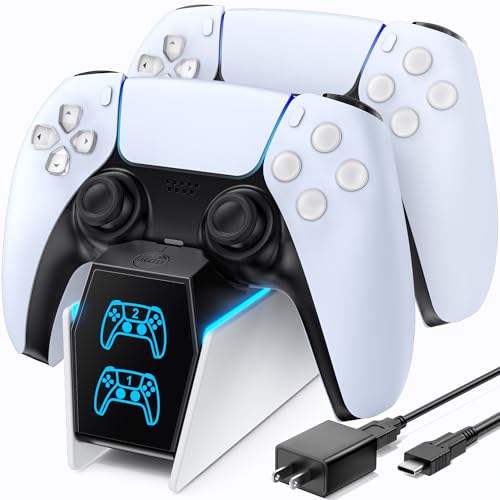


Top 3 picks at a glance

Quick Verdict
For sheer everyday convenience, a controller charging station wins for most households with two or more wireless controllers. You get a fixed home for your controllers, no fumbling for ports in the dark, and faster turnaround between gaming sessions. Individual USB cables win for price, portability, and compatibility, especially if you only have one controller, game infrequently, or need cables that work with other devices like a PS3 controller, camera, or GPS. If your priority is a clean setup with the least daily effort, choose the station. If your priority is spending the least and keeping things minimal, choose cables.
As an Amazon Associate we earn from qualifying purchases at no extra cost to you.


Side by Side
| Feature | Controller Charging Station | Individual USB Cables |
|---|---|---|
| Convenience / Comfort | Drop-in docking, no plugging. Click-in cradle with LED indicators. One-handed operation. | Plug in each time, align small ports. Requires bending behind console or finding a free USB port. |
| Durability | Solid plastic dock, metal contact pins. Rated for thousands of dock cycles. No cable bending stress on controller port. | Cable lifespan 1-3 years depending on bend cycles. Mini-B and USB-C ports wear with repeated plugging. |
| Price Range | $16 to $30 for dual docks. Examples like the OIVO PS5 Controller Charger with Fast Charging AC Adapter at around $16 and the PowerA Twin Charging Station for Dualsense Wireless Controllers at around $21 set the typical range. | $5 to $14 for multi-packs. A 2-pack of 3ft Mini USB cables around $7, or a 10-pack like the Smays Mini USB Cable 3ft bulk option at around $13. |
| Maintenance | Wipe dust from contacts monthly, keep AC adapter connected. No cable untangling. | Untangle, replace frayed cables, clean ports. Keep spare cables on hand. |
| Space Needed | Footprint approx. 6.5 x 4.5 to 7.2 x 5.5 inches, height 2.5 to 3 inches, weight 0.5 to 0.85 lbs. Needs dedicated outlet. | Almost no footprint. Cables coil to 3-4 inches. Use existing console or wall USB port, no extra outlet needed. |
| Look | Clean, unified display stand. Hides wires, controllers stand upright. Matches PS5 aesthetic. | Loose cables across shelves or floor when charging. Less polished, more utilitarian. |
| Resale / Longevity | Platform-specific. A PS5 DualSense dock will not work with future controller designs. Resale value $8 to $15 used. | Universal. Mini-B and USB-C cables work with many devices, retain utility even after you sell the console. |
| Charging Speed | Typically 5V/1.5A to 5V/2A via included AC adapter, full charge in 2 to 3 hours for two controllers simultaneously, independent of console power state. | Depends on source: 5V/0.9A to 5V/1.5A from console USB, 2 to 3.5 hours per controller. Console often must stay on or in rest mode. |
| Best For | Households with 2+ controllers, daily gamers, anyone who values a tidy entertainment center. | Solo players, occasional gamers, travelers, and budget-conscious buyers. |
Where Controller Charging Station Wins
The biggest advantage is frictionless routine. Instead of hunting for a cable, flipping a controller over to find the port, and making sure the console is in rest mode, you simply set the controller on the pins and walk away. Most dual stations, including the officially licensed PowerA Twin Charging Station for Dualsense Wireless Controllers, use a click-in design that aligns the contacts automatically and shows a clear amber-to-white or red-to-blue LED shift when charging is complete. That matters at night when you want to dock without turning on lights or the TV.
A station also protects your hardware. Repeatedly inserting and removing a Mini-B or USB-C cable puts stress on the controller’s port, which is a common failure point after a year or two of daily use. Docking stations use bottom contact points or a pass-through adapter, so the main data port stays untouched. For homes where controllers get passed around, that reduction in wear adds up.
Speed and independence are other practical wins. Units like the OIVO PS5 Controller Charger ship with their own AC adapter, so you can charge two controllers at full wattage at the same time without tying up the console’s front USB ports or keeping the console powered. Most stations deliver a full charge in about 2 to 2.5 hours from empty, while charging from the console’s USB-A ports is often slower and stops if the console is fully powered off. You also free up the console’s ports for headsets, external drives, or charging other accessories.
Finally, there is the visual and organizational benefit. A station creates a designated home. Controllers are not left on couches, under blankets, or on the floor where they get stepped on. The dock’s footprint is small, roughly the size of a paperback book, but it corrals everything into one intentional spot. In a living room where the entertainment center is visible, that looks far more intentional than two black cables dangling from the PS5.
Where Individual Usb Cables for Convenience Wins
Individual cables win on cost, simplicity, and flexibility. If you only need to charge one controller at a time and you already have a console or a USB wall brick, a basic cable is all you need. A 3ft Mini USB cable 2 Pack for under $8 can cover a PS3 controller and still leave a spare for a dash cam or MP3 player, while a 10-pack like the Smays Mini USB Cable 3ft bulk set for around $13 equips an entire household for years. There is no extra device to find space for and no additional AC adapter to plug in behind an already crowded media console.
Cables are also universal in a way docks are not. That same Mini-B cord that charges a legacy controller can charge a digital camera, Garmin GPS, or Hero 3+ housing. A USB-C cable can jump between DualSense, phone, and tablet. If you travel, move between rooms, or game at a friend’s house, a cable coils up and fits in a drawer or bag. A charging station does not.
For convenience in a different sense, cables allow play-and-charge. You can continue gaming while tethered, which a dock cannot do. A 3-foot length is ideal for close couch-to-console setups, and a 6-foot or 10-foot option lets you recline while topping off. With a dock, once you lift the controller, charging stops.
Replacement is trivial as well. If a cable frays, you recycle it and grab another from the pack. If a dock’s AC adapter fails or its pins get bent, the whole unit is usually out of commission. For renters or anyone who prefers fewer dedicated gadgets, cables keep your setup lighter and less committed to a single console generation, a relevant consideration as we move through 2026 and hardware refreshes become more frequent.
Cost Over 5 Years
Upfront, cables are clearly cheaper. Expect to pay $8 to $14 for a multi-pack that will last the full five years if you rotate spares, or $16 to $22 for a single dual charging station with its included AC adapter and dongles. The gap widens or narrows based on how you count electricity and replacements.
Electricity cost for either option is negligible, roughly $2 to $4 over five years assuming a 7 to 10 watt draw for 2.5 hours per full charge, two to three charges per week. The real cost difference is replacement. A good dock should last the full five years without needing new parts, so your five-year total stays around $16 to $30. With cables, even durable braided options can fail at the connector after 12 to 24 months of daily plugging. Budget one replacement pack in that period and your five-year total becomes $13 to $28 for a 10-pack strategy, or $16 to $24 if you buy two 2-packs over time.
In other words, the station costs about $5 to $10 more over five years but saves dozens of hours of plugging, unplugging, and untangling. If you value that time at all, the station pays for itself. If you rarely play and already own spare cables, the cable route remains the lowest total spend.
Which One for Your Home
Convenience is not one-size-fits-all. Your floor plan and household habits should drive the choice.
Small Apartment or Compact Media Console
Go with individual USB cables if surface space is tight and outlets are scarce. A dock needs a flat, stable surface about 7 inches wide and a dedicated wall outlet that is not blocked by furniture. In a studio or one-bedroom where the PS5 sits on a small stand, a single 3ft cable tucked behind the console keeps the footprint zero and lets you charge only when needed. If you have two controllers and a narrow TV stand with an open shelf, however, a slim low-profile dock can actually save space by stacking controllers vertically instead of laying them flat with cables snaking out.
Family With Kids or Pets
Choose a controller charging station. Kids rarely coil cables or return them to the same drawer, and pets chew dangling cords. A weighted dock with a non-slip base gives controllers a clear, consistent home and removes loose cables from the floor. LED indicators also give kids a visual cue for when controllers are ready, reducing the classic “controller died mid-game” meltdown. The drop-in design is far more forgiving than asking a child to gently align a small USB plug.
Rental or Temporary Setup
Stick with cables. Renters often cannot add extra shelving or rearrange power strips to accommodate another AC brick, and you may not want to invest in a platform-specific accessory if you plan to move or downsize your setup. A 2-pack of Mini USB cables or a USB-C cable you already own charges without modifying anything and packs flat on moving day. There is nothing to mount, pair, or leave behind.
Long-Term Home or Dedicated Game Room
Invest in a charging station. If your console has a permanent place and you play several times a week, the daily ease of docking outweighs the small extra cost. You get faster dual charging, you preserve wall and console USB ports, and you keep the room looking intentional for guests. Pair the dock with one spare 3ft cable in a drawer for play-and-charge emergencies and you have covered every scenario without clutter.
FAQ
Can a charging station charge my controller faster than a standard USB cable?
Usually yes, but only slightly. A station with its own AC adapter can supply a steady 1.5A to 2A per bay and charge two DualSense controllers in about 2 to 2.5 hours. A cable connected to the PS5’s front USB-A port typically supplies 0.9A to 1.5A and takes 2.5 to 3.5 hours, and it often requires the console to be on or in rest mode. If you use a high-output USB wall brick with your cable, speeds are comparable.
Will individual USB cables damage my controller’s charging port over time?
Not immediately, but repeated plugging does add wear. Mini-B and USB-C ports are rated for thousands of insertions, yet angled yanks and daily use can loosen the port after 18 to 30 months. A docking station reduces that wear because you rarely use the main port for charging. To extend cable life, plug straight in without wiggling, avoid charging while pulling the cable taut, and replace any cable that feels loose.
Do I need to leave my PS5 on to use a charging station?
No. Most dual stations include an AC adapter that plugs directly into a wall outlet, so they charge independently of the console. That is a key convenience difference from cables plugged into the console, which need rest mode enabled. Check the product box: if an AC adapter is included, you can place the dock on any shelf with outlet access.
What if I have a mix of old and new controllers?
Keep at least one cable on hand even if you buy a dock. A PS5 DualSense dock will not charge a PS3 controller that needs Mini-B, and a Mini-B cable will not charge a DualSense that needs USB-C. A practical combo is a dual dock for your daily PS5 controllers plus a Smays 10-pack or similar bulk Mini-B set for legacy controllers, cameras, and other small electronics. That covers convenience for your main setup without losing backward compatibility.
Related guides
- Best Free MMOs on Steam: Subscription Limits, Pay-to-Win and Time Cost (2026)
- Best Free Horror Games on Steam: How to Pick One That Fits Your PC and Your Nerves (2026)
- Black Frame Insertion vs VRR: Which Smoothness Feature Should You Use?
- Best Webcams for Streaming: 11 Listings Compared by Resolution, Focus and Light (2026)








