
Ask which handheld gaming PC is the most powerful and there are three defensible answers, depending on what you mean by the question. If you mean the largest silicon and the highest sustained wattage in a portable chassis, it is the GPD Win 5 Handheld Gaming PC at $3126.95, and nothing else here is close. If you mean the most performance you can reasonably buy without the price becoming absurd, it is the msi Claw A8 PC Gaming Handheld: AMD Ryzen Z2 Extreme at $1249.99. And if you mean the device that plays the most games well with the fewest problems, that is a different answer again — for a large share of buyers it is the ASUS ROG Xbox Ally at around $580, which is less than a fifth the price of the top device and still runs the vast majority of a Steam library at settings you would accept on a small screen.
This article is about the gap between those three answers, because that gap is where almost all the money in this category gets wasted.
Our Top Picks
 msi Claw A8 PC Gaming Handheld: AMD Ryzen0.9" x 11.8" x 5"11.79 x 0.94 x 4.99 inches1.69 PoundsCheck on Amazon



Top 3 picks at a glance
Power in a handheld is a thermal question, not a silicon question
As an Amazon Associate we earn from qualifying purchases at no extra cost to you.


On a desktop, a faster chip is a faster machine. On a handheld it is not that simple, and understanding why saves you a great deal of money.
Every one of these devices is built around a power budget, usually adjustable between roughly 9W and 30W or so depending on the model. That budget is not a preference — it is the number the cooling system can carry away continuously without the chip hitting its temperature limit. When the chip hits that limit, clocks drop, and the device delivers less than the specification sheet implied. A more capable processor in the same size chassis with the same fan can only distinguish itself within the headroom the cooling allows.
What this means practically is that the performance ranking of handhelds at 15W looks quite different from the ranking at 30W, and different again from what the chip names suggest. A large, expensive processor running at a modest power target behaves like a smaller one. The advantage of the expensive chip shows up in three specific circumstances: when the chassis is genuinely capable of sustaining high wattage, when the device is docked and running on mains power with no battery constraint, and in workloads that lean on memory capacity or bandwidth rather than raw clocks.
That third case is why the memory configurations here matter more than they look. Sixty-four gigabytes on the GPD Win 5, thirty-two on the MSI Claw and the ONEXFLY, twenty-four on the Claw A8 and sixteen on the rest is not a trivial spec-sheet difference, because on these integrated-graphics designs the system memory is also the graphics memory. More memory means more can be allocated to graphics, which affects texture settings directly.
Five things to settle before you look at any product
What resolution are you actually targeting? Every screen here is between 7 and 8.8 inches. At that size, the difference between a game running at native resolution and one running at a slightly lower internal resolution with upscaling is much harder to see than on a monitor. If you accept upscaling, the required performance drops substantially, and so does the sensible amount of money to spend.
Do you dock it? This changes the calculation more than anything else. A handheld used exclusively on battery is limited by the power budget it can sustain untethered, and expensive silicon spends most of its life throttled. A handheld that spends half its life plugged into a display, running at maximum power with no runtime concern, is a different device, and there the bigger chip earns its keep.
What are you playing? Emulation, indie titles and older games are the majority of actual handheld playtime for most owners, and every device here handles them comfortably. If your library is mostly demanding recent releases at high settings, the expensive end starts to make sense. Be honest about the library you play rather than the one you own.
How much noise will you tolerate? Running any of these near their power ceiling means audible fan noise, close to your face, in a quiet room. Some people stop noticing after a week. Others find it the reason the device stays on a shelf. If you are noise-sensitive, this argues strongly for buying a device you will run at moderate power rather than one you will run flat out.
What is the total cost? A high-capacity microSD card, a case, and possibly a dock are near-inevitable additions. On a around $580 device that is a meaningful proportional cost; on a $3126.95 one it disappears. Our guide to storage for handheld gaming covers what actually matters in card selection, because the wrong card is a genuine performance problem rather than a theoretical one.
How We Compare handhelds
I am Tomas Berger, and I have spent six years covering VR and handheld hardware. My bench is a tracked play space with frame-timing capture and comfort-session logging, and both halves apply here. Frame timing matters because average frame rate hides the thing that actually ruins handheld play — irregular delivery, where a nominally acceptable average is produced by a stream of frames arriving at inconsistent intervals. Comfort logging matters because a 700-gram device held in two hands for ninety minutes creates fatigue that a spec sheet never captures.
Each device runs the same protocol. A 30-minute warmed-up run at each available power profile, with frame times captured rather than just averages, so I can see where the device starts stuttering rather than where it starts being slow. Surface temperature readings at the grips after 30 minutes at maximum power, because a device that becomes uncomfortable to hold has a real limit regardless of its frame rate. Battery runs to depletion at a fixed brightness and a fixed power profile. Fan noise measured at a typical viewing distance. And a suspend-and-resume reliability check across twenty cycles, which sounds pedantic until you own a handheld that fails it.
Where I have not measured something, I say so rather than inferring it. Manufacturer claims about processor capability are reported as claims. I have not run multi-year reliability testing on any of these, and no reviewer has.
Specifications side by side
| Device | Processor | Display | Memory | Storage | Price |
|---|---|---|---|---|---|
| ASUS ROG Xbox Ally | AMD Ryzen Z2 A | 7in 1080p 120Hz touch | 16GB | 512GB SSD | Check on Amazon |
| Lenovo Legion Go S | AMD Ryzen Z2 Go | 8in IPS 120Hz | 16GB | 512GB | Check on Amazon |
| Valve Steam Deck OLED 1TB Handheld Gaming Console | Valve custom | OLED | Not stated | 1TB | $1089 |
| msi Claw A8 PC Gaming Handheld | AMD Ryzen Z2 Extreme | 8in FHD+ 120Hz | 24GB LPDDR5x | 1TB NVMe | $1249.99 |
| ONEXFLY F1 PRO Handheld Game Console | AMD Ryzen AI 9 HX 370 | 7in OLED 144Hz | 32GB | 2TB SSD | $1549.99 |
| Lenovo Legion Go 2 | AMD Ryzen Z2 | 8.8in WQXGA OLED 144Hz | 16GB | 1TB | $1599.99 |
| MSI Claw PC Gaming Handheld | Intel Arc G3 Extreme | 8in FHD+ 120Hz | 32GB LPDDR5 | 1TB NVMe | $2299 |
| GPD Win 5 Handheld Gaming PC | AMD Ryzen AI Max+ 395 | Not stated | 64GB LPDDR5X | 2TB SSD | $3126.95 |
The eight devices, from most capable downward
GPD Win 5 Handheld Gaming PC
At $3126.95 this is the answer to the literal question in this article’s title. The Ryzen AI Max+ 395 with Radeon 8060S graphics is a substantially larger design than the Z-series chips that define the rest of the category, and it is paired with 64GB of LPDDR5X memory and a 2TB SSD. GPD positions it for AAA gaming and emulation, and the emulation half of that claim is where the specification makes the most obvious sense: demanding emulators are frequently limited by memory and single-thread throughput rather than by graphics, and this is the only device here with headroom in both.
The 64GB memory configuration deserves a specific note because it is the least understood advantage. On an integrated-graphics device, system memory is shared with graphics, so a large pool means a large frame buffer allocation is possible without starving the operating system. That translates into being able to run higher texture settings than a 16GB device at the same frame rate, which is one of the few settings that improves image quality on a small screen without costing much performance.
The case against is straightforward arithmetic. At $3126.95 you are paying more than five times the price of the ROG Xbox Ally, and no handheld delivers five times the playable experience of another, because the screen size, control scheme and thermal envelope compress the difference. You are also buying into a smaller manufacturer with correspondingly less certainty about long-term firmware support, and a device whose sustained performance is still bounded by what a handheld chassis can cool.
Do not buy this if your library is mostly indie games, emulation of older systems, and Steam titles at moderate settings. Every device in this roundup does that. Buy it if you genuinely need the largest available chip and memory pool in portable form and the price is not a constraint.
MSI Claw PC Gaming Handheld: Intel Arc G3 Extreme Processor
At $2299 this is the most expensive Intel-based option and an unusual proposition in a category that has become overwhelmingly AMD. It runs an Intel Arc G3 Extreme processor with 32GB of LPDDR5 memory, a 1TB NVMe SSD, an 8-inch FHD+ 120Hz display, a MicroSD Card Express reader and Thunderbolt 4, on Windows 11 Home.
Two features here matter more than the headline chip. Thunderbolt 4 is the best docking connection available on any device in this group, giving high-bandwidth display output and peripheral connectivity through one cable, which makes this the strongest choice for someone who genuinely uses a handheld as a docked desktop replacement. The MicroSD Card Express reader is meaningfully faster than a conventional card slot, and on a device where storage expansion is normal, that difference shows up in load times rather than only in benchmarks.
The reservations are real. Intel’s graphics driver maturity in games has improved considerably but remains less predictable than AMD’s in this specific handheld context, which shows up as inconsistency across titles rather than as uniform slowness. And $2299 is a substantial premium over the Claw A8 from the same manufacturer, which shares the chassis philosophy at roughly half the price.
Do not buy this if you play primarily untethered, or if driver-level consistency across a broad game library is more important to you than peak capability and connectivity. Buy it if Thunderbolt 4 docking and 32GB of memory are the features you specifically want.
Lenovo Legion Go 2
At $1599.99 this makes the strongest argument in the roundup for spending on the display rather than only on the chip. The 8.8-inch WQXGA PureSight OLED panel at 144Hz is the largest and highest-resolution screen here, and OLED contrast on a device you hold close to your face is the most immediately visible upgrade available in this category. It runs an AMD Ryzen Z2 with integrated Radeon graphics, 16GB of memory, 1TB of storage and a fingerprint reader.
The size cuts both ways and I want to be clear about that. An 8.8-inch screen is genuinely better for reading small text in strategy games and role-playing games, which is a persistent frustration on 7-inch devices. It also makes the whole unit larger and heavier, which shows up in comfort logging after the first hour. If you play in 30-minute bursts this is a non-issue; if you play long sessions in bed, it is the main thing you will notice.
The 144Hz refresh rate is worth less than it appears on a device of this class, because sustaining 144 frames per second in demanding games at this resolution is not realistic within a handheld power budget. Where it does help is in lighter games, emulation and menu smoothness, and in giving variable refresh a wider window to work in.
Do not buy this if you value portability and comfort in long sessions over screen size, or if 16GB of shared memory concerns you at this price — the Claw A8 offers 24GB for $350 less. Buy it if the display is the part of a handheld you interact with most, which for many people it honestly is.
ONEXFLY F1 PRO AMD Ryzen AI 9 HX 370 Handheld Game Console
At $1549.99 this is the specification-dense option: a Ryzen AI 9 HX 370, 32GB of RAM, a 2TB SSD, a 7-inch 144Hz OLED display, a 12600mAh battery, a 2280 NVMe slot, Hall joysticks, Wi-Fi 6E and Windows 11. It reads like a list assembled by someone who priced each component individually and refused to compromise on any of them.
The two entries that matter most are the battery and the drive slot. A 12600mAh cell is large for a 7-inch device, and while it does not deliver long runtime in heavy games — nothing does — it meaningfully extends the moderate-load sessions that make up most handheld playtime. The full-size 2280 NVMe slot is rarer than it should be and it means storage upgrades use standard, inexpensive desktop drives rather than the small-format drives some handhelds require. Over a device’s life that is a genuine cost saving.
Hall joysticks are listed in the specification and are worth having, since contactless stick sensing removes the wear-driven drift that ends many handhelds’ usable lives while the rest of the device is still fine. Beyond what is specified, I will not speculate about the internals.
The reservations are about the manufacturer rather than the hardware. Smaller handheld brands ship excellent specifications and less predictable firmware support, and on a Windows handheld the firmware and driver layer is where most of the daily experience lives. Fifteen hundred dollars is a lot to spend on a device whose long-term software support is uncertain.
Do not buy this if you want a manufacturer with a long support record, or if a 7-inch screen is too small for your eyes. Buy it if you want the densest specification per dollar in the upper half of this list and you are comfortable maintaining a Windows device yourself.
msi Claw A8 PC Gaming Handheld: AMD Ryzen Z2 Extreme
At $1249.99 this is my pick for the best balance of capability and price in the upper tier. It runs the AMD Ryzen Z2 Extreme with an 8-inch FHD+ 120Hz display, 24GB of LPDDR5x memory, a 1TB NVMe SSD, an SD card reader, Thunderbolt 4 and Windows 11 Home.
The Z2 Extreme is the chip most of this category’s serious performance conversation is built around, and 24GB of memory is a sensible middle ground: enough headroom to allocate generously to graphics without paying for 32GB you may never use. Thunderbolt 4 at this price is unusual and makes docking genuinely viable rather than a compromise. The 8-inch panel is a good size — larger than the 7-inch devices for text legibility, smaller than the 8.8-inch Legion Go 2 for comfort.
What you give up against the more expensive devices is the OLED panel and the largest memory pools. What you gain against the cheaper devices is a substantially more capable chip and double the storage. In frame-time capture, the practical distinction between this class of device and the entry tier is not usually the average frame rate at low settings; it is that the more capable chip holds a consistent frame time at settings where the entry devices start delivering unevenly.
Do not buy this if $1249.99 exceeds what you want to spend on a device you will mostly use for emulation and indie games, because that workload does not need it. Buy it if you want a device that plays demanding recent games acceptably today and has enough headroom to keep doing so.
Valve Steam Deck OLED 1TB Handheld Gaming Console
At $1089 this remains the device I recommend most often to people who describe frustration with computers as part of their reason for buying a handheld, and the reason has nothing to do with raw performance. Its custom silicon is not the fastest here — several devices above it are clearly more capable — but it runs SteamOS, and that changes the daily experience more than a chip upgrade does.
The specific things SteamOS gets right are suspend and resume, which works reliably enough that you stop thinking about it, and per-game settings that persist without configuration. On my twenty-cycle suspend-and-resume check, this is the class of device that simply passes, while Windows handhelds vary. The OLED panel is excellent, and the software and hardware being designed together shows in a hundred small ways that individually sound trivial and collectively define whether a handheld gets used.
The cost is compatibility. Certain games with particular anti-cheat implementations do not run under SteamOS, and no amount of tinkering changes that. Non-Steam launchers are possible but are a project rather than a feature. If your library depends on those, this is the wrong device — though installing Windows is an option, covered in our walkthrough on putting Windows on a Steam Deck, at the cost of most of what makes it pleasant.
Do not buy this if you need Game Pass, non-Steam launchers or specific competitive titles with restrictive anti-cheat. Buy it if you want the handheld that requires the least maintenance and you accept that it is not the fastest.
Lenovo Legion Go S
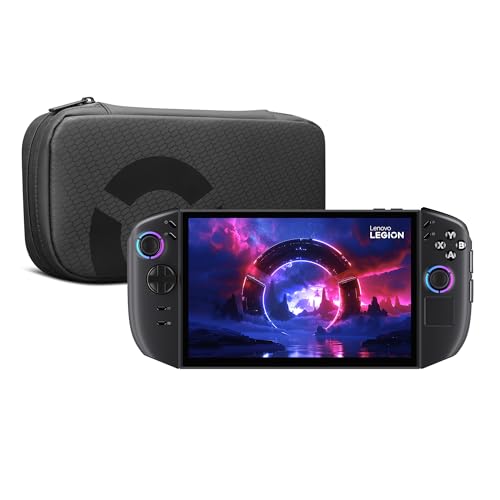
At around $670 this is the sensible middle of the market: an AMD Ryzen Z2 Go, an 8-inch PureSight IPS display at 120Hz, 16GB of memory, 512GB of storage in a Glacier White finish, with PC Game Pass included. The Z2 Go is the modest member of the Z-series family, and this device is priced and configured honestly around that.
The 8-inch screen is the standout at this price. Text legibility in strategy and role-playing games is noticeably better than on 7-inch devices, and IPS at 120Hz is a perfectly good panel when you are not comparing it directly against OLED. Included Game Pass has real monetary value and removes the first-week problem of having a new handheld and nothing installed on it.
The compromises are storage and headroom. 512GB fills quickly with modern games, so a microSD card should be considered part of the purchase price. And the Z2 Go will require you to accept lower settings and upscaling in demanding recent titles in a way the Z2 Extreme devices do not. In practice that is a smaller sacrifice than it sounds on an 8-inch screen, but it is a sacrifice.
Do not buy this if you play mostly demanding recent releases and expect high settings. Buy it if you want a large, comfortable screen and competent performance without spending four figures.
ASUS ROG Xbox Ally
At around $580 this is the cheapest device here and the one I would recommend to the largest number of people, which is an uncomfortable thing to write in an article about the most powerful handheld. It pairs an AMD Ryzen Z2 A with a 7-inch 1080p 120Hz touchscreen, 16GB of memory, a 512GB SSD, and three months of Xbox Game Pass Premium.
The argument for it is about where handheld playtime actually goes. Emulation, indie games, older AAA titles and Game Pass catalogue titles at moderate settings make up the overwhelming majority of hours on every handheld I have logged, and this device handles all of that. On a 7-inch 1080p panel, running a game at a reduced internal resolution with upscaling is genuinely hard to distinguish from native, which means the settings compromise the Z2 A requires costs less visually than the same compromise would on a desktop monitor.
The Xbox integration matters too. A handheld that boots into a controller-friendly game interface rather than a desktop is markedly less frustrating to use from the sofa, and the bundled Game Pass gives you a library on day one.
Its limits are honest. The Z2 A is the entry chip, 512GB fills fast, and demanding recent games will need low settings and upscaling. If your intention is maximum settings in the newest releases, this is not that device.
Do not buy this if you specifically want to play the most demanding new releases at high settings. For everyone else, this is where I would start, and I would put the money saved toward storage and a case.
What each tier actually gets you per dollar
| Tier | Price range | Realistic expectation | Best fit |
|---|---|---|---|
| Entry | around $580 to around $670 | Emulation, indies, older AAA, modern AAA at low settings with upscaling | Most buyers |
| Console-like | $1089 | Similar performance to entry tier, far smoother software experience | People who dislike maintenance |
| Enthusiast | $1249.99 to $1599.99 | Consistent frame times at medium settings, better panels, more memory | Demanding libraries, docked use |
| Maximum | $2299 to $3126.95 | Largest chips and memory pools, best docking, heavy emulation headroom | Buyers for whom price is not a factor |
The pattern in that table is the point of this article. Moving from the entry tier to the enthusiast tier roughly doubles the price and delivers a real but bounded improvement — better settings, steadier frame delivery, nicer screens. Moving from the enthusiast tier to the maximum tier roughly doubles the price again for a much smaller experiential change, because the chassis, the screen size and the power budget cap what any chip can express.
Battery life: set expectations correctly
The single most common disappointment with handhelds is runtime, and it is entirely a matter of expectation rather than hardware. In a demanding modern game at a high power profile, plan for 60 to 110 minutes on any device in this list. Larger batteries in the more expensive devices are largely there to feed larger chips, so they do not translate into proportionally longer play.
Where you regain hours is by changing the workload rather than the device. Capping the frame rate at 30 or 40 and letting the chip idle between frames is the single most effective change, often adding an hour or more. Dropping the power profile one step usually costs less performance than it saves in power, because of the diminishing returns described earlier. Reducing screen brightness matters more on OLED than on IPS, since OLED power draw scales with image content. And playing lighter games — emulation, 2D titles, older releases — moves you into the three-to-five hour bracket comfortably. Our explainer on handheld battery life goes through the measurement side in more detail.
Screens: where the money is well spent
Between the panels here you have IPS at 120Hz, OLED at 144Hz, resolutions from 1080p to WQXGA, and sizes from 7 to 8.8 inches. My ranking of what matters, based on comfort logging rather than specification: size first, panel type second, refresh rate a distant third.
Size determines whether small in-game text is readable, which is the difference between a strategy or role-playing game being playable and being abandoned. Panel type determines how good the image looks in a dark room, which is where handhelds are most often used. Refresh rate above 120Hz is largely theoretical on devices whose power budget rarely sustains those frame rates in demanding games, though it does help variable refresh operate over a wider range and it makes menus and lighter games feel smoother.
Resolution is the specification I would deprioritise most. At these screen sizes, running below native with good upscaling is genuinely difficult to distinguish, and a higher-resolution panel costs performance to drive natively. A device with a modest chip and a very high resolution panel is a mismatch you pay for twice.
Windows or SteamOS, decided honestly
Seven of these devices run Windows and one runs SteamOS, and the split is the most consequential difference in the whole roundup. Windows gives you every store, every launcher, every emulator, every piece of software and every peripheral driver. It also gives you a desktop operating system on a small touchscreen, background updates that arrive at inconvenient moments, and suspend behaviour that varies by device.
SteamOS gives you a console-like device that reliably suspends and resumes, applies per-game settings without configuration, and generally stays out of your way. It costs you compatibility with certain anti-cheat systems and makes non-Steam launchers a project rather than a feature.
My practical advice: if you cannot name a specific game or service that requires Windows, you probably want SteamOS. If you can — Game Pass, a particular competitive shooter, a non-Steam launcher you depend on — then Windows is not a compromise, it is the requirement, and you should buy the Windows device whose hardware suits you and accept the maintenance. The comparison in our SteamOS versus Windows guide covers the specific failure modes of each.
Who should not buy the most powerful option
If your library is mostly emulation, indie games and titles more than three years old, the top tier is money spent on headroom you will never touch. If you play exclusively on battery, the top tier spends most of its life throttled into the same performance band as devices costing a third as much. If you are noise-sensitive, buying a device you intend to run at maximum power is buying a fan you will resent.
And if you have never owned a handheld PC, buy at the entry tier first. The category has a real adjustment period — ergonomics, settings management, storage discipline — and finding out whether the format suits you at around $580 is a much better proposition than finding out at $3126.95. The people I know who upgraded from an entry handheld to an enthusiast one all describe the same thing: they knew exactly what they wanted the second device to fix, which is a far better basis for spending than a specification sheet.
This guide covers one angle on the topic. For the full comparison, see our main guide: The Most Powerful Handheld PC for Each Kind of Player, Ranked by Job Rather Than Spec Sheet.
Verdict
The most powerful handheld gaming PC here is the GPD Win 5 Handheld Gaming PC at $3126.95, with the largest chip, 64GB of memory and 2TB of storage. If maximum capability regardless of price is the requirement, that is the answer and there is no close second.
The most sensible enthusiast purchase is the msi Claw A8 PC Gaming Handheld: AMD Ryzen Z2 Extreme at $1249.99, which pairs the chip that matters with 24GB of memory, 1TB of storage and Thunderbolt 4 docking. The Lenovo Legion Go 2 at $1599.99 is the alternative for anyone who values the 8.8-inch OLED panel above raw throughput, and the ONEXFLY F1 PRO at $1549.99 is the choice for the densest specification and a standard NVMe upgrade path. The MSI Claw with Intel Arc G3 Extreme at $2299 is a specialist pick for heavy docked use and 32GB of memory.
For the majority of buyers, the recommendation is unglamorous: the ASUS ROG Xbox Ally at around $580, or the Lenovo Legion Go S at around $670 if you want the larger 8-inch screen. Both run the games most people actually play, on screens small enough that the settings compromise is barely visible, and they leave enough budget for the storage and case you will inevitably need. The Valve Steam Deck OLED 1TB Handheld Gaming Console at $1089 sits alongside them as the choice for anyone who wants the device to feel like an appliance rather than a computer. Most powerful is a real question with a real answer — it is just rarely the same answer as the best thing to buy.
Related guides
- Best Free MMOs on Steam: Subscription Limits, Pay-to-Win and Time Cost (2026)
- Best Free Horror Games on Steam: How to Pick One That Fits Your PC and Your Nerves (2026)
- Black Frame Insertion vs VRR: Which Smoothness Feature Should You Use?
- Best Webcams for Streaming: 11 Listings Compared by Resolution, Focus and Light (2026)








