
Our Top Picks

The Short Answer
No, you do not need to buy a new high-speed HDMI cable for your PlayStation 5, but there is one major condition: you must use the original HDMI cable that came inside the PS5 box, or purchase a certified “Ultra High Speed” (HDMI 2.1) cable if you need a replacement.
The term “High Speed” is actually a technical industry label for older HDMI 2.0 cables, which are limited to a 18 Gbps bandwidth. To unlock the PS5’s peak performance, you actually need an Ultra High Speed cable, which supports a massive 48 Gbps bandwidth. If you are hooking your console up to a modern 4K TV capable of a 120Hz refresh rate, using an outdated standard HDMI cable will bottleneck your gaming experience. However, if you are plugging your console into an older 1080p television or a standard 60Hz display, your existing older cables will work perfectly fine, though you will miss out on the console’s premium visual features.
As an Amazon Associate we earn from qualifying purchases at no extra cost to you.

What You Actually Get
Upgrading to a true certified Ultra High Speed (HDMI 2.1) cable—whether you stick with the stock 5-foot (1.5-meter) cable Sony provides or swap it for an aftermarket option—fundamentally changes how data moves from your console to your display. Here is a breakdown of the technical and physical features these cables deliver:
- Unprecedented Bandwidth: Older HDMI 2.0 cables max out at 18 Gbps of data transmission. An Ultra High Speed cable pumps this up to 48 Gbps. This extra headroom is what allows the PS5 to output uncompressed 4K resolution at 120 frames per second (fps) simultaneously.
- Variable Refresh Rate (VRR): VRR syncs your TV’s refresh rate to the PS5’s frame output on the fly. This eliminates screen tearing and stuttering during chaotic action sequences, keeping gameplay butter-smooth.
- Auto Low Latency Mode (ALLM): This feature tells your TV to automatically switch to its lowest-latency “Game Mode” the moment you boot up your PS5, saving you from digging through clunky television menus.
- Enhanced Audio Return Channel (eARC): If you route your PS5 through a home theater receiver or a high-end soundbar, an Ultra High Speed cable allows for the transmission of uncompressed object-based audio formats, such as Dolby Atmos and DTS:X, at high wattages (often supporting sound systems rated up to 500W or more).
- Robust Physical Build: These cables are typically constructed with thicker 28 AWG to 30 AWG copper wiring and heavy triple-layer shielding. This shielding is critical in modern living rooms, as it prevents electromagnetic interference from disrupting nearby Wi-Fi routers or wireless gaming headsets.
As we look ahead toward the home entertainment setups of 2026, Ultra High Speed HDMI cables will become the absolute baseline standard for all consumer electronics, making it wise to audit your living room wiring today.
Pros
- Unlocks the absolute maximum performance of the PS5, including 4K gaming at 120Hz and support for future 8K displays.
- Eliminates screen tearing and input lag via native support for VRR and ALLM.
- Provides backward compatibility, meaning it works flawlessly with older HDMI 1.4 and 2.0 ports on legacy televisions.
- Heavy-duty shielding prevents signal drops and wireless interference behind crowded media consoles.
- Supports uncompressed, high-fidelity audio formats for immersive surround-sound systems.
Cons
- The physical cable is thicker (often 6mm to 8mm in diameter) and stiffer, making it harder to route through tight bends or flat against wall mounts.
- Completely unnecessary and offers zero visual improvement if your TV or monitor is limited to a 1080p resolution or a 60Hz refresh rate.
- Passive copper Ultra High Speed cables lose signal integrity over long distances; you cannot reliably run them past 10 feet (3 meters) without purchasing expensive active optical cables.
- The market is flooded with counterfeit or misleadingly labeled “8K” cables that lack official HDMI Forum certification.
Who Should Buy It
You should purchase an Ultra High Speed HDMI cable if you have lost or damaged the original cable that came with your PS5. It is also a necessary purchase if your console is integrated into a custom home theater setup where the stock 5-foot cable is simply too short. If you are mounting your television on the wall and routing cables through the drywall or inside a media console channel, you will likely need a longer 6.6-foot (2-meter) or 10-foot (3-meter) certified cable. Finally, if you own a high-end OLED or QLED gaming television featuring 120Hz capabilities, this cable is mandatory to justify the premium price you paid for your display.
Who Should Skip It
If your PS5 is currently connected to its original out-of-the-box cable and you have no issues with your console’s physical placement, you should absolutely skip buying a new one. Sony’s stock cable is a fully certified HDMI 2.1 cord. You should also skip buying one if you play on a standard 1080p bedroom TV, an older 4K TV that maxes out at 60Hz, or an office monitor. Plugging a premium Ultra High Speed cable into these displays will not magically improve their resolution, refresh rate, or color reproduction.
Cheaper Alternatives
If you need to replace your stock cable or require a different length, you do not need to spend an exorbitant amount of money. While premium options like the officially licensed Hori Ultra High Speed HDMI Cable retail for around $19, highly reliable, third-party certified cables can be found for much less. Below is a comparison of common options on the market:
| Option | Estimated Cost | Trade-off |
|---|---|---|
| Stock PS5 HDMI Cable | $0 (Included in box) | Limited to a 5-foot length; no woven nylon protective braiding. |
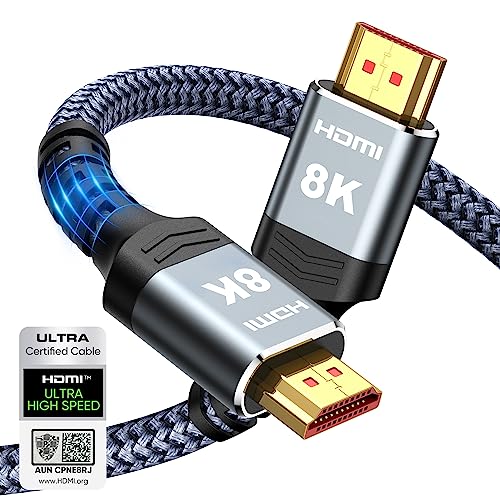
| Highwings 8K Certified Cable (6.6FT/2M) | around $6 – around $8 | Lacks official Sony PlayStation branding; stiff braided jacket can be difficult to bend around tight corners. |
| Hori Officially Licensed PS5 Cable | Check on Amazon | Higher price tag for the peace of mind of official Sony licensing, though performance is identical to cheaper certified cables. |
| Standard HDMI 2.0 Cable (Non-Ultra) | around $4 – around $6 | Limits your console to 4K at 60Hz; does not support VRR or high-bandwidth eARC audio formats. |
FAQ
Can I use my old PS4 HDMI cable with my PS5?
Yes, you can physically plug a PS4 HDMI cable into a PS5, but it will bottleneck your performance. The standard PS4 used an older HDMI 1.4 cable, and the PS4 Pro used an HDMI 2.0 cable. Neither of these cables can carry the 48 Gbps bandwidth required to display PS5 games at 4K resolution with a 120Hz refresh rate. If you use an old cable, your PS5 will automatically downgrade its output to match the lower capabilities of that wire.
How do I know if an aftermarket HDMI cable is actually HDMI 2.1 certified?
To avoid counterfeit products, look for the official “Ultra High Speed HDMI” hologram label on the product packaging. This label features a scannable QR code that you can verify using the official HDMI Cable Certification app on your smartphone. Brands like Highwings and Hori carry this official certification, ensuring they have been physically tested to handle the full 48 Gbps load without signal dropout.
Does a braided HDMI cable offer better picture quality?
No. A braided outer jacket (like the nylon braiding found on many budget aftermarket cables) only provides physical durability. It protects the wire from being pinched, cut, or frayed behind heavy media furniture. It has absolutely zero impact on the digital signal, color accuracy, or frame rate of your games. Internal copper shielding and wire gauge (AWG) are what determine signal quality, not the outer fabric.
What happens if I use a cheap, non-certified cable for 4K 120Hz gaming?
If you attempt to run 4K at 120Hz through a cable that cannot handle the bandwidth, you will experience immediate visual issues. These typically present as “sparkles” (tiny white pixels flickering across the screen), frequent black screens where the TV temporarily loses connection with the console, audio dropouts, or an automatic downgrade of your console’s output resolution to 1080p.
Related guides
- Best Free MMOs on Steam: Subscription Limits, Pay-to-Win and Time Cost (2026)
- Best Free Horror Games on Steam: How to Pick One That Fits Your PC and Your Nerves (2026)
- Black Frame Insertion vs VRR: Which Smoothness Feature Should You Use?
- Best Webcams for Streaming: 11 Listings Compared by Resolution, Focus and Light (2026)








