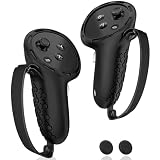
Our Top Picks


The Short Answer
No, you don’t need a headset stand for your VR setup — a headset works perfectly fine without one. But there’s one condition that changes the answer: if you use your headset multiple times per week and store it on a desk, floor, or couch between sessions, a stand pays for itself in convenience and lens protection. At $20–$30, it’s one of the cheapest quality-of-life upgrades in all of VR. If you only use your headset occasionally and already store it in its case or a drawer, skip it.
What You Actually Get
A VR headset stand is a weighted base with an upright post and a curved cradle that holds your headset upright or at a slight angle, with most models adding hooks or arms for the controllers. Take something like the AMVR TYBP1, a representative mid-range option at around $27: it supports the Quest 3, Quest 3S, Quest 2, Steam Frame, Pico 4, and PSVR 2, with a stable base that typically measures around 8–10 inches across and a total height of roughly 10–12 inches. The DigiCharge stand, at around $22, takes a similar approach for the Quest 3S, Quest 3, and Quest 2, combining a headset cradle with holders for both Touch controllers.
As an Amazon Associate we earn from qualifying purchases at no extra cost to you.


Functionally, you’re getting three things: a designated parking spot so your headset never ends up face-down on a surface, elevated storage that keeps lenses away from dust-settling horizontal planes, and controller organization so you stop losing a Touch controller under a pile of mail. Most stands hold headsets weighing 1–1.5 pounds without issue — every major consumer headset falls well under that — and the cradles are padded or contoured so they don’t press on the facial interface or strap.
Assembly is usually minimal: a post that twists or screws into the base, taking under five minutes with no tools on most models. Placement matters more than assembly — a stand needs about a one-square-foot footprint on a desk or shelf, away from direct sunlight (more on that below).
Pros
- Lens protection. The single biggest real-world benefit. Lenses sitting face-up collect dust, and lenses touching any surface risk scratches — and scratched lenses aren’t covered under most manufacturer warranties.
- Sunlight safety. A headset left on a windowsill-facing desk with lenses exposed to direct sun can suffer permanent screen damage in minutes. A stand keeps the headset upright and makes it far less likely the lenses catch angled sunlight — though no stand eliminates this risk entirely.
- Routine-friendly storage. When the headset has a visible home, you’re more likely to actually use it. People who store VR gear in a closet play measurably less often, simply because setup friction wins.
- Controller organization. Dedicated controller hooks mean fewer dropped controllers, fewer dead batteries discovered mid-session, and no more hunting through drawers.
- Small cost. At $22–$28 for popular models, this is a low-stakes purchase by hardware-accessory standards.
- It looks intentional. Not a real “pro,” but a headset displayed on a stand reads as part of a setup rather than clutter.
Cons
- It’s genuinely optional. A soft cloth on a shelf accomplishes most of the same protection for free.
- Desk space. Expect to surrender roughly 8–10 inches of width and 10–12 inches of height. Small desks feel it.
- Fit quirks. Aftermarket head straps — especially battery-strap designs that add bulk or rigid rear pads — sometimes don’t sit correctly on generic cradles. Check compatibility with your specific strap before buying.
- Base weight varies. Budget stands with light bases can tip if you bump the headset while reaching for controllers. Look for a base weighing at least 1.5–2 pounds.
- Doesn’t charge anything. A basic stand is passive. If you want the headset topped up between sessions, you need a charging dock, which runs $40–$70.
Who Should Buy It
Buy a stand if you’re in the market’s sweet spot: a Quest 3, Quest 3S, Quest 2, PSVR 2, or similar headset used several times a week, stored in an open room. It’s an especially easy call if you have kids or pets (headsets on couches and floors don’t survive either), if you’ve ever set your headset lens-down and immediately regretted it, or if you keep losing track of your controllers. It’s also a sensible first accessory — cheaper than a strap upgrade and arguably more protective.
Who Should Skip It
Skip it if your headset lives in its carrying case between sessions, which is arguably better protection than any stand. Skip it if you play once a month or less. Skip it if your desk is already maxed out, or if you have a wall-mounted storage solution or shelf display already working for you. And if you’re on a strict budget, put that $25 toward a silicone lens cover instead — a $10–$15 lens cover addresses the biggest risk a stand mitigates.
Cheaper Alternatives
| Option | Cost | Trade-off |
|---|---|---|
| Wall hooks or adhesive wall mounts | $8–$15 | Frees up desk space and looks clean, but requires wall mounting (or strong adhesive) and the headset hangs rather than sits — awkward with some straps. |
| Silicone lens cover + soft shelf spot | $10–$15 total | Solves the lens-scratch and dust problem for half the price of a stand, but controllers stay unorganized and the headset still looks like clutter. |
| Repurposed headphone stand | $0–$20 | Free if you own one; many headphone stands hold a headset cradle fine, though the curved saddle may not fit bulkier head straps. |
| Original cardboard insert or carrying case | $0 | Best physical protection, but adds friction to every session — and friction is the quiet killer of VR habits. |
FAQ
Does a stand protect my VR headset’s lenses?
Indirectly, yes. A stand keeps the lenses off surfaces and holds the headset upright, where less dust settles on them. It’s not a substitute for a lens cover, but it removes the two most common causes of lens damage: face-down storage and surface contact.
Will a stand work with an aftermarket head strap?
Often, but not always. Rigid or battery-pack straps — like halo-style or elite-style straps with rear batteries — add bulk that some cradles don’t accommodate. Check the product listing for strap compatibility, and when in doubt, look for stands advertised with an open or adjustable cradle design.
Is a charging dock better than a regular stand?
Different tool, different job. A charging dock ($40–$70) does everything a stand does and keeps your headset and controllers topped up, which is genuinely useful for daily players. A basic stand at $22–$28 does the storage job for less money. If you play daily and hate dead controllers, the dock is worth the premium; otherwise, a plain stand is fine.
Can I leave my headset on a stand long-term?
Yes, with one caveat: keep it out of direct sunlight. Lenses can focus sunlight onto the display panels and cause permanent damage, and this applies on a stand just as much as on a table. Position the stand away from windows or angle the headset so lenses never face the light. Beyond that, long-term stand storage is perfectly safe for modern headsets.