Choosing a headset stand seems simple until you live with the wrong one. Most buyers focus on how the RGB looks in product photos and forget to check how it actually powers those lights, where the cables go, or whether the base will wobble under a 0.7-pound headset. The result is a stand that crowds your desk, adds cable clutter instead of solving it, and needs an extra power brick you didn’t plan for. If you are trying to figure out how to choose a headset stand with RGB and cable routing, the trick is to treat lighting and cable management as functional decisions first, and aesthetic ones second.
This guide breaks down what actually matters so you can match a stand to your desk, your headset, and your charging habits without overpaying for features you won’t use.
As an Amazon Associate we earn from qualifying purchases at no extra cost to you.


Our Top Picks


Top 3 picks at a glance
Decide These 3 Things First
Before you compare materials or light modes, lock in these three constraints. They eliminate most bad fits immediately.
1. Where will it live on your desk? Measure your available space. Most RGB stands have a base between 4.5 x 4.5 inches and 6 x 6 inches and stand 9 to 11 inches tall. If your desk depth is under 24 inches or you keep your monitor, keyboard, and mouse close together, a wide base or an attached controller holder that extends 8 to 10 inches wide will dominate your surface. Decide if you want a compact single-post stand or a larger organizer-style stand with storage arms.
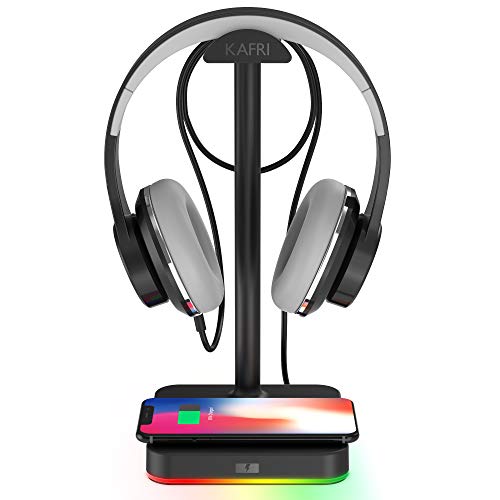
2. How will you power it and what do you need to charge? Some stands are USB-powered for lighting only, requiring a single 5V/1A USB-A port from your PC or a hub. Others function as a powered hub with AC outlets, 15W to 65W USB-C Power Delivery ports, or a 5W to 15W Qi wireless charging pad. Count what you actually charge daily: headset, controller, phone, mouse. If you need to charge a controller and phone at the same time, you need at least two dedicated ports with 10W or more each, not just one shared 5W port.
3. What headset are you hanging? Check weight and headband width. Standard gaming headsets weigh 0.55 to 0.85 pounds, premium wireless models can reach 1 pound. Narrow, sharp-edged hangers can dent a padded headband over time. Look for a saddle or hanger width of at least 1.2 to 1.8 inches with a soft silicone or rubber cap if you own a headset with a suspension strap or thin headband cushion.
Size and Footprint: Will It Fit Your Desk?
Size is the most common regret. A stand that looks sleek in isolation can feel enormous next to a full-size keyboard.
Start with height and clearance. To keep your headset ear cups from touching the desk, you need at least 9.5 inches of clearance from the base to the bottom of the hanger. For over-ear headphones with large 50mm drivers and tall ear cups, look for 10 to 10.8 inches. Anything taller than 11.5 inches can interfere with low monitor shelves or overhead storage.
Next, check the base. Budget T-bar stands are often 4.7 x 4.7 inches and weigh 0.6 to 0.9 pounds, which is fine for light headsets but can tip if bumped. Mid-range and organizer stands with controller holders or AC outlets are heavier, typically 1.2 to 2.1 pounds, with a 7 to 10 inch wide footprint to prevent tipping when two devices are hanging. If your desk is prone to vibration or you have a standing desk, prioritize a base that weighs over 1 pound with a full-coverage non-slip rubber bottom rather than four small feet.
Finally, consider cable length. Integrated USB cables for RGB and hub power are usually 3.3 to 5 feet long. Measure the distance from your planned stand location to your PC or power strip. If it is more than 4 feet, a short 3.3-foot cable will force awkward routing or require an extension.
Material and Build Quality: Plastic vs. Metal vs. Wood
Material affects stability, heat resistance, and how the RGB diffuses.
ABS plastic is the most common for budget stands in the $15 to $30 range. It is light, allows for translucent light strips, and keeps costs down, but thin plastic posts can flex under headsets over 0.8 pounds and may creak. Look for wall thickness and a reinforced T-joint where the post meets the base. If the listing mentions a hollow feel or total weight under 0.7 pounds, expect less stability.
Aluminum alloy and steel are the go-to for mid to premium stands from $30 to $65. A single aluminum post with a steel or weighted ABS base offers the best strength-to-weight ratio. These models typically support 2 to 4 pounds of total hanging weight, which easily covers a headset plus a controller, and they resist warping from the low heat of integrated LEDs. The RGB is usually housed in a recessed acrylic strip, which gives a cleaner diffusion than exposed LED dots on plastic.
Solid wood or wood-composite bases appear in the $40 to $60 range for a more furniture-like look. Wood dampens vibration well and adds weight, but check that the hanger itself is still metal or high-grade plastic. Wood alone can scratch a headband if the finish is rough, so a rubber or leatherette saddle is important.
For durability, examine the contact points. A silicone or rubber saddle, rounded edges, and a weighted base with a metal plate inside are better indicators of long-term build quality than RGB brightness alone.
RGB Lighting and Power Requirements
RGB is not one feature. Brightness, control method, and power draw vary widely and affect daily use more than color count.
Most stands offer 5 to 10 light modes, including static colors, breathing, cycling, and music-reactive modes. True value comes from how you control it. Button control on the base is standard and reliable. Touch control is sleek but can be triggered accidentally, and remote control adds convenience if the stand sits behind a monitor. If you want synchronization with your PC, look for 5V 3-pin ARGB headers or advertised compatibility with motherboard software, rather than standalone cycling. True ecosystem sync is rare below $45.
Power draw is critical for cable routing. Simple RGB-only stands draw 0.5 to 2 watts and can run from any USB-A port on your PC. Stands that add charging hubs, AC outlets, or wireless charging need more. A stand with 2 AC outlets and multiple Type-C ports must be plugged into a wall outlet with its own AC power cord, not just USB. It is not portable but can replace a desk power strip. A stand with 2 USB-C and 1 USB-A port for charging only will typically come with a USB-A to USB-C power cable that needs a 18W to 30W adapter or a powered USB port to deliver full speed. If you power a hub-style stand from a slow 5W laptop port, charging will be throttled and RGB may flicker.
Also note light placement. Edge-lit bases and vertical light strips create ambient glow without shining directly into your eyes. Front-facing exposed LEDs on a tall post can reflect in a glossy monitor at night. Diffused strips behind acrylic or silicone deliver softer illumination that works better for long gaming sessions.
Cable Routing and Charging Hub Performance
This is where a good stand earns its keep. Effective cable routing should reduce clutter, not create a new tangle of hub cables.
There are three tiers of cable management to compare:
Basic routing: A channel or clip at the back of the post plus a mouse bungee arm. This simply guides your existing headset or mouse cable to prevent drag. It adds no charging. Ideal if you already have a good power strip and just want tidiness.
Integrated charging ports: This is the most useful tier as of 2026, combining 1 to 4 USB ports directly in the base. Expect 5V/2.4A (12W) for USB-A and 5V/3A (15W) to USB-C PD for mixed ports. Some models include a retractable Type-C cable for controllers that extends 2 to 2.5 feet and retracts to hide slack. Check total output. A stand advertising 4 Type-C ports may share a total of 20W to 30W across all ports, meaning charging two devices simultaneously will slow both. For reliable controller plus phone charging, look for at least 1 port rated 15W or higher independently.
Power station tier: Stands with 2 AC outlets plus USB ports act as a desktop power hub. They are typically rated for 125V/10A to 12A with surge protection, similar to a small power strip. The advantage is you can plug in a monitor light bar or powered speakers through the stand, centralizing cords. The trade-off is a thicker 16 AWG to 18 AWG AC cord and the need for wall power, which eliminates close-to-PC USB power simplicity.
Wireless charging is a separate consideration. Pads built into the base are usually 10W for Android and 7.5W for iPhone, with some newer models offering 15W Qi2. The effective range is less than 0.2 inches, so cases thicker than 0.16 inches or with metal rings may charge inconsistently. If wireless charging is a priority, verify the pad is positioned flat on the base, not angled, and that it has a separate indicator light so you know when alignment is correct.
For true cable routing, look for a weighted base with an underside cable groove or a removable cover that hides the incoming power cable, plus at least two clips up the post. This keeps the power cord flush against the desk rather than looping visibly around the stand.
Price Tiers: What Your Money Actually Buys
Price tends to map directly to power and stability, not just looks.
Budget, $15 to $30: Expect ABS plastic, a single post, 7-color RGB with button control, and either no charging or 1 to 3 basic 5W to 12W USB ports. These weigh 0.6 to 1.0 pounds and are best for light headsets and users who only need occasional charging. Wireless charging in this range is almost always 5W to 10W and slower.
Mid-range, $30 to $50: This is the sweet spot for most desks. You get an aluminum post, heavier 1.2 to 1.8 pound base, better-diffused RGB with 7 to 10 modes, non-slip full rubber base, and a functional hub with 2 to 4 ports including at least one 15W USB-C. Some include a retractable cable or mouse bungee at this price. Build quality jumps noticeably, with less wobble and cleaner light diffusion.
Premium, $50 to $80: Here you find organizer-style frames with dual hangers for headset and controller, built-in AC outlets, faster 20W to 30W+ USB-C PD ports, upgraded 10W to 15W wireless charging, and more refined materials like aluminum plus wood or full metal bases up to 2 pounds. You are paying for centralization. If you do not need AC outlets or controller storage, you can often get equal stability and lighting in the mid-range for less.
Warranty, Delivery, and Assembly
Do not overlook support details. They signal how the manufacturer expects the product to hold up.
Warranty coverage for RGB stands is typically 12 months for budget brands and 18 to 24 months for established gaming accessory brands. Check what is covered. LEDs, charging ports, and wireless coils should be included, not just structural defects. A 30-day return window is standard, but premium sellers often offer 60 days.
Delivery is straightforward. Most stands ship as small parcels, 12 x 8 x 4 inches, weighing 1.5 to 3 pounds boxed, and arrive fully or partially assembled. Assembly usually involves three steps and under 5 minutes: attach the post to the base with a single thumb screw or 2 to 3 included screws, attach the hanger arm, and plug in. No tools beyond an included Allen key are normally required. If a stand requires more than 4 screws or an exposed power brick, check reviews for stability complaints after assembly.
Also look at packaging and instructions for cable management. A well-designed stand will include a small cable tie or adhesive clip and a clear diagram showing which port delivers the highest wattage, so you put your phone or controller on the fastest port without guessing.
Spec Checklist
| Spec | Budget | Mid | Premium |
|---|---|---|---|
| Typical Price | $15 – $30 | $30 – $50 | $50 – $80 |
| Weight (stand only) | 0.6 – 1.0 lb | 1.2 – 1.8 lb | 1.6 – 2.2 lb |
| Base Size | 4.5 x 4.5 in to 5 x 5 in | 5 x 5 in to 6 x 6 in | 6 x 6 in to 10 x 5 in (organizer) |
| Height / Clearance | 9 – 10 in / 8.5 – 9.5 in | 10 – 10.8 in / 9.5 – 10 in | 10 – 11.5 in / 9.5 – 10.5 in |
| Material | ABS plastic, thin post | Aluminum post, weighted ABS/steel base | Aluminum + steel/wood, full diffuser |
| RGB Control | Button, 7 modes, no sync | Button/touch, 7-10 modes, diffused strip | Button/touch/remote, 10+ modes, ARGB sync option |
| Cable Routing | Single clip or channel | Rear channel + 2 clips, hidden underside groove, bungee option | Full channel system + hidden AC cord routing |
| Charging Hub | 1-3 ports, 5W-12W shared | 2-4 ports, at least one 15W USB-C, retractable cable option | 3-6 ports, 20W-30W+ PD, 2 AC outlets, 10W-15W Qi pad |
Red Flags
Watch for these warning signs before you buy:
- RGB controlled only through proprietary software that requires a constant background app and has few user reviews.
- A hub that lists 4 Type-C ports but shows no individual wattage rating and powers only via a single USB-A cable. Total output will be too low for real charging.
- Total stand weight under 0.6 pounds combined with a tall 11-inch post. This combination tips easily with a wireless headset.
- Sharp or flat 0.5-inch-wide hanger edges with no silicone cover. These can permanently dent memory foam headbands within weeks.
- Product photos that show AC outlets but the specifications list only USB input. True AC requires a wall-rated power cord.
- Wireless charging listed as 15W with no mention of Qi certification or case thickness limits. Charging will likely be closer to 5W in practice.
- No mention of non-slip material on the base bottom. On glass or laminate desks, the stand will slide when you grab your headset one-handed.
FAQ
Do I need to plug an RGB headset stand into the wall or is USB enough?
RGB-only stands and those with low-power USB charging can run fine from a PC’s USB-A port, usually needing 5V/1A to 5V/2A. If the stand includes AC outlets, multiple 15W+ ports, or a 10W+ wireless charger, it will have a dedicated AC power cord that must go to a wall outlet or power strip. Check the cable type in the photos. A thick flat-prong cord means wall power. A thin USB cable means PC power, and you will get slower charging if you use an unpowered hub.
Will the USB ports on a headset stand fast-charge my phone or controller?
It depends on the port rating. A 5W or 12W shared port will charge overnight but not quickly. For meaningful speed, use a stand that lists at least one USB-C port at 15W or higher, and power the stand from the included adapter or a powered USB port. Shared total wattage matters. If a 4-port stand is rated for 30W total, using two ports will split that power. For a phone, expect 30 to 50 percent charge in an hour from a true 15W port versus 15 to 25 percent from a 5W port.
How do I keep RGB cables and charging cables from tangling?
Route the main power cable first along the back edge of your desk using the underside groove or included clips, then use the post clips for the headset or mouse cable only. Keep charging cables short. A 3-foot retractable Type-C cable stays tidy, while a loose 6-foot cable will always look messy. If your stand has AC outlets, bundle that thick AC cord separately from low-voltage USB cables to avoid a bulge behind your monitor.
Are RGB headset stands safe for expensive headsets?
Yes, if the hanger is wide and padded. Look for a hanger width of at least 1.5 inches with a soft rubber, silicone, or leatherette saddle that distributes weight across the headband. Avoid narrow hooks or exposed screw heads that create pressure points. With a proper saddle, even headsets over 0.9 pounds can hang indefinitely without deforming the cushion. Also ensure the base is heavy enough that you are not dragging the headset off an unstable stand.