Our Short List of 3

- Best for: Everyday Discord calls at a desk
- Video resolution: 1080p at 30 fps, 720p at 30 fps
- Field of view: 78 degrees (diagonal)
- Focus: Autofocus
- Microphone: Dual stereo microphones

- Best for: Dim rooms and smooth 60fps motion
- Video resolution: 1080p at 60 fps (uncompressed)
- Sensor feature: Adaptive light sensor
- HDR: Supported
- Field of view: Adjustable 103, 90 or 80 degrees

- Best for: Group calls where several faces share one camera
- Video resolution: 1080p (1920 x 1080)
- Field of view: 110 degrees, adjustable in software
- Microphone: Built-in microphone
- Privacy: Privacy cover included
All 5 Picks at a Glance
| Product | Specs | Action |
|---|---|---|
| Logitech C920s HD Pro |
| Check price on Amazon |
| Razer Kiyo Pro |
| Check price on Amazon |
| NexiGo N60 |
| Check price on Amazon |
 Dell Pro Webcam (WB5023) |
| Check price on Amazon |
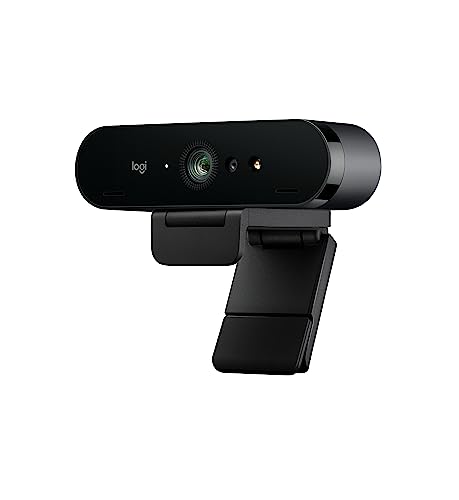 Logitech Brio |
| Check price on Amazon |
Choosing a webcam for Discord is less about chasing the highest resolution and more about how you actually appear in a call window. Discord compresses video, most calls run in small tiles, and typical room lighting is far from studio quality, so a camera that handles dim light, focuses reliably and frames one person at a desk matters more than headline specs. The wrong field of view can crop your head or show the whole room, and a weak built-in microphone can undo a sharp picture.
This guide compares five USB webcams sold on Amazon, grouped for the people who live in Discord voice channels: everyday callers who want a dependable 1080p picture, streamers who need smooth 60fps motion, friends squeezing several faces into one frame, and detail seekers who record or screen-share at higher resolutions. Every pick is a plug-and-play USB model that Discord recognizes as a standard camera, and each entry lists the resolution, frame rate and field of view from its product page.
Our Top Picks
Top 3 picks at a glance
Quick Picks
As an Amazon Associate we earn from qualifying purchases.
| Product | Best for | Key spec from title |
|---|---|---|
| Logitech C920s HD Pro | Most Discord callers | 1080p/30fps, 78° field of view |
| Razer Kiyo Pro | Dim rooms and smooth motion | 1080p 60fps uncompressed, HDR |
| NexiGo N60 | Wide group framing | 1080p, 110° adjustable field of view |
| Dell Pro Webcam (WB5023) | Sharper detail and auto-framing | 2K QHD video, 65° or 78° field of view |
| Logitech Brio | Maximum detail | 4K/30fps, 1080p/60fps |
How to Choose
Resolution and Frame Rate in a Call Window
Discord scales video to fit call windows, so resolution works differently here than in recording. A 1080p camera already fills a large call tile cleanly, while 2K and 4K models mainly add headroom for zooming, cropping and use outside Discord. Frame rate is easier to feel: 60fps keeps head movement and gestures smooth, which suits streamers and animated talkers, while 30fps is fine for seated conversation. Match the camera to the biggest way you actually appear on screen. If friends mostly see a small tile, spend on light handling and audio instead of maximum pixels.
Field of View and Framing
Field of view decides how much of the room Discord shows. A view around 78 degrees frames one person at a desk with a little background, which suits most callers. Wider views, up to 110 degrees, fit two or three people or a shared gaming setup, but they shrink your face in the tile and expose more of the room. Narrow views near 65 degrees crop tightly on head and shoulders. Adjustable models let you switch presets or trim the view in software, which is the flexible option if your setup changes between solo calls and group sessions.
Low-Light Handling and Autofocus
Most Discord calls happen in ordinary rooms, often after dark, where a lamp behind the camera does more harm than a modest sensor can fix. Look for automatic light correction, HDR or an adaptive light sensor, which keep faces readable when the room is dim or a window backlights you. Autofocus matters when you lean in, hold objects up to the camera or move between a chair and a standing position. Fixed-focus cameras are simpler and can be perfectly sharp at desk distance, but they punish anyone who sits much closer or farther away than the designed range.
Microphone, Mount and Software
If you do not use a headset, the webcam microphone is your voice in the channel. Dual or stereo microphones pick up a more natural voice than a single capsule, and noise canceling helps when a PC fan or keyboard shares the desk, though no webcam mic matches a dedicated microphone. Check the mount as well: most picks clip to a monitor and tilt, and some add a tripod thread for off-screen placement. Companion software from Logitech, Razer, NexiGo or Dell unlocks field-of-view changes, zoom and image adjustments that Discord’s own settings cannot make.
The 5 Best Options
Logitech C920s HD Pro
- Best for: Everyday Discord calls at a desk
- Video resolution: 1080p at 30 fps, 720p at 30 fps
- Field of view: 78 degrees (diagonal)
- Focus: Autofocus
- Microphone: Dual stereo microphones
Everyday Discord calls at a desk
No 60fps mode, so motion is less smooth than the Kiyo Pro
The C920s is the safe default for Discord: a long-running 1080p model with autofocus, automatic light correction and a field of view that frames one person at a desk without swallowing the room. Its dual stereo microphones are a genuine step up from most laptop mics, which matters in voice channels where people hear you more clearly than they see you. The included privacy shutter snaps over the lens between calls. It tops out at 30 frames per second, so fast head movement looks less smooth than on 60fps rivals, but for everyday calls its balance of picture, sound and simplicity is hard to beat.
Razer Kiyo Pro
- Best for: Dim rooms and smooth 60fps motion
- Video resolution: 1080p at 60 fps (uncompressed)
- Sensor feature: Adaptive light sensor
- HDR: Supported
- Field of view: Adjustable 103, 90 or 80 degrees
Dim rooms and smooth 60fps motion
No built-in privacy shutter; HDR mode lowers the frame rate
The Kiyo Pro targets the two problems Discord users notice most: grainy video in evening light and choppy motion. It records uncompressed 1080p at 60 frames per second, and its adaptive light sensor adjusts exposure for dim or backlit rooms, with HDR available when you drop the frame rate. The adjustable field of view lets you widen the shot for a group or tighten it on your face. Razer lists it as working with OBS, XSplit, Twitch, Zoom and Teams, and Discord treats it as a standard USB camera. It has no privacy shutter, and its best modes need a USB 3.0 connection.
NexiGo N60
- Best for: Group calls where several faces share one camera
- Video resolution: 1080p (1920 x 1080)
- Field of view: 110 degrees, adjustable in software
- Microphone: Built-in microphone
- Privacy: Privacy cover included
Group calls where several faces share one camera
The 110-degree view can look too wide for a solo caller
The N60 is built around one standout number: a 110-degree field of view, the widest in this group, which makes it the natural pick when two or three people crowd around one desk for a group call. Software controls let you narrow that view and zoom digitally when you are alone in frame. It records 1080p video, includes a built-in microphone and ships with a privacy cover. The wide lens can make a solo caller look small and can show more of the room than some people want on camera, and faces near the edges of the frame can look stretched.
Dell Pro Webcam (WB5023)
- Best for: Callers who want sharper 2K detail without going 4K
- Video resolution: 2K QHD (2560 x 1440) at 30 fps; 1080p at up to 60 fps; 720p at up to 60 fps
- Sensor: Sony STARVIS
- Field of view: 65 or 78 degrees
- Zoom: Up to 4x digital zoom
Callers who want sharper 2K detail without going 4K
USB-A only with no adapter in the box, and the cable is fixed to the camera
The WB5023 is Dell’s 2K entry, and the step up from 1080p shows where Discord gives you room: large one-to-one windows, pop-out video and stream layouts. Its Sony STARVIS sensor pairs with Digital Overlap HDR to hold faces together when a window backlights the room, and AI auto framing keeps you centered as you shift in your chair. The field of view switches between 65 and 78 degrees, the noise-reduction microphone covers voice duty without a headset, and a magnetic cap covers the lens between calls. Discord still compresses the feed, so the extra detail is headroom rather than a guarantee.
Logitech Brio
- Best for: Maximum detail for recording, streaming and presenting
- Video resolution: 4K (4096 x 2160) at 30 fps; 1080p at 30 or 60 fps; 720p up to 90 fps
- Field of view: 65, 78 or 90 degrees
- Zoom: 5x digital zoom
- Light correction: RightLight 3 with HDR
Maximum detail for recording, streaming and presenting
Discord calls rarely display the full 4K feed
The Brio is the detail ceiling of this group: 4K recording at 30 frames per second, 1080p at up to 60 frames per second, and a choice of 65, 78 or 90 degree fields of view. RightLight 3 with HDR balances harsh window light, the 5x digital zoom reframes without moving the camera, and dual noise-canceling microphones handle voice pickup. It also supports Windows Hello face sign-in. For plain Discord calls much of that resolution is headroom rather than visible gain, so the Brio makes most sense for people who also record, stream at high quality or present detailed work on camera.
Which One Fits Your Situation
You Take Discord Calls Every Day From a Desk
Pick the Logitech C920s HD Pro. Its 78-degree view frames one person naturally, autofocus and light correction handle a normal desk setup without adjustment, and the dual microphones are clear enough that a separate mic is optional. The privacy shutter is a small daily convenience: close it when the call ends and the lens is physically covered until the next session starts.
You Stream and Play in a Dim Room
Pick the Razer Kiyo Pro. The adaptive light sensor and uncompressed 1080p at 60 frames per second are aimed at exactly this case: evening lighting, fast movement and a facecam that stays smooth while you play. Widen the field of view to show your setup or narrow it to a tighter face shot, and use a USB 3.0 port so the camera can run its full mode.
Several People Share One Camera
Pick the NexiGo N60 for three or more faces, or the Dell Pro Webcam for two. The N60’s 110-degree view fits a couch or a group around one desk without anyone leaning in, while the Dell at its 78-degree setting covers two people with sharper 2K detail. When you return to solo calls, narrow the view in software so your face fills more of the tile.
You Record or Present as Well as Call
Pick the Logitech Brio. Discord alone will not show everything it captures, but the 4K sensor, three field-of-view presets and 5x digital zoom pay off when you record videos, present detailed objects or crop your framing in streaming software. If your extra work is mostly voice-led, the WB5023’s 2K picture and noise-reduction microphone cover the same ground in a simpler package.
Common Mistakes
- Buying the highest resolution for Discord alone, when call tiles and compression hide most of the extra detail
- Sitting with a bright window behind you, which silhouettes your face on almost any camera
- Leaving the webcam at screen level pointing up, instead of raising it to roughly eye height
- Ignoring the microphone and relying on a laptop mic across the room
- Choosing the widest field of view for solo calls, which makes your face tiny in the tile
Frequently Asked Questions
Does Discord use a webcam’s full resolution?
Not always. Discord adjusts video quality to the call layout, your connection and the size of the window, so a 2K or 4K camera often sends a reduced feed in group calls. The extra resolution still helps in large windows, one-to-one calls and when the same camera is used for recording or streaming software.
Is 60fps worth it for Discord video calls?
For seated conversation, 30fps looks fine and is what most webcams offer. The jump to 60fps shows in movement: turning your head, gesturing, holding up objects or appearing in a facecam over fast gameplay. If you stream or spend long sessions in animated group calls, a 60fps model like the Kiyo Pro or Brio is the noticeable upgrade.
Will any USB webcam work with Discord?
Nearly all of them. The picks here are UVC plug-and-play cameras, so Windows and macOS recognize them without drivers and Discord lists them under Voice and Video settings. Problems usually come from another app holding the camera, a privacy setting blocking access, or a USB hub that cannot supply enough bandwidth for high frame rate modes.
Should I use the webcam microphone or a headset?
Use a headset or dedicated microphone if you own one; it will almost always sound closer and clearer. Webcam microphones are the fallback, and they vary: dual or stereo arrays with noise canceling, like those on the C920s and Brio, stay usable in a typical room, while a single basic capsule picks up more echo and keyboard noise.
Related guides
More from Amazon
Programs that pair well with the guide above. Offers and eligibility are set by Amazon and may change.
Free shipping on eligible items, Prime Video and more. Eligible new members can start with a free trial.
Start a Prime free trialAd-free music streaming. Eligible new subscribers can start with a free trial.
Try Music Unlimited freeA Prime membership for ages 18-24 with a trial period. Eligibility is set by Amazon.
See Prime for Young AdultsAudiobooks and podcasts to listen to on the go. Eligible new members can start with a free trial.
Try Audible freeAs an Amazon Associate we earn from qualifying purchases.