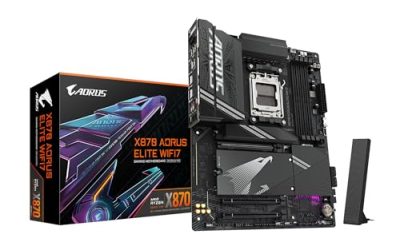
Our Short List of 3

- Best for: a flagship Ryzen 9 build that mixes gaming with heavy creation work.
- Socket: AM5, AMD X870E chipset
- Processor support: Ryzen 9000, 8000 and 7000 series
- Power design: 18+2+2 power stages, 110A
- Memory: 4 x DDR5 DIMM slots, up to 192 GB listed

- Best for: Ryzen 9 builds that move big files daily and need the fastest wired networking.
- Socket: AM5, AMD X870E chipset
- Processor support: Ryzen 9000, 8000 and 7000 series
- Power design: 18 Duet Rail Power System, 110A SPS, dual 8-pin CPU power
- Memory: DDR5, rated to 8400+ MT/s with overclocking

- Best for: long-term Ryzen 9 systems where warranty length and memory capacity matter.
- Socket: AM5, AMD X870E chipset
- Processor support: Ryzen 9000, 8000 and 7000 series
- Power design: 16+2+2 twin digital VRM, 110A smart power stages, 8-layer PCB
- Memory: 4 x DDR5 DIMM slots, up to 256 GB, to 8600 MT/s (OC)
All 5 Picks at a Glance
| Product | Specs | Action |
|---|---|---|
| ASUS ROG Crosshair X870E Hero |
| Check price on Amazon |
| MSI MPG X870E Carbon MAX WiFi |
| Check price on Amazon |
| GIGABYTE X870E AORUS Master |
| Check price on Amazon |
 ASUS ROG Strix X870E-E Gaming WiFi |
| Check price on Amazon |
 ASRock X870E Taichi |
| Check price on Amazon |
A Ryzen 9 is the easiest processor in the AM5 range to pair with the wrong motherboard. A 12-core or 16-core chip holds heavy current draw for hours at a time, and a board with modest power stages will run hot, throttle the chip or shut down long before the processor itself is the limit. The real decision is not the brand on the box; it is whether the voltage regulator, cooling and slot layout can feed a flagship CPU all day without becoming the bottleneck.
This guide is for builders assembling a new AM5 system around a Ryzen 9 9900X or 9950X, owners of a 7900X or 7950X moving up from an entry board, and creators whose gaming rig also renders, compiles or encodes. Every pick below is an X870E flagship chosen from its Amazon listing specifications, with power delivery as the first filter and storage, networking and board size ranked after it.
Our Top Picks
Top 3 picks at a glance
Quick Picks
As an Amazon Associate we earn from qualifying purchases
| Product | Best for | Key spec from title |
|---|---|---|
| ASUS ROG Crosshair X870E Hero | No-compromise flagship builds | 18+2+2 power stages, 5 M.2 slots |
| MSI MPG X870E Carbon MAX WiFi | Fast wired and wireless networking | 110A SPS VRM, 5G and 2.5G LAN |
| GIGABYTE X870E AORUS Master | Long warranty and memory tuning | 16+2+2 twin digital VRM, DDR5 to 8600 (OC) |
| ASUS ROG Strix X870E-E Gaming WiFi | Flagship features at a lower tier | 18+2+2 stages, Dynamic OC Switcher |
| ASRock X870E Taichi | Maximum VRM headroom for 16 cores | 24+2+1 phase design, 110A SPS |
How to Choose
Start with power delivery, not features
A Ryzen 9 under an all-core render or compile load draws far more sustained current than a six-core gaming chip, and the motherboard’s voltage regulator has to supply every amp of it. Look at the phase count and the rating of each stage: the boards in this guide run 16 to 24 phases with 110A smart power stages, backed by large heatsinks and, on most, two 8-pin CPU power connectors. Entry B650 and A620 boards physically accept a Ryzen 9, but their smaller regulators run hotter and leave no headroom for Precision Boost Overdrive.
Know what the X870E chipset adds
X870E sits at the top of the AM5 chipset stack because it carries the most connectivity: USB4 is mandatory on these boards, there are more PCIe lanes for storage, and every model here offers PCIe 5.0 for both the graphics slot and at least one M.2 socket. X870 (without the E) trims some of that expansion, while B650E keeps Gen5 slots with fewer extras. For a Ryzen 9 build that will hold several fast SSDs and a top-end graphics card for years, X870E is the tier that avoids lane compromises later.
Plan memory around two sticks first
Every AM5 board takes DDR5 only, so memory from an older AM4 build cannot move across. Four DIMM slots are standard in this class, and capacities run to 192 GB or 256 GB depending on the board, but the highest memory speeds on the listings are rated with two sticks fitted. If you want fast EXPO memory for gaming, buy a two-stick kit and leave two slots empty. If your Ryzen 9 doubles as a workstation and capacity matters more than the last step of speed, fill all four slots and accept a lower memory clock.
Check size, lane sharing and networking
Two of the decisions that strand builders are physical. The ASRock Taichi is an E-ATX board, wider than standard ATX, and many mid-tower cases cannot take it. The second is lane sharing: on most X870E boards, populating every Gen5 M.2 socket borrows lanes from the graphics slot, so read the manual’s sharing table before you fill every slot. Finally, match the networking to your home: every pick here has Wi-Fi 7, and wired speeds run from 2.5 gigabit to dual 5 gigabit and 2.5 gigabit ports on the MSI.
The 5 Best Options
ASUS ROG Crosshair X870E Hero
- Best for: a flagship Ryzen 9 build that mixes gaming with heavy creation work.
- Socket: AM5, AMD X870E chipset
- Processor support: Ryzen 9000, 8000 and 7000 series
- Power design: 18+2+2 power stages, 110A
- Memory: 4 x DDR5 DIMM slots, up to 192 GB listed
a flagship Ryzen 9 build that mixes gaming with heavy creation work.
the flagship tier only pays off if you will actually use the extra M.2 slots, USB4 ports and tuning features.
The Crosshair X870E Hero is the board for a Ryzen 9 build with no intended compromises: a 9950X, a flagship graphics card, several Gen5 SSDs and memory tuning all in one system. Its 18+2+2 power stages use 110A stages with the cooling to match, so sustained all-core loads stay fed without the regulator becoming the hot spot. Five M.2 slots, dual USB4 ports and Wi-Fi 7 cover the storage and connectivity side, and ASUS’s overclocking toolkit, including Core Flex, is aimed at owners who tune rather than leave everything on auto.
MSI MPG X870E Carbon MAX WiFi
- Best for: Ryzen 9 builds that move big files daily and need the fastest wired networking.
- Socket: AM5, AMD X870E chipset
- Processor support: Ryzen 9000, 8000 and 7000 series
- Power design: 18 Duet Rail Power System, 110A SPS, dual 8-pin CPU power
- Memory: DDR5, rated to 8400+ MT/s with overclocking
Ryzen 9 builds that move big files daily and need the fastest wired networking.
this MAX model is a different listing from the original Carbon WiFi, so confirm the exact model name before ordering.
The Carbon MAX WiFi suits a Ryzen 9 owner whose network matters as much as the processor: it pairs a Realtek 5G LAN port with a second 2.5G port, Wi-Fi 7 and Bluetooth 5.4, which makes it the natural pick for a home server, NAS-heavy or streaming setup. Power delivery is an 18-phase Duet Rail design with 110A smart power stages and dual 8-pin CPU connectors, fed through a 64MB BIOS ROM that leaves room for future processor support. Gen5 M.2 storage with double-sided Shield Frozr heatsinks rounds out a board aimed at fast everything.
GIGABYTE X870E AORUS Master
- Best for: long-term Ryzen 9 systems where warranty length and memory capacity matter.
- Socket: AM5, AMD X870E chipset
- Processor support: Ryzen 9000, 8000 and 7000 series
- Power design: 16+2+2 twin digital VRM, 110A smart power stages, 8-layer PCB
- Memory: 4 x DDR5 DIMM slots, up to 256 GB, to 8600 MT/s (OC)
long-term Ryzen 9 systems where warranty length and memory capacity matter.
Gen5 M.2 slots share lanes with the graphics slot on this class of board, so check the lane-sharing table before filling all four.
The AORUS Master is the pick for a builder who keeps a motherboard through several processor generations. GIGABYTE backs it with a five-year warranty, the longest in this group, and the 16+2+2 twin digital VRM with 110A stages on an 8-layer PCB gives a 16-core Ryzen 9 steady power without exotic pricing at the very top of the range. Memory support is a strength: four DDR5 slots take up to 256 GB, with speeds listed to 8600 MT/s under overclocking and EXPO profiles, which suits creator builds that grow into larger kits over time.
ASUS ROG Strix X870E-E Gaming WiFi
- Best for: gaming-first Ryzen 9 builds that want flagship power delivery at the Strix tier.
- Socket: AM5, AMD X870E chipset
- Processor support: Ryzen 9000, 8000 and 7000 series
- Power design: 18+2+2 power stages, Dynamic OC Switcher, Core Flex
- Memory: DDR5 with AEMP profiles
gaming-first Ryzen 9 builds that want flagship power delivery at the Strix tier.
populating every M.2 slot changes PCIe lane allocation, so plan which slots to use before the build goes together.
The Strix X870E-E is the way into this flagship group without paying for the Crosshair tier. It keeps the parts a Ryzen 9 actually stresses: 18+2+2 power stages, five M.2 slots, PCIe 5.0 for graphics and storage, Wi-Fi 7 and a 5 gigabit Ethernet port. The Dynamic OC Switcher is a genuinely useful extra for a 9900X or 9950X, shifting between single-core boost behaviour and all-core overclocks depending on load, and Core Flex adds control over how power and temperature trade off. For a gaming-first Ryzen 9 with one fast SSD and room to grow, it covers the brief.
ASRock X870E Taichi
- Best for: a 16-core Ryzen 9 that works at full load for hours, in a case with E-ATX room.
- Socket: AM5, AMD X870E chipset
- Processor support: Ryzen 9000, 8000 and 7000 series
- Power design: 24+2+1 phase design, 110A SPS
- Memory: 4 x DDR5 DIMM slots, up to 256 GB, 8200+ (OC)
a 16-core Ryzen 9 that works at full load for hours, in a case with E-ATX room.
the E-ATX board is wider than standard ATX, so measure your case before ordering; many mid-towers will not fit it.
The Taichi carries the strongest power design in this group, a 24+2+1 phase layout with 110A smart power stages, which makes it the board for a 9950X that spends its life at full load: long renders, shader compiles, virtual machines or heavy multitasking while gaming. Four DDR5 slots accept up to 256 GB at speeds listed to 8200+ under overclocking, and storage runs to four M.2 sockets, one Gen5 and three Gen4. Dual USB4 Type-C ports, 5 gigabit Ethernet and Wi-Fi 7 complete a specification aimed at workstation-style builds that also play games.
Which One Fits Your Situation
You render, compile or encode for hours at a time
Sustained all-core work is a power delivery problem before it is anything else. The ASRock X870E Taichi, with its 24+2+1 phase design, has the most headroom for a 9950X held at full load, and the Crosshair X870E Hero is close behind with stronger tuning tools. Either board keeps the regulator cool enough that the processor, not the motherboard, sets the limit.
Your Ryzen 9 build is gaming-first
A gaming 9900X or 9950X3D spends its life boosting a few cores rather than loading all sixteen, so the Strix X870E-E Gaming WiFi is the balanced buy: flagship stages, Dynamic OC Switcher for mixed loads and five M.2 slots. The MSI Carbon MAX WiFi is the alternative if your gaming setup also streams or pulls files from a home server over a wired network.
You plan to keep this board for years
Longevity argues for the GIGABYTE X870E AORUS Master. Its five-year warranty is the longest listed here, memory capacity reaches 256 GB for creator workloads that grow, and the AM5 socket has years of processor support ahead of it. Buy the board once, and later upgrades become a processor and graphics card swap rather than another full rebuild.
Your case is a standard ATX mid-tower
Skip the Taichi, because its E-ATX width rules out many popular cases, and choose between the Hero, Carbon MAX WiFi and Strix X870E-E, all standard ATX. Measure the graphics card clearance as well: flagship boards carry tall VRM heatsinks and shrouds, and a thick radiator in the roof of a compact case can crowd the top edge of any of them.
Common Mistakes
- Buying an A620 or entry B650 board for a 16-core Ryzen 9, then blaming the processor when sustained loads throttle on a hot voltage regulator.
- Filling every Gen5 M.2 slot without reading the lane-sharing table, and cutting the graphics card slot down from its full width without realising.
- Ordering the E-ATX Taichi for a case that only fits standard ATX boards.
- Fitting four DDR5 sticks and expecting the two-stick overclocked speeds printed on the box; capacity and maximum memory speed trade against each other on AM5.
- Carrying DDR4 memory over from a Ryzen 9 5950X build; AM5 boards accept DDR5 only, so the memory has to be replaced along with the board.
Frequently Asked Questions
Does a Ryzen 9 need an X870E board, or is B650 enough?
A B650 board will run a Ryzen 9, and for a gaming build that boosts a few cores it can be sufficient. X870E earns its place when the chip works at full load for long stretches, when you want USB4 and more Gen5 storage, or when you plan to keep the board through future processors. The heavier the sustained workload, the stronger the case for the flagship tier.
Will these boards work with a Ryzen 9 7900X or 7950X?
Yes. Every listing in this guide states support for Ryzen 9000, 8000 and 7000 series processors on the AM5 socket, which includes the 7900X and 7950X. Fit the latest BIOS before installing the processor if the board has been in stock for a while, and pick DDR5 memory from the board maker’s compatibility list for the capacity you intend to run.
Can I reuse parts from a Ryzen 9 5950X build?
The processor and memory cannot move across: the 5950X is an AM4 chip and AM5 uses a different socket, and AM5 boards take DDR5 rather than the DDR4 an AM4 system runs. Your case, power supply, storage drives and graphics card can all carry over, provided the case fits the board size and the power supply has the CPU power connectors the new board expects.
How much power delivery does a Ryzen 9 actually need?
Look for a high phase count with strong individual stages and real heatsinks rather than a headline number alone. The boards here run from 16+2+2 phases up to the Taichi’s 24+2+1, all with 110A stages, which is comfortably beyond what a stock or lightly tuned 9950X draws. That headroom is what keeps regulator temperatures, and therefore throttling, out of long workloads.
Related guides
More from Amazon
Programs that pair well with the guide above. Offers and eligibility are set by Amazon and may change.
Free shipping on eligible items, Prime Video and more. Eligible new members can start with a free trial.
Start a Prime free trialAd-free music streaming. Eligible new subscribers can start with a free trial.
Try Music Unlimited freeA Prime membership for ages 18-24 with a trial period. Eligibility is set by Amazon.
See Prime for Young AdultsAudiobooks and podcasts to listen to on the go. Eligible new members can start with a free trial.
Try Audible freeAs an Amazon Associate we earn from qualifying purchases.