Our Short List of 3

- Best for: Owners of an unlocked i9-9900K or i7-9700K who want the strongest ASUS feature set this chipset offered.
- Socket: LGA 1151 for 8th and 9th generation Intel Core processors
- Chipset: Intel Z390
- Form factor: ATX
- Memory: 4 DIMM slots, DDR4

- Best for: A like-for-like replacement board where a verified current listing matters as much as the spec sheet.
- Socket: LGA 1151 for 9th and 8th generation Intel Core processors
- Chipset: Intel Z390
- Form factor: ATX
- Memory: 4 DIMM slots, dual-channel DDR4 up to 4400 MHz (OC), up to 128GB

- Best for: Storage-heavy 9th generation builds that want three NVMe drives on the board itself.
- Socket: LGA 1151 for 9th and 8th generation Intel Core processors
- Chipset: Intel Z390
- Form factor: ATX
- Memory: 4 DIMM slots, DDR4
All 4 Picks at a Glance
| Product | Specs | Action |
|---|---|---|
| ASUS ROG Maximus XI Hero (Wi-Fi) |
| Check price on Amazon |
| MSI MPG Z390 Gaming Edge AC |
| Check price on Amazon |
| Gigabyte Z390 AORUS ULTRA |
| Check price on Amazon |
 Gigabyte Z390 AORUS ELITE |
| Check price on Amazon |
Nobody buys a Z390 board for a brand-new platform anymore. You buy one because a Core i9-9900K, i7-9700K or i5-9600K is already on your desk, or because the board under one just died, and the replacement has to match a socket Intel walked away from years ago. That changes the decision completely: the spec sheet matters less than whether the listing in front of you is a real, current offer for the exact model you think it is.
This guide is for owners of 8th and 9th generation Intel chips who need a board that still has a live Amazon listing, whether that means a like-for-like repair, a long-planned upgrade from a B360 board, or a period-correct gaming build. Every pick below is a Z390 board chosen from its Amazon product title and listing specs, and each one had a current offer in fresh sources when this guide was written.
Our Top Picks
Top 3 picks at a glance
Quick Picks
As an Amazon Associate we earn from qualifying purchases
| Product | Best for | Key spec from title |
|---|---|---|
| ASUS ROG Maximus XI Hero (Wi-Fi) | Flagship 9900K overclocking builds | Dual M.2, USB 3.1 Gen 2, 802.11AC Wi-Fi |
| MSI MPG Z390 Gaming Edge AC | A Wi-Fi board with a fresh, current listing | Twin Turbo M.2, Wi-Fi, DDR4 4400 (OC) |
| Gigabyte Z390 AORUS ULTRA | Storage-heavy builds that want three M.2 slots | 3x M.2 Thermal Guard, onboard AC Wi-Fi |
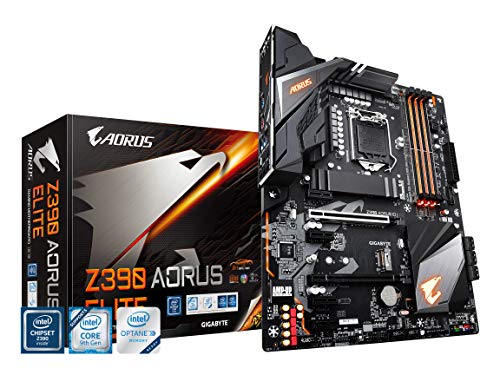
| Gigabyte Z390 AORUS ELITE | Wired-only builds that skip the Wi-Fi markup | 2x M.2, 12+1 DrMOS VRM, ALC1220-VB audio |
How to Choose
Confirm your chip is 8th or 9th generation
Z390 only accepts Intel Core processors from the 8th and 9th generations on the LGA 1151 socket in its second revision. A 10th generation chip also says LGA on the box but sits in LGA 1200 and will never fit, and a 6th or 7th generation chip shares the socket shape yet is electrically incompatible. Read the exact CPU model off your processor or order history before ordering, then match it against the board maker’s CPU support list for that model.
Match power delivery to your processor
A Core i5-9600K at stock clocks is an easy load, but an i9-9900K under an all-core overclock is the hardest workload this platform ever saw. Boards built for that chip use multi-phase digital VRM designs with DrMOS stages and finned heatsinks, and that hardware is the difference between holding boost clocks and throttling. If your chip is a 9900K or 9700K, put VRM design at the top of the list; if it is a locked i5 or i7, almost any board here will do.
Decide whether you need Wi-Fi on the board
Roughly half the Z390 range shipped with onboard 802.11ac Wi-Fi and half without, and on a discontinued platform that split decides which listings are even worth opening. A wired desk next to the router gains nothing from the wireless models, while a living-room or bedroom build without an Ethernet run needs the AC models or a separate adapter. Note that none of these boards offers Wi-Fi 6; the wireless you get is the 802.11ac the platform shipped with.
Count M.2 slots against the drives you own
Z390 boards carry between one and three M.2 slots, and the count matters if your storage plan leans on NVMe drives. Two slots cover the common boot-plus-games layout; three suits a scratch drive for editing work. Check the slot lengths and whether a slot shares bandwidth with SATA ports, because populating some M.2 sockets disables specific SATA connectors. Your existing DDR4 memory carries over to every board here, which is one reason the platform still makes sense as a repair.
The 4 Best Options
ASUS ROG Maximus XI Hero (Wi-Fi)
- Best for: Owners of an unlocked i9-9900K or i7-9700K who want the strongest ASUS feature set this chipset offered.
- Socket: LGA 1151 for 8th and 9th generation Intel Core processors
- Chipset: Intel Z390
- Form factor: ATX
- Memory: 4 DIMM slots, DDR4
Owners of an unlocked i9-9900K or i7-9700K who want the strongest ASUS feature set this chipset offered.
Confirm the listing is the Wi-Fi model and not the cheaper non-Wi-Fi Hero variant before ordering, since both names appear in listings.
The Maximus XI Hero (Wi-Fi) was ASUS’s flagship ATX board for this chipset, and it remains the pick for anyone running a 9900K they intend to push. Revamped 5-Way Optimization handles automated overclocking driven by thermal telemetry, OptiMem II routing targets DDR4 stability at high memory clocks, and the pre-mounted I/O shield removes one small misery from the install. Dual M.2 slots, USB 3.1 Gen 2 and onboard 802.11ac Wi-Fi cover the connectivity a high-end 9th generation build expects, and Aura Sync ties the board lighting into the wider ASUS ecosystem.
MSI MPG Z390 Gaming Edge AC
- Best for: A like-for-like replacement board where a verified current listing matters as much as the spec sheet.
- Socket: LGA 1151 for 9th and 8th generation Intel Core processors
- Chipset: Intel Z390
- Form factor: ATX
- Memory: 4 DIMM slots, dual-channel DDR4 up to 4400 MHz (OC), up to 128GB
A like-for-like replacement board where a verified current listing matters as much as the spec sheet.
Stock on this listing is limited, and MSI lists Windows 10 64-bit support, so check your operating system plan against the driver page.
The Gaming Edge AC is the mainstream MSI board from this generation, and its listing is the freshest of any pick here, checked on Amazon the same day this guide was written. It runs the full 9th generation stack from the i9-9900K down through Pentium Gold and Celeron chips, with four DIMM slots rated to DDR4 4400 with overclocking. Two Turbo M.2 sockets are Intel Optane Memory ready, Wi-Fi is integrated so no slot is sacrificed to a wireless card, and Mystic Light covers RGB strips through addressable headers. For a repair build, that combination of currency and completeness is hard to beat.
Gigabyte Z390 AORUS ULTRA
- Best for: Storage-heavy 9th generation builds that want three NVMe drives on the board itself.
- Socket: LGA 1151 for 9th and 8th generation Intel Core processors
- Chipset: Intel Z390
- Form factor: ATX
- Memory: 4 DIMM slots, DDR4
Storage-heavy 9th generation builds that want three NVMe drives on the board itself.
Third-party pricing on this flagship fluctuates widely, so compare the offer against the other picks before committing.
The AORUS ULTRA is the storage maximalist of the Z390 range. Three M.2 connectors, each under a Thermal Guard heatsink, let you run a boot drive, a games drive and a scratch drive without touching the SATA ports, something no other board in this guide offers. The 12+1 phase digital VRM with DrMOS stages was built to hold sustained all-core loads from a 9900K, onboard AC Wi-Fi is included, and RGB Fusion handles the lighting. If your 9th generation machine doubles as an editing or capture rig, this is the board that keeps its drive layout simple.
Gigabyte Z390 AORUS ELITE
- Best for: Wired gaming builds that want flagship-grade power delivery without paying for wireless.
- Socket: LGA 1151 for 9th and 8th generation Intel Core processors
- Chipset: Intel Z390
- Form factor: ATX
- Memory: 4 DIMM slots, DDR4 up to 4400 MHz memory clock support
Wired gaming builds that want flagship-grade power delivery without paying for wireless.
There is no Wi-Fi or Bluetooth on this model, so budget for an adapter if your setup ever moves away from a wired connection.
The AORUS ELITE takes the same 12+1 phase DrMOS power design as its Ultra sibling and strips out the parts a wired build never uses. There is no onboard Wi-Fi, which is exactly the point: an Ethernet cable to the Intel Gigabit LAN port is faster and one less antenna to position. Two M.2 slots with a single Thermal Guard, the ALC1220-VB audio codec with WIMA capacitors, an integrated I/O shield and Smart Fan 5 control round out a board aimed at gamers who would rather pay for power delivery than wireless. It is the sensible end of this list.
Which One Fits Your Situation
Your Z390 board died under a 9900K
Go straight to the ASUS ROG Maximus XI Hero (Wi-Fi) or the MSI MPG Z390 Gaming Edge AC. Both were designed around the 9900K’s power draw, both carry Wi-Fi for flexible placement, and the MSI listing is the most recently verified of the set. Either drops into your existing case, memory and storage without changing anything else in the build.
You are upgrading an 8700K system from a B360 board
The Gigabyte Z390 AORUS ELITE is the natural step up. It unlocks the overclocking your B360 board blocked, keeps the same DDR4 and drives, and skips the wireless hardware your wired desk does not need. The AORUS ULTRA earns its premium only if you also plan to add a second or third NVMe drive during the same rebuild.
You are finishing a period-correct showpiece build
Pick the ASUS ROG Maximus XI Hero (Wi-Fi) for the Aura Sync ecosystem or the Gigabyte Z390 AORUS ULTRA for RGB Fusion, depending on which lighting family your other components already belong to. On a discontinued platform, matching the board to the fans, strips and memory you already own matters more than small spec differences between the two flagships.
You just need the machine running again this week
Take the MSI MPG Z390 Gaming Edge AC. Its Amazon listing was checked most recently of any board in this guide, it includes Wi-Fi so placement is flexible while you troubleshoot, and its spec sheet covers every 8th and 9th generation chip. When a repair is urgent, the board you can actually order beats the theoretically perfect one.
Common Mistakes
- Ordering a Z490 or Z590 board because the names look close, when those chipsets use LGA 1200 and cannot take an 8th or 9th generation processor.
- Assuming every LGA 1151 board supports every LGA 1151 chip, when 6th and 7th generation processors are electrically incompatible with Z390 despite the shared socket shape.
- Buying the first listing that matches the model name without checking whether it is the Wi-Fi or non-Wi-Fi variant, a different board size, or a marketplace offer in used condition.
- Forgetting that Z390 is DDR4 only, so DDR5 memory bought for a newer build cannot come across.
- Paying flagship prices for a third M.2 slot or premium audio that your existing parts and usage will never touch.
Frequently Asked Questions
Will a Z390 board work with a 10th or 11th generation Intel CPU?
No. Those processors moved to the LGA 1200 socket, so they physically and electrically cannot run on Z390. The newest chips any board in this guide accepts are 9th generation Core models such as the i9-9900K and i7-9700K, and the oldest are 8th generation parts like the i7-8700K.
Is buying a Z390 board in 2026 a sensible move?
It is sensible in one specific case: you already own a compatible processor and DDR4 memory, and you need a board to complete or repair that system. As the foundation of an entirely new build it makes little sense, because the platform has no upgrade path and current listings are mostly third-party stock.
How much memory can these boards take?
Each board here has four DDR4 DIMM slots. Fitted with 32GB modules they reach 128GB in total, and rated memory speeds run to 4400 MHz with overclocking on the MSI and Gigabyte picks. Real-world stability at the top speeds depends on your processor’s memory controller and the specific kit you install.
Do I need to update the BIOS for a 9th generation chip?
Usually not on Z390. Unlike Z370 boards, which often needed a firmware update before they would boot a 9th generation processor, Z390 launched alongside those chips and supports them from its earliest BIOS releases. Checking the maker’s CPU support list for your exact model is still worth two minutes before you order.
Related guides
More from Amazon
Programs that pair well with the guide above. Offers and eligibility are set by Amazon and may change.
Free shipping on eligible items, Prime Video and more. Eligible new members can start with a free trial.
Start a Prime free trialAd-free music streaming. Eligible new subscribers can start with a free trial.
Try Music Unlimited freeA Prime membership for ages 18-24 with a trial period. Eligibility is set by Amazon.
See Prime for Young AdultsAudiobooks and podcasts to listen to on the go. Eligible new members can start with a free trial.
Try Audible freeAs an Amazon Associate we earn from qualifying purchases.