Our Short List of 3

- Best for: wireless gaming on a desk where mouse room matters
- Layout: 65 percent form factor
- Switches: Razer Yellow mechanical, linear and silent
- Keycaps: Phantom Pudding keycaps with Chroma RGB
- Connectivity: HyperSpeed Wireless, Bluetooth and USB-C wired
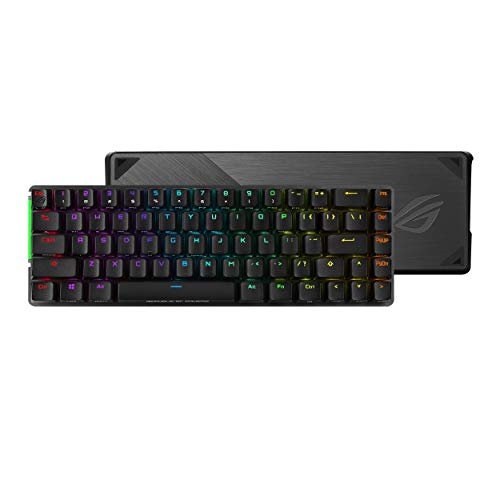
- Best for: players who carry a keyboard between rooms or to events
- Layout: 65 percent form factor, 306 mm long
- Switches: ROG NX Blue, clicky
- Keycaps: PBT doubleshot
- Connectivity: 2.4 GHz RF wireless and wired USB

- Best for: a wired desk setup that values build solidity over wireless modes
- Layout: 65 percent compact form factor
- Switches: HyperX Aqua, tactile
- Keycaps: double shot PBT with secondary functions printed
- Body: aircraft-grade aluminum
All 4 Picks at a Glance
| Product | Specs | Action |
|---|---|---|
| Razer BlackWidow V3 Mini HyperSpeed |
| Check price on Amazon |
| ASUS ROG Falchion NX |
| Check price on Amazon |
| HyperX Alloy Origins 65 |
| Check price on Amazon |
 Ducky One 3 SF |
| Check price on Amazon |
A 65 percent keyboard is the layout to pick when a full-size board eats too much desk but a 60 percent board leaves you lost without arrow keys. You keep a dedicated arrow cluster and a small navigation column, and you give up the number pad and the separate function row. That trade suits players who sweep a mouse across a wide arc and typists who still reach for Delete and Page Down every few minutes.
This guide gathers five boards that all hold the same 65 percent layout, so the differences come down to switches, connection and build rather than size. Wireless players, wired purists, Mac and Windows households and clicky-switch fans each get a named pick. Every board below was chosen from its Amazon listing title and specification fields, and each section notes the variant to confirm before ordering, because most of these models sell in several switch and color versions.
Our Top Picks
Top 3 picks at a glance
Quick Picks
As an Amazon Associate we earn from qualifying purchases
| Product | Best for | Key spec from title |
|---|---|---|
| Razer BlackWidow V3 Mini HyperSpeed | Wireless gaming on a small desk | HyperSpeed wireless, 200-hour battery |
| ASUS ROG Falchion NX | Taking a board between setups | 2.4 GHz wireless, 450-hour battery |
| HyperX Alloy Origins 65 | A wired board that feels solid | Aluminum body, double shot PBT keycaps |
| Keychron K6 | Switching between Mac and Windows | Bluetooth 5.1 plus USB-C wired mode |
| Ducky One 3 SF | Clicky typing with switch swapping | Hot-swappable Cherry MX Blue switches |
How to Choose
What the 65 Percent Layout Keeps and Drops
The defining feature of this format is the arrow cluster. A 60 percent board buries arrows on a function layer, while a 65 percent board keeps physical arrow keys plus a slim column with keys such as Delete, Page Up and Page Down. In exchange you lose the number pad and the dedicated function row, so F-keys sit behind the Fn key. Spreadsheet work with heavy number entry feels cramped, and games that map actions to F1 through F12 need a layer press. Measure your desk before ordering: most of these boards run about 12 to 12.6 inches wide, which frees real mouse room beside them.
Switch Feel and Hot-Swap Sockets
Switches decide how the board sounds and how each press registers. Linear switches travel smoothly with no bump, tactile switches add a small bump you can feel, and clicky switches add an audible snap on top of that bump. None of the three is faster in a way that decides matches; comfort over long sessions matters more. The bigger question is whether the sockets are hot-swappable. A hot-swap board lets you pull a switch and press in a different one with no soldering, which makes it easy to soften a board that feels too heavy. Soldered boards lock you into the factory switch choice for the life of the keyboard.
Wired, 2.4 GHz and Bluetooth Connections
A wired USB-C connection is the simplest option: no battery to charge, no pairing, and a cable that usually detaches for travel. The 2.4 GHz mode uses a small USB receiver and is the wireless choice for gaming, since it reports keys with wired-like speed; Bluetooth trades some of that speed for the ability to pair with tablets, laptops and phones without a receiver. Boards that offer both let you game on the receiver and type on a second machine over Bluetooth. Check what the listing actually includes, because some boards in this class are wired only even though sibling models add wireless modes.
Keycaps, Case Materials and Included Extras
Keycap plastic shapes how a board ages. Double shot PBT caps resist the shine that develops on heavily used keys, and their legends are molded through the cap rather than printed on top. ABS caps feel smooth at first but polish shiny with use. Case material matters too: an aluminum body adds weight and a firm, planted feel, while a plastic case keeps a travel board light. Extras differ by brand and are worth reading on the listing, since some boards bundle a cover case, a keycap puller, spare keys or an alternate spacebar, and others ship with the keyboard and cable alone.
The 5 Best Options
Razer BlackWidow V3 Mini HyperSpeed
- Best for: wireless gaming on a desk where mouse room matters
- Layout: 65 percent form factor
- Switches: Razer Yellow mechanical, linear and silent
- Keycaps: Phantom Pudding keycaps with Chroma RGB
- Connectivity: HyperSpeed Wireless, Bluetooth and USB-C wired
wireless gaming on a desk where mouse room matters
the same model also sells with clicky Green switches, so confirm the Yellow variant on the listing before ordering
This is the pick for players who want a name-brand wireless board that still behaves like a wired one during a match. The listing pairs Razer HyperSpeed wireless with Bluetooth and a USB-C wired mode, so one board can cover a gaming PC and a laptop. This version carries Razer Yellow switches, which are linear and damped for quieter presses, and the Phantom Pudding keycaps let the Chroma RGB lighting show through the sides of each cap. Battery life is rated up to 200 hours, so charging becomes a rare chore rather than a weekly one.
ASUS ROG Falchion NX
- Best for: players who carry a keyboard between rooms or to events
- Layout: 65 percent form factor, 306 mm long
- Switches: ROG NX Blue, clicky
- Keycaps: PBT doubleshot
- Connectivity: 2.4 GHz RF wireless and wired USB
players who carry a keyboard between rooms or to events
NX Blue switches click audibly, and the family also sells in Red and Brown, so check the switch named on the listing
The Falchion NX suits players who move between a desk and a couch setup, because ASUS bundles a keyboard cover case that protects the board in a bag. Its 2.4 GHz RF connection reports at 1 ms and can also run wired over USB, and the battery is rated for up to 450 hours with lighting off. This listing uses ROG NX Blue switches, the clicky option in the NX family, with doubleshot PBT keycaps that hold up better than printed caps. A touch panel along the left edge handles volume and other controls without reaching for software.
HyperX Alloy Origins 65
- Best for: a wired desk setup that values build solidity over wireless modes
- Layout: 65 percent compact form factor
- Switches: HyperX Aqua, tactile
- Keycaps: double shot PBT with secondary functions printed
- Body: aircraft-grade aluminum
a wired desk setup that values build solidity over wireless modes
it is wired only, and a Red linear version exists, so confirm the Aqua tactile variant before ordering
Choose the Alloy Origins 65 if you want a wired board that feels like a single machined part. The full aircraft-grade aluminum body gives it a planted, flex-free typing platform, and the HyperX switches are rated to withstand 80 million keypresses. This listing ships with Aqua switches, the tactile option, under double shot PBT keycaps whose secondary functions are printed on the key fronts, which helps while you learn the function layer. The cable detaches over USB-C for easier packing, and HyperX includes a keycap puller, an extra Esc key and an alternate spacebar design in the box.
Keychron K6
The K6 is the natural pick for a desk shared between a Mac and a Windows machine, since the board is built for both systems and pairs over Bluetooth 5.1 or a USB-C cable. This listing carries Keychron K Pro Brown switches, a middle-ground tactile that suits mixed typing and gaming without the noise of a clicky board. The 68-key layout keeps arrow keys and a compact navigation column, and the rechargeable battery means the cable only comes out for charging or wired play. It is also one of the lighter boards here, which helps if it travels in a backpack.
Specs
- Layout: 65 percent compact layout, 68 keys
- Switches: Keychron K Pro Brown
- Connectivity: Bluetooth 5.1 wireless and USB-C wired
- Backlighting: LED backlit
- Battery: rechargeable, included
- Compatibility: Mac and Windows
Best for: mixed Mac and Windows desks that want one compact board
Watch out for: the K6 sells in many switch, backlight and frame variants under similar titles, so match the exact variant name on the listing
ASIN: B07ZT7W5FP
Ducky One 3 SF
- Best for: clicky-switch fans who want the option to swap switches later
- Layout: 65 percent form factor
- Switches: Cherry MX Blue, clicky and hot-swappable
- Backlighting: RGB
- Color: Pure White
clicky-switch fans who want the option to swap switches later
Cherry MX Blue is loud in shared rooms, and many One 3 SF switch and color variants exist, so verify the exact listing
The One 3 SF is aimed at typists who treat the keyboard as a hobby as much as a tool. Its switches sit in hot-swappable sockets, so the Cherry MX Blue set fitted here can be pulled and replaced with a quieter or heavier switch later, no soldering involved. This Pure White listing pairs those clicky switches with RGB backlighting in a clean white case, a look few gaming-branded boards attempt. Ducky also keeps setup simple: the board runs over a wired USB-C connection and needs no software account to use its onboard controls and lighting modes.
Which One Fits Your Situation
You Play Fast Games and Sweep the Mouse Wide
Pick the Razer BlackWidow V3 Mini HyperSpeed or the ASUS ROG Falchion NX. Both free up the right side of the desk for long mouse arcs while keeping real arrow keys for menus and strategy games. The Razer adds Bluetooth for a second machine; the Falchion answers with a longer rated battery and a cover case for the trip between desk and living room.
You Type All Day and Game at Night
Look at the Keychron K6 or the HyperX Alloy Origins 65. Their tactile switches give a felt bump that many typists prefer for accuracy, and neither clicks loudly enough to carry into the next room. The K6 wins if the board must pair wirelessly with two computers; the HyperX wins if you would rather have an aluminum body and a cable that never needs charging.
You Carry the Keyboard Between Desks
The Falchion NX is built for this, with its included cover case and a battery rated in weeks rather than days. The Keychron K6 is the other travel candidate: it is light, pairs over Bluetooth with no receiver to lose, and falls back to a USB-C cable at any desk. Between the two, choose the ASUS for gaming-first trips and the Keychron for work-first ones.
You Share a Room and Need Quiet Keys
Start with the Razer BlackWidow V3 Mini Yellow, since its linear switches are damped for silent presses. Avoid the two clicky boards here, the Falchion NX and the Ducky One 3 SF, because their click is designed to be heard. If even tactile switches feel loud at night, the soldered Razer also removes the temptation to experiment with noisier switches later.
Common Mistakes
- Buying a 60 percent board by mistake because the listing photos look similar, then missing the arrow keys the 65 percent layout exists to keep
- Ordering the wrong switch variant, since most of these models sell in linear, tactile and clicky versions under near-identical titles
- Assuming every compact board is wireless, when several strong picks in this class are wired USB-C only
- Forgetting that the function row lives on a layer, which matters for games and software that lean on F-keys
- Ignoring keycap material, then watching ABS legends shine and wear while PBT boards still look new
Frequently Asked Questions
What does a 65 percent keyboard keep that a 60 percent board drops?
A 65 percent board keeps dedicated arrow keys and a small navigation column with keys such as Delete and Page Down. A 60 percent board folds those into a function layer, so every arrow press needs two keys. Both sizes drop the number pad and the separate function row, which is why the 65 percent format is called the smallest layout that feels complete for mixed work and play.
Are 65 percent keyboards good for gaming?
Yes, for most players. The smaller footprint leaves more room for wide mouse movements, which helps in shooters and other aim-heavy games, and the arrow keys remain for games that use them. The trade-offs are layered F-keys and no number pad, so players who rely on numpad binds or frequent F-key macros may prefer a tenkeyless or full-size board instead.
Can I change the switches on a 65 percent keyboard?
Only if the board has hot-swappable sockets, like the Ducky One 3 SF in this guide. On a hot-swap board you pull a switch out and press a new one in, with no soldering. Boards with soldered switches, including the Razer, ASUS and HyperX picks here, keep their factory switches for life, so the switch choice at purchase matters much more on those models.
Do 65 percent keyboards work with both Mac and Windows?
Most do at a basic typing level, since they present as standard USB or Bluetooth keyboards. The differences show up in key legends and software: the Keychron K6 is built for Mac and Windows households, while gaming boards from Razer, ASUS and HyperX focus their software and printed legends on Windows. Check the listing for the operating systems named, and for whether Mac keycaps are included in the box.
Related guides
More from Amazon
Programs that pair well with the guide above. Offers and eligibility are set by Amazon and may change.
Free shipping on eligible items, Prime Video and more. Eligible new members can start with a free trial.
Start a Prime free trialAd-free music streaming. Eligible new subscribers can start with a free trial.
Try Music Unlimited freeA Prime membership for ages 18-24 with a trial period. Eligibility is set by Amazon.
See Prime for Young AdultsAudiobooks and podcasts to listen to on the go. Eligible new members can start with a free trial.
Try Audible freeAs an Amazon Associate we earn from qualifying purchases.