Our Short List of 3

- Best for: Adopted storage holding games and heavy apps on a compatible Android phone.
- Brand: SanDisk
- Model number: SDSQXAA-128G-GN6MA, as listed on the product page
- Flash memory type: Micro SDXC
- Memory storage capacity: 128 GB

- Best for: Everyday adopted storage on an Android phone or tablet, with an adapter included.
- Brand: Samsung
- Model number: MB-ME128KA/AM, as listed on the product page
- Flash memory type: Micro SDXC
- Memory storage capacity: 128 GB
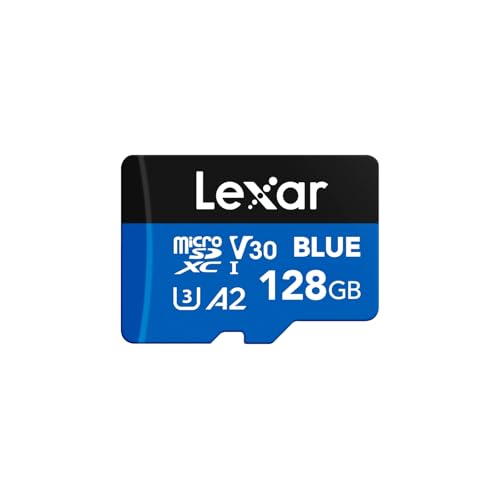
- Best for: A tablet or phone needing an A2-rated card from a further major brand.
- Brand: Lexar
- Model number: LMSBLUE128G-BNAAU, as listed for this card
- Flash memory type: Micro SDXC
- Memory storage capacity: 128 GB
All 3 Picks at a Glance
| Product | Specs | Action |
|---|---|---|
| SanDisk 128GB Extreme microSDXC UHS-I Card |
| Check price on Amazon |
| Samsung EVO Select microSDXC Card 128GB |
| Check price on Amazon |
| Lexar 128GB Blue microSDXC UHS-I Card |
| Check price on Amazon |
Adoptable storage changes what a memory card has to do. Formatted as portable storage, a card mostly holds photos and video in large, sequential files. Adopted as internal storage, the same card holds apps and their data, which means constant small reads and writes, and a slow card makes the whole phone feel slow. The real decision is therefore not capacity first, but whether the card carries the app performance rating that adopted use demands.
This guide is for Android phone and tablet owners whose device still offers a microSD slot and an adoptable or internal storage option, and who want to move apps onto the card rather than only media. Every product below is a microSDXC card whose listing states an A2 rating, and every specification is taken from its Amazon product page.
Our Top Picks
Top 3 picks at a glance
Quick Picks
As an Amazon Associate we earn from qualifying purchases.
| Product | Best for | Key spec from title |
|---|---|---|
| SanDisk 128GB Extreme microSDXC UHS-I Card | Fast app loading with high stated write speed | Up to 190MB/s read, A2, U3, V30 |
| Samsung EVO Select microSDXC Card 128GB | Everyday adopted storage with an adapter included | 130MB/s in title, U3, A2, V30 |
| Lexar 128GB Blue microSDXC UHS-I Card | A further A2 option for phones and tablets | Up to 160MB/s read, C10, U3, A2, V30 |
How to Choose
Put the A rating ahead of the headline capacity
For adopted storage, the Application Performance Class is the specification written for exactly this job: running apps from the card. An A2 card is rated for higher random read and write input-output operations than an A1 card, and random access is what app launches, updates and data lookups consist of. A large card with no A rating, or with only a basic speed class, can hold more apps while making each one slower to open. All three cards in this guide state an A2 rating in their listings, which is the starting requirement, not a bonus feature.
Understand what U3 and V30 do and do not promise
The U3 and V30 markings both relate to a minimum sustained write speed, which matters when the phone saves video, downloads large game files or moves data onto the adopted card in bulk. They do not describe random app performance, which is the A rating’s job, so a card can look strong on video classes and still be a poor adopted-storage choice if it lacks A2. Treat the classes as a pair: A2 for how apps behave day to day, and U3 or V30 as reassurance that sustained writes will not collapse when the card is busy.
Choose a capacity the phone will actually manage well
Adopting a card merges it with internal storage, so it is tempting to buy the largest card available. A more useful approach is to match capacity to the apps and games you genuinely keep: a 128GB card, the size featured in this guide, already holds a substantial app library alongside the phone’s own storage. Very large cards also concentrate more of your data in one removable component that is encrypted to one device. If the phone fails, the adopted card cannot simply be read elsewhere, so capacity should be balanced against a working backup habit.
Check device support before you format anything
Not every Android device offers adoptable storage, and some manufacturers limit or hide the option even when a card slot is present. Confirm in your device settings, or in the manufacturer’s documentation for your model, that formatting a card as internal storage is offered before you buy a card for that purpose. Also confirm the slot takes microSDXC at the capacity you plan to use. A card bought for adopted use can still serve as portable storage if the option is missing, but that is a different job with different priorities.
The 3 Best Options
SanDisk 128GB Extreme microSDXC UHS-I Card
- Best for: Adopted storage holding games and heavy apps on a compatible Android phone.
- Brand: SanDisk
- Model number: SDSQXAA-128G-GN6MA, as listed on the product page
- Flash memory type: Micro SDXC
- Memory storage capacity: 128 GB
Adopted storage holding games and heavy apps on a compatible Android phone.
The highest stated read speed depends on compatible devices and SanDisk QuickFlow technology as described on the listing, so expect lower figures in an ordinary phone slot.
This SanDisk Extreme card is the pick for a phone where adopted storage will hold demanding games and frequently used apps, because its listing pairs the A2 rating with the highest stated read and write figures in this guide. The listing describes the A2 specification in terms of faster app performance, and names Android smartphones among its intended devices. It also includes an adapter, which helps when the card is first prepared or later used as portable storage in another device. For a single-card purchase meant to stay in the phone, this is the strongest specification set here.
Samsung EVO Select microSDXC Card 128GB
- Best for: Everyday adopted storage on an Android phone or tablet, with an adapter included.
- Brand: Samsung
- Model number: MB-ME128KA/AM, as listed on the product page
- Flash memory type: Micro SDXC
- Memory storage capacity: 128 GB
Everyday adopted storage on an Android phone or tablet, with an adapter included.
Samsung sells newer EVO Select versions with different model numbers and stated speeds, so check that the listing you order matches the model number and ratings shown here.
The Samsung EVO Select is the everyday choice in this guide: an A2, U3 and V30 card whose listing names Android smartphones and tablets as expanded-storage devices and includes an adapter in the package. Its stated read figure in the title is lower than the SanDisk card’s, but for adopted use the A2 rating is the more important line, and this card carries it. The listing also describes protection features including water, temperature and X-ray proofing, which suits a card that will live permanently inside a phone carried everywhere. It fits buyers who want a mainstream card from a major memory brand.
Lexar 128GB Blue microSDXC UHS-I Card
- Best for: A tablet or phone needing an A2-rated card from a further major brand.
- Brand: Lexar
- Model number: LMSBLUE128G-BNAAU, as listed for this card
- Flash memory type: Micro SDXC
- Memory storage capacity: 128 GB
A tablet or phone needing an A2-rated card from a further major brand.
Lexar sells several similarly named series with different ratings, including A1 cards, so confirm the A2 marking on the exact listing and packaging before formatting the card as internal storage.
Lexar’s Blue series card gives this guide a third A2 option, useful when you are comparing availability or already use Lexar cards in other devices and want to stay with one brand across cameras and phones. Its listing states a read speed up to 160MB/s together with the C10, U3, A2 and V30 ratings, and it is supplied with an SD adapter, which makes the card easy to check in a computer before it is adopted. It suits a tablet used for apps and downloaded media, or a phone where adopted storage holds a moderate app library rather than the largest games.
Which One Fits Your Situation
You are adopting storage mainly for large games
Pick the SanDisk Extreme 128GB. Games combine large sequential downloads with constant small data reads during play, and this listing pairs the A2 rating with the highest stated read and write speeds here. Leave spare space on the card rather than filling it completely, because a nearly full adopted card leaves the phone little room to manage updates and temporary files smoothly.
You want more room for everyday apps on a family phone
Pick the Samsung EVO Select 128GB. For messaging, shopping, banking and school apps, the A2 rating matters more than the highest transfer figure, and this card’s listing also describes several protection features for a card that stays in the phone permanently. Set up a backup routine at the same time, since adopted data cannot be recovered by putting the card in a computer.
You are expanding a tablet used by several people
Pick the Lexar Blue 128GB, and think carefully before adopting it at all. A shared tablet often benefits from portable storage that can be removed and read elsewhere, while adopted storage ties the card to that one tablet. If each user mainly needs apps rather than shared media files, adopt the Lexar card; if the tablet is a media hub for the household, portable formatting is the better decision.
Your phone warns that a previous card was slow
Treat that warning as information about random performance, not capacity. Replace the card with any of the A2 options in this guide rather than a larger card with a weaker rating, and move only the apps you use onto it first. If the phone still reports slow storage with an A2 card fitted, the limitation may be the device itself, and keeping only essential apps on the card is the sensible compromise.
Common Mistakes
- Buying a card for adopted storage based on capacity and headline read speed, without checking for an A1 or A2 rating.
- Assuming an adopted card can be removed and read in a computer or another phone later.
- Formatting a card as internal storage before backing up the photos and files already on it.
- Filling the adopted card completely, leaving no working space for app updates and temporary files.
- Buying a card for a phone that does not offer adoptable storage, without checking the device settings first.
Frequently Asked Questions
What happens to an adopted card if I remove it?
Android formats and encrypts an adopted card for the single device that adopted it, so removing it makes its contents unreadable elsewhere, and apps stored on it will stop working until it is returned. Treat adoption as a permanent installation rather than swappable storage. If you later want the card for portable use, the device can reformat it, which erases everything stored on it.
Is A2 always better than A1 for adoptable storage?
A2 is the higher application performance class, with higher rated random read and write operations than A1, so on a device that supports the relevant commands it is the better fit for running apps from the card. The difference is most noticeable with many small apps and frequent updates. An A1 card can still work, but the three cards in this guide all state A2, removing that compromise.
Can I use a full-size SD card instead of microSD?
Phones and tablets with card slots almost always take microSD cards, and the products in this guide are microSDXC cards supplied with adapters for larger slots in other equipment. The adapter works in the other direction only: it lets a microSD card fit a full-size slot, but a full-size SD card cannot be made to fit a phone. Check your device slot before ordering if you are unsure which format it takes.
How much capacity should I choose for adopted storage?
Match the card to the apps you actually keep, rather than the largest size on sale. The 128GB cards in this guide suit most app libraries alongside a phone’s built-in storage, and they limit how much data depends on one encrypted card. Whatever size you choose, keep a backup of important data elsewhere, because an adopted card cannot be read by another device if the phone is lost or fails.
Related guides
More from Amazon
Programs that pair well with the guide above. Offers and eligibility are set by Amazon and may change.
Free shipping on eligible items, Prime Video and more. Eligible new members can start with a free trial.
Start a Prime free trialAd-free music streaming. Eligible new subscribers can start with a free trial.
Try Music Unlimited freeA Prime membership for ages 18-24 with a trial period. Eligibility is set by Amazon.
See Prime for Young AdultsAudiobooks and podcasts to listen to on the go. Eligible new members can start with a free trial.
Try Audible freeAs an Amazon Associate we earn from qualifying purchases.