Our Short List of 3

- Best for: Writers and office workers on the current 11-inch Pro who type for hours at a desk or table.
- Compatibility: iPad Pro 11-inch (M4 and M5)
- Connection: Smart Connector, powered by the iPad
- Trackpad: Glass, with haptic feedback and Multi-Touch gestures
- Keys: Backlit, scissor mechanism, function row

- Best for: 13-inch Pro owners who work at a desk and want the roomiest typing and trackpad area.
- Compatibility: iPad Pro 13-inch (M4 and M5)
- Connection: Smart Connector, powered by the iPad
- Trackpad: Glass, with haptic feedback and Multi-Touch gestures
- Keys: Backlit, scissor mechanism, function row

- Best for: Students and mixed-use owners who detach the keyboard for drawing or reading but still type daily.
- Compatibility: iPad Pro 11-inch (M4 and M5), models A2836, A2837, A3006, A3357, A3358, A3359
- Connection: Smart Connector, powered by the iPad
- Keyboard: Detachable, backlit, with iPadOS shortcut keys
- Trackpad: Large multi-touch trackpad
All 5 Picks at a Glance
| Product | Specs | Action |
|---|---|---|
| Apple Magic Keyboard for iPad Pro 11-inch (M4 and M5) |
| Check price on Amazon |
| Apple Magic Keyboard for iPad Pro 13-inch (M4 and M5) |
| Check price on Amazon |
| Logitech Combo Touch for iPad Pro 11-inch (M4 and M5) |
| Check price on Amazon |
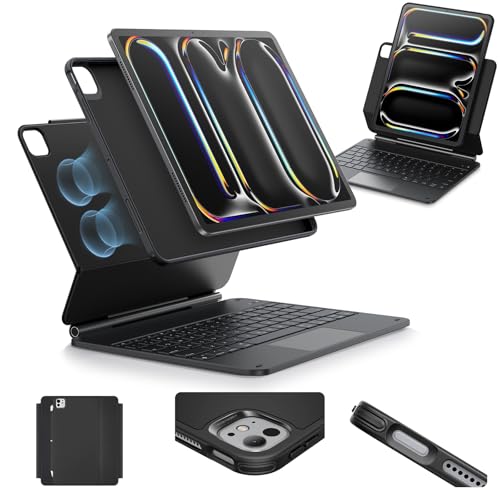 ESR Rebound 360 for iPad Pro 13-inch (M5 and M4) |
| Check price on Amazon |
 Logitech Combo Touch for iPad Pro 11-inch (2018 to 2022) |
| Check price on Amazon |
The real decision with an iPad Pro keyboard is not the typing feel, because every case here types well enough for daily work. The decision is fit. Keyboard cases are molded around one exact iPad Pro size and generation, and the current 11-inch and 13-inch M4 and M5 models use different magnet layouts and Smart Connector positions than the 2018 to 2022 Pros. A case built for the wrong generation will not attach, charge, or line up its trackpad correctly, no matter how good the keyboard itself is.
This guide is for iPad Pro owners only, covering the current M4 and M5 models in both sizes plus the earlier 11-inch generations that many people still use. Every pick below was chosen from the name and specifications on its Amazon product page, with the compatible iPad Pro models stated in the listing, so you can match the case to your exact tablet before ordering.
Our Top Picks
Top 3 picks at a glance
Quick Picks
As an Amazon Associate we earn from qualifying purchases
| Product | Best for | Key spec from title |
|---|---|---|
| Apple Magic Keyboard for iPad Pro 11-inch (M4 and M5) | Laptop-style typing on the current 11-inch Pro | Glass trackpad with haptic feedback |
| Apple Magic Keyboard for iPad Pro 13-inch (M4 and M5) | Desk work on the current 13-inch Pro | Aluminum palm rest and function row |
| Logitech Combo Touch for iPad Pro 11-inch (M4 and M5) | Owners who detach the keyboard often | Detachable backlit keyboard, kickstand case |
| ESR Rebound 360 for iPad Pro 13-inch (M5 and M4) | Portrait viewing and raised screen setups | Multi-mode magnetic stand, detachable back case |
| Logitech Combo Touch for iPad Pro 11-inch (2018 to 2022) | Owners of an older 11-inch Pro | Click-anywhere trackpad, Smart Connector |
How to Choose
Match the exact model and generation, not the screen size
Screen size alone misleads Pro buyers because three different 11-inch iPad Pro generations share a display size while their bodies, camera cutouts, and connector positions differ. Open Settings, then General, then About, and note the model name and chip before you shop. The current Magic Keyboard fits only the 11-inch and 13-inch iPad Pro with M4 or M5 chips. The 2018 to 2022 11-inch Pros need the older Combo Touch generation, and the old 12.9-inch size is not the same fit as the current 13-inch body.
Decide how the keyboard connects and gets power
Smart Connector keyboards draw power from the iPad itself, so there is no pairing step and no separate battery to recharge. Apple’s Magic Keyboard and both Logitech Combo Touch versions below work this way, which suits people who open the case and type all day. Bluetooth keyboards, like the ESR Rebound 360, carry their own battery and need an occasional USB-C charge plus a one-time pairing. In exchange, a Bluetooth keyboard keeps working when detached and can sit further from the screen on a crowded desk.
Weigh the trackpad as carefully as the keys
A trackpad decides how often you reach up and touch the screen during a work session. Apple’s glass trackpad uses haptic feedback, so the click feels even across the whole surface and supports the full set of Multi-Touch gestures. Logitech’s large trackpad clicks mechanically, which some people prefer because the press is physical. ESR’s pad is smaller but still handles tap, pinch, and swipe gestures. If you edit documents or spreadsheets for hours, put the trackpad ahead of small differences in key feel when you compare these cases.
Think about the stand, the shell, and carrying it
The Magic Keyboard floats the iPad on a cantilever hinge, which looks clean and types well on a desk but leaves the tablet’s edges exposed and offers a narrow angle range. The Combo Touch wraps the iPad in a protective back case with a kickstand, so the tablet stays covered when the keyboard comes off. The ESR design adds portrait orientation and a raised viewing mode. Decide whether your Pro lives on a desk, rides in a bag daily, or gets handed around a classroom, then pick the shell that matches that life.
The 5 Best Options
Apple Magic Keyboard for iPad Pro 11-inch (M4 and M5)
- Best for: Writers and office workers on the current 11-inch Pro who type for hours at a desk or table.
- Compatibility: iPad Pro 11-inch (M4 and M5)
- Connection: Smart Connector, powered by the iPad
- Trackpad: Glass, with haptic feedback and Multi-Touch gestures
- Keys: Backlit, scissor mechanism, function row
Writers and office workers on the current 11-inch Pro who type for hours at a desk or table.
It fits only the M4 and M5 11-inch Pro, so confirm your chip generation in Settings before ordering.
This is the keyboard to pick if your 11-inch M4 or M5 iPad Pro is your main computer and you want it to behave like a small laptop. The floating cantilever design holds the screen at a steady angle, the aluminum palm rest feels solid under long documents, and the haptic glass trackpad is the most precise pad in this group. It connects through the Smart Connector, so it wakes instantly and never needs its own charge. The trade-off is protection: the iPad’s edges stay exposed, and the case only works in one landscape typing position.
Apple Magic Keyboard for iPad Pro 13-inch (M4 and M5)
- Best for: 13-inch Pro owners who work at a desk and want the roomiest typing and trackpad area.
- Compatibility: iPad Pro 13-inch (M4 and M5)
- Connection: Smart Connector, powered by the iPad
- Trackpad: Glass, with haptic feedback and Multi-Touch gestures
- Keys: Backlit, scissor mechanism, function row
13-inch Pro owners who work at a desk and want the roomiest typing and trackpad area.
The 13-inch keyboard does not fit the older 12.9-inch iPad Pro generations, despite the similar screen size.
Owners of the 13-inch M4 or M5 iPad Pro get the same floating design scaled up, with a wider keyboard deck that suits larger hands and longer documents. The bigger glass trackpad gives more room for gestures and precise cursor work in spreadsheets, and the aluminum palm rest keeps the setup feeling like a single rigid unit on a desk. Like the 11-inch version, it runs through the Smart Connector with pass-through charging, so there is nothing extra to plug in or pair. It is the heaviest and most desk-bound option here once the large tablet is attached.
Logitech Combo Touch for iPad Pro 11-inch (M4 and M5)
- Best for: Students and mixed-use owners who detach the keyboard for drawing or reading but still type daily.
- Compatibility: iPad Pro 11-inch (M4 and M5), models A2836, A2837, A3006, A3357, A3358, A3359
- Connection: Smart Connector, powered by the iPad
- Keyboard: Detachable, backlit, with iPadOS shortcut keys
- Trackpad: Large multi-touch trackpad
Students and mixed-use owners who detach the keyboard for drawing or reading but still type daily.
Logitech sells similar Combo Touch versions for older Pros and for the iPad Air, so check that the listing names the M4 and M5 11-inch Pro.
The Combo Touch suits 11-inch M4 and M5 Pro owners who move between typing, drawing, and reading in one day. The keyboard detaches completely while the woven-fabric back case and kickstand stay on the iPad, so the tablet keeps its protection and a stand in every mode. The backlit keyboard includes a full shortcut row, the trackpad is the largest Logitech offers for this size, and everything runs through the Smart Connector with no charging. The kickstand needs desk depth behind the iPad, which can crowd a small tray table, and the full case adds noticeable bulk to a very thin tablet.
ESR Rebound 360 for iPad Pro 13-inch (M5 and M4)
- Best for: Presenters and video callers on the 13-inch Pro who want portrait mode and a raised screen.
- Compatibility: iPad Pro 13-inch (M5 and M4), models A2925, A2926, A3007, A3360, A3361, A3362
- Connection: Bluetooth, rechargeable keyboard
- Stand: Quick-set magnetic stand with raised and portrait modes
- Case: Detachable back case with full-body coverage
Presenters and video callers on the 13-inch Pro who want portrait mode and a raised screen.
The listing warns it is not designed for iPad Pros with nano-texture glass, and it fits no 11-inch or older 12.9-inch model.
The Rebound 360 is the flexible option for 13-inch M5 and M4 Pro owners who present, video call, or read in portrait orientation. Its magnetic stand supports several setups, including a raised screen view that lifts the tablet closer to eye level and a portrait mode the Apple and Logitech cases cannot offer. The back case detaches for direct tablet use while keeping full-body coverage, and the multi-touch trackpad covers everyday navigation. Because the keyboard connects over Bluetooth, it needs its own charging, and its typing feel is a step below the two Smart Connector designs above.
Logitech Combo Touch for iPad Pro 11-inch (2018 to 2022)
- Best for: Owners of a 2018 to 2022 11-inch iPad Pro who want a full keyboard case without replacing the tablet.
- Compatibility: iPad Pro 11-inch 1st, 2nd, 3rd, and 4th generation (2018 to 2022)
- Connection: Smart Connector, powered by the iPad
- Keyboard: Detachable, backlit
- Trackpad: Click-anywhere multi-touch trackpad
Owners of a 2018 to 2022 11-inch iPad Pro who want a full keyboard case without replacing the tablet.
It does not fit the M4 or M5 11-inch Pro, and Amazon groups several Combo Touch generations on similar pages, so verify the generation list on the listing.
If your 11-inch iPad Pro is a 1st, 2nd, 3rd, or 4th generation model from 2018 to 2022, this is the Combo Touch generation built for it, and it is still the most complete keyboard case for those tablets. You get the same formula as the current version: a protective back case with a kickstand, a detachable backlit keyboard, and a click-anywhere trackpad, all powered through the Smart Connector so there is no battery to manage. It turns an older Pro into a credible laptop stand-in for writing, classes, and travel without forcing a tablet upgrade.
Which One Fits Your Situation
You type long documents every day
Start with the Apple Magic Keyboard in your size. The rigid aluminum palm rest, the backlit scissor keys, and the haptic glass trackpad hold up best across hours of writing, and the Smart Connector means the keyboard is ready the moment you open it. Choose the 11-inch version for portability or the 13-inch version if your hands and documents need the wider deck.
You switch between typing, drawing, and reading
The Logitech Combo Touch for the 11-inch M4 and M5 Pro fits a mixed day best. The keyboard detaches for sketching, the kickstand holds viewing angles for reading, and the back case keeps protecting the tablet in every mode. Older 11-inch Pro owners get the same flexibility from the 2018 to 2022 Combo Touch generation instead.
You present, teach, or take video calls
The ESR Rebound 360 earns its place when the screen needs to face people other than you. Its magnetic stand raises the 13-inch Pro toward eye level and rotates into portrait mode for calls, which neither Apple nor Logitech offers. Accept the Bluetooth charging routine as the price of that stand, and keep the keyboard topped up before a presenting day.
Your iPad Pro is a few years old
Do not buy a current-generation case and hope it fits. The 2018 to 2022 11-inch Pro has its own Combo Touch generation with the correct magnets and connector placement, listed above. Check your model name in Settings first, because the 11-inch label covers both the older generations and the unrelated M4 and M5 models, and their keyboards cannot be swapped.
Common Mistakes
- Buying by screen size alone, when the 11-inch name covers three different iPad Pro generations with incompatible cases.
- Assuming a 13-inch M4 case fits the older 12.9-inch iPad Pro because the screens measure almost the same.
- Ordering a Combo Touch for the iPad Air or the base iPad, which Amazon lists beside the Pro versions with near-identical photos.
- Forgetting that a Bluetooth keyboard case has its own battery, then finding it flat before a trip or a class.
- Ignoring the nano-texture glass warning on third-party magnetic cases for the newest 13-inch Pro.
Frequently Asked Questions
Will the current Magic Keyboard fit my 2022 iPad Pro 11-inch?
No. The current Magic Keyboard is built only for the 11-inch iPad Pro with an M4 or M5 chip, and its magnets and connector do not line up with the 2022 4th generation model. Owners of the 2018 to 2022 11-inch Pro should choose the older Logitech Combo Touch generation instead, which was designed for those tablets.
Do Smart Connector keyboards need to be charged or paired?
No. A Smart Connector keyboard draws power directly from the iPad and starts working as soon as it attaches, with no Bluetooth pairing and no battery of its own. That is the main daily convenience of the Apple Magic Keyboard and both Logitech Combo Touch versions. Only Bluetooth designs, like the ESR Rebound 360, need charging.
Can I use an iPad Air keyboard case on an iPad Pro?
Generally no, even when the screen size matches. The Air and Pro bodies differ in thickness, camera layout, and magnet placement, so a case molded for one will not attach or align correctly on the other. Always match the case to the exact model name shown in your iPad’s Settings, not to the inch measurement in a listing title.
Does the iPad Pro stay protected when the keyboard is detached?
With the Logitech Combo Touch and the ESR Rebound 360, yes: the back case stays on the iPad and keeps covering the back and edges after the keyboard comes off. With Apple’s Magic Keyboard, the iPad lifts away completely bare, because the keyboard itself is the case. Frequent detachers who carry the tablet separately should weigh that difference.
Related guides
More from Amazon
Programs that pair well with the guide above. Offers and eligibility are set by Amazon and may change.
Free shipping on eligible items, Prime Video and more. Eligible new members can start with a free trial.
Start a Prime free trialAd-free music streaming. Eligible new subscribers can start with a free trial.
Try Music Unlimited freeA Prime membership for ages 18-24 with a trial period. Eligibility is set by Amazon.
See Prime for Young AdultsAudiobooks and podcasts to listen to on the go. Eligible new members can start with a free trial.
Try Audible freeAs an Amazon Associate we earn from qualifying purchases.