Choosing within the Redragon range is a different exercise from choosing between brands. The catalogue is wide, the model names overlap, and two mice that look alike can be built for entirely different jobs: one carries a twelve-button thumb grid for an MMO hotbar, while another is a plain seven-button shooter mouse with the same logo. The real decision is which Redragon shape and button layout matches the games you play, and whether you want a cable, a wireless link, or both in the same mouse.
This roundup is for players who have already decided on Redragon and want the line-up untangled, from MMO veterans to first-time buyers comparing the wired staples. Every pick was chosen from its Amazon listing name and stated specifications, and where a model’s listing is thin on detail, that gap is flagged in its section rather than filled in from outside sources.
Top 3 picks at a glance

Quick Picks
As an Amazon Associate we earn from qualifying purchases
| Product | Best for | Key spec from title |
|---|---|---|
| Redragon M908 Impact | MMO players who live on a thumb grid | 18 programmable buttons including 12 side buttons |
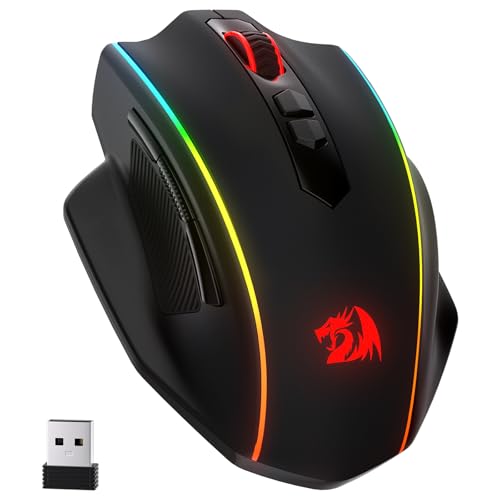
| Redragon M686 Vampire Elite | Wireless freedom with macro buttons | Up to 45-hour battery with wired and 2.4 GHz modes |
| Redragon M711 Cobra | A straightforward wired all-rounder | 10,000 DPI with 7 programmable buttons |
| Redragon M602-KS Griffin Tri-Mode | One mouse for PC, laptop and tablet | Tri-mode 2.4G, Bluetooth and USB-C wired connectivity |
| Redragon M901 Perdition | Maximum buttons on a long-running wired design | 18 programmable buttons with weight tuning set included |
How to Choose
Count the buttons your games actually use
Redragon’s range splits cleanly on button count. The MMO models carry twelve side buttons in a thumb grid and reach eighteen programmable buttons in total, which suits players who bind entire rotations to their mouse hand. Shooter and general-purpose models settle at seven or eight buttons, enough for melee, push-to-talk and a grenade key without a grid to memorise. Buying the grid when you never bind it adds weight and accidental presses; skipping it when your game demands macros leaves you reaching back to the keyboard mid-fight. Count your current bindings honestly before choosing a side.
Wired, wireless or tri-mode
Three of the mice here are wired only, one switches between a cable and a 2.4 GHz receiver, and one adds Bluetooth as a third mode. Wired Redragon models never need charging and tend to be the simplest to live with at a fixed desk. The wireless M686 lists up to 45 hours of battery, which covers a week of evenings but demands a charging habit. The tri-mode M602-KS is the flexible traveller, pairing over Bluetooth with a laptop or tablet and falling back to its receiver or cable for gaming. Decide by where the mouse will actually be used, not by which connection sounds most advanced.
Sensor figures in perspective
The listed DPI ceilings in this line-up run from 8,000 to 24,000, and the spread says less than it appears to. Most players aim somewhere in the hundreds or low thousands of DPI, so every sensor here has headroom to spare; the number matters mainly as a sign of which generation of hardware sits inside. What differs more in daily use is how the mouse tracks at your settings, and no listing can tell you that. Treat DPI as a minimum requirement to clear rather than a score to maximise, and spend your attention on shape and buttons instead.
Shape, grip and the age of the design
Most Redragon mice use broad right-handed ergonomic shells that favour a palm grip, which suits the relaxed hand position of long MMO and RPG sessions. Fingertip and claw players should check each model’s size and weight claims in its listing, because the brand’s shells run larger than esports-focused rivals. Age matters too: some Redragon listings have been running for many years, which means a proven design and deep stock, but also older internals. The Perdition section below is upfront about that trade, because a long-running listing is a reason to check the details, not a reason to dismiss the mouse.
The 5 Best Options
Redragon M908 Impact

The M908 Impact is the mouse most people picture when they think of Redragon. Its listing leads with eighteen programmable buttons, twelve of them arranged in a thumb grid, which makes it the natural home for MMO and MOBA players who bind skills, mounts and consumables to the mouse hand. The optical sensor is listed at up to 12,400 DPI, the shape is a wide ergonomic shell with RGB backlighting, and the connection is wired USB, so there is no battery to manage during a raid night. For players whose previous mouse ran out of buttons, this is the straightforward answer inside the brand.
Specs
- Wired USB connection
- Optical sensor, up to 12,400 DPI
- 18 programmable buttons, including 12 side buttons
- RGB backlighting
- Ergonomic right-handed shape
Best for: MMO players who want a full thumb grid without leaving the Redragon range.
Watch out for: The wired-only design and large shell suit a settled desk setup better than a laptop bag.
ASIN: B07HC4NBQ8
Redragon M686 Vampire Elite
The Vampire Elite is Redragon’s wireless step up. Its listing pairs wired use with a 2.4 GHz wireless mode and quotes up to 45 hours of battery life, so it can run untethered through a week of play and plug in when the charge runs low. Eight macro buttons give it more binding room than the basic wired models without committing you to a full thumb grid, and the sensor ceiling is listed at 16,000 DPI. The shell is ergonomic with RGB lighting. Players who want to clear the cable off the desk but keep a Redragon in hand, and who play a mix of shooters and RPGs, are exactly who this model is aimed at.
Specs
- Wired and 2.4 GHz wireless connectivity
- Up to 16,000 DPI
- Up to 45-hour battery life as listed
- 8 macro buttons
- Ergonomic shape with RGB lighting
Best for: Players who want Redragon ergonomics without the cable, plus a handful of macro buttons.
Watch out for: The listing does not state a weight, so check the live page if heft matters to your grip style.
ASIN: B0859TTQRN
Redragon M711 Cobra
The Cobra is the uncomplicated wired all-rounder of the group. The listing keeps the formula simple: an optical sensor adjustable to 10,000 DPI, seven programmable buttons and 16.8 million colour RGB backlighting in a shape that asks nothing of the player. There is no grid to learn, no battery to charge and no receiver to lose, which is why the Cobra keeps appearing in starter setups and spare-desk builds. It suits players who split their time between shooters and everyday desktop work and want one mouse that covers both without a settings project attached. Sometimes the right pick is the one with the least to explain.
Specs
- Wired connection
- Optical sensor, adjustable up to 10,000 DPI
- 7 programmable buttons
- 16.8M RGB colour backlighting
Best for: A first Redragon mouse, or a dependable wired spare for a second setup.
Watch out for: Seven buttons is plenty for shooters but will feel tight if you later move into macro-heavy MMOs.
ASIN: B0751D11BL
Redragon M602-KS Griffin Tri-Mode
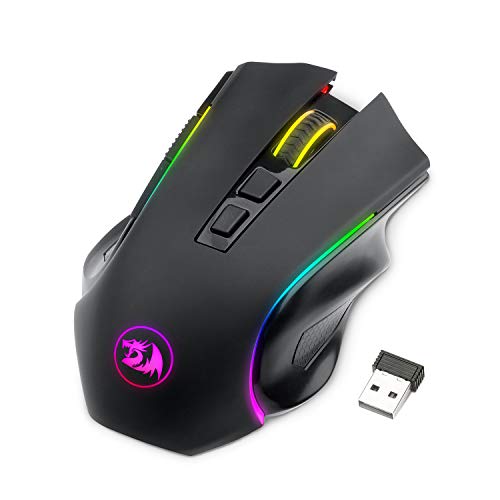
Do not confuse this one with the older wired Griffin that shares its name: the M602-KS is a separate tri-mode model, and its listing connects by 2.4 GHz wireless, Bluetooth or a USB-C cable. That spread makes it the pick for a mouse that moves between a gaming PC, a work laptop and a tablet in the same day. The sensor is listed at up to 8,000 DPI, the lowest ceiling here, which remains far above everyday settings, and seven programmable buttons plus RGB backlighting cover the gaming basics. Battery figures recorded for the model run to 35 hours with lighting on and 70 hours with it off, so turning the RGB down is a genuine range extender.
Specs
- Tri-mode connectivity: 2.4G wireless, Bluetooth and USB-C wired
- Up to 8,000 DPI
- 7 programmable buttons
- RGB spectrum backlighting
- Rechargeable battery, listed at 35 hours with RGB on and 70 hours off
Best for: One mouse shared across a gaming PC and Bluetooth devices like a laptop or tablet.
Watch out for: The similar name invites mix-ups with the wired Griffin; confirm the M602-KS model code on the listing before ordering.
ASIN: B08M9FZWN9
Redragon M901 Perdition

The Perdition is the veteran of this list, and its age deserves a straight mention: the design and its listing have been around for many years, so its internals belong to an earlier generation than the other picks. What it still offers is volume: eighteen programmable buttons for MMO bindings, a PixArt PMW3360 sensor listed at up to 24,000 DPI through software, RGB LED backlighting and a weight tuning set in the box so you can add heft until the glide feels right. It is wired, like the M908, and the two overlap heavily. Choose the Perdition if the tuning weights and its long track record appeal; choose the M908 for the newer listing of the same idea.
Specs
- Wired connection
- PixArt PMW3360 sensor, up to 24,000 DPI via software
- 18 programmable buttons
- RGB LED backlighting
- Weight tuning set included
Best for: MMO players who like a heavier, tunable mouse and value a long-running, proven design.
Watch out for: This is a legacy model from an earlier hardware generation; check the live listing carefully and weigh it against the M908 before buying.
ASIN: B00GU8W5AE
Which One Fits Your Situation
You raid in an MMO several nights a week
Your choice is between the two eighteen-button wired models. The M908 Impact is the current expression of the idea, with its twelve-button grid and 12,400 DPI sensor. The M901 Perdition counters with its weight tuning set and a higher listed DPI ceiling, but it is the older design. Most raiders should start with the M908 and only pick the Perdition if adjustable weight is the deciding factor.
You want to ditch the cable at a gaming desk
The M686 Vampire Elite is the one built for you. Its 2.4 GHz mode keeps the connection gaming-grade, the cable stays in the box as a backup and for charging, and eight macro buttons cover the bindings most mixed-genre players need. Just build the charging habit early, because 45 hours disappears faster than expected during a holiday gaming stretch.
The mouse moves between your PC, laptop and tablet
Take the M602-KS Griffin Tri-Mode. Bluetooth handles the laptop and tablet pairing, the receiver covers the gaming PC, and the USB-C cable is the fallback that always works. Its lower DPI ceiling is irrelevant at real-world settings, and the lighting-off battery figure makes it the longest-running traveller here as well.
You are buying a first gaming mouse on a sensible budget
The M711 Cobra asks the fewest questions. It plugs in, its seven buttons map to the controls beginners actually use, and its sensor ceiling is more than enough while aim and settings are still being learned. If the player later falls for an MMO, the M908 will be waiting as the upgrade; nothing about the Cobra purchase is wasted in the meantime.
Common Mistakes
- Buying the twelve-button grid for shooters, then fighting accidental thumb presses in every firefight.
- Confusing the tri-mode M602-KS with the older wired Griffin that shares the Griffin name.
- Treating the highest DPI figure as the best sensor, when every ceiling here already exceeds real playing settings.
- Forgetting that the wireless models need charging, and blaming the mouse when the battery dies mid-session.
- Assuming a long-running listing means a current design; the Perdition is a legacy model and should be compared as one.
Frequently Asked Questions
Which Redragon mouse is best for MMOs?
The M908 Impact is the default answer, with eighteen programmable buttons and a twelve-button thumb grid listed for exactly that job. The M901 Perdition offers the same button count with a weight tuning set, but it is an older design. Pick the M908 unless adjustable weight matters more to you than the newer listing.
Are Redragon mice good for shooters?
The simpler models are. The M711 Cobra’s seven buttons and 10,000 DPI sensor cover what a shooter player uses, and the M686 adds wireless play with macro buttons to spare. The big grid models are built for MMOs and feel oversized for flick aiming, so match the mouse to the genre rather than buying the most buttons available.
What is the difference between the M602-KS and the wired Griffin?
They are different products that share a name. The M602-KS in this guide is the tri-mode version with 2.4 GHz wireless, Bluetooth and USB-C wired connections and a rechargeable battery. The older Griffin is a wired-only mouse sold under a separate listing. Check the model code on the product page so the version in your cart is the one you intended.
Do these mice need software to work?
Every mouse here works as a pointing device the moment it is plugged in or paired. Redragon’s software is where button remapping and macro recording happen for the programmable models, and the M901’s highest listed DPI figure is quoted via software as well. If you never install anything, you still get a working mouse; you just leave the custom bindings unused.
Related guides
More from Amazon
Programs that pair well with the guide above. Offers and eligibility are set by Amazon and may change.
Free shipping on eligible items, Prime Video and more. Eligible new members can start with a free trial.
Start a Prime free trialAd-free music streaming. Eligible new subscribers can start with a free trial.
Try Music Unlimited freeA Prime membership for ages 18-24 with a trial period. Eligibility is set by Amazon.
See Prime for Young AdultsAudiobooks and podcasts to listen to on the go. Eligible new members can start with a free trial.
Try Audible freeAs an Amazon Associate we earn from qualifying purchases.