Buying a gaming keyboard in 2026 is really a decision about how a keypress registers. Two boards can look identical on a desk yet behave completely differently in a match, because one lets you set exactly where each key fires and resets while the other fixes that point at the factory. Sensor-driven switches with adjustable actuation and rapid trigger have moved from novelty to the main dividing line, and choosing between them and a proven mechanical switch is the choice that shapes everything else.
This guide is for PC players weighing that switch decision, whether they compete in tactical shooters, grind fighting games, or simply want a board that still feels right for everyday typing. Every pick below was chosen from its Amazon listing name and stated specifications, so the features compared here are the ones each manufacturer actually prints on the product page rather than claims gathered from elsewhere.
Top 3 picks at a glance


Quick Picks
As an Amazon Associate we earn from qualifying purchases
| Product | Best for | Key spec from title |
|---|---|---|
| Razer Huntsman V3 Pro Tenkeyless | Players who want analog control in a TKL frame | Analog Optical Switches with Rapid Trigger and Adjustable Actuation |
| SteelSeries Apex Pro TKL Gen 3 | Fine-tuning actuation per key | OmniPoint 3.0 HyperMagnetic switches with Rapid Trigger |
| Logitech G Pro X TKL Lightspeed | Wireless play and travel to events | LIGHTSPEED wireless tenkeyless with carry case included |
| Corsair K70 RGB Pro | Classic mechanical feel with fast polling | Cherry MX Red switches with 8,000 Hz hyper-polling |
| Keychron V1 | Customisation on a compact desk | 75-percent layout with QMK/VIA and hot-swappable switches |
How to Choose
Adjustable actuation and rapid trigger
Analog and magnetic switches measure how far a key travels, which unlocks two features fixed mechanical switches cannot offer. Adjustable actuation lets you set the exact depth at which a key registers, so movement keys can fire on a shallow press while an ability key demands a deliberate push. Rapid trigger resets the key the moment you start releasing it instead of at a fixed point, which makes repeated strafing inputs feel immediate. If you play shooters where counter-strafing decides duels, this is the single most meaningful upgrade on this page; if you mostly play slower genres, it matters far less.
Switch feel and sound
A switch defines the board’s personality long after the novelty of extra features fades. Linear switches travel smoothly from top to bottom and suit rapid repeated presses, tactile switches add a small bump you can feel without looking down, and clicky switches add an audible snap that housemates may not appreciate. Optical and magnetic switches remove the physical contact of a traditional design, while a classic mechanical board such as the K70 RGB Pro keeps the familiar Cherry MX Red stroke many players grew up on. Match the feel to your games and your room, not to a spec sheet ranking.
Layout and desk space
Form factor decides how much room your mouse hand gets. A tenkeyless board drops the number pad and pulls the mouse closer to your body, which helps low-sensitivity players who sweep across a large pad. A 75-percent layout squeezes the function row and navigation keys tighter still, freeing even more desk while keeping the essentials one reach away. Full-size boards remain the sensible pick if you type figures all day or lean on a number pad in strategy titles. Measure your desk and your mouse pad together before deciding, because the keyboard is only half of the space equation.
Connection, polling and extras
Wired boards still deliver the simplest, most consistent link, and the fastest wired models here poll at 8,000 Hz. Wireless has closed most of the gap: Logitech’s LIGHTSPEED connection is built for tournament play, and a wireless TKL is far easier to carry to a friend’s house or a LAN. After the connection, weigh the extras you will genuinely touch: a media dial you reach for daily, PBT keycaps that resist shine, a wrist rest included in the box, or an OLED display for quick settings checks. Features you never use are just weight in the carrying case.
The 5 Best Options
Razer Huntsman V3 Pro Tenkeyless

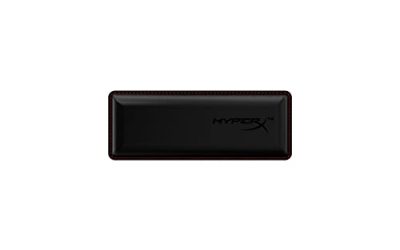
Razer’s flagship TKL is built around Analog Optical Switches, and its listing leads with the two features that follow from them: Rapid Trigger and Adjustable Actuation. That pairing suits competitive shooter players who want movement keys that fire early and reset the instant a finger lifts, without giving up a board that still behaves for typing. Snap Tap support adds another layer for strafing inputs. The package is rounded out with textured doubleshot PBT keycaps, dedicated media keys with a digital dial, and a firm leatherette wrist rest in the box, which makes it the most complete esports-leaning option here.
Specs
- Analog Optical Switches
- Rapid Trigger and Adjustable Actuation as listed
- Snap Tap support
- Dedicated media keys and digital dial
- Textured doubleshot PBT keycaps
- Firm leatherette wrist rest included
- Tenkeyless form factor
Best for: Competitive FPS players who want analog switch control in a tenkeyless frame.
Watch out for: It is a wired board, so players set on a cable-free desk should look at the Logitech pick instead.
ASIN: B0CG7BWG7J
SteelSeries Apex Pro TKL Gen 3
SteelSeries takes the magnetic route with its OmniPoint 3.0 HyperMagnetic switches, and the listing emphasises how much tuning they allow. Adjustable Actuation and Rapid Trigger are both present, joined by Rapid Tap for SOCD-style inputs and a Protection Mode aimed at reducing accidental presses. An OLED Smart Display on the board itself handles settings and notifications, which appeals to players who dislike digging through software menus mid-session. It stays wired over USB-C and keeps PBT keycaps, so the trade is clear: you give up wireless freedom and gain the deepest on-board adjustment of any pick in this guide.
Specs
- OmniPoint 3.0 HyperMagnetic switches
- Adjustable Actuation and Rapid Trigger as listed
- Rapid Tap / SOCD support
- Protection Mode
- OLED Smart Display
- PBT keycaps
- Wired USB-C, tenkeyless layout
Best for: Players who want per-key actuation tuning with feedback on the keyboard itself.
Watch out for: The wired-only connection and display add desk presence that minimalists may not want.
ASIN: B0DGZLHN8G
Logitech G Pro X TKL Lightspeed
This is the wireless entry in the group, and its listing sells portability as much as performance. LIGHTSPEED wireless handles the connection, the tenkeyless body keeps the footprint small, and a carry case is included, which makes it the natural choice for players who split time between home, a dorm room and local events. The recorded listing uses GX Brown tactile switches, so each press carries a gentle bump rather than a smooth linear stroke, paired with LIGHTSYNC RGB and PBT keycaps. Buyers who prefer their feedback physical rather than digital, and who hate cable drag on a crowded desk, will feel at home here.
Specs
- LIGHTSPEED wireless connection
- Ultra-portable tenkeyless design
- GX Brown tactile switches on this listing
- LIGHTSYNC RGB lighting
- PBT keycaps
- Carry case included
Best for: Players who want a tournament-style TKL they can carry between setups without a cable.
Watch out for: The switch type is fixed to the listing variant, so confirm the tactile version is the one in your cart before ordering.
ASIN: B0BQBSH6NQ
Corsair K70 RGB Pro
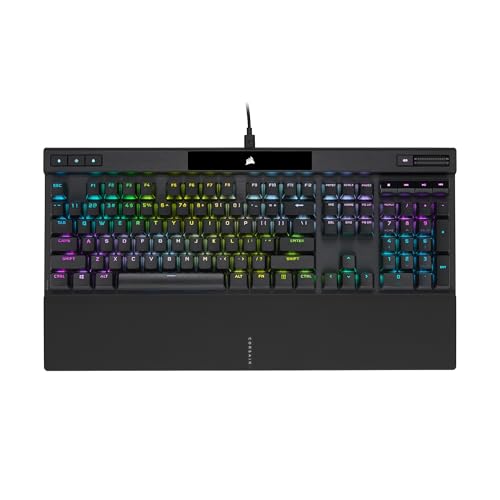
Corsair’s entry ignores analog tricks and doubles down on a proven mechanical formula. The listing pairs Cherry MX Red linear switches with 8,000 Hz hyper-polling, so the board’s speed story comes from how often it reports rather than how its keys actuate. PBT double-shot PRO keycaps promise legends that will not fade, a tournament switch locks down distractions for competition play, and the detachable USB-C cable makes the board easier to pack and to repair. For players who have tried rapid trigger and simply prefer the predictable bottom-out of a classic switch, this is the honest, fast alternative.
Specs
- Cherry MX Red linear switches on this listing
- 8,000 Hz hyper-polling
- PBT double-shot PRO keycaps
- Tournament switch
- Detachable USB-C cable
- SOCD support as listed
Best for: Players who want classic linear mechanical feel with the fastest wired polling here.
Watch out for: There is no adjustable actuation, so keypress depth is fixed the way traditional switches are.
ASIN: B09NCMHTSB
Keychron V1

The Keychron V1 shrinks the footprint further with a 75-percent layout and leans into customisation instead of esports features. Its listing highlights QMK/VIA programmability, so remapping keys and building macros happens at a level the gaming brands here do not match, and the switches are hot-swappable if you want to experiment with feel later. This recorded listing uses Keychron K Pro Brown tactile switches and adds a rotary knob for quick volume control, with south-facing RGB and support for Mac, Windows and Linux. It is wired only, which keeps it planted at a single desk, but for a mixed work-and-play setup it offers the most flexibility per key.
Specs
- 75-percent layout
- Wired USB-C connection
- QMK/VIA programmable
- Hot-swappable Keychron K Pro Brown switches on this listing
- Rotary knob version
- South-facing RGB
- Listed for Mac, Windows and Linux
Best for: Desk setups that mix gaming with typing and heavy key remapping.
Watch out for: Wired-only connectivity and the compact layout mean no number pad and no wireless freedom.
ASIN: B09NLWG6X1
Which One Fits Your Situation
You play tactical shooters and counter-strafe constantly
Rapid trigger earns its keep in your matches, so start with the two analog and magnetic boards. The Huntsman V3 Pro TKL adds a wrist rest and media dial for long sessions, while the Apex Pro TKL Gen 3 counters with its OLED display and Protection Mode. Either gives you actuation you can tune per key; choose based on whether you value the dial or the display more.
You split time between home and LAN events
The G Pro X TKL Lightspeed was picked with you in mind. LIGHTSPEED wireless removes the cable entirely, the included carry case protects the board in a bag, and the tactile switches keep feedback clear in a noisy hall. It is also the easiest of the five to lend desk space to a large mouse pad once you arrive.
You want one board for work and play
The Keychron V1 handles the double shift best. QMK/VIA remapping lets you build a work layer and a game layer on the same compact board, the knob covers volume during calls, and Mac and Windows support is stated in the listing. If your job needs a number pad, step up to a full-size board instead of forcing the 75-percent layout.
You prefer gear that stays simple and proven
Choose the Corsair K70 RGB Pro. It skips actuation menus entirely, relies on Cherry MX Red switches that have been a gaming staple for years, and still reports at 8,000 Hz over its detachable cable. The tournament switch is a small touch that shows it was designed for players who want to plug in and play.
Common Mistakes
- Buying rapid trigger for games that never reward it, then never opening the settings to configure it.
- Choosing a layout by looks alone and discovering the missing number pad only during work.
- Mixing up switch variants at checkout, since several boards here sell under separate listings per switch type.
- Assuming wireless means laggy, or assuming wired always wins, without checking the actual connection each listing states.
- Ignoring keycap material, then wondering why the legends look shiny and worn within a year.
Frequently Asked Questions
Does rapid trigger actually help in shooters?
It helps most with movement. Because the key resets as soon as you release pressure rather than at a fixed point, alternating strafe keys feel more responsive and counter-strafing becomes easier to time. The benefit is real but narrow: it changes how movement inputs register, not your aim, and it only matters in games where fast direction changes are constant.
Are adjustable actuation keyboards good for typing?
They can be, once tuned. Setting a deeper actuation point for typing reduces accidental presses from resting fingers, while a shallow point suits gaming. The catch is that the feel differs from a traditional switch, and some typists miss the familiar travel. Boards with standard mechanical switches, like the K70 RGB Pro, remain the safer pick for typing-first users.
Is a tenkeyless keyboard better than a full-size one for gaming?
For most players, yes, because removing the number pad lets the mouse sit closer and travel further, which suits low-sensitivity aiming. The trade-off only bites if you use the number pad for work, data entry or extra game bindings. A 75-percent board goes further still, but compresses keys some players rely on, so try to match the layout to your whole routine.
Do I need 8,000 Hz polling on a keyboard?
Probably not, but it does no harm. Higher polling means the board reports key states more often, shaving small amounts of input delay on paper. In practice the difference is subtle next to switch type and actuation settings. Treat polling as a tiebreaker between two boards you already like, as with the K70 RGB Pro, rather than the reason to buy one.
Related guides
More from Amazon
Programs that pair well with the guide above. Offers and eligibility are set by Amazon and may change.
Free shipping on eligible items, Prime Video and more. Eligible new members can start with a free trial.
Start a Prime free trialAd-free music streaming. Eligible new subscribers can start with a free trial.
Try Music Unlimited freeA Prime membership for ages 18-24 with a trial period. Eligibility is set by Amazon.
See Prime for Young AdultsAudiobooks and podcasts to listen to on the go. Eligible new members can start with a free trial.
Try Audible freeAs an Amazon Associate we earn from qualifying purchases.