Some players simply do not want another background app running beside their games. Companion software means accounts, updates, and settings that live on one PC and vanish when you plug the mouse into a laptop, a work machine or a friend’s setup. The honest starting point is that very few gaming mice are truly software-free. This guide separates the two real routes: mice designed to be driverless from the start, and mice whose listings state on-board memory, meaning the settings you save are stored on the mouse itself and travel with it.
The picks below cover both routes, and the difference is stated plainly for each one. The two ZOWIE models carry the word “Driverless” in their listing wording. The three Logitech models rest on the “On-Board Memory” wording in their listing titles — that means settings stored on the mouse, not full software-free customisation of every feature, and the sections below say so rather than overselling it. If you want zero setup of any kind, start with the driverless picks.
Top 3 picks at a glance

Quick Picks
As an Amazon Associate we earn from qualifying purchases
| Product | Best for | Key spec from title |
|---|---|---|
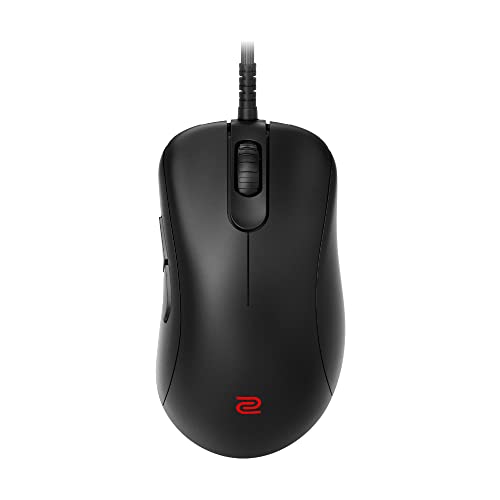
| BenQ ZOWIE EC2-C | True plug-and-play, medium hands | Driverless, Paracord Cable |
| BenQ ZOWIE EC3-C | True plug-and-play, smaller hands | Driverless series wording, small size |
| Logitech G502 HERO | Stored settings plus many buttons | On-Board Memory, 11 programmable buttons |
| Logitech G203 Lightsync | Simple wired mouse with stored settings | On-Board Memory, 6 programmable buttons |
| Logitech G305 Lightspeed | Wireless with stored settings | On-Board Memory, up to 250 hr battery |
How to Choose
Understand the two meanings of “no software”
A driverless mouse is designed to need nothing installed: you plug it in, and adjustment happens on the mouse itself through button combinations and switches. An on-board memory mouse is different — you typically set it up once, the settings are written to memory inside the mouse, and from then on it carries those settings to any computer without the app running. Both free you from day-to-day software, but only the first is software-free from the moment you open the box. Decide which definition matches what you actually want before choosing.
Check how settings are changed on the mouse itself
If there is no app in your daily routine, the physical controls matter. Look at what the listing states: a DPI button you can cycle, a scroll wheel with a stated step count, a polling or lift-off control underneath. ZOWIE’s EC-C listings, for example, state a 24-step scroll wheel and a paracord cable, pointing to a design where feel is fixed by hardware rather than tuned in a menu. A mouse with very few physical controls and no driverless claim will leave you dependent on software for changes you may want to make later.
Match the claim to the listing wording
Marketing language around software is slippery, so anchor on the exact words the listing uses. “Driverless” in a title is a design claim about how the mouse works. “On-Board Memory” in a title is a storage claim about where settings live — it does not promise that every feature can be changed without software. Listings that say nothing about either should not be assumed to do either. Every pick in this guide was chosen because its listing carries one of those two phrases; where the basis is weaker, the product section says so.
Wired simplicity versus wireless convenience
A wired driverless mouse is the simplest object in this guide: no battery, no receiver, no pairing, nothing to charge before a session. Wireless models add freedom of movement and a cleaner desk, but they add a battery routine, and the G305 below runs on a replaceable AA cell rather than recharging. If your reason for avoiding software is a dislike of maintenance generally, a wired pick removes the most upkeep. If the cable itself is the annoyance, the wireless on-board memory route keeps settings portable without an app running day to day.
The 5 Best Options
BenQ ZOWIE EC2-C

The EC2-C is the strongest answer to this search because its listing title says the quiet part out loud: “Driverless”. ZOWIE builds this line for players who plug in and play, with adjustment handled on the mouse rather than in an app. The listing also states a paracord cable, a 24-step scroll wheel and a lighter weight than the previous generation, in a medium-size ergonomic shell finished in matte black. There is no lighting system to configure and no button-remapping suite to install. For a shared PC, a tournament setup or a work laptop you cannot install software on, this is the cleanest route in the guide.
Specs
- “Driverless” stated in the listing title
- Ergonomic shape, medium size
- Paracord cable
- 24-step scroll wheel
- Lighter weight than the prior generation, as listed
- Matte black finish
- Wired connection
Best for: Players who want a genuinely driverless mouse for medium hands, with nothing to install on any machine.
Watch out for: The fixed, hardware-led design means deep customisation is limited by intention — what you see is what the mouse does.
BenQ ZOWIE EC3-C
The EC3-C is the small size of the same EC-C line, aimed at smaller hands or players who prefer a shorter shell they can move with the fingers. Its basis for this guide is the EC-C series’ driverless wording, which BenQ carries across the family; the listing information for this size also notes a paracord cable and reduced weight compared with the earlier generation. Treat it as the same plug-and-play philosophy in a more compact shape. Because the verification behind this particular listing is thinner than its bigger sibling’s, read the live product page and confirm the driverless wording and current availability before ordering.
Specs
- Small size of the ZOWIE EC-C line
- “Driverless” series wording, as listed for the family
- Paracord cable
- Reduced weight versus the prior generation, as listed
- Ergonomic shape for right-handed use
- Wired connection
Best for: Smaller hands that want the same driverless, plug-and-play approach as the EC2-C in a shorter shell.
Watch out for: Confirm the driverless wording and stock on the live listing before buying — the evidence for this size is weaker than for the EC2-C.
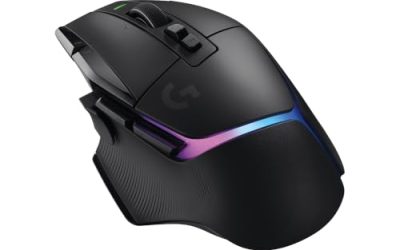
Logitech G502 HERO
The G502 HERO takes the second route in this guide. Its listing title states “On-Board Memory”, which means the settings you save are stored on the mouse itself and stay active when you move between computers, with no app needing to run in the background. Be plain about the limit: on-board memory is a storage feature, not a promise of full software-free customisation — the initial setup of its 11 programmable buttons is normally done in Logitech’s software once, after which the mouse carries the result. In return you get the dual-mode hyper-fast scroll wheel, the HERO 25K sensor and five included tuning weights in a wired shell.
Specs
- HERO 25K sensor, up to 25,600 DPI
- 11 programmable buttons
- “On-Board Memory” stated in the listing title
- Dual-mode hyper-fast scroll wheel
- Adjustable weight: five 3.6 g weights included
- Wired USB connection
- Listed for PC and Mac
Best for: Players who are happy to configure once, then want their button layout and settings to live on the mouse across machines.
Watch out for: On-board memory is not the same as driverless — expect one setup session in software before the mouse becomes self-contained.
Logitech G203 Lightsync

The G203 is the simplest wired option here, and its listing title also states “On-Board Memory”, so the profile you save is held by the mouse rather than by an app on one PC. The listing states 8,000 DPI, six programmable buttons and LIGHTSYNC RGB lighting, in a compact shell that suits smaller desks and laptop bags. As with the G502 above, the honest framing is configure-once-then-carry: the stored settings travel, but the mouse is not a driverless design in the ZOWIE sense. For a spare setup, a child’s PC or a laptop you game on occasionally, that trade is usually acceptable.
Specs
- 8,000 DPI sensor, as listed
- 6 programmable buttons
- “On-Board Memory” stated in the listing title
- LIGHTSYNC RGB lighting
- Wired USB connection
- Listed for PC and Mac, and as laptop compatible
Best for: A straightforward wired mouse for a second machine or laptop, where stored settings matter more than deep features.
Watch out for: The lighting and button setup still lean on an initial configuration step; it is not a zero-software design out of the box.
Logitech G305 Lightspeed

The G305 brings the on-board memory route to wireless. Its listing title states “On-Board Memory” alongside the HERO sensor at 12,000 DPI, six programmable buttons and up to 250 hours of battery life from a single AA battery. Settings saved to the mouse stay with it when you move between a desktop and a laptop, so no companion app needs to run day to day — with the same caveat as the other Logitech picks, that the initial configuration is a software task. It connects through its LIGHTSPEED USB receiver only; there is no Bluetooth, which matters for laptops with few ports.
Specs
- HERO sensor, 12,000 DPI
- 6 programmable buttons
- “On-Board Memory” stated in the listing title
- LIGHTSPEED wireless via USB receiver
- Up to 250 hours battery life, as listed
- Powered by one AA battery
- Listed as compatible with PC and Mac
Best for: Players who want wireless freedom and stored settings for moving between machines, without an app running permanently.
Watch out for: It runs on replaceable AA batteries rather than recharging, and the receiver-only connection means no Bluetooth option for port-limited laptops.
Which One Fits Your Situation
You cannot install software on the machine at all
School, work and shared household PCs often block installations, and that rules the Logitech route down to a one-time setup done elsewhere. The ZOWIE EC2-C or EC3-C is the direct answer: driverless by design, adjusted on the mouse, identical on every machine you plug into. Pick the EC2-C for medium hands and the EC3-C for smaller hands, and confirm the EC3-C’s live listing before ordering.
You game on two or more computers
If your settings need to follow you between a desktop and a laptop, on-board memory is the feature to buy. The G502 HERO stores a full 11-button layout for a fixed desk, the G203 covers a lighter wired setup, and the G305 does the same job wirelessly. Configure each once on your main machine; after that, the mouse itself carries your DPI and button choices wherever it goes.
You dislike background apps but still want custom buttons
That combination points to the Logitech picks rather than the ZOWIE pair. Driverless mice deliberately limit what can be changed, while the G502 HERO’s stored profile keeps a genuinely custom layout active with nothing running in the background. Accept the one-time setup session as the price. If even that is too much software contact, the EC2-C’s hardware-led design is the honest alternative, with fewer custom options.
You want the least maintenance overall
Count the chores each option leaves you. The wired ZOWIE models ask for nothing: no charging, no batteries, no receiver, no app. The wired Logitech pair removes battery care but keeps a one-time setup. The G305 removes the cable and the daily software, but adds AA battery swaps and a receiver to keep safe. For the fewest moving parts in your routine, a wired driverless mouse wins outright.
Common Mistakes
- Reading “on-board memory” as “no software ever” — it means settings are stored on the mouse, usually after one setup session.
- Assuming any mouse without a famous app is driverless; if the listing does not say so, do not count on it.
- Forgetting that a driverless design also limits remapping, macros and lighting control by intention.
- Buying a receiver-only wireless mouse for a laptop with no spare USB port and no hub.
- Skipping the live listing check on less common models, where stock and listing wording change between production runs.
Frequently Asked Questions
What does “driverless” actually mean on the ZOWIE mice?
It means the mouse is designed to work fully without installing a driver or companion app: you plug it in and adjust settings on the mouse itself. The EC2-C carries the word in its listing title, and the EC-C family wording extends it to the EC3-C. The trade-off is fixed functionality — there is no software layer adding macros or lighting effects later.
Is on-board memory the same as being software-free?
No. On-board memory means the mouse stores your settings internally, so they stay active on any computer without the app running. The Logitech listings in this guide state that feature in their titles. Setting those profiles up is normally done once in Logitech’s software. After that session, day-to-day use needs no software at all, which is the distinction worth understanding before you buy.
Can I change DPI without any software?
On the driverless ZOWIE models, yes — sensitivity adjustment is handled on the mouse itself, which is the point of the design. On the Logitech picks, you can cycle the DPI steps stored in the active profile using the mouse’s buttons. Defining new custom steps is part of that one-time setup. Check the listing for the model you choose to see exactly which controls are on the hardware.
Why are there so few truly software-free gaming mice?
Because most buyers want the opposite: deep remapping, macros, lighting scenes and per-game profiles, all of which live in software. Manufacturers build for that majority, so genuinely driverless designs come mainly from esports-focused brands like ZOWIE. The on-board memory middle route exists because players asked for settings that travel between PCs, not because the market is moving away from companion apps altogether.
Related guides
More from Amazon
Programs that pair well with the guide above. Offers and eligibility are set by Amazon and may change.
Free shipping on eligible items, Prime Video and more. Eligible new members can start with a free trial.
Start a Prime free trialAd-free music streaming. Eligible new subscribers can start with a free trial.
Try Music Unlimited freeA Prime membership for ages 18-24 with a trial period. Eligibility is set by Amazon.
See Prime for Young AdultsAudiobooks and podcasts to listen to on the go. Eligible new members can start with a free trial.
Try Audible freeAs an Amazon Associate we earn from qualifying purchases.