
Our Short List of 3

- Size: 27 inches
- Panel: Nano IPS, flat
- Resolution: 2560 x 1440
- Refresh rate: 165Hz, 180Hz overclock

- Size: 27 inches
- Panel: IPS, flat
- Resolution: 2560 x 1440
- Refresh rate: 165Hz, supports 144Hz
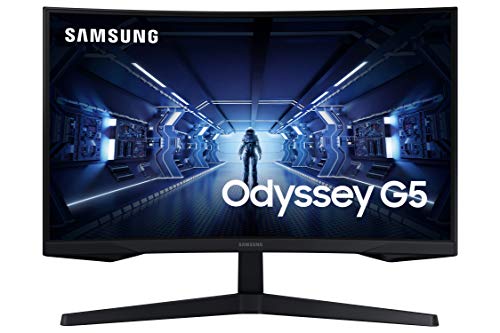
- Size: 27 inches
- Panel: VA, 1000R curved
- Resolution: 2560 x 1440
- Refresh rate: 144Hz
All 4 Picks at a Glance
| Product | Specs | Action |
|---|---|---|
| 1. LG UltraGear 27GP850-B: Best Overall for Mounting |
| Check price on Amazon |
| 2. ASUS TUF Gaming VG27AQ: Best for Full Ergonomic Arms |
| Check price on Amazon |
| 4. Samsung Odyssey G5 LC27G55T: Best Curved Pick for Mounting |
| Check price on Amazon |
 5. MSI MAG274QRFW: Best High-Refresh Value for Arms |
| Check price on Amazon |
Mounting a monitor changes a gaming desk more than almost any other upgrade. Lifting the panel off its stand frees the surface underneath for a keyboard, mouse, speakers, and controllers, removes the fixed height and depth that a factory stand imposes, and lets the screen float at exactly the eye level and distance that suits the player. For gaming and VR-adjacent setups on gamingpcvr.com readers’ desks, that flexibility matters even more, because a mounted screen can swing aside for room-scale play, tilt down for relaxed viewing, or line up edge to edge with a second panel for a wide, clean battlestation.
Not every monitor mounts well, though. Some panels hide their mounting holes under covers, some are too heavy for common desk arms, some place their ports where an arm blocks them, and some curved or bulky designs wobble on mounts that handle flat panels easily. This guide focuses only on monitors that suit VESA wall and desk-arm mounting in practice: clear VESA patterns, manageable size and weight for typical arms, thin bezels for multi-monitor arrays, and gaming performance that justifies the setup effort in the first place.
As an Amazon Associate, we earn from qualifying purchases.
Our Top Picks
- LG 27GP850-B Ultragear Gaming Monitor 27-Inch QHD14.4"x24.2"x2"11.5 x 24.2 x 22.7 inches13.9 poundsCheck on Amazon
Top 3 picks at a glance
How to Choose
Start with the VESA pattern
VESA is the standard bolt pattern on the back of the panel, measured in millimeters. The two patterns that dominate gaming monitors are 100 by 100 millimeters and 75 by 75 millimeters. A monitor and a mount must share the same pattern, or use an adapter plate rated for the panel weight. Before ordering any arm or wall mount, confirm the pattern in the monitor listing, check whether the holes are recessed, and keep the four mounting screws that many panels require close at hand. Recessed patterns, like those found on some Dell designs, can need longer screws or spacers so the arm plate sits flush instead of rocking against the rear housing.
Match panel weight to arm capacity
Every desk arm and wall mount carries a weight rating, and the figure that matters is the weight of the panel without its stand, since the stand stays in the box once the monitor is mounted. Most 27-inch gaming monitors fall comfortably within the range of a standard single arm, while larger and curved panels push closer to the limit. Staying well under the maximum rating keeps the arm from drifting downward during long sessions and makes tilt adjustment smooth rather than strained. Gas-spring arms handle heavier panels more gracefully, while simpler mechanical arms suit lighter 24-inch and 27-inch models.
Consider size, curve, and bezels
Size shapes the whole mounting plan. A 27-inch panel is the sweet spot for a single desk arm: large enough for immersive QHD gaming, light enough for easy adjustment, and wide enough that one screen covers work and play. Curved panels mount just as securely when the pattern matches, but the curve adds depth, so the arm needs clearance behind the desk and the panel sits farther forward than a flat screen on the same mount. Thin bezels matter most in pairs and triples. When two or three mounted panels meet at their edges, narrow borders keep the combined image looking continuous and reduce the total width of the array.
Plan ports and cables before mounting
Mounting hides the back of the monitor, which is exactly why port layout deserves attention in advance. Downward-facing ports are easiest to reach after mounting, while rear-facing ports need enough gap between panel and wall for cable bends. Connect power, DisplayPort, and HDMI cables before raising a wall-mounted panel, leave a gentle loop of slack for arm movement, and route cables along the arm itself where channels or clips allow. A monitor with a USB hub adds value on an arm, because peripherals can plug into the screen instead of trailing down to the PC every time the panel moves.
Decide between a desk arm and a wall mount
A desk arm clamps or bolts to the desk and offers height, reach, tilt, and swivel adjustment whenever the player wants it, which suits shared desks and evolving setups. A wall mount fixes the panel in place, frees the entire desk surface, and gives the cleanest look, but it demands a suitable wall, careful stud or anchor placement, and a final position chosen before drilling. Both routes use the same VESA holes, so a monitor chosen for one can move to the other later. The five monitors below all expose standard VESA patterns and keep their panel weight in the range that mainstream arms and wall mounts handle well.
1. LG UltraGear 27GP850-B: Best Overall for Mounting
- Size: 27 inches
- Panel: Nano IPS, flat
- Resolution: 2560 x 1440
- Refresh rate: 165Hz, 180Hz overclock
The LG UltraGear 27GP850-B earns the top spot because it pairs a fast Nano IPS gaming panel with the most common mounting pattern in the category and a three-sided virtually borderless design that was clearly shaped with mounted arrays in mind. On a single arm it floats cleanly with minimal rear bulk, and in pairs the thin borders let two panels meet with only a slim seam between them.
Performance holds up its side of the bargain. The 27-inch QHD panel runs at 165Hz with an overclock to 180Hz, responds in 1ms gray to gray, and carries DisplayHDR 400 with wide DCI-P3 color coverage. NVIDIA G-SYNC Compatible and AMD FreeSync Premium support cover variable refresh on both graphics card families, so a mounted setup built for one PC today still suits a different build later.
Who It Suits
This monitor suits gamers building a single-arm or dual-arm QHD setup who want the easiest mounting path: a standard 100 by 100 pattern, a flat and relatively slim rear housing, and bezels thin enough for multi-monitor work. Players who plan to wall mount a pair for a wide field of view will find the borderless three sides especially well judged.
2. ASUS TUF Gaming VG27AQ: Best for Full Ergonomic Arms
- Size: 27 inches
- Panel: IPS, flat
- Resolution: 2560 x 1440
- Refresh rate: 165Hz, supports 144Hz
The ASUS TUF Gaming VG27AQ is a long-running favorite for mounted gaming desks because its VESA mountable design, moderate size, and complete gaming feature set make it a safe match for almost any arm. Once the factory stand comes off, the flat IPS panel sits neatly on a 100 by 100 mount and leaves room behind the desk for cable routing and arm travel.
On screen, the VG27AQ delivers QHD resolution at up to 165Hz with a 1ms MPRT response, Extreme Low Motion Blur, and G-SYNC Compatible variable refresh. HDR10 support, built-in speakers, and Shadow Boost dark-area enhancement round out a package aimed at players who want one mounted screen to handle competitive titles, story games, and everyday desktop use without swapping hardware.
Who It Suits
This monitor suits players who adjust their screen position often and want a proven, mid-weight panel that will not strain a standard gas-spring or mechanical arm. It also suits mixed-use desks, where the built-in speakers reduce clutter under a mounted panel and the IPS viewing angles stay consistent when the arm swings the screen toward a second seat.
3. Dell S2721DGF: Best Color for a Mounted Setup
The Dell S2721DGF brings the strongest color credentials in this guide to a VESA-ready 27-inch panel. Its Fast IPS Nano Color screen covers 98 percent of DCI-P3 with 1.07 billion colors, so a wall-mounted or arm-mounted display can serve color-sensitive work in the day and fast gaming at night without compromise on either side.
Gaming speed matches the color. The QHD panel reaches 165Hz over DisplayPort and 144Hz over HDMI, with a 1ms gray-to-gray response in Extreme mode, FreeSync Premium Pro, and G-SYNC Compatible certification. The VESA pattern sits recessed in the rear housing, a detail worth knowing before mounting: spacers or the correct screw length may be needed so an arm plate seats properly. A four-port USB hub helps mounted setups by keeping desk peripherals connected through the screen.
Specs
- Size: 27 inches
- Panel: Fast IPS Nano Color, flat
- Resolution: 2560 x 1440
- Refresh rate: 165Hz over DisplayPort, 144Hz over HDMI
- Response time: 1ms GtG in Extreme mode
- Variable refresh: FreeSync Premium Pro, G-SYNC Compatible
- HDR: DisplayHDR 400
- Color gamut: 98 percent DCI-P3, 1.07 billion colors
- VESA mount: 100 x 100 mm, recessed
- Ports: DisplayPort 1.4, 2x HDMI 2.0, USB 3.0 hub
Who It Suits
This monitor suits creators and gamers sharing one mounted screen, especially in dual-panel arrays where consistent color and wide viewing angles matter from off-center seats. Buyers choosing it for an arm should add a spacer kit to the shopping list and confirm screw length, after which the recessed mount holds as securely as any flush design.
4. Samsung Odyssey G5 LC27G55T: Best Curved Pick for Mounting
- Size: 27 inches
- Panel: VA, 1000R curved
- Resolution: 2560 x 1440
- Refresh rate: 144Hz
The Samsung Odyssey G5 proves that a curved gaming monitor can mount just as willingly as a flat one, provided the buyer plans for the extra depth a 1000R curve brings. Its VESA pattern accepts standard arms and wall mounts, and once raised off its stand the sweeping curve wraps the game around the player in a way a wall-mounted flat panel cannot quite match.
The 27-inch VA panel curves aggressively at 1000R, runs QHD resolution at 144Hz, and responds in 1ms. FreeSync Premium keeps frame delivery smooth with AMD systems and compatible adaptive sync setups, while HDR10 support adds tone mapping for supported games and video. Because the curve pushes the panel edges forward, a desk arm needs enough reach and rear clearance, and a wall mount benefits from a tilting bracket that lets the screen angle down into the curve’s natural viewing position.
Who It Suits
This monitor suits gamers who want a single immersive curved screen on a wall mount or a sturdy arm and who mainly play solo, where the curve is viewed from its center. The 75 by 75 pattern is the one detail to verify against the chosen mount, since many arms ship with 100 by 100 plates first; an adapter or a dual-pattern plate solves it simply when planned in advance.
5. MSI MAG274QRFW: Best High-Refresh Value for Arms
- Size: 27 inches
- Panel: IPS-class flat panel, listed as VESA mountable
- Resolution: 2560 x 1440
- Refresh rate: 180Hz
The MSI MAG274QRFW closes the guide as a modern high-refresh option that lists VESA mountable design right in its core specification. At 27 inches with a flat panel, it keeps the balanced size and shape that desk arms handle best, while its 180Hz refresh rate gives competitive players the highest out-of-box speed here.
The QHD panel responds in 1ms, supports Adaptive Sync for tear-free play, and connects over HDMI and DisplayPort. Height and tilt adjustment on the included stand cover the period before an arm arrives, and the built-in speaker handles basic audio in a minimal mounted setup. In white, this model also suits lighter desk themes where a wall-mounted or arm-mounted panel becomes a visible part of the room rather than a black rectangle to hide.
Who It Suits
This monitor suits competitive players who want the fastest refresh in this guide on a clean desk arm, and builders putting together a bright, minimal setup where the panel stays on display. It also suits first-time mounters, because a flat 27-inch panel of this class pairs predictably with the widest range of arms and wall brackets.
FAQ
1. How do I know if a monitor can be mounted?
Check the product specification for a VESA mount pattern, expressed as two measurements such as 100 by 100 millimeters or 75 by 75 millimeters. That pattern is the grid of four screw holes on the back of the panel. If a listing states VESA mountable and names a pattern, the monitor fits arms and wall brackets with the matching plate. If no pattern is listed, the panel likely relies on its stand or a model-specific adapter, and it is a poor candidate for a standard mount.
2. Is a desk arm or a wall mount better for gaming?
A desk arm is better when position changes often, because height, reach, tilt, and swivel stay adjustable and the panel can swing aside for other activities such as room-scale VR. A wall mount is better when the seating position is fixed and clearing the entire desk surface matters most. Both use the same VESA holes, so the decision rests on flexibility versus permanence rather than on the monitor itself, and a panel can move from an arm to a wall bracket later without replacement.
3. Can a curved monitor go on a regular monitor arm?
Yes, as long as the VESA pattern matches and the arm is rated for the panel weight. The curve adds depth rather than width, so the setup needs more clearance behind and above the desk, and the panel center sits farther from the wall than a flat screen on the same mount. A tilting mount or an arm with a strong tilt joint helps angle a curved panel into its ideal viewing position, and checking the combined depth before drilling or clamping avoids surprises.
4. What else should be bought alongside a monitor for mounting?
The essentials are the arm or wall bracket itself with the correct VESA plate, the right mounting screws or spacers for recessed patterns, and cables long enough to reach the PC with slack for movement. Cable clips or a sleeve keep power and display leads tidy along the arm. For wall mounting, a stud finder and suitable anchors matter as much as the bracket, because the mount is only as secure as the wall fixing behind it.
Final Verdict
The best monitors for mounting are the ones that treat the VESA pattern as a headline feature rather than a footnote, and all five panels here do exactly that. The LG UltraGear 27GP850-B is the strongest all-round choice, combining a standard 100 by 100 mount, thin bezels for arrays, and fast Nano IPS performance in one panel. The ASUS TUF Gaming VG27AQ and Dell S2721DGF give arm users proven alternatives, the Dell standing out for color and the ASUS for all-round versatility and speakers. The Samsung Odyssey G5 is the pick for a curved wall or arm installation planned around its 75 by 75 pattern and extra depth, while the MSI MAG274QRFW delivers the highest refresh rate for competitive players mounting a flat 27-inch screen. Choose the pattern first, match the arm to the panel weight, plan the cables before lifting anything, and any of these monitors will turn a crowded desk into a cleaner, more adjustable gaming setup.
Product and ASIN Reference
| Product | ASIN |
|---|---|
| LG UltraGear 27GP850-B | B093MTSTKD |
| ASUS TUF Gaming VG27AQ | B07WQ4FXY9 |
| Dell S2721DGF | B08T1X513P |
| Samsung Odyssey G5 LC27G55TQWNXZA | B08FF3F5HR |
| MSI MAG274QRFW | B0CZ7J26B4 |
Related guides
More from Amazon
Programs that pair well with the guide above. Offers and eligibility are set by Amazon and may change.
Free shipping on eligible items, Prime Video and more. Eligible new members can start with a free trial.
Start a Prime free trialAd-free music streaming. Eligible new subscribers can start with a free trial.
Try Music Unlimited freeA Prime membership for ages 18-24 with a trial period. Eligibility is set by Amazon.
See Prime for Young AdultsAudiobooks and podcasts to listen to on the go. Eligible new members can start with a free trial.
Try Audible freeAs an Amazon Associate we earn from qualifying purchases.









