
Our Short List of 3
All 5 Picks at a Glance
| Product | Specs | Action |
|---|---|---|
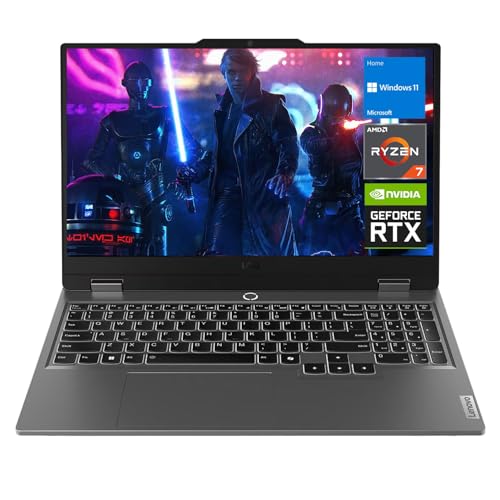 1. Lenovo LOQ 15 15ARP9 — The Most Memory Out of the Box | Check price on Amazon | |
 2. HP Victus 16 — The Biggest Screen in the Group | Check price on Amazon | |
 3. ASUS TUF Gaming A15 (2023) — The Toughest Build | Check price on Amazon | |
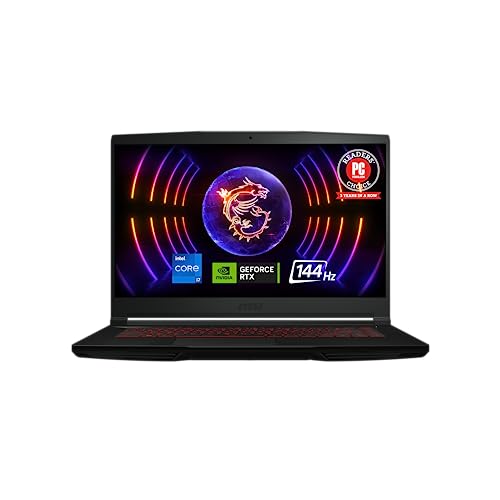 4. MSI Thin GF63 12VE-066US — The Lightest Chassis Here | Check price on Amazon | |
 5. Acer Nitro V 15 ANV15-51-51H9 — The Most Approachable Entry Point | Check price on Amazon |
A low key gaming laptop is a machine that keeps its gaming hardware quiet in every sense. The lid carries no glowing logo, the keyboard glows white instead of rainbow, and the chassis looks like any ordinary work laptop. Open it on a desk in a lecture hall, a meeting room, or a coffee shop and nobody gives it a second look, yet it still runs modern titles at smooth frame rates.
That combination matters to a lot of players. Not everyone wants a laptop that announces itself. Some play in shared spaces, some carry the same machine to class or to the office, and some simply prefer clean design over aggressive angles and light strips. Understated design no longer means weak hardware: several mainstream gaming laptops now ship with dedicated RTX graphics, fast high-refresh displays, and proper cooling inside plain black or grey shells.
This guide covers five low key gaming laptops that are genuinely subtle in design and genuinely capable in games. Every pick is a different model from a different brand, and each earns its place for a distinct reason: the most memory out of the box, the biggest screen in the group, the toughest build, the lightest chassis here, and the most approachable entry point.
Our Top Picks
Top 3 picks at a glance
What Makes a Gaming Laptop Low Key
Low key is a design judgment, not a specification on a data sheet. Before choosing the five picks below, every candidate was judged against the same four design checks, and a laptop had to pass all four to make the list.
First, the lid. A low key laptop has a plain lid with a small, unlit logo or no logo at all. Big glowing emblems, angular cutouts, and glossy gaming badges fail this check immediately.
Second, the keyboard lighting. A single white backlight is the low key standard. Multi-zone rainbow lighting that cycles through colors is the clearest sign of a gaming machine, and the hardest to hide in a dark room. Every pick in this guide uses a plain white backlight.
Third, the chassis shape. Low key laptops use straight edges, flat panels, and muted colors: black, grey, or silver. Sharp fins, raised vents that look like spoilers, and translucent panels all push a machine out of the low key category.
Fourth, the proportions. A low key laptop should not look out of place next to ordinary laptops. A normal 15 or 16-inch body in a plain finish is exactly right: the point is that the machine blends in, not that it disappears.
These four checks explain why some famous gaming laptops are absent from this guide. Machines with glowing logos, rainbow keyboards, and angular light bars can be excellent gaming laptops, and several of them appear in other guides on this site. They are simply not low key. The five picks below pass the design checks while still carrying dedicated RTX graphics and fast displays.
The 5 Best Low Key Gaming Laptops at a Glance
| Laptop | Graphics | Memory and Storage | Display |
|---|---|---|---|
| Lenovo LOQ 15 15ARP9 | RTX 4060 | 32GB DDR5, 1TB SSD | 15.6-inch FHD, 144Hz |
| HP Victus 16 | RTX 4060 | 32GB DDR5, 1TB SSD | 16.1-inch FHD, 144Hz |
| ASUS TUF Gaming A15 (2023) | RTX 4060 | 16GB DDR5, 1TB SSD | 15.6-inch FHD, 144Hz |
| MSI Thin GF63 12VE-066US | RTX 4050 | 16GB DDR4, 512GB SSD | 15.6-inch FHD, 144Hz |
| Acer Nitro V 15 ANV15-51-51H9 | RTX 4050 | 8GB DDR5, 512GB SSD | 15.6-inch FHD, 144Hz |
1. Lenovo LOQ 15 15ARP9 — The Most Memory Out of the Box
The Lenovo LOQ 15 is the quietest-looking machine in this guide and the most generous on memory. Its Luna Grey chassis is plain from every angle: a flat lid with a small Lenovo mark, straight edges, and a white backlit keyboard. Nothing about it says gaming laptop until you open a game.
The configuration listed here pairs an AMD Ryzen 7 7435HS processor with an NVIDIA GeForce RTX 4060 laptop graphics card carrying 8GB of GDDR6 memory. That is the strongest graphics tier in this guide, and the RTX 4060 is the card to aim for when you want comfortable 1080p play in modern titles with room to spare. The eight-core Ryzen processor keeps up in games that lean on the CPU, and it handles streaming and background apps without stumbling.
What sets this LOQ 15 apart is the memory. The listing ships with 32GB of DDR5 memory and a 1TB SSD, double the memory of most machines in this guide. That much memory matters when you keep a browser with many tabs open beside a game, or when you edit video and play on the same machine.
The display is a 15.6-inch Full HD IPS panel running at 144Hz with G-Sync support. Ports are generous for a plain-looking laptop: three USB-A ports, a USB-C port with power delivery and DisplayPort, HDMI 2.1, Ethernet, and a headphone and microphone combo jack.
The LOQ 15 is the best low key gaming laptop for most buyers. It hides its gaming hardware better than anything else here, it carries the strongest graphics in the group, and it ships with the most memory. Check the listing carefully before ordering: match the Ryzen 7 7435HS processor, the RTX 4060 graphics, and the 32GB memory and 1TB storage configuration to the ASIN below, because Lenovo sells look-alike LOQ 15 configurations with different graphics and memory.
Lenovo LOQ 15 15ARP9: B0FG3GDG64
2. HP Victus 16 — The Biggest Screen in the Group
The HP Victus 16 is the understated all-rounder of this guide. Its mica silver and black chassis is clean and professional, with a plain lid and a restrained keyboard. The Victus line is HP’s quiet alternative to its flashier OMEN machines: full gaming hardware in a shell that looks like a standard HP laptop.
The configuration listed here runs an Intel Core i7-14700HX processor with twenty cores and boost speeds up to 5.5 GHz, paired with an NVIDIA GeForce RTX 4060 laptop graphics card with 8GB of GDDR6 memory. That processor is the most powerful CPU in this guide, and it shows in games that depend on the processor as much as the graphics card.
The Victus 16 is the only laptop in this guide with a 16.1-inch display, and the extra screen space is a genuine advantage. The 16.1-inch Full HD IPS panel runs at 144Hz, so motion stays smooth in fast games. The listing ships with 32GB of DDR5 memory and a 1TB PCIe SSD, matching the LOQ 15 for memory and storage.
Connectivity covers the essentials: three USB-A ports, a USB-C port, HDMI, Ethernet, and a headphone and microphone combo jack, plus Wi-Fi 6 and Bluetooth. The keyboard is backlit and includes a numeric keypad. The listing also includes a 512GB external SSD in the bundle, a handy place to keep a second game library or backups.
Choose the Victus 16 when screen size matters most to you, or when you want the strongest processor in this guide inside the plainest large chassis here. It is the best low key gaming laptop for players who want the biggest view without the flashy design that usually comes with a 16-inch gaming machine.
HP Victus 16: B0DBJ28HTK
3. ASUS TUF Gaming A15 (2023) — The Toughest Build
The ASUS TUF Gaming A15 is the rugged member of this group. The TUF line is built to a military-grade durability standard, and this model carries that toughness in a plain dark chassis with a subtle design and a white backlit keyboard. The 2023 FA507NV configuration keeps the lid clean and the lighting simple, so it reads as a sturdy work laptop rather than a gaming machine.
Inside, the A15 pairs an AMD Ryzen 7 7735HS processor with an NVIDIA GeForce RTX 4060 laptop graphics card carrying 8GB of GDDR6 memory, running at up to 140W with Dynamic Boost in this family. That full-power graphics configuration is what makes the A15 a serious gaming laptop rather than a tough-looking pretender. The eight-core Ryzen processor boosts up to 4.7 GHz, and the combination handles modern games at 1080p high settings without strain.
The display is a 15.6-inch Full HD IPS-level panel running at 144Hz with 100 percent sRGB color coverage and G-Sync, one of the better-looking screens in this guide for both games and photo work. The listing ships with 16GB of DDR5 memory and a 1TB PCIe SSD, and both can be upgraded later.
Ports are a strong point: HDMI 2.1, two USB-A ports, a USB-C port with DisplayPort and power delivery, a USB4 Type-C port, Ethernet, and a headphone and microphone combo jack. The 90Wh battery is the largest in this guide.
The A15 is the pick for players who carry their laptop everywhere and want it to survive the trip. Its durability standard, full-power graphics, and large battery make it the best low key gaming laptop for travel and daily carrying. Match the model code FA507NV-EH74 and the RTX 4060 graphics to the ASIN below before ordering.
ASUS TUF Gaming A15 (2023) FA507NV-EH74: B0CJSY4PLN
4. MSI Thin GF63 12VE-066US — The Lightest Chassis Here
The MSI Thin GF63 is the lightest laptop in this guide and the most portable low key gaming machine here. It weighs under 2kg, and its black chassis is plain and unadorned. The lid carries a small MSI mark, and the keyboard uses a simple red-tinted backlight on this configuration.
The configuration listed here runs a 12th generation Intel Core i7-12650H processor with an NVIDIA GeForce RTX 4050 laptop graphics card carrying 6GB of GDDR6 memory. The RTX 4050 is a step below the RTX 4060 in the three picks above, and it suits players who mainly play competitive and popular titles at 1080p.
The listing ships with 16GB of DDR4 memory and a 512GB NVMe SSD, enough for a solid game library and smooth multitasking. The 15.6-inch Full HD display runs at 144Hz, matching the rest of the group for smoothness.
The Thin GF63 is the best low key gaming laptop for players who carry their machine every day. Its light weight is the difference between a laptop you bring everywhere and one you leave at home, and its plain black design draws no attention in a lecture hall or an office.
One note on the backlight: this configuration uses a red backlight rather than white, the one design detail that hints at gaming. It is a single color, not a rainbow cycle, and it can be dimmed or turned off. If a strictly white backlight matters to you, the LOQ 15 or the Victus 16 is the safer choice.
MSI Thin GF63 12VE-066US: B0BT3CD75G
5. Acer Nitro V 15 ANV15-51-51H9 — The Most Approachable Entry Point
The Acer Nitro V 15 is the most approachable low key gaming laptop in this guide. Its black chassis is plain and restrained, with a simple Nitro mark on the lid and a white backlit keyboard. Acer’s Nitro V line is the company’s quiet gaming range, for players who want dedicated graphics without the aggressive styling of the flagship Nitro models.
The configuration listed here runs an Intel Core i5-13420H processor with an NVIDIA GeForce RTX 4050 laptop graphics card carrying 6GB of GDDR6 memory. That combination handles popular competitive titles and modern games at 1080p with ease, and the 144Hz Full HD IPS display keeps motion smooth. The ten-core i5 processor boosts up to 4.6 GHz, which is plenty for gaming alongside everyday work.
The listing ships with 8GB of DDR5 memory and a 512GB Gen 4 SSD. That is the leanest memory configuration in this guide, and the one real compromise on this machine. The Nitro V 15 has two DDR5 slots with room for up to 32GB, so adding a second memory module later is a simple upgrade and the most worthwhile one for this laptop. The laptop has two M.2 slots for a second drive.
Choose the Nitro V 15 when you want the most affordable way into a genuinely low key gaming laptop, or when you are buying a first gaming laptop and would rather spend less now and upgrade the memory later. It is the best low key gaming laptop for first-time buyers.
Acer Nitro V 15 ANV15-51-51H9: B0CP8D4SM2
How to Choose a Low Key Gaming Laptop
Low key design is the first filter, but it is not the only one. Once a laptop passes the design checks, the same practical questions apply as with any gaming laptop.
Graphics first. The RTX 4060 in the LOQ 15, Victus 16, and TUF A15 is the stronger graphics tier in this guide and the right choice when you play modern AAA titles and want headroom for the next few years. The RTX 4050 in the Thin GF63 and Nitro V 15 suits players who mainly play competitive and popular titles at 1080p. Either way, check the exact graphics card on the listing before ordering, because every brand in this guide sells look-alike configurations with different graphics.
Memory second. 16GB is the practical minimum for a gaming laptop in 2026, and 32GB is better when you multitask heavily. The LOQ 15 and Victus 16 ship with 32GB, the TUF A15 and Thin GF63 ship with 16GB, and the Nitro V 15 ships with 8GB and benefits from a memory upgrade soon after purchase. Memory is the easiest upgrade on all five machines.
Display third. Every pick in this guide uses a 144Hz Full HD IPS display, which is the sweet spot for low key gaming laptops: smooth enough for fast games, sharp enough for work, and efficient enough to keep battery life reasonable. Higher refresh rates and higher resolutions usually come with flashier designs and shorter battery life.
Cooling and noise fourth. A low key laptop should also be quiet. The TUF A15 and the LOQ 15 have the most substantial cooling in this group, which helps them stay quiet under load. The Thin GF63 is the lightest machine here and runs warmer under sustained load, the normal trade-off for a light chassis. Keep the vents clear and the laptop on a hard surface during long sessions.
Battery and weight fifth. None of these laptops is an all-day ultrabook. The TUF A15 has the largest battery in the group at 90Wh, and the Thin GF63 is the lightest at under 2kg. If you carry the laptop daily, weight matters more than battery. If you work away from an outlet, battery matters more than weight.
Frequently Asked Questions
Are low key gaming laptops weaker than flashy gaming laptops?
Not necessarily. The RTX 4060 machines in this guide match the graphics in many flashier laptops, and the difference between a low key laptop and a flashy one is design, not hardware. Flashy laptops sometimes carry stronger graphics at the top end, but at the RTX 4050 and RTX 4060 tiers, low key machines are equally capable.
Can I use a low key gaming laptop for work or school?
Yes, and that is the main reason to buy one. A plain chassis, a white backlight, and a quiet fan profile suit classrooms, offices, and shared spaces where a glowing gaming laptop would stand out.
Is 8GB of memory enough for gaming?
8GB is enough to begin with, and the Nitro V 15 in this guide ships with 8GB. Adding a second memory module is the most worthwhile upgrade for that machine. If you multitask heavily, choose one of the 16GB or 32GB picks instead.
Do low key gaming laptops have upgradeable memory and storage?
All five picks in this guide have upgradeable memory and storage. The LOQ 15 has two memory slots and two M.2 slots, the Nitro V 15 has two DDR5 slots and two M.2 slots, and the other three machines have similar upgrade paths.
Which low key gaming laptop is best for travel?
The MSI Thin GF63 is the lightest machine in this guide at under 2kg, which makes it the easiest to carry. The ASUS TUF Gaming A15 is the toughest and has the largest battery, which makes it the best choice for rough travel.
Verdict
The best low key gaming laptop for most buyers is the Lenovo LOQ 15 15ARP9. It hides its gaming hardware better than anything else in this guide, it carries RTX 4060 graphics, and it ships with 32GB of memory and a 1TB SSD. It is the machine that most completely delivers on the low key idea: a plain grey laptop that plays modern games without announcing itself.
The HP Victus 16 is the pick when you want the biggest screen and the strongest processor, and the ASUS TUF Gaming A15 is the pick when toughness and battery life matter most. The MSI Thin GF63 is the pick for daily carrying, and the Acer Nitro V 15 is the pick for first-time buyers who want the most approachable entry point.
Whichever you choose, the rule is the same: match the exact model code and configuration to the ASIN on the listing before ordering. Brands sell look-alike configurations with different graphics and memory.
Disclosure: As an Amazon Associate, we earn from qualifying purchases.
Related guides
More from Amazon
Programs that pair well with the guide above. Offers and eligibility are set by Amazon and may change.
Free shipping on eligible items, Prime Video and more. Eligible new members can start with a free trial.
Start a Prime free trialAd-free music streaming. Eligible new subscribers can start with a free trial.
Try Music Unlimited freeA Prime membership for ages 18-24 with a trial period. Eligibility is set by Amazon.
See Prime for Young AdultsAudiobooks and podcasts to listen to on the go. Eligible new members can start with a free trial.
Try Audible freeAs an Amazon Associate we earn from qualifying purchases.









