
Our Short List of 3

- Best for: Competitive players who want the fastest panel response in this tier.
- 24-inch class screen, 23.8-inch viewable, Full HD 1080p
- Fast IPS panel
- 180Hz refresh rate
- 1ms response time
- Best for: Players who want one screen shared between a gaming PC and a console.
- 23.8-inch Full HD 1920 x 1080 screen
- VA panel
- 165Hz refresh rate
- 1ms VRB response time

- Best for: First gaming setups that need proper height adjustment included.
- 24-inch frameless Full HD 1920 x 1080 screen
- VA panel
- 165Hz refresh rate
- 1ms response time
All 4 Picks at a Glance
| Product | Specs | Action |
|---|---|---|
| ASUS TUF Gaming VG249QL3A |
| Check price on Amazon |
| Acer Nitro KG241Y Sbiip |
| Check price on Amazon |
| AOC Gaming 24G2S |
| Check price on Amazon |
 Samsung Odyssey G3 G30D |
| Check price on Amazon |
Shopping for a gaming monitor in this tier comes down to a few clear trade-offs rather than a long feature list. Every serious option here is a 24-inch 1080p screen, so the real decision is panel type, refresh rate and stand design: a Fast IPS panel answers movement quickly and holds its colors from an angle, while a VA panel trades some of that speed for deeper contrast in dark scenes. Refresh rates split between 165Hz and 180Hz, and sync support decides whether fast action stays smooth when frame rates dip.
This guide is for PC players building a first gaming setup, competitive players who want high refresh rates without overspending, and anyone replacing an older 60Hz office screen. The four picks below were chosen from their listed panel, refresh and sync specifications, and each one suits a slightly different desk and play style.
Our Top Picks
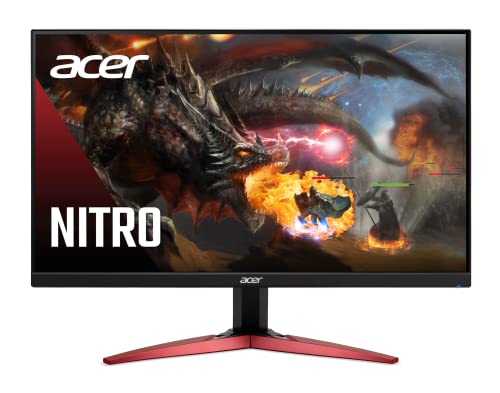
- Acer Nitro 23.8in FHD 1920x1080 180Hz Gaming Monitor23.8-inch21.27 x 7.44 x 16.3 inches8.4 poundsCheck on Amazon
Top 3 picks at a glance
Quick Picks
As an Amazon Associate we earn from qualifying purchases
| Product | Best for | Key spec |
|---|---|---|
| ASUS TUF Gaming VG249QL3A | Fast competitive play | 180Hz Fast IPS panel |
| Acer Nitro KG241Y Sbiip | Everyday 1080p gaming | 165Hz VA panel |
| AOC Gaming 24G2S | Adjustable desk setups | 165Hz with height adjustment |
| Samsung Odyssey G3 G30D | Long sessions, dark scenes | 180Hz with Eye Saver Mode |
How to Choose
Panel type: IPS or VA
Panel type shapes everything else about how a monitor feels in play. Fast IPS panels respond quickly and keep colors accurate when you view the screen slightly off center, which suits fast shooters and shared desks. VA panels deliver stronger contrast, so dark scenes in story games look deeper and shadow detail stands out more. The trade-off is that VA pixels can change brightness more slowly, which may soften very fast motion. Pick IPS for speed and viewing angles, VA for contrast, and check the listed panel type before anything else.
Refresh rate and response time
Refresh rate is how many times per second the screen redraws, and at this tier the choice is 165Hz or 180Hz. Both are a large step up from a 60Hz office monitor, and either one makes tracking moving targets noticeably easier in fast games. The listed 1ms response figures are measured under maker test modes, so treat them as a rough guide rather than a guarantee. What matters most is pairing a high refresh rate with a graphics card that can feed it; a strong panel fed by weak hardware still shows low frame rates.
Adaptive sync support
Adaptive sync lets the monitor match its refresh rate to the frame rate your graphics card is producing, which removes screen tearing and reduces stutter when the action gets busy. FreeSync Premium appears on several picks here, the ASUS adds G-SYNC Compatible support, and the AOC lists Adaptive-Sync, so there is an option for both AMD and NVIDIA cards. Check which sync standard your graphics card uses before you buy, because the benefit only appears when the card and monitor speak the same language over the connection you plan to use.
Stand, ports and everyday extras
A height adjustable stand matters more than it first seems, because screen height decides your posture across long sessions and a fixed stand can leave you looking down at the panel. Check the port list against your setup as well: the Acer lists one DisplayPort and two HDMI inputs, which suits a PC plus a console on one desk, while the ASUS lists DisplayPort and built-in speakers for a tidier setup. Small extras such as eye comfort modes and on-screen aim helpers are worth having, but they should never outweigh panel, refresh rate and sync.
The 4 Best Options
ASUS TUF Gaming VG249QL3A
- Best for: Competitive players who want the fastest panel response in this tier.
- 24-inch class screen, 23.8-inch viewable, Full HD 1080p
- Fast IPS panel
- 180Hz refresh rate
- 1ms response time
Competitive players who want the fastest panel response in this tier.
The built-in speakers are fine for casual use, but a headset still sounds far better.
The VG249QL3A is the speed pick of this group, built around a Fast IPS panel running at 180Hz with a 1ms response time and ELMB motion blur reduction for cleaner movement in fast games. It carries both FreeSync Premium and G-SYNC Compatible support, so it pairs smoothly with AMD and NVIDIA graphics cards, and the height adjustable stand makes it easy to set a comfortable viewing position. Built-in speakers keep a small desk tidy for casual play and video, and the 3-year warranty is longer cover than most screens at this level offer.
Acer Nitro KG241Y Sbiip
- Best for: Players who want one screen shared between a gaming PC and a console.
- 23.8-inch Full HD 1920 x 1080 screen
- VA panel
- 165Hz refresh rate
- 1ms VRB response time
Players who want one screen shared between a gaming PC and a console.
The VA panel narrows at wide viewing angles compared with IPS screens.
The KG241Y Sbiip is a well-rounded everyday gaming screen with a 23.8-inch VA panel running at 165Hz and a 1ms VRB response time. AMD FreeSync Premium keeps motion smooth when frame rates fluctuate, and the ZeroFrame design keeps the bezels slim for a clean desk or a future multi-monitor setup. Its connection list is the most flexible here, with one DisplayPort 1.2 and two HDMI 2.0 ports, so a PC and a console can share the screen without swapping cables. Color coverage is listed at 72 percent NTSC, adequate for gaming and everyday viewing.
AOC Gaming 24G2S
- Best for: First gaming setups that need proper height adjustment included.
- 24-inch frameless Full HD 1920 x 1080 screen
- VA panel
- 165Hz refresh rate
- 1ms response time
First gaming setups that need proper height adjustment included.
The specification list is brief, so fine details beyond the headline features are not stated.
The 24G2S keeps the formula simple: a 24-inch frameless VA panel at 165Hz with a 1ms response time and Adaptive-Sync to keep fast games free of tearing. Its standout feature at this level is the height adjustable stand, which many screens in the tier skip, so you can raise the panel to a posture-friendly height instead of stacking it on books or a box. The frameless design also makes it a tidy candidate for a dual-screen desk later. It covers the gaming essentials without extras you may never use, which is exactly what many first setups need.
Samsung Odyssey G3 G30D
- Best for: Players who game for long stretches and play titles with dark scenes.
- 24-inch Full HD screen
- 180Hz refresh rate
- 1ms MPRT response time
- AMD FreeSync
Players who game for long stretches and play titles with dark scenes.
The 1ms figure is an MPRT rating, so judge motion clarity by the refresh rate too.
The Odyssey G3 G30D is the pick for players who sit down for long sessions, pairing a 24-inch Full HD panel at 180Hz with Eye Saver Mode and a flicker-free screen that aim to keep viewing comfortable over hours. AMD FreeSync handles tearing, Black Equalizer lifts detail in dark scenes so opponents hiding in shadow are easier to spot, and the Virtual Aim Point adds an on-screen crosshair helper. The stand is adjustable, which helps you dial in height for those longer sessions. Its 1ms figure is an MPRT rating, worth knowing when you compare it against the other picks here.
Which One Fits Your Situation
You play fast competitive shooters
Frame clarity matters more to you than contrast, so the ASUS with its Fast IPS panel, 180Hz rate and ELMB is the natural fit. Its dual sync support also means it keeps working smoothly if you change graphics card brands later, and the height adjustable stand helps you set an aggressive, close playing position that stays comfortable through a full evening of matches.
You share one desk between PC and console
You need inputs more than anything, so look first at the Acer and its two HDMI ports plus DisplayPort. One screen can serve the gaming PC at your desk and a console beside it, and the 165Hz VA panel still delivers smooth, high-contrast play for both. The slim ZeroFrame bezels keep the shared setup looking clean rather than crowded.
You are setting up your first gaming desk
Start with the basics done right: a 165Hz panel, sync support and a stand that adjusts to your chair and desk height. The AOC covers all three without extras competing for your attention, and its frameless design leaves room to add a second screen later. Set the height so your eyes meet the upper third of the panel and you are ready to play.
You play long sessions after dark
Comfort features earn their place here, so the Samsung with Eye Saver Mode and a flicker-free screen suits you best. Black Equalizer helps in the dark scenes that fill evening gaming, and the adjustable stand lets you settle in properly. Take short breaks anyway, because no screen feature replaces rest for your eyes during a marathon session.
Common Mistakes
- Buying on refresh rate alone and ignoring panel type, when IPS and VA behave very differently in motion and contrast.
- Forgetting to set the higher refresh rate in your operating system display settings after connecting the monitor.
- Mismatching sync standards, such as expecting a FreeSync screen to smooth out a card that cannot use it over your chosen cable.
- Using an old HDMI cable that cannot carry the full refresh rate the panel supports.
- Skipping stand adjustment and then compensating with poor posture for months.
Frequently Asked Questions
Is 1080p still a sensible resolution for gaming?
Yes, especially at 24 inches, where Full HD still looks sharp at a normal desk distance. It is also far easier for a mid-range graphics card to drive at 165Hz or 180Hz than a higher resolution would be, which means you actually reach the frame rates these panels are built for instead of leaving their speed unused.
Can I feel the difference between 165Hz and 180Hz?
The difference is small, and most players would struggle to separate the two in a blind test. Both are a major step up from 60Hz. Panel type, sync support and stand design usually matter more to your day-to-day experience than the gap between these two rates, so choose on the whole package rather than the headline number alone.
Which panel type is better for gaming, IPS or VA?
Neither wins everywhere. IPS panels respond faster and hold color at an angle, which suits competitive play and shared viewing. VA panels give deeper contrast, which suits story games and dark scenes. In this guide the ASUS uses Fast IPS while the Acer, AOC and Samsung use VA, so pick by the games you play most rather than by a general ranking.
Do I need a special cable to use the full refresh rate?
Usually, yes. DisplayPort is the safest choice for reaching 165Hz or 180Hz at 1080p, and older HDMI cables may limit the rate even when the port itself supports more. Use the cable supplied with the monitor where one is included, and confirm the active refresh rate in your display settings after setup.
Related guides
More from Amazon
Programs that pair well with the guide above. Offers and eligibility are set by Amazon and may change.
Free shipping on eligible items, Prime Video and more. Eligible new members can start with a free trial.
Start a Prime free trialAd-free music streaming. Eligible new subscribers can start with a free trial.
Try Music Unlimited freeA Prime membership for ages 18-24 with a trial period. Eligibility is set by Amazon.
See Prime for Young AdultsAudiobooks and podcasts to listen to on the go. Eligible new members can start with a free trial.
Try Audible freeAs an Amazon Associate we earn from qualifying purchases.









