The best laptop backpacks for travel are the Aer City Pack Pro 2 for organized carry-on travel, the Bellroy Transit Workpack for a lighter office-to-airport bag, and the Osprey Nebula 32 for maximum comfort and daily capacity.
As an Amazon Associate we earn from qualifying purchases at no extra cost to you.


Our Top Picks
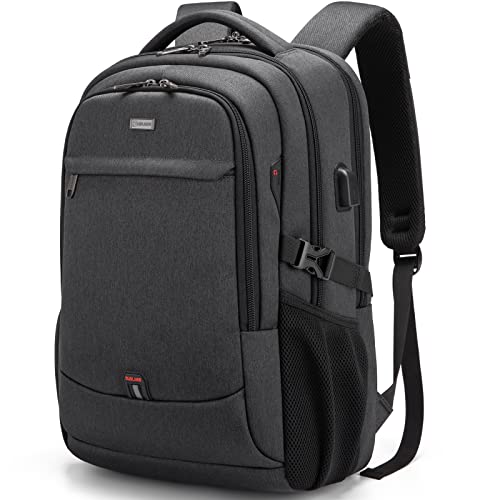 DUSLANG 17 inch Travel Laptop Backpack for Men/Women17 Inch6 x 12 x 19 inches1.7 poundsCheck on Amazon


Top 3 picks at a glance
Quick comparison
| Backpack | Capacity | Laptop fit | Best use | Typical market range |
|---|---|---|---|---|
| Aer City Pack Pro 2 | About 24 L | Up to roughly 16 inches, depending on thickness | Structured carry-on organization | Usually $200–$300 |
| Bellroy Transit Workpack | About 20 L | Up to 16 inches on current versions | Light daily travel and commuting | Usually $180–$260 |
| Osprey Nebula 32 | 32 L | Up to about 16 inches | Comfortable, high-volume travel | Usually $140–$220 |
| Timbuk2 Authority Deluxe | About 28 L | Up to about 17 inches on compatible versions | Large laptop and work equipment | Usually $180–$250 |
| Peak Design Everyday Backpack Zip 20L | 20 L | Up to about 15 inches, with model-specific limits | Compact, camera-friendly carry | Usually $180–$240 |
Capacity figures and laptop limits can vary by generation, so check the manufacturer’s current measurements before ordering. Laptop size alone is not enough: a thick gaming laptop may not fit a sleeve designed around a thin 16-inch notebook.
Best overall for organized carry-on travel: Aer City Pack Pro 2
The Aer City Pack Pro 2 is the strongest all-round choice when you want a backpack that behaves like a compact travel briefcase. Its separate laptop compartment, structured opening, wide main compartment, front organization, and luggage pass-through make it easy to divide electronics from clothing and airport essentials.
The laptop sleeve is best suited to thin and medium-thickness 14- to 16-inch laptops. Measure the computer rather than relying on the diagonal screen size: a 16-inch gaming laptop with a large power brick may fit the sleeve but leave too little room for the charger in the adjacent pocket.
Why it works for flights
- The clamshell-style opening exposes the main compartment without forcing you to unpack everything.
- A separate laptop section lets you remove the computer quickly at security.
- The relatively firm structure prevents the bag from collapsing onto fragile accessories.
- The luggage pass-through reduces shoulder strain when the backpack rides on a rolling suitcase.
The trade-off is weight and rigidity. The bag is more protective and organized than a soft daypack, but it can feel bulky when nearly empty. Choose it if your daily load includes a laptop, charger, headphones, mouse, documents, and a change of clothes.
Best lightweight work-and-travel option: Bellroy Transit Workpack
The Bellroy Transit Workpack is a better fit for travelers who want a refined bag that remains comfortable and relatively compact during everyday commuting. It offers a dedicated laptop compartment, a main clothing compartment, and smaller pockets for cables and personal items without the heavily structured feel of a technical travel pack.
Its approximately 20-liter capacity is enough for a laptop, tablet, charger, water bottle, headphones, notebook, and a light layer. It becomes restrictive when you add shoes, a camera, or several days of clothing. That smaller capacity is useful, however, because it discourages overpacking and is easier to manage under an airline seat.
Check these fit details
- Measure laptop height, width, and thickness, including a protective shell.
- Check whether the charger must share the laptop compartment or can fit in the main section.
- Test the shoulder-strap adjustment with the bag loaded; a slim bag can still pull backward if the laptop sits far from your back.
This is the choice for a traveler who usually carries one computer and personal essentials rather than a complete mobile workstation.
Best for comfort and maximum capacity: Osprey Nebula 32
The Osprey Nebula 32 is the comfort-first choice for people who carry heavier loads over longer distances. Its ventilated back panel, padded shoulder straps, sternum strap, and more outdoors-oriented suspension spread weight better than many urban laptop bags.
The 32-liter capacity gives you room for a large laptop, accessories, clothing, lunch, and a jacket. It is also more forgiving if you need to carry bulky items such as a portable monitor or a compact camera cube. The compromise is a less formal appearance and a larger footprint. When filled completely, it can become too deep for convenient under-seat storage and may need to go in the overhead bin.
Who should choose it?
- Choose it for walking-heavy trips, public-transit commutes, or heavy daily loads.
- Choose it if shoulder comfort matters more than a minimalist silhouette.
- Skip it if you need a compact personal item for every flight or a polished business appearance.
The Nebula’s laptop protection is suitable for normal travel, but a separate padded sleeve is sensible if the computer will share the main compartment with hard objects.
Best for a large laptop and work equipment: Timbuk2 Authority Deluxe
The Timbuk2 Authority Deluxe is aimed at travelers whose computer setup is larger than a typical ultrabook load. Its tall, boxy design provides useful space for a large laptop, charger, documents, headphones, and work accessories while retaining a dedicated electronics section.
It is particularly practical for users carrying a 15- or 16-inch laptop with a substantial power adapter. Some versions support laptops approaching 17 inches, but compatibility depends on the exact computer dimensions. Measure the sleeve opening and depth, not just the advertised screen size.
The main drawback is that the tall profile can feel less balanced when only the laptop compartment is full. Place dense items low and close to your back, and use the sternum strap if available. This reduces the backward pull that causes shoulder straps to dig in.
Best for compact camera and laptop carry: Peak Design Everyday Backpack Zip 20L
The Peak Design Everyday Backpack Zip 20L suits travelers who carry a laptop alongside a camera, lenses, or delicate electronics. Its configurable internal dividers allow the main space to be divided into protective sections instead of one large cavity.
That flexibility is useful, but the 20-liter capacity is limited for clothing-heavy travel. It is better for a one-day business trip, camera commute, or minimalist overnight trip than for a full weekend of gear. Pay close attention to the laptop-size limit because the compact version is not the safest choice for thick 16-inch or 17-inch gaming laptops.
How to choose the right laptop backpack
1. Start with the laptop’s actual measurements
Measure the computer in millimeters or inches with its case attached. Compare those numbers with the sleeve’s usable height, width, and thickness. Leave a little clearance for inserting and removing the laptop; a sleeve that matches the dimensions exactly may be difficult to use and can put pressure on the zipper.
For a gaming laptop, also measure the power brick. A 230-watt adapter can be several times larger than an ultrabook charger and may determine whether a 20-liter backpack is practical.
2. Match capacity to the trip
| Load | Useful capacity | Recommended type |
|---|---|---|
| Laptop, charger, tablet, headphones, documents | 16–20 L | Compact workpack |
| Work gear plus one change of clothes | 20–26 L | Structured travel backpack |
| Laptop, camera, clothing, shoes, and toiletries | 28– is 32 L | Comfort-oriented travel pack |
A 20-liter bag does not provide 20 liters of equally usable space. The laptop sleeve, frame, divider walls, and rounded corners consume part of the stated volume. A heavily padded electronics bag may hold less clothing than a soft bag with the same advertised capacity.
3. Prioritize ergonomic support for heavy loads
Look for padded shoulder straps that curve around the chest, a sternum strap, breathable back padding, and a firm panel that keeps the load close to your body. A hip belt is valuable when carrying roughly 8 kilograms or more, but a thin decorative belt does little to transfer weight.
Pack dense items against the back panel, with lighter clothing toward the outside. For example, place the laptop nearest your back, the charger beside or below it, and a jacket in the outer section. This lowers the pulling force at your shoulders and makes the bag feel lighter without reducing its actual weight.
4. Check carry-on practicality
For air travel, compare the loaded bag with your airline’s personal-item or carry-on limits rather than assuming a 28- or 32-liter bag will qualify. A backpack can fit the stated volume yet exceed the allowed depth when its front pocket is full.
A luggage pass-through is helpful, but it should not replace comfortable straps: you may still need to carry the bag through a terminal, onto public transport, or up stairs. If you frequently travel with a rolling suitcase, prioritize a pass-through, top handle, and a laptop compartment that opens independently.
Frequently asked questions
Can a thick gaming laptop fit in any of these backpacks?
A thick gaming laptop may not fit a sleeve designed for a thin laptop with the same screen size. Measure its height, width, and thickness with its protective case attached, then compare those measurements with the sleeve’s usable dimensions. Also measure the power brick, since a large adapter can determine whether a smaller backpack has enough practical space.
Which backpack is most suitable for carrying a portable monitor?
The Osprey Nebula 32 is the most suitable choice described for carrying bulky equipment such as a portable monitor. Its capacity also leaves room for a large laptop, accessories, clothing, lunch, and a jacket. The trade-off is a larger footprint and less formal appearance, and when completely filled it may be too deep for convenient under-seat storage.
How should I pack a laptop backpack to reduce shoulder strain?
Place the laptop nearest your back, with the charger beside or below it and lighter clothing toward the outside. Dense items should stay low and close to the back panel. Adjust the shoulder straps with the bag loaded, and use a sternum strap when available. These steps reduce backward pull and help distribute the load more comfortably.
Is a larger backpack automatically better for air travel?
No. A larger backpack provides more room, but it may exceed an airline’s personal-item or carry-on depth limits when loaded. The Osprey Nebula 32, for example, can become too deep for convenient under-seat storage when filled completely. Compare the loaded backpack with the airline’s current limits instead of relying only on its stated capacity.
How much extra space should a laptop sleeve have?
A sleeve should not match the laptop’s dimensions exactly. Leave some clearance for inserting and removing the computer, because an exact fit may be difficult to use and can put pressure on the zipper. Measure the laptop with its case attached, including height, width, and thickness, and compare those measurements with the sleeve’s usable dimensions.
Final recommendation
Choose the Aer City Pack Pro 2 for the best balance of laptop protection, compartment layout, and carry-on organization. Choose the Bellroy Transit Workpack for a lighter daily bag, the Osprey Nebula 32 for long-distance comfort and maximum capacity, the Timbuk2 Authority Deluxe for a large laptop and bulky charger, or the Peak Design Everyday Backpack Zip 20L for compact camera-and-laptop organization.
Related guides
- Best Streaming Gear for Twitch: Webcams, Capture Card, Backdrop and Light (2026)
- Best Over Ear Headphones: 9 Closed, Open-Back and Bluetooth Picks Explained (2026)
- Best Monitor for Console Gaming: Eight 1080p and 1440p Screens Compared by HDMI and Refresh Rate (2026)
- Best Monitors for PS5 Pro 4K 120Hz: Eight Screens and the HDMI Bandwidth Check (2026)