Our Short List of 3

- Best for: FPS players moving from cloth who want a faster glide without giving up stopping control.
- Hard gaming mouse pad with a moderate-friction surface
- Optimized for gaming sensors
- Non-slip mouse mat with a rubber base
- Size: 340 x 280 mm

- Best for: Small desks where a compact hard pad needs to stay put and be easy to reposition.
- Hard gaming mouse pad with an improved surface texture
- Medium size: 320 x 270 x 3 mm
- Hard surface optimized for optical and laser sensors
- Non-slip rubber base
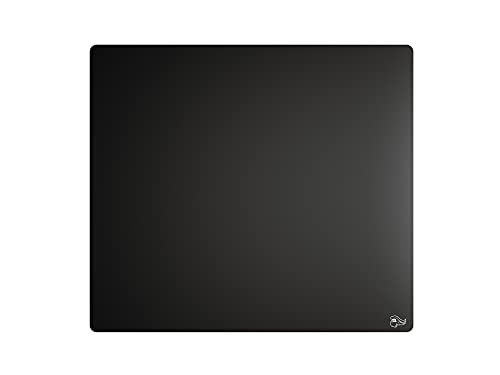
- Best for: Low-sensitivity players who sweep wide and want a large hard surface that sits almost flush with the desk.
- XL hard mousepad with an ultra-thin polycarbonate flexible surface
- Size: 15 x 17 inches
- Extended hard mousepad (Helios)
- Model: GLO-MP-ELEM-AIR
All 4 Picks at a Glance
| Product | Specs | Action |
|---|---|---|
| Logitech G440 Hard Gaming Mouse Pad |
| Check price on Amazon |
| SteelSeries QcK Hard Gaming Mouse Pad |
| Check price on Amazon |
| Glorious Elements Air Mousepad – XL (Helios) |
| Check price on Amazon |
 Razer Firefly V2 Pro Gaming Mouse Mat |
| Check price on Amazon |
A hard mouse pad changes every flick shot because the mouse glides with almost no drag, rewarding fast wrist movements. The real decision is not whether a hard surface is faster than cloth, since it almost always is, but whether you can live with its trade-offs: a rigid pad cannot be rolled up, it takes up fixed desk space, and a surface that feels slick at first can feel hard to stop on when you need to hold an angle. Pick by matching the material to your aim style instead of chasing the smoothest pad on the list.
This guide is for FPS players who want a firm, low-friction surface and are ready to give up the soft give of cloth. Every pad below was chosen from the product name and specifications on its Amazon listing, with surface material, size, and base called out so you can compare like with like.
Top 3 picks at a glance
Quick Picks
As an Amazon Associate we earn from qualifying purchases.
| Product | Best for | Key spec from title |
|---|---|---|
| Logitech G440 Hard Gaming Mouse Pad | FPS players who want a compact hard pad with moderate friction | Hard Gaming Mouse Pad, Optimized for Gaming Sensors, Moderate Surface Friction |
| SteelSeries QcK Hard Gaming Mouse Pad | Small desks where a compact hard pad must stay put | Hard Gaming Mouse Pad, Improved Surface Texture, Medium Size |
| Razer Atlas Tempered Glass Gaming Mouse Mat | Players who want the smoothest glide and a surface that wipes clean | Tempered Glass Gaming Mouse Mat, Ultra-Smooth Micro-Etched Surface |
| Glorious Elements Air Mousepad – XL (Helios) | Large sweeping arm movements on a desk-hugging thin pad | XL Hard and Ultra Thin Polycarbonate Flexible Surface, 15 x 17 Inches |
| Razer Firefly V2 Pro Gaming Mouse Mat | RGB desk setups that need a hard lit surface with a dongle port | Fully Illuminated RGB Gaming Mouse Mat, 15 Zone Chroma Lighting, USB 2.0 Port |
How to Choose
Match the surface material to your stopping power
Hard pads are not all equally slick, and the material sets how easily your mouse starts moving and how quickly it stops. Polycarbonate and hard plastic pads, such as the thin Glorious and SteelSeries options below, give a fast glide with a little more grip than glass, which suits players who flick often and still need to land on a target. Tempered glass, like the Razer Atlas, is smoother still and keeps its glide as it wears, but it can feel almost frictionless until your muscle memory adapts, so low-sensitivity players who stop with their whole arm usually adjust faster than high-sensitivity wrist players.
Measure the desk space before you fall for a big pad
A hard pad cannot be trimmed or folded, so its footprint is a permanent claim on your desk. Measure the clear area between your keyboard and the desk edge, then leave room for the mouse to travel at your usual sensitivity without sliding off the pad mid-fight. A compact pad around 320 by 270 mm works when the keyboard sits close and the desk is narrow, while a large pad near 450 by 400 mm or an XL 15 by 17 inch pad suits low-sensitivity players who sweep wide. If the pad would hang over the edge or push the keyboard into an awkward angle, choose the smaller size.
Check how the base holds the pad still
A slick top is useless if the whole pad shifts during a clutch round, and hard pads solve this in different ways. Rubber and silicone bases grip the desk through friction and let you lift and reposition the pad whenever you rearrange your setup, which is the flexible choice for shared desks. Adhesive bases, found on ultra-thin polycarbonate pads, bond the pad to the desk so it never moves at all, but they collect dust over time and leave you committed to one spot. Pick a rubber base if you move gear around, and an adhesive base only if the pad will stay in one place for months.
Decide whether lighting and ports are worth the bulk
Some hard pads add RGB lighting, a USB port for a wireless dongle, or a thicker frame, and those extras change the pad from a simple surface into a desk fixture. A lit pad looks striking in a dark room and keeps the receiver close to the mouse, which can help wireless stability, yet it needs a USB cable, adds thickness, and costs more than a plain pad that glides just as well. If your setup already has lighting and your dongle sits in a front USB port, a plain hard pad gives you the same glide without the cable. Choose the lit option only when the lighting and the port solve a real problem on your desk.
The 5 Best Options
Logitech G440 Hard Gaming Mouse Pad
- Best for: FPS players moving from cloth who want a faster glide without giving up stopping control.
- Hard gaming mouse pad with a moderate-friction surface
- Optimized for gaming sensors
- Non-slip mouse mat with a rubber base
- Size: 340 x 280 mm
FPS players moving from cloth who want a faster glide without giving up stopping control.
The compact size can feel cramped for low-sensitivity players who sweep their whole arm.
The G440 is the straightforward hard pad in this group, built around a firm plastic surface with moderate friction rather than the near-zero drag of glass. That middle ground matters for FPS players who want faster movement than cloth without losing the ability to stop precisely on a headshot. Its compact footprint fits desks where a keyboard, a monitor stand, and a mouse already compete for room, and the rubber base keeps it from sliding when the action speeds up. It is the safe first hard pad for anyone switching from cloth.
Watch out for: The compact size can feel cramped for low-sensitivity players who sweep their whole arm.
SteelSeries QcK Hard Gaming Mouse Pad
- Best for: Small desks where a compact hard pad needs to stay put and be easy to reposition.
- Hard gaming mouse pad with an improved surface texture
- Medium size: 320 x 270 x 3 mm
- Hard surface optimized for optical and laser sensors
- Non-slip rubber base
Small desks where a compact hard pad needs to stay put and be easy to reposition.
At 320 by 270 mm it is the smallest pad here, so wide arm movements can run off the edge.
SteelSeries takes the familiar QcK shape and replaces the cloth top with a rigid surface, giving long-time QcK users a hard pad without relearning a new size. The medium pad measures 320 by 270 mm with a 3 mm thickness, so it sits low on the desk and leaves the wrist at a natural angle during long sessions. Its textured hard surface is made for optical and laser sensors, and the non-slip rubber base holds it in place without glue, so you can pick it up and move it when the desk layout changes. It is a compact, no-frills option for crowded setups.
Watch out for: At 320 by 270 mm it is the smallest pad here, so wide arm movements can run off the edge.
Razer Atlas Tempered Glass Gaming Mouse Mat
The Atlas swaps plastic for tempered glass, and the difference shows up the first time the mouse moves across its micro-etched surface. The glide is exceptionally smooth and consistent, and because glass does not fray or compress, it keeps that feel far longer than a plastic pad. Spills and dust wipe off instead of soaking in, which keeps the surface uniform over months of daily play. The anti-slip base anchors the heavy glass slab, and the large 450 by 400 mm area gives low-sensitivity players room to sweep. It is the premium pick for players who value glide above all else.
Specs
- Tempered glass gaming mouse mat with an ultra-smooth micro-etched surface
- Dirt and scratch-resistant surface
- Anti-slip base
- Quiet mouse movements
- Size: 450 x 400 mm
Best for: Players who want the smoothest, most consistent glide and a surface that wipes clean.
Watch out for: Glass is heavy, rigid, and unforgiving if dropped, and the near-zero friction takes time to master.
Glorious Elements Air Mousepad – XL (Helios)
- Best for: Low-sensitivity players who sweep wide and want a large hard surface that sits almost flush with the desk.
- XL hard mousepad with an ultra-thin polycarbonate flexible surface
- Size: 15 x 17 inches
- Extended hard mousepad (Helios)
- Model: GLO-MP-ELEM-AIR
Low-sensitivity players who sweep wide and want a large hard surface that sits almost flush with the desk.
The adhesive base sticks the pad to one spot, so moving it later can weaken the grip and leave residue.
The Elements Air, the updated version of the Glorious Helios, is barely there at all: a hard polycarbonate sheet that sticks to the desk and disappears under the mouse. At 15 by 17 inches it covers far more area than the compact pads here, which suits low-sensitivity players who move from the elbow and need room for long sweeps. The ultra-thin flexible surface follows the desk instead of adding a raised edge for the wrist to catch on, and the adhesive base keeps it fixed during fast flicks. It is the best choice when desk coverage matters more than portability.
Watch out for: The adhesive base sticks the pad to one spot, so moving it later can weaken the grip and leave residue.
Razer Firefly V2 Pro Gaming Mouse Mat
- Best for: RGB desk setups that want a hard lit surface with a dongle port close to the mouse.
- Fully illuminated RGB gaming mouse mat with 15-zone Chroma lighting
- Backlit design with a micro-textured hard surface
- Integrated USB 2.0 port for a wireless mouse dongle
- Detachable USB Type-C cable
RGB desk setups that want a hard lit surface with a dongle port close to the mouse.
It needs a USB cable for power, and the lighting adds cost over a plain pad with a similar glide.
The Firefly V2 Pro is the only lit pad in this lineup, and its hard frosted surface is backlit across the whole mat rather than just around the edges. Fifteen Chroma lighting zones can be set through Razer Synapse, so the pad doubles as desk lighting in a dark room. A built-in USB 2.0 port gives the wireless mouse dongle a home right beside the mouse, and the detachable USB Type-C cable means the power lead can be swapped if it frays. The micro-textured surface is tuned for optical sensors, and the anti-slip base keeps the mat steady. It is a showpiece pad that still plays seriously.
Watch out for: It needs a USB cable for power, and the lighting adds cost over a plain pad with a similar glide.
Which One Fits Your Situation
You play FPS games and want your first hard pad
Start with the Logitech G440. Its moderate friction is the closest hard surface to cloth, so the jump feels like a speed upgrade rather than a complete change in aim. The compact size fits a standard desk, and if you later decide you want glass-smooth glide, you will know exactly what to look for next.
Your desk is small and the keyboard sits close to the edge
Take the SteelSeries QcK Hard. Its 320 by 270 mm footprint leaves room for the keyboard, and the rubber base lets you slide it into a better spot without peeling anything off the desk. The smaller area is a fair trade when every centimetre of desk counts, and the hard surface still gives you the fast glide a cloth pad cannot match.
You use low sensitivity and sweep with your whole arm
Choose the Glorious Elements Air in XL if you want the pad to vanish under your arm, or the Razer Atlas if you want the smoothest surface available. Both give you room to move, but the Glorious pad stays thin and flush while the Atlas adds weight, presence, and a wipe-clean glass top.
You want the desk to look as good as it plays
Go with the Razer Firefly V2 Pro. The edge-to-edge backlighting turns the pad into part of the room lighting, and the built-in USB port keeps the wireless dongle out of the way. It is the pick when the setup is on display as much as it is used for ranked matches.
Common Mistakes
- Buying the largest pad available without measuring the clear desk space, then finding it hangs over the edge or crowds the keyboard.
- Choosing glass for its smoothness and then struggling to stop the mouse, because near-zero friction needs time and a lower sensitivity to control.
- Sticking an adhesive pad to a dusty or uneven desk, which weakens the bond and lets the pad lift during play.
- Ignoring the base and blaming the mouse when the whole pad slides across the desk mid-game.
- Paying for RGB lighting and a USB hub when a plain hard pad would give the same glide for a simpler setup.
Frequently Asked Questions
Is a hard mouse pad better than a cloth pad for FPS games?
A hard pad usually gives a faster, lower-friction glide, which helps quick flicks and tracking in FPS games, while cloth gives more stopping friction and a softer feel. Neither is better for every player, so the choice comes down to whether you value raw speed or control when you land on a target.
Do hard mouse pads wear out mouse feet faster?
Hard surfaces can wear PTFE mouse feet faster than cloth, especially glass and rough-textured plastic, so feet may need replacing sooner. Keeping the pad clean and free of grit slows the wear, and replacement feet are a normal running cost for hard-pad users.
How do I clean a hard gaming mouse pad?
Wipe a plastic or glass hard pad with a slightly damp cloth to remove dust and skin oils, then dry it before playing so the mouse does not skid on moisture. Avoid abrasive cleaners that can scratch the surface and change how the mouse glides.
Can I use a hard mouse pad with any gaming mouse?
Most modern optical and laser gaming mice track well on hard pads, and several pads here are listed as optimized for gaming sensors. Very old sensors can struggle on glossy glass, so check the mouse and pad listings together if the sensor is several generations old.
Related guides
More from Amazon
Programs that pair well with the guide above. Offers and eligibility are set by Amazon and may change.
Free shipping on eligible items, Prime Video and more. Eligible new members can start with a free trial.
Start a Prime free trialAd-free music streaming. Eligible new subscribers can start with a free trial.
Try Music Unlimited freeA Prime membership for ages 18-24 with a trial period. Eligibility is set by Amazon.
See Prime for Young AdultsAudiobooks and podcasts to listen to on the go. Eligible new members can start with a free trial.
Try Audible freeAs an Amazon Associate we earn from qualifying purchases.