
Tight entertainment centers are the natural enemy of a PlayStation 5. The console measures roughly 15.4 inches tall standing up and about 4 inches deep, and once you add a vertical cooling stand with controller chargers, you can easily push past 17 inches of clearance — more than many media consoles and wall-mounted shelves can spare. Add heat into the equation (a PS5 can pull 200+ watts under load and dumps a surprising amount of it out the back), and squeezing it into a cabinet with poor airflow becomes a genuine risk to the hardware.
That’s why horizontal stands with built-in cooling have become so popular. Lying the console flat cuts its footprint to roughly 15.4 x 10.2 inches, and most stands keep total height under 4.5 inches — low enough to slide into a shelf with just 5 inches of clearance. The catch is that quality varies wildly: some “cooling” stands barely move air, some are too wide for narrow shelves, and a few only fit certain console revisions. We compared and compared eight of the best options for cramped setups, with prices ranging from around $8 to around $41, so you can find one that fits your space without cooking your console.
Our Top Picks
 PS5/Slim/Pro Horizontal Stand and Cooling Station with ControllerCooling & Charging VersionCheck on Amazon

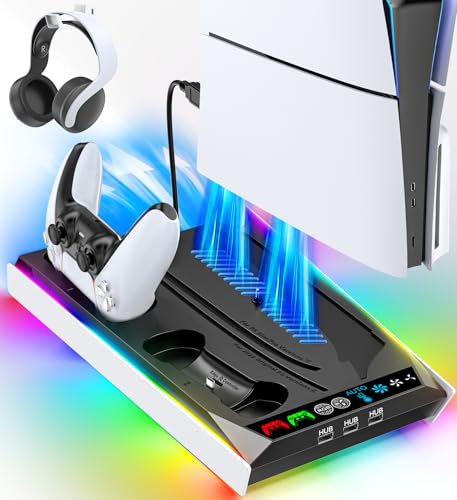


Top 3 picks at a glance
Quick Picks
| Product | Best for | Price |
|---|---|---|
| Scalable Horizontal Stand with Cooling Fan & Charger (White) | White PS5 setups in shallow shelves | Check on Amazon |
| Cooling & Charging Station with RGB Lights | RGB lighting fans who still want full cooling | Check on Amazon |
| Horizontal Stand & Cooling Station with 3-Level Fan | Households with DualSense Edge controllers | Check on Amazon |
| Tokluck Cooling Station with Auto Turbofan | Budget buyers who want automatic cooling | Check on Amazon |
| XBERSTAR Horizontal Placement Bracket | Ultra-tight spaces with minimal clearance | Check on Amazon |
| Rysker Stand with 3-Level Fan & Fast Charger | All-in-one convenience with a headset holder | Check on Amazon |
| Scalable Horizontal Stand with Cooling Fan & Charger (Black) | Matching a black PS5 in a dark cabinet | Check on Amazon |
| Slim/Pro Horizontal Cooling Stand with Dual Charger | PS5 Slim and Pro owners only | Check on Amazon |
How We Compared
We focused this roundup on one question: which cooling stands actually fit and perform in tight spaces? That meant prioritizing horizontal (sideways) designs, which keep total height low, and scalable/adjustable models that adapt to the original PS5, the Slim, and the Pro. We only included stands with some form of active or passive cooling, since heat management is the entire point of running a console in a confined cabinet.
Beyond fit, we looked for:
- Real compatibility: Supports disc and digital editions across PS5 generations, and includes adapters where needed for older consoles.
- Controller charging: Docking for at least one or two DualSense pads, with support for the DualSense Edge on premium models.
- Fan control: Multi-level speed settings or automatic adjustment, so you’re not stuck with a constant whine.
- Value: Every pick here costs under $42, and most land between $29 and $39.
We paid attention to build details that matter in cramped quarters — EVA foam padding to protect the console’s shell, safety screws to lock the console in place, and side-loading designs that don’t add width. We did not run thermal-lab testing on these stands; our rankings reflect design quality, feature sets, fit, and how well each addresses space-constrained setups.
The 8 Best Picks
1. PS5/Slim/Pro Horizontal Stand with Cooling Fan & Charger (White) — around $35
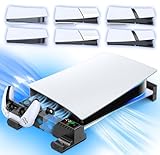
If your setup is white-on-white — a white PS5 on a white or light shelf — this is the cleanest-looking option on the list. The scalable design adjusts to fit the original PS5, Slim, and Pro in both disc and digital editions, and the horizontal orientation keeps the whole assembly low-profile enough for shelves with roughly 5 inches of clearance. EVA foam pads cushion the console and prevent scratches while helping damp vibration from the fan. The integrated charger handles original and Edge controllers, so your pad tops up right on the stand.
- Pro: Scalable design fits every PS5 revision, including the Pro.
- Pro: EVA foam padding protects the console shell and reduces rattle.
- Con: The white finish shows dust more readily than darker stands.
Skip it if you prefer a color-matched black setup — the identical stand is available in black at a higher price.
As an Amazon Associate we earn from qualifying purchases at no extra cost to you.




2. PS5 Cooling & Charging Station with RGB Lights — around $33
This is the pick for anyone whose “tight space” is also the room’s visual centerpiece. You get a full cooling and charging station with addressable RGB lighting that looks genuinely good in a darkened room, plus a built-in fan with both three-level manual control and an AUTO mode that ramps speed with console temperature — handy in a closed cabinet where you can’t easily hear or watch the console. It supports disc and digital consoles, and charging works for PlayStation 4 controllers too, which is great if you still hop back to older games.
- Pro: AUTO fan mode adjusts cooling without you touching anything.
- Pro: RGB lighting adds flair to open-shelf setups.
- Con: RGB lights are wasted — or distracting — inside a fully closed cabinet.
Skip it if your stand lives behind closed doors where the lighting won’t be seen; a plainer model will do the same job for less fuss.
3. PS5/Slim/Pro Horizontal Stand and Cooling Station — around $38
This is the premium all-rounder and our top overall pick for tight spaces. The scalable chassis handles original, Slim, and Pro consoles in disc or digital trim, the horizontal layout keeps height minimal for shallow shelves, and the three-level cooling fan gives you manual control over noise versus airflow. Crucially for enthusiasts, the charging station supports both standard DualSense and DualSense Edge controllers — most budget stands don’t fit the Edge’s slightly different grip geometry. At around $38 it’s a few dollars above the pack, but the flexibility justifies it.
- Pro: Charges both DualSense and DualSense Edge controllers.
- Pro: Scalable fit across three console generations.
- Con: Highest price among the full-featured stands in this roundup.
Skip it if you only own standard DualSense controllers and want to save $10 — the Tokluck below covers the basics well.
4. Tokluck PS5/Slim/Pro Cooling Station with Auto Turbofan — around $29
The best value in the roundup. At around $29, the Tokluck delivers features that cost $35+ elsewhere: an auto turbofan that adjusts its three speed levels on its own, vertical stand cooling, and a controller charger built into the docking station. It supports PS5, Slim, and Pro with the appropriate adapters, and it also works with PlayStation 4 controllers — a nice bonus for mixed households. Note that this is a vertical stand, so you’ll need roughly 17+ inches of shelf height; it’s best for tight width situations, like a narrow media console column, rather than low clearance.
- Pro: Cheapest full-featured cooling station here.
- Pro: Auto turbofan speed adjusts to console temperature.
- Con: Vertical orientation needs more vertical clearance than horizontal stands.
Skip it if your shelf is shallow — measure first, because a vertical setup won’t fit under 17 inches of clearance.
5. XBERSTAR Horizontal Placement Bracket — around $8
Sometimes the tight-space answer isn’t more hardware — it’s less. This simple bracket from XBERSTAR holds a PS5 Slim flat on its side with minimal added bulk, essentially adding nothing but stable feet and better airflow underneath the console. There’s no fan and no charging, but there’s also almost no footprint, no noise, and no power draw. For a Slim tucked into a shelf with a cabinet door left ajar or a rear cutout for ventilation, this is often all you need — and at around $8 it costs less than a pizza.
- Pro: Lowest cost and smallest footprint of any pick here.
- Pro: Zero fan noise and no power consumption.
- Con: No active cooling or controller charging whatsoever.
Skip it if your cabinet traps heat — a passive bracket can’t move air the way a fanned stand can.
6. Rysker PS5/Slim/Pro Stand with 3-Level Fan & Fast Charger — around $33
The Rysker is the thoughtful details pick. It’s a full cooling station — three-level fan, fast charging dock, disc and digital support across PS5, Slim, and Pro — but it adds two things cramped setups genuinely appreciate: a safety screw that locks the console to the stand (great if your shelf gets bumped, or if you have kids or pets around the TV), and a headset holder so your gaming headset lives on the stand instead of cluttering the shelf. At around $33 it’s competitively priced against every other full-featured option here.
- Pro: Safety screw secures the console against bumps and tips.
- Pro: Built-in headset holder reclaims shelf space.
- Con: No automatic fan mode — you set the speed yourself.
Skip it if you want set-and-forget temperature-based fan control; choose the RGB model at #2 instead.
7. PS5/Slim/Pro Horizontal Stand with Cooling Fan & Charger (Black) — around $41
This is the same scalably designed horizontal platform as our #1 pick — cooling fan, charger for original and Edge controllers, EVA foam padding, disc and digital support across PS5, Slim, and Pro — finished in black. It’s our recommendation for anyone with a black console slotted into a dark media cabinet, where a white stand would glare. The one knock: at around $41 it’s the most expensive item in this roundup, several dollars above the white version of the same design. If matching your console matters, it’s worth it; if not, the white one is the better deal.
- Pro: Identical feature set to the white model, in a black finish.
- Pro: Charges DualSense Edge as well as standard controllers.
- Con: Priciest pick here at around $41 versus around $35 for the white version.
Skip it if color matching doesn’t matter to you — grab the white version and save nearly $7.
8. PS5 Slim/Pro Horizontal Cooling Stand — around $34
One important caveat up front: this stand does not fit the 2020-era original PS5 — it’s built specifically for the Slim and Pro. If you own either of those revisions, it’s a strong pick: horizontal orientation for low clearance, a dual controller charger so two pads charge simultaneously, and a three-level cooling fan. The listing also mentions compatibility with Sony PSP consoles as a bonus, though that’s a niche extra. For Slim and Pro owners with two controllers and a shallow shelf, this hits a sweet spot at around $34.
- Pro: Charges two controllers at once, not just one.
- Pro: Low-profile horizontal design suits shelves around 5 inches of clearance.
- Con: Incompatible with the original 2020 PS5 — check your model first.
Skip it if you own the launch-model PS5; the scalable options at #1, #3, or #6 will fit your console properly.
Buying Guide
Measure Your Space First — Clearance and Width Both Matter
Before anything else, measure. A horizontal PS5 stand typically brings total height to around 4.5 inches, so shelves with 5 to 5.5 inches of clearance work; anything less and you should look at the minimal XBERSTAR bracket. Check width too — most fanned stands add an inch or two beyond the console’s ~15.4-inch length, and controller docks extend the sides further. Vertical stands like the Tokluck need 17+ inches of height, so they only solve narrow-width problems. And confirm your cabinet has some route for hot air to escape: even the best stand can’t fix a fully sealed box.
Fan Speed, Noise, and Auto Modes
Most stands here offer three fan speeds. Low is usually quiet enough to forget, while high moves noticeably more air — and makes noticeably more noise, which matters in a small room. If your stand sits behind a closed cabinet door where you can’t judge temperature yourself, prioritize an AUTO mode (options #2 and #4), which scales fan speed to console temperature automatically. If the stand is in the open and you’re within arm’s reach, simple manual three-level control (options #3, #6, #8) is all you need. Also consider powered stands add a small but nonzero power draw; the passive bracket draws none.
Compatibility: Console Revision and Controller Type
Three revision checks will save you a return shipment. First, console: original PS5, Slim, and Pro have different dimensions, so “scalable” stands include adjustable elements or adapters — verify the listing names your revision, and be careful with option #8, which excludes the original 2020 console. Second, disc versus digital: most stands here handle both, but depth and port cutouts differ. Third, controllers: if you own a DualSense Edge, only some chargers fit it properly — options #1, #3, and #7 explicitly support it. Mixed PS4 households should look at options #2 and #4, which charge PlayStation 4 controllers too.
Our Verdict
For most tight-space setups, the Horizontal Stand and Cooling Station at #3 (around $38) is the one to buy: scalable across original PS5, Slim, and Pro, low-profile for shallow shelves, three-level fan control, and the rare ability to charge a DualSense Edge alongside standard controllers. If budget comes first, the Tokluck at #4 (around $29) delivers auto cooling and charging for less, provided your shelf can handle its vertical height. And if your space is truly extreme, don’t overlook the XBERSTAR bracket at #8.22 — er, around $8: for Slim owners with decent ventilation, a fanless side bracket is the smallest, quietest, cheapest solution there is.
FAQ
Do PS5 cooling stands actually work?
They help — with realistic expectations. A stand’s fan adds airflow over the console’s vents, which is most valuable in enclosed cabinets where ambient heat builds up. The console’s internal fan remains the primary cooling system, so a stand is a supplement, not a replacement. The bigger benefit in tight spaces is often positioning: a proper stand lifts the console off the shelf surface and creates clearance around intake vents, which a console lying flat on wood in a cramped cubby doesn’t get on its own.
Will a horizontal stand damage my PS5?
No — Sony itself acknowledges horizontal orientation as a supported position for the console, and modern stands are designed around it. The things to check are padding (the EVA-foam models here protect the shell), secure fit (look for the safety screw on option #6 if stability matters), and that vents stay unobstructed. What you want to avoid is laying the console directly on carpet or fabric inside a cabinet, which blocks airflow far worse than any stand.
Do these stands work with the PS5 Slim and PS5 Pro?
Most of the stands in this roundup support all three revisions — original, Slim, and Pro — via scalable or adjustable designs. The exceptions matter, though: option #8 fits Slim and Pro only and explicitly does not fit the 2020 original PS5, while the XBERSTAR bracket (#5) is designed specifically for the Slim. Always match the listing to your exact console revision before buying; the Slim and Pro have different dimensions from the launch model, and a mismatched stand won’t seat properly.
How much clearance does a PS5 need in a cabinet?
A good rule of thumb: give the console at least 4 inches of open space on the intake and exhaust sides, and make sure the cabinet has an escape route for hot air — a vented back panel, a gap at the door, or a rear cutout. A horizontal stand keeps total height around 4.5 inches, so a shelf with 5 to 5.5 inches of clearance works. If your cabinet is fully sealed with no ventilation, no stand will fully solve it; consider cutting a vent, leaving the door ajar during play, or moving the console outside the cabinet entirely.
Related guides
- Best Free MMOs on Steam: Subscription Limits, Pay-to-Win and Time Cost (2026)
- Best Free Horror Games on Steam: How to Pick One That Fits Your PC and Your Nerves (2026)
- Black Frame Insertion vs VRR: Which Smoothness Feature Should You Use?
- Best Webcams for Streaming: 11 Listings Compared by Resolution, Focus and Light (2026)








