
If your PS5 lives inside a tight entertainment center, you already know the trade-offs. That closed-in shelf looks clean, but it traps heat fast, and a vertical tower simply will not fit under a low clearance. Add a soundbar, a streaming box, and a tangle of cables behind the console, and even sliding the PS5 in horizontally can feel like a puzzle, with barely enough room for air to move around the vents.
That is exactly why a low-profile horizontal stand with built-in cooling makes such a difference. The right base lifts the console just enough to create an airflow channel underneath, keeps it from sliding on glass or wood shelving, and in some cases adds Edge and DualSense charging without demanding more shelf space. As we refreshed our research for 2026, we focused specifically on stands that work sideways in cabinets, media consoles, and enclosed TV stands where every inch counts.
As an Amazon Associate we earn from qualifying purchases at no extra cost to you.





Our Top Picks
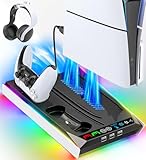
 PS5/Slim/Pro Horizontal Stand and Cooling Station with ControllerCooling & Charging VersionCheck on Amazon
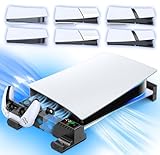
 NexiGo Slim Horizontal Stand for PS5 with ChargingRegular with Fans and Charging11.38 x 1.59 x 0.79 Inches1.3 poundsCheck on Amazon


Top 3 picks at a glance
Quick Picks
| Product | Best for | Price |
|---|---|---|
| PS5/Slim/Pro Horizontal Stand with Cooling Fan & Charger for Original & Edge Controllers, Scalable Design PS5 Accessories Base with EVA Foams for All PS Five Disc & Digital, PS 5 Sideways Stand White | Best Overall for Tight Shelves | Check on Amazon |
| PS5/Slim/Pro Horizontal Stand and Cooling Station with Controller Charging Station for Playstation 5 Console, Scalable PS5 Stand with 3-Level Cooling Fan, PS5 & Edge Controller Charger Accessories Kit | Best for Adjustable Cooling Control | Check on Amazon |
| PS5/Slim/Pro Stand for Disc & Digital Console, PS5 Cooling & Charging Station with RGB Lights, PS5 Controller Charger Built-in 3 Level & AUTO Adjustable Fan, Accessories for PlayStation 4 Chargers | Best with RGB Lighting | Check on Amazon |
| XBERSTAR Stand for PS5 Slim, for ps5 pro Cooling Feet, Horizontal Placement Bracket Holder for PS5 Slim Console Flat Stand (Disc Edition-A) | Best Minimalist Feet | Check on Amazon |
| PS5/Slim/Pro Horizontal Stand with Cooling Fan & Charger for Original & Edge Controllers, Scalable Design PS5 Accessories Base with EVA Foams for All PS 5 Disc & Digital, PS 5 Sideways Stand Black | Best Black Finish for Dark Cabinets | Check on Amazon |
| NexiGo Slim Horizontal Stand for PS5 with Charging Station for Dual_Sense&Dual_Sense Edge Controllers,Silent Cooling Fan w/Intelligent Temperature Control, LED Indicators, White | Best Premium Charging Station | Check on Amazon |
| OIVO PS5/ Slim/Pro Horizontal Stand for Disc & Digital Console, Stable PS5 Accessories Base Stand with Upgraded Support Rods on Bottom & Scalable Design for PlayStation 5 Console-Black | Best Budget Stable Base | Check on Amazon |
| XBERSTAR PS5 Slim Console Stand, Horizontal Placement Bracket Holder, Cooling Feet, Anti-Slip, Compatible with PS5 Slim (Disc Edition-A) | Best Ultra-Low-Profile Bracket | Check on Amazon |
How We Compared
For tight entertainment centers, height and footprint matter more than anything. We prioritized horizontal stands that add minimal vertical lift while still creating a clear air gap beneath the console. Scalable or adjustable cradles that lock to the PS5, PS5 Slim, and PS5 Pro in both Disc and Digital versions scored higher, because a stand that wobbles or blocks the bottom vents defeats the purpose in an enclosed shelf.
We also weighed integrated cooling and charging pragmatically. In a closed cabinet, a quiet fan that helps move stagnant air is useful, but only if it has usable speed settings and does not take up extra shelf width. Controller charging was evaluated on compatibility with both standard DualSense and DualSense Edge controllers and on whether the charger adds clutter in a narrow space. Finally, we considered stability features that actually help on slick surfaces, like EVA foams, anti-slip pads, and reinforced support rods, and sorted value by real checkout prices rather than list-price ranges.
The 8 Best Picks
1. PS5/Slim/Pro Horizontal Stand with Cooling Fan & Charger for Original & Edge Controllers, Scalable Design PS5 Accessories Base with EVA Foams for All PS Five Disc & Digital, PS 5 Sideways Stand White
This white scalable base is the most well-rounded option for cramped media consoles. It is designed to sit the PS5 family horizontally, with an adjustable cradle that fits original PS5, Slim, and Pro models in Disc and Digital, and it integrates both a cooling fan and a charger for Original and Edge controllers so you do not need a separate dock on the shelf.
- Pro: Scalable design plus EVA foams keep the console centered and prevent sliding on wood or glass shelves
- Pro: Built-in fan and dual-controller charging save space compared to buying stand, cooler, and charger separately
- Con: White finish shows dust more readily inside dark cabinets
When to skip: If your entertainment center is very shallow and you cannot accommodate any extra base width, a feet-only bracket will preserve more usable depth. At around $35, it hits the sweet spot for most enclosed setups.
2. PS5/Slim/Pro Horizontal Stand and Cooling Station with Controller Charging Station for Playstation 5 Console, Scalable PS5 Stand with 3-Level Cooling Fan, PS5 & Edge Controller Charger Accessories Kit
Built for users who want direct control over airflow, this cooling station offers a 3-level cooling fan that lets you dial the speed to match how enclosed your cabinet is. The scalable PS5 stand layout keeps the console stable on its side, and the integrated charging station handles both PS5 and Edge controllers without requiring a separate accessory kit behind the TV.
- Pro: Three fan levels make it easier to balance noise and airflow in tight, poorly vented shelves
- Pro: All-in-one kit approach reduces cable clutter in already crowded entertainment centers
- Con: More features mean a slightly larger footprint than minimalist feet
When to skip: If you prefer automatic temperature-based control or want the quietest possible setup, consider an intelligent auto-adjust model instead. Priced at around $38, it is a strong value for feature coverage.
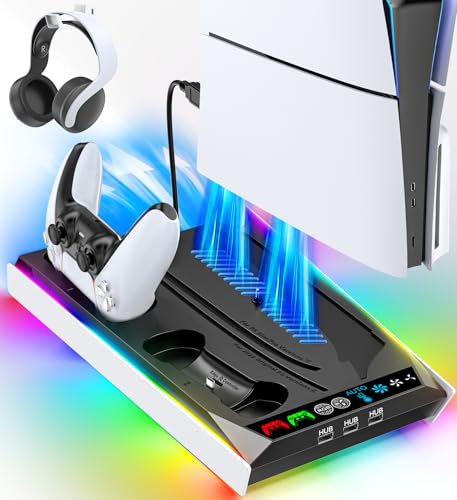
3. PS5/Slim/Pro Stand for Disc & Digital Console, PS5 Cooling & Charging Station with RGB Lights, PS5 Controller Charger Built-in 3 Level & AUTO Adjustable Fan, Accessories for PlayStation 4 Chargers
This stand is ideal if your closed cabinet doubles as a display and you want a little visual flair without adding bulk. It supports Disc and Digital consoles across the PS5 family, offers both 3-level manual and AUTO adjustable fan modes, and includes a built-in PS5 controller charger plus compatibility as an accessory for PlayStation 4 chargers.
- Pro: Choice of manual 3-level or AUTO fan adjustment adapts to varying airflow in tight shelves
- Pro: Integrated RGB lights add visibility when reaching into a dark entertainment center
- Con: RGB lighting is not ideal if you want a completely stealthy, lights-out cabinet
When to skip: Choose a plain black base or simple feet if you keep your center closed and want zero light bleed. At around $33, it is one of the more affordable full stations.
4. XBERSTAR Stand for PS5 Slim, for ps5 pro Cooling Feet, Horizontal Placement Bracket Holder for PS5 Slim Console Flat Stand (Disc Edition-A)
When clearance is under an inch, less is more. This XBERSTAR option uses simple cooling feet and a horizontal placement bracket holder to lift a PS5 Slim or PS5 Pro just enough to let air circulate underneath, without adding a powered fan or charging dock. The Disc Edition-A fit is tailored for a flat, stable sideways position.
- Pro: Ultra-compact feet preserve maximum shelf height and depth in the tightest cabinets
- Pro: No extra cables or power draw, so setup stays clean
- Con: No active cooling or controller charging, so you will need separate solutions if you want those
When to skip: If your entertainment center has almost no ventilation and you want active airflow, pick a fan-equipped station. At around $8, it is the cheapest way to fix wobble and improve passive cooling.
5. PS5/Slim/Pro Horizontal Stand with Cooling Fan & Charger for Original & Edge Controllers, Scalable Design PS5 Accessories Base with EVA Foams for All PS Five Disc & Digital, PS 5 Sideways Stand Black
Functionally identical to our top white pick but finished for dark cabinetry, this black version blends into enclosed entertainment centers where a white base would stand out. It uses the same scalable design, EVA foams, cooling fan, and charger for Original and Edge controllers, and it fits all PS5 Disc and Digital variants including Slim and Pro when placed sideways.
- Pro: Black finish hides dust and matches most modern media consoles and black PS5 trims
- Pro: EVA foams and scalable cradle add stability on slick shelves where horizontal consoles can drift
- Con: Priced higher than the white version at around $41 despite matching features
When to skip: If color does not matter to you, the white model offers the same capability for less. Stick with this one when you want the stand to visually disappear.
6. NexiGo Slim Horizontal Stand for PS5 with Charging Station for Dual_Sense&Dual_Sense Edge Controllers,Silent Cooling Fan w/Intelligent Temperature Control, LED Indicators, White
This NexiGo slim horizontal stand is the premium pick for buyers who want quiet, hands-off cooling in a closed shelf. Instead of manual levels, its silent cooling fan uses intelligent temperature control to ramp up or down as needed, and the integrated charging station supports both DualSense and DualSense Edge controllers with LED indicators to confirm status at a glance.
- Pro: Intelligent temperature control helps keep noise down while still moving air in enclosed spaces
- Pro: Clear LED indicators make it easy to check charging without pulling the console out
- Con: Highest price in this roundup at around $49, and white color may not suit dark cabinets
When to skip: If you are on a tight budget or do not need automatic fan control, a manual 3-level station offers similar cooling for less.
7. OIVO PS5/ Slim/Pro Horizontal Stand for Disc & Digital Console, Stable PS5 Accessories Base Stand with Upgraded Support Rods on Bottom & Scalable Design for PlayStation 5 Console-Black
OIVO focuses on stability first, which is exactly what matters when a heavy console sits sideways on a narrow shelf. This black base stand features upgraded support rods on the bottom and a scalable design that secures Disc and Digital consoles across the PS5, Slim, and Pro lineup. It is a straightforward stand without a built-in fan or charger, keeping the profile low.
- Pro: Upgraded bottom support rods improve rigidity and reduce flex on uneven shelves
- Pro: Scalable design ensures a snug sideways fit across all current PS5 variants
- Con: No cooling fan or controller charging, so you will add accessories separately if needed
When to skip: If you want active cooling inside a poorly ventilated cabinet, choose a fan-equipped alternative. At around $20, it is a solid middle ground between cheap feet and full stations.
8. XBERSTAR PS5 Slim Console Stand, Horizontal Placement Bracket Holder, Cooling Feet, Anti-Slip, Compatible with PS5 Slim (Disc Edition-A)
Similar in spirit to its sibling but with an anti-slip emphasis, this XBERSTAR bracket uses cooling feet to create a passive air gap under a horizontally placed PS5 Slim. The horizontal placement bracket holder keeps the Disc Edition-A console from shifting, and the anti-slip treatment helps on glass shelves where vibration can cause slow drift.
- Pro: Anti-slip feet add security in tight centers where the console is bumped when opening doors
- Pro: Extremely low profile and low cost at around $8 preserve space for other devices
- Con: Limited to PS5 Slim Disc Edition-A fit, not the broader PS5/Slim/Pro compatibility of scalable stands
When to skip: If you own an original PS5, Pro, or Digital-only model, pick a scalable base that is confirmed for all variants.
Buying Guide
1. Measure Your Cabinet Before You Buy
In tight entertainment centers, the limiting factor is usually usable height between shelves, not width. Measure the interior height, depth, and the position of the rear cable cutout, then compare that to the total height of the PS5 on its side plus the stand. Scalable bases add slightly more lift than feet-only brackets, but they also distribute weight better and prevent the curved PS5 panels from rocking. If your shelf has doors, leave at least a finger-width of clearance above the console for warm air to escape instead of recirculating.
2. Choose Your Cooling Approach
You have three practical options. Passive cooling feet create a small air gap so the bottom vents can breathe and are best when your cabinet has some ventilation slots or you leave the door open while gaming. Manual 3-level fans give you direct control and are useful in fully enclosed shelves where you want more airflow during long sessions. Intelligent or AUTO adjustable fans vary speed based on temperature, which can keep noise lower when the console is idle. None of these replace basic ventilation, so avoid pushing the console flush against the back wall.
3. Decide How Much Integration You Need
Combined cooling and charging stations consolidate two accessories into one footprint, which saves precious shelf space and reduces cables. That matters when your power strip is already full. However, if you already own a dedicated DualSense charger or rarely charge on the shelf, a simpler stable base with support rods or minimalist cooling feet will keep the setup cleaner and cheaper, with prices in this lineup ranging from around $8 to around $49. Pick integration based on whether you actually charge controllers in the entertainment center.
Our Verdict
For most tight entertainment centers, the white PS5/Slim/Pro Horizontal Stand with Cooling Fan and Charger at around $35 is the best overall balance of low horizontal profile, scalable fit for Disc, Digital, Slim, and Pro, and useful extras like EVA foams, active cooling, and Edge controller charging. If you want a dark finish to disappear inside a black cabinet, the same stand in black at around $41 is worth the premium. On a strict budget or when every millimeter of height matters, either XBERSTAR feet model will stabilize the console and improve passive airflow for under $9 without adding clutter.
FAQ
Will a horizontal stand actually help with heat in an enclosed entertainment center?
Yes, when it lifts the console to create an air channel underneath and keeps the bottom and rear vents from being blocked. Passive feet help with circulation, while fan-equipped bases actively move stagnant air that otherwise pools in closed cabinets. For best results, keep the rear of the shelf open where cables exit and avoid stacking items directly on top of the console.
Are these stands compatible with PS5 Slim and PS5 Pro?
Many of the picks are explicitly scalable for PS5, Slim, and Pro in both Disc and Digital versions, including the top-ranked white and black models and the OIVO stable base. The two XBERSTAR feet brackets in this list are specific to PS5 Slim Disc Edition-A, so double-check your exact model before choosing a minimalist bracket.
Do I need a stand with a cooling fan, or are feet enough?
Feet are enough if your entertainment center has ventilation gaps, you keep doors open while playing, and your sessions are short. Choose a 3-level or AUTO fan model if the cabinet is fully enclosed, has minimal rear airflow, or the console runs for hours at a time. Intelligent temperature control, like on the NexiGo, is the quietest hands-off option.
Can these stands charge both DualSense and DualSense Edge controllers?
The full stations in this roundup are built for both. The scalable white and black horizontal stands, the 3-level cooling station, and the NexiGo slim horizontal stand all include charging for standard DualSense and DualSense Edge controllers. OIVO and the XBERSTAR feet-only options do not include charging, so you would continue using your existing dock or USB cable.
Related guides
- Best Free MMOs on Steam: Subscription Limits, Pay-to-Win and Time Cost (2026)
- Best Free Horror Games on Steam: How to Pick One That Fits Your PC and Your Nerves (2026)
- Black Frame Insertion vs VRR: Which Smoothness Feature Should You Use?
- Best Webcams for Streaming: 11 Listings Compared by Resolution, Focus and Light (2026)








