
If your PlayStation 5 disc edition lives in an entertainment center or on an open shelf, you already know the two problems that come with it: the console runs hot during long sessions, and the bulky vertical footprint eats space you’d rather give to speakers, decor, or a second controller dock. Add in two (or more) DualSense controllers that always seem to be dead when you sit down to play, and the case for a dedicated cooling stand becomes pretty obvious. The right stand consolidates all three jobs—cooling, charging, and stable support—into one footprint that’s often smaller than the console itself.
The catch is that the market is flooded with lookalike stands, many of which are built for the original 2020 console and don’t actually fit the Slim or Pro models. For the disc edition specifically, you also need to confirm the stand supports the disc drive’s added width and weight. We sorted through the options to find eight stands that genuinely work with the PS5 disc edition (and its Slim and Pro siblings), from a budget base under $20 to fully loaded cooling stations pushing $42. Here’s how they stack up.
As an Amazon Associate we earn from qualifying purchases at no extra cost to you.
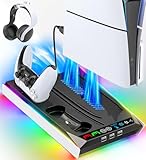


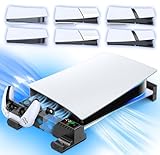
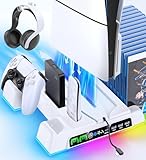
Our Top Picks
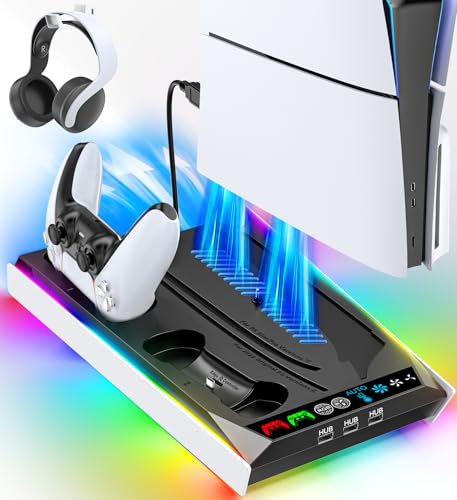
 PS5/Slim/Pro Horizontal Stand and Cooling Station with ControllerCooling & Charging VersionCheck on Amazon


Top 3 picks at a glance
Quick Picks
| Product | Best for | Price |
|---|---|---|
| PS5/Slim/Pro Stand with RGB Lights, 3-Level & Auto Adjustable Fan | Best overall | Check on Amazon |
| PS5 Slim/Pro Horizontal Cooling Stand (Not Fit 2020 Regular Version) | Best for Slim and Pro owners | Check on Amazon |
| PS5/Slim/Pro Horizontal Stand with Cooling Fan, White | Best for white consoles | Check on Amazon |
| OIVO PS5/Slim/Pro Horizontal Stand | Best budget pick | Check on Amazon |
| PS5/Slim/Pro Horizontal Stand and Cooling Station with Controller Charging | Best all-in-one station | Check on Amazon |
| PS5/Slim/Pro Cooling Station with 3 USB Hubs | Best for connectivity | Check on Amazon |
| PS5/Slim/Pro Horizontal Stand with Cooling Fan, Black | Best for black consoles | Check on Amazon |
| Cooling Stand for PS5/Slim/Pro with Dual Controller Charging, Auto Fan | Best auto-cooling value | Check on Amazon |
How We Compared
We focused on stands that explicitly support the PS5 disc edition as well as the Slim and Pro models, since the disc drive changes the console’s dimensions and a stand built only for the digital version can rock or fail to seat properly. Compatibility with both original DualSense and DualSense Edge controllers was a plus for the charging stations. We prioritized stands with multi-level or automatic fans over single-speed designs, checked that horizontal stands include proper support rods or EVA padding to protect the console’s shell, and weighed price against feature count. We did not run independent thermal lab testing; our rankings reflect stated features, build design, and value at the listed prices. Every pick here falls between around $18 and around $41, so there’s a legitimate option at nearly any budget.
The 8 Best Picks
1. PS5/Slim/Pro Stand with RGB Lights, 3-Level & Auto Adjustable Fan — around $33
This vertical cooling and charging station is the best all-around choice for most disc edition owners. It handles the console, charges controllers, and adds a bit of personality with RGB lighting, all for a mid-pack price. The fan offers both manual three-level adjustment and an automatic mode, so it can ramp up on its own during a demanding game and quiet down when you’re browsing the dashboard.
- Auto-adjustable fan takes the guesswork out of cooling
- RGB lights plus controller charging in one unit at around $33
- RGB lighting can’t be disabled entirely if you prefer a dark room
Skip it if you want a horizontal, low-profile setup—this is a vertical station that adds height to your console.
2. PS5 Slim/Pro Horizontal Cooling Stand (Not Fit 2020 Regular Version) — around $34
If you own a PS5 Slim or Pro and want the console lying flat, this horizontal stand is purpose-built for you. The dual controller charger and three-level cooling fan cover the essentials, and the horizontal orientation keeps the console’s center of gravity low—ideal for shallow shelves. Just note the compatibility warning clearly stated in the listing: it does not fit the 2020 regular version.
- Genuine horizontal design suits tight media cabinets
- Dual charger plus 3-level fan for around $34 is strong value
- Explicitly incompatible with the original 2020 PS5
Skip it if you still own the launch-model console—the fit simply won’t work.
3. PS5/Slim/Pro Horizontal Stand with Cooling Fan, White — around $35
This white sideways stand matches the stock white faceplates of most disc edition consoles, so it disappears visually instead of looking like an add-on. It charges both original and Edge controllers and includes EVA foam pads to cushion the console and prevent scratches—a thoughtful touch most rivals skip. The scalable design accommodates the disc edition, Slim, and Pro.
- EVA foam padding protects the console’s finish
- Color-matched for white consoles at around $35
- Fan is manual-only, with no automatic temperature mode
Skip it if you own the black-column Slim or a dark Pro setup and want a matching aesthetic.
4. OIVO PS5/Slim/Pro Horizontal Stand — around $18
OIVO’s horizontal base is the budget play: under $20 gets you a stable platform with upgraded support rods on the bottom for extra rigidity. There’s no fan and no charging here—this is purely about giving your disc edition a secure, space-saving horizontal home. For anyone whose console already runs cool or who games in short sessions, that’s all you actually need.
- Upgraded support rods on the bottom add stability
- At around $18, it’s the cheapest option in the roundup by a wide margin
- No cooling fan or controller charging whatsoever
Skip it if you play long, demanding sessions and want active cooling—the extra ~$15 for a fanned model is worth it.
5. PS5/Slim/Pro Horizontal Stand and Cooling Station with Controller Charging — around $38
This is the most complete horizontal package: a scalable base for any current PS5 model, a three-level cooling fan, and a charging station that handles both standard DualSense and Edge controllers. It’s the right call for a disc edition owner who wants flat placement but refuses to give up the charging-dock convenience of vertical stations. The around $38 price reflects the fuller feature set.
- Horizontal layout with a full charging station—rare combination
- Serves both DualSense and Edge controllers
- Priciest of the horizontal picks at around $38 (before the black variant below)
Skip it if budget matters most; the around $34 Slim/Pro-focused horizontal stand delivers most of the same function.
6. PS5/Slim/Pro Cooling Station with 3 USB Hubs — around $33
Connectivity is this station’s superpower. Alongside the cooling fan and controller charging, it includes three USB hubs, which is genuinely useful on a disc edition console whose rear USB ports are often buried behind an entertainment center. If you plug in a headset dongle, an external drive, and a charging cable, those hubs alone justify the around $33.
- Three USB hubs solve front-port scarcity
- Full cooling and charging package at a mid-range price
- Vertical design adds height to the console footprint
Skip it if you never use USB accessories and would rather spend that money on RGB flair or a horizontal layout.
7. PS5/Slim/Pro Horizontal Stand with Cooling Fan, Black — around $41
This is the black sibling of our white pick, and it’s the premium option in the roundup at around $41. You get the same scalable base for all PS5 variants, cooling fan, EVA foam protection, and charging for both original and Edge controllers, finished in black to match darker consoles and AV gear. If your setup is a matte-black tower on a black shelf, this is the one that looks factory-made.
- Black finish suits Pro and dark-themed setups
- EVA foams and Edge controller support included
- Highest price here at around $41 for features others offer for less
Skip it if color doesn’t matter to you—the white version costs around $6 less with identical function.
8. Cooling Stand with Dual Controller Charging, Auto Fan — around $34
The strongest value among the auto-cooling stations, this one pairs an automatic adjustable fan with dual controller charging at the same around $34 as the manual Slim/Pro horizontal stand. The auto mode is the differentiator: instead of babysitting fan levels, the stand adjusts output on its own, which is exactly what you want for an unattended disc drive spinning a game disc all evening.
- Auto-adjustable fan at a mid-tier around $34 price
- Dual charging station handles two controllers overnight
- Lacks the RGB and USB-hub extras of similarly priced rivals
Skip it if you want lights or extra ports—spend the same money on pick #1 or #6 instead.
Buying Guide
Orientation: Vertical vs. Horizontal
Vertical stations (picks #1, #6, #8) minimize floor space and typically bundle more features—charging docks, RGB, USB hubs—at lower prices. Horizontal stands (picks #2, #3, #4, #5, #7) suit shallow cabinets where height is the constraint, and they place the console’s weight on a wider base. Measure your shelf: if you have more than about four inches of clearance above the console plus stand, vertical works; if not, go horizontal.
Fan Modes: Manual vs. Automatic
A three-level manual fan lets you choose your noise-to-cooling tradeoff yourself; an auto mode adjusts fan speed based on need without your input. Auto is objectively more convenient, but manual fans often run quieter on low settings during light use. If you mostly play shorter sessions, manual is fine; for marathon sessions or hot rooms, pay the small premium for auto-adjustable models.
Compatibility and Protection Features
Double-check model fit before buying: at least one strong stand in this roundup (pick #2) explicitly excludes the 2020 regular PS5, and others vary on Slim and Pro support. Disc edition owners should confirm disc-drive clearance, since the drive adds width to the console. Look for EVA foam pads or support rods—features on picks #3, #4, and #7—which prevent scratches and flex over long-term use. Finally, verify DualSense Edge support if you own one, as not every “dual charger” seat fits the Edge’s slightly different dimensions.
Our Verdict
For most PS5 disc edition owners, the around $33 RGB cooling and charging station (pick #1) is the smart buy: auto-adjustable fan, controller charging, and lights at a fair price. Slim or Pro owners with a shallow cabinet should grab the around $34 horizontal cooling stand (pick #2). If budget rules everything, the OIVO base at around $18 is a perfectly respectable way to set your console down safely—you just give up active cooling. And if black-on-black aesthetics matter, the around $41 horizontal stand is the premium finish worth the splurge.
FAQ
Do cooling stands actually lower PS5 temperatures?
A well-designed stand improves airflow around the console and adds active fan assistance, which helps most in enclosed cabinets or warm rooms. Results vary by setup, and no stand replaces the console’s internal cooling, but for shelf-bound disc editions with restricted clearance, the added airflow is worthwhile.
Will a cooling stand fit my PS5 disc edition if it’s a Slim or Pro?
All eight picks here support the Slim and Pro alongside the original disc edition, with one important exception: pick #2 explicitly does not fit the 2020 regular version, so original-console owners should choose a different model.
Is it safe to leave controllers charging overnight on these stands?
These charging stations are designed with controllers seated in dedicated docks, and typical setups include overcharge protection. Still, the general best practice is to unplug or power down the station once controllers are full, especially in enclosed furniture.
Horizontal or vertical—which is better for the PS5?
Sony supports both orientations, so choose based on your space and preference. Vertical saves shelf depth and pairs with more feature-packed stations; horizontal suits low-clearance cabinets and offers a lower center of gravity. All the stands above work for the disc edition in their stated orientation.
Related guides
- Best Free MMOs on Steam: Subscription Limits, Pay-to-Win and Time Cost (2026)
- Best Free Horror Games on Steam: How to Pick One That Fits Your PC and Your Nerves (2026)
- Black Frame Insertion vs VRR: Which Smoothness Feature Should You Use?
- Best Webcams for Streaming: 11 Listings Compared by Resolution, Focus and Light (2026)








