The best controller for Halo Infinite on PC is the Xbox Elite Wireless Controller Series 2. Halo reads Xbox-pattern pads natively, keeps controller aim assist on PC, and the Elite’s four paddles let you jump, slide and melee without lifting your thumb off the right stick. If you’d rather have drift-resistant TMR sticks and 1000Hz wireless for about half the price, the GameSir G7 Pro is the value pick.
As an Amazon Associate we earn from qualifying purchases at no extra cost to you.


Our Top Picks


Top 3 picks at a glance
Why a controller is a serious choice in Halo Infinite on PC
Halo is one of the few PC shooters where a pad is a real competitive option, not just a comfort choice. Three facts drive that.
- Aim assist follows your active input, not your platform. 343’s sandbox lead explained that it only switches off when you are actually playing on mouse and keyboard. The launch-era “no aim assist on PC” reports came from a bug: pressing Enter on the title screen made the game think you were on keyboard. Press Start on the controller instead, and avoid touching the mouse mid-match.
- Ranked is cross-input. The input-restricted Solo/Duo Ranked Arena playlists were disabled with the November 2022 Winter Update. Halo Support’s known-issues page still listed them as temporarily removed in November 2025, so controller and mouse players share ranked lobbies.
- The sandbox is stable. Operation: Infinite on November 18, 2025 was the last major content update. Since then the game has been in maintenance mode with ranked seasons and challenges, and a surprise May 2026 update added Firefight: Gauntlet. Settings you tune now are unlikely to be upended by a sandbox overhaul.
The compatibility trap: Steam Input and PlayStation pads
Halo Infinite is built around Xbox-pattern (XInput) pads. A DualSense works but shows Xbox prompts. Steam Input is on by default for PlayStation and generic controllers, and players reported that routing a pad through it brought stick acceleration and drift-like behavior, along with an aim assist feel that was off. Their fix was to disable Steam Input for this game only:
- In your Steam Library, right-click Halo Infinite and open Properties, then Controller.
- Choose “Disable Steam Input” from the dropdown and relaunch.
- If the pad stops responding entirely, it needs Steam’s translation layer. Re-enable Steam Input, and consider an XInput pad instead.
That’s why every pick below is either Xbox-licensed or connects to Windows as an Xbox-style controller.
The shortlist
| Controller | Stick sensor | Rear inputs | PC polling / link | Battery | Typical price |
|---|---|---|---|---|---|
| Xbox Elite Series 2 | Potentiometer, 3 tension levels | 4 paddles | Bluetooth, USB-C, Xbox Wireless | Up to 40 h | $150–$200 |
| GameSir G7 Pro | TMR | Back buttons | 1000Hz wired and 2.4GHz | Rechargeable | $80–$110 |
| Razer Wolverine V3 Pro | Hall effect | 4 back + 2 claw bumpers | 250Hz wireless, 1000Hz wired (Tournament Mode) | Rechargeable | About $200 |
| 8BitDo Ultimate 2 Wireless | TMR | 2 paddles + L4/R4 | 1000Hz 2.4GHz and wired | Rechargeable | $55–$75 |
| GameSir G7 SE | Hall effect | Back buttons with lock switches | 1000Hz wired | None (wired) | $35–$50 |
Xbox Elite Series 2
Four paddles cover Halo’s movement verbs. Three-position hair-trigger locks shorten the trigger pull for faster follow-up shots with semi-auto weapons, and three on-board profiles let you keep one layout for Ranked Arena and another for Firefight or vehicles. Its potentiometer sticks are the weak point. Stick drift on aging units is a widely reported issue, and in Halo it forces a higher center deadzone.
GameSir G7 Pro
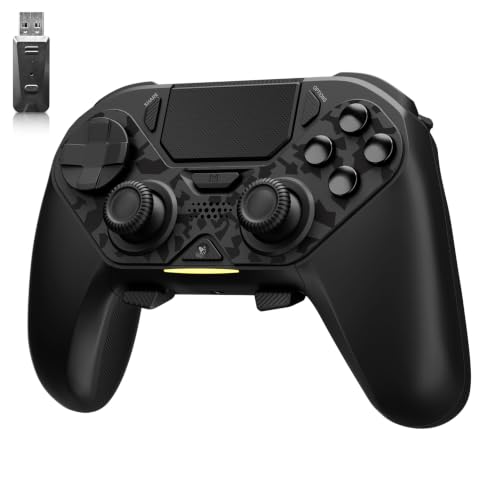
It’s Xbox-licensed, so Halo sees it natively. TMR sticks hold low deadzones over time, and the 1000Hz polling over the 2.4GHz dongle means you don’t need a cable for low latency. Dual-mode triggers switch between Hall effect analog travel and microswitch clicks, and the clicks suit precision rifles.
Razer Wolverine V3 Pro
Six remappable extras give you the most room of any pad here: paddles for jump, crouch, melee and grenade, plus bumpers for equipment. Plug it in for ranked. Razer rates it at 250Hz wirelessly and 1000Hz only when wired on PC in Tournament Mode.
8BitDo Ultimate 2 Wireless and GameSir G7 SE
These are the budget routes. The 8BitDo has TMR sticks, 1000Hz on its dongle and four extra inputs. The wired, Xbox-licensed G7 SE has Hall effect sticks and back buttons you can disable with latches. Both run the low deadzones Halo rewards.
How much latency the link adds
Average added wait is half the polling interval. At 250Hz the interval is 4 ms, so you wait about 2 ms on average. At 1000Hz the interval is 1 ms, so the average wait is 0.5 ms. Switching the Wolverine from wireless to wired saves about 1.5 ms, roughly a fifth of a 6.9 ms frame at 144 fps. The gain is small but free, so use a cable or a 1000Hz dongle for ranked and avoid Bluetooth, which usually adds more delay than either.
Starting settings and why
Published Halo guides disagree on exact values, but they cover a predictable range. Start in the middle, then adjust for your stick type.
| Setting (look stick) | Range used in guides | Start with | Reasoning |
|---|---|---|---|
| Look Acceleration | 1–5 | 3 | Higher values snap to full turn speed quickly but overshoot strafing targets. |
| Center Deadzone | 0–4 | 1–2 on TMR/Hall, 3–4 on worn pads | Go as low as possible without the view creeping at rest. |
| Axial Deadzone | 0–3 | 0–1 | Keeps small diagonal corrections from snapping to one axis. |
| Max Input Threshold | 0–15 | 8–10 | A higher value means you reach top speed before the stick hits the edge. |
| Move stick deadzones | Match look stick | Same as look | Many players apply deadzone changes to both sticks for consistent strafes. |
The deadzone row is where sensor type pays off. Potentiometer sticks wear and need more deadzone over time, while Hall effect and TMR sticks usually hold the low setting much longer.
A paddle map built for Halo movement
- Upper-left paddle: jump. Strafe-jumping while you keep your reticle on target is the core skill in Halo duels.
- Upper-right paddle: crouch/slide. Sprint-slides and crouch-strafes become possible mid-fight without letting go of the right stick.
- Lower-left paddle: melee. Beatdowns decide many close-range trades, so melee should never cost you aim.
- Lower-right paddle: equipment, such as the Grappleshot or Threat Sensor, or a grenade if you play Slayer more than Objective.
Reload and weapon swap can stay on the face buttons, because you trigger them between fights when your aim is free.
Which pick fits you
- Ranked Arena grinder: Xbox Elite Series 2 for the paddles, or GameSir G7 Pro if you want TMR sticks and a lower price.
- Wants every action on a rear button: Razer Wolverine V3 Pro, wired.
- Casual Firefight and Big Team Battle: 8BitDo Ultimate 2 Wireless or the wired GameSir G7 SE.
- Owns a DualSense already: it works, but expect Xbox prompts and turn off Steam Input before judging the aim.
Frequently asked questions
How do I keep aim assist active when starting Halo Infinite on PC?
Start the game by pressing Start on the controller rather than Enter on the title screen, and avoid touching the mouse mid-match. Aim assist follows your active input, not your platform. The launch-era reports that PC had no aim assist came from a bug in which pressing Enter made the game think you were using keyboard and mouse.
Will a DualSense controller show PlayStation button prompts in Halo Infinite?
A DualSense works with Halo Infinite, but the game shows Xbox prompts. Halo is built around Xbox-pattern XInput controllers, so a DualSense may need Steam Input to translate its controls. If you disable Steam Input and the controller stops responding, re-enable it; otherwise, an XInput controller avoids that translation layer.
Can I save different controller layouts for different Halo activities?
The Xbox Elite Series 2 has three onboard profiles, so you can keep one layout for Ranked Arena and another for Firefight or vehicles. Its four paddles can cover movement actions such as jump, crouch or slide, melee, and equipment, while its hair-trigger locks shorten trigger pulls for faster follow-up shots with semi-auto weapons.
Should I use wired or wireless mode for ranked matches?
Use a cable or a 1000Hz dongle for ranked play, and avoid Bluetooth because it usually adds more delay. At 250Hz, the average polling wait is about 2 ms; at 1000Hz, it is 0.5 ms. The Wolverine saves about 1.5 ms when switched from wireless to wired, though the overall gain is small.
What should I do if my controller’s view slowly moves by itself?
Increase the look stick’s center deadzone until the view stops creeping at rest. Start around 1–2 on TMR or Hall effect sticks, and 3–4 on worn potentiometer sticks. Use the lowest setting that remains stable. Potentiometer sticks can require more deadzone over time, while TMR and Hall effect sticks usually hold low settings longer.
Related guides
- Best Streaming Gear for Twitch: Webcams, Capture Card, Backdrop and Light (2026)
- Best Over Ear Headphones: 9 Closed, Open-Back and Bluetooth Picks Explained (2026)
- Best Monitor for Console Gaming: Eight 1080p and 1440p Screens Compared by HDMI and Refresh Rate (2026)
- Best Monitors for PS5 Pro 4K 120Hz: Eight Screens and the HDMI Bandwidth Check (2026)