The best blood pressure monitors for large arms are the A&D Medical UA-789AC for very large upper arms, the Welch Allyn Home 1700 with its XL cuff for a readable, clinically oriented setup, and the Omron 10 Series with the correct optional cuff for shoppers who want app connectivity and multiple-user memory.
The important specification is not the monitor’s name or the word “large” on the box—it is the cuff’s stated circumference range. A cuff that is too small can produce a falsely high reading, while an oversized cuff can make readings less reliable. Measure the midpoint of your upper arm before choosing.
As an Amazon Associate we earn from qualifying purchases at no extra cost to you.


Our Top Picks
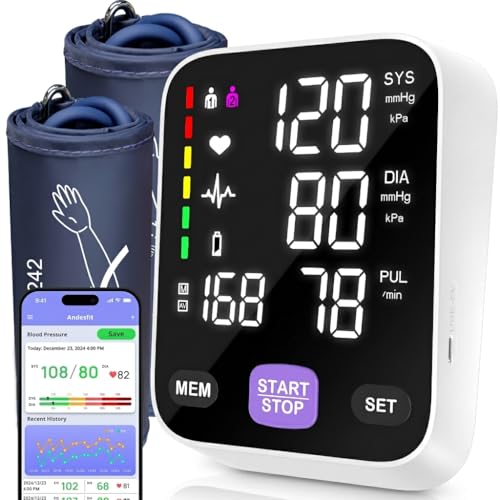 Andesfit Upper Arm Blood Pressure Monitor for HomeLarge and Extra Large4.5 x 4.2 x 1.9 inchesCheck on Amazon
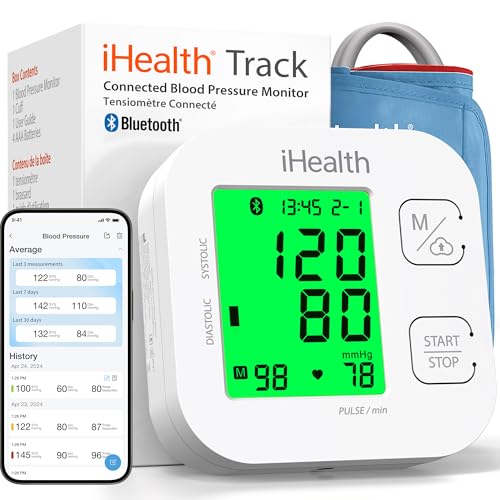 iHealth Track Smart Upper Arm Blood Pressure Monitor1 Count (Pack of 1)3.9 x 3.9 x 1.6 inches1 poundsCheck on Amazon
 OMRON Bronze Blood Pressure Monitor & Upper Arm9-17" Cuff Size | Single Unit5.5 x 3.3 x 4.3 inches1.23 poundsCheck on Amazon

Top 3 picks at a glance
Best large-arm blood pressure monitors compared
| Monitor | Usable cuff range | Best for | Memory and display | Typical market range |
|---|---|---|---|---|
| A&D Medical UA-789AC | Approximately 16.5–23.6 inches (42–60 cm) | Very large arms and users who need the widest standard option | Large LCD, memory for two users | Usually $70–$120 |
| Welch Allyn Home 1700 with XL cuff | XL cuff approximately 16.5–21.3 inches (42–54 cm) | Clear readings and a straightforward home-monitoring workflow | High-contrast display, stored readings depending on configuration | Usually $80–$150 |
| Omron 10 Series with compatible large or extended cuff | Common cuffs cover about 9–17 inches; extended options reach roughly 17–20 inches | Connected tracking, two users, and broad accessory support | Large display, multi-reading averaging, app support on connected versions | Usually $60–$120 |
| Beurer BM55 with compatible cuff | Approximately 8.7–16.5 inches (22–42 cm), depending on cuff | Large arms near the upper end of a standard cuff range | Backlit display, two-user memory on the BM55 | Usually $50–$90 |
Ranges can vary by regional package and replacement-cuff version. Confirm the exact cuff included with the retailer or manufacturer before buying, especially if your arm measures more than 17 inches.
Our top picks by arm circumference
Best for very large arms: A&D Medical UA-789AC
The UA-789AC is the easiest recommendation when a standard “large” cuff is still too tight. Its cuff range extends to about 23.6 inches, giving it substantially more coverage than monitors whose optional cuffs stop around 20 or 21 inches. That extra range matters: a cuff that closes comfortably but sits near the very edge of its limits is less reassuring than one that places your measurement in the middle of the range.
Its trade-offs are a more traditional, less app-centered experience and a bulkier cuff. The large LCD and two-user memory are useful for routine home tracking, but shoppers who want automatic cloud logs should look at a connected Omron model instead.
Best for readability and simple operation: Welch Allyn Home 1700
The Welch Allyn Home 1700 is a strong choice when the priority is seeing the result quickly and repeating measurements consistently. With the XL cuff, it covers upper arms around 16.5–21.3 inches. The controls are less distracting than a feature-heavy connected monitor, and the display is suitable for users who find small segmented numbers difficult to read.
Choose this model only after checking whether the package includes the XL cuff. A base package with a regular cuff may not fit an arm above approximately 17 inches, even though the monitor itself is otherwise suitable.
Best connected option: Omron 10 Series with the correct cuff
Omron’s 10 Series is appealing for households that want two-user memory, averaging of multiple readings, and smartphone tracking on connected versions. The key is treating the cuff as a separate selection rather than assuming every 10 Series package fits a large arm. Many supplied cuffs cover roughly 9–17 inches, while compatible extended cuffs may reach approximately 17–20 inches.
This makes the Omron a particularly good match for an arm in the 16–20-inch range, provided the selected cuff covers the measured circumference. For an arm above 20 inches, the A&D UA-789AC or another monitor with a clearly stated extra-large range is a safer choice.
Decision matrix: match the monitor to your situation
| Your situation | What to prioritize | Best direction |
|---|---|---|
| Arm measures 13–16 inches | A standard upper-arm cuff with room at both ends of its range | Omron 10 Series, Beurer BM55, or a comparable validated upper-arm monitor |
| Arm measures 16–17 inches | A cuff whose upper limit is at least 17 inches | Welch Allyn XL, Omron compatible large cuff, or A&D UA-789AC |
| Arm measures 17–20 inches | An explicitly listed extended or XL cuff; do not rely on “large” wording | Omron with extended cuff or Welch Allyn XL |
| Arm measures 20–24 inches | A cuff reaching at least your measured circumference, preferably with spare range | A&D Medical UA-789AC |
| Poor eyesight or limited dexterity | Large digits, physical start button, clear error indicators | Welch Allyn Home 1700 or A&D UA-789AC |
| Two people track readings | Separate user memory and a way to label readings | Omron 10 Series, Beurer BM55, or a two-user A&D model |
How to measure your arm and fit the cuff correctly
- Measure at the midpoint. Wrap a flexible tape around the upper arm halfway between the shoulder and elbow, with the arm relaxed. Do not measure over a sleeve.
- Compare the number with the cuff range. If your arm is 18 inches and the cuff says 9–17 inches, it is not a suitable match. Buy the extended cuff or select another monitor.
- Expose the upper arm. A thin shirt can create inconsistent pressure; thick or rolled-up clothing can change the result.
- Place the lower edge about one inch above the elbow crease. The artery marker, if printed on the cuff, should sit on the inside of the arm.
- Keep the tube aligned as directed. It should not be sharply bent or trapped beneath the arm.
- Support the arm at heart level. Rest your forearm on a table so the cuff is approximately level with the heart. An unsupported arm can make the reading higher.
The cuff should feel snug but not painful. You should not be able to slide it freely around the arm, but it should not require force to close. If the monitor repeatedly reports a cuff error, check the range, placement, tubing, and whether the cuff is wrapped evenly.
Memory features that are actually useful
Memory capacity is less important than how the monitor organizes readings. For routine tracking, look for two-user profiles, date and time stamps, irregular-heartbeat indicators, and an average of the last three readings. A monitor that stores 100 readings but mixes two people together is less useful than one that stores 60 readings in clearly separated profiles.
A practical routine is to take two readings one minute apart and record the average. Some monitors calculate an automatic average; others require you to write it down or use an app. Do not delete unusual readings simply because they are inconvenient—note what happened, such as exercise, stress, caffeine, or a poor cuff fit.
Display and power considerations
For older users or dim bedrooms, prioritize high-contrast digits and a backlight over decorative connectivity features. A display with systolic pressure, diastolic pressure, pulse, and error symbols visible at the same time reduces mistakes when copying results.
Battery estimates are commonly optimistic because they assume short inflation cycles. As a practical example, if four AA batteries provide about 2,000 mAh at their nominal 6-volt pack voltage, the theoretical energy is approximately:
2,000 mAh × 6 V = 12,000 mWh, or 12 Wh.
After conversion losses and the higher current used during inflation, a monitor might use roughly 0.03–0.08 Wh per measurement cycle. That suggests around 150–400 cycles in ideal conditions, before battery self-discharge and cold temperatures reduce capacity. Use the supplied AC adapter if the monitor stays in one location; use fresh batteries for travel or backup.
What to avoid when shopping
- Wrist monitors when a correctly fitting upper-arm monitor is practical. Wrist position is much more sensitive to height and movement.
- Any listing that says only “large cuff” without giving inches or centimeters.
- A cuff selected by shirt size rather than measured arm circumference.
- Relying on a phone app as proof of accuracy. Connectivity improves record keeping, not the measurement itself.
- Buying a replacement cuff without confirming connector compatibility with the monitor.
Frequently asked questions
Can a cuff that says “large” fit every large arm?
No, a cuff labeled “large” may not fit every large arm. The important specification is the stated circumference range, not the word “large” on the box. Measure the midpoint of your upper arm and compare it with the cuff range. If your arm is outside that range, choose an extended cuff or another monitor.
Is an upper-arm monitor better than a wrist monitor for a large arm?
Yes, an upper-arm monitor is generally the better choice when a correctly fitting model is practical. Wrist position is more sensitive to height and movement. The article recommends avoiding wrist monitors in that situation and focusing on an upper-arm cuff whose stated circumference range covers your measured arm.
What should I do if my monitor repeatedly reports a cuff error?
Check the cuff range, placement, tubing, and whether the cuff is wrapped evenly. Confirm that the cuff covers your measured upper-arm circumference and that its lower edge is about one inch above the elbow crease. Keep the tube aligned as directed, without sharply bending it or trapping it beneath the arm.
How many readings should I take during a routine measurement session?
Take two readings one minute apart and record the average. Some monitors calculate an automatic average, while others require you to write it down or use an app. Before measuring, rest your forearm on a table with the cuff approximately level with the heart, because an unsupported arm can make the reading higher.
Does smartphone connectivity make a blood pressure monitor more accurate?
No, connectivity improves record keeping rather than the measurement itself. A connected monitor can help with smartphone tracking, while some models also provide two-user memory and averaging of multiple readings. Accuracy still depends on selecting a compatible cuff with the correct circumference range and fitting it properly.
Bottom line
For arms above 20 inches, start with the A&D Medical UA-789AC because its approximately 16.5–23.6-inch range is unusually broad. For a 16.5–21.3-inch arm and a readable, simple interface, choose the Welch Allyn Home 1700 with its XL cuff. For arms up to roughly 20 inches and a preference for app tracking, the Omron 10 Series is a good fit when paired with the correct extended cuff. Whatever you choose, measure first, verify the exact cuff range, and use the monitor on the bare upper arm at heart level.
If readings are repeatedly very high, very low, or markedly different between arms, contact a healthcare professional rather than trying to solve the issue by changing cuff size alone. Seek urgent medical care for a reading around 180/120 mmHg or higher accompanied by symptoms such as chest pain, shortness of breath, weakness, confusion, or vision changes.
Related guides
- Best Streaming Gear for Twitch: Webcams, Capture Card, Backdrop and Light (2026)
- Best Over Ear Headphones: 9 Closed, Open-Back and Bluetooth Picks Explained (2026)
- Best Monitor for Console Gaming: Eight 1080p and 1440p Screens Compared by HDMI and Refresh Rate (2026)
- Best Monitors for PS5 Pro 4K 120Hz: Eight Screens and the HDMI Bandwidth Check (2026)