
Our Top Picks

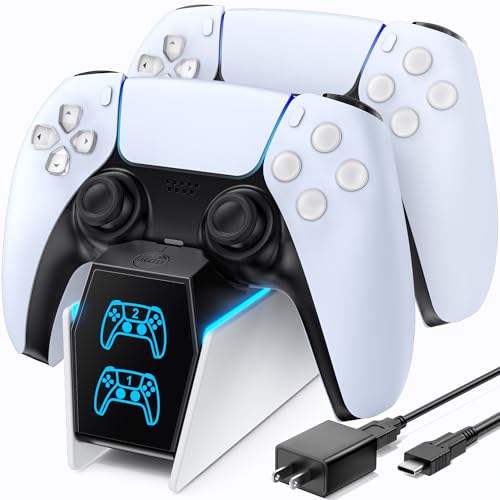
The Short Answer
Yes, a dual controller charging station is absolutely worth it for the vast majority of PlayStation 5 owners, provided you own at least two DualSense controllers and value a tidy, organized living space. If you are a solo gamer who only owns a single gamepad and doesn’t mind a stray USB-C cable dangling from your media console, you can easily skip this accessory. However, for households with multiple players, or for gamers who hate cable clutter, a dedicated dock is one of the most practical upgrades you can make to your home entertainment setup.
What You Actually Get
At its core, a dual controller charging station is a small, specialized dock designed to hold and power two PS5 DualSense controllers simultaneously. From a home design perspective, these accessories are compact. Most standard docks measure roughly 6 to 7.5 inches in length, 2 to 3 inches in width, and stand about 2.5 inches tall. They are lightweight, typically weighing between 4 and 8 ounces, though high-quality options feature weighted bases or rubberized feet to prevent them from sliding around on your media console or desk.
As an Amazon Associate we earn from qualifying purchases at no extra cost to you.


When you purchase a charging station, you are buying two main things: power convenience and aesthetic organization. Instead of plugging a USB-C cable into the top port of your controller, these stations utilize the copper “click-in” contact pins located on the bottom of the DualSense controller (right next to the 3.5mm headphone jack). This drop-and-charge design means you never have to fumble with tiny cords in the dark.
Power delivery is another crucial component. Most reputable charging stations operate on a 5V/2A or 5V/3A power profile. They generally fall into two categories:
- AC Adapter Powered: Units like the officially licensed PowerA Twin Charging Station (typically priced around $20 to $22) plug directly into a standard wall outlet. This completely frees up the USB ports on your PS5 console.
- USB Powered: Units like the OIVO PS5 Controller Charger (typically priced around $15 to $18) plug into the back of your PS5 console or a separate USB wall brick using an included USB-C to USB-A cable.
Both styles will fully charge a depleted DualSense controller (which houses a 1,560 mAh lithium-ion battery) in approximately 2.5 to 3 hours. This matches the exact charging speed you would get by plugging the controller directly into the console itself.
Pros
- Impeccable Cable Management: Instead of having two long, unsightly USB-C cables snaking out from the front of your PlayStation 5 to your coffee table or floor, a charging station consolidates everything into a single, neat footprint. As we look forward to interior design trends in 2026, the emphasis is heavily on hiding technology wires, and a dock is the easiest way to achieve this in a living room.
- Console Port Conservation: The PS5 only has a limited number of high-speed USB ports. By using an AC-powered charging station, you keep those valuable front and rear console ports open for external storage drives, wireless headset dongles, or PSVR2 connections.
- Reduced Wear and Tear: Constantly plugging and unplugging a USB-C cable into the top of your controller can eventually loosen the internal port or scratch the plastic casing. Using the bottom click-in contact pins on a dock completely eliminates this wear and tear on the controller’s main port.
- Display Aesthetic: A good charging station acts as a display stand. It gives your premium controllers a designated “home” when not in use, rather than leaving them tossed on the couch cushions, pet-accessible side tables, or the floor where they can be stepped on.
- Always Game-Ready: If you own two controllers, you can seamlessly swap a dead one for a 100% charged one mid-session. You will never have to sit awkwardly close to the television because your controller is tethered to a short charging cable.
Cons
- Occupies Physical Space: While compact, a charging station still requires dedicated flat real estate on your TV stand, desk, or shelf. If your entertainment center is already overcrowded, adding another accessory might feel cluttered.
- Vampire Power Draw: Cheap, uncertified third-party charging docks can continuously draw a small amount of “vampire” electricity (around 1 to 2 watts) even when the controllers are fully charged. It is crucial to buy docks with built-in smart chips that cut off power delivery once the battery hits 100%.
- Alignment Finickiness: Some budget-friendly docks require very precise alignment to get the controller to sit perfectly on the charging pins. If you drop the controller on the dock too quickly, you might wake up the next day to find it never actually connected and is still dead.
- Requires an Extra Outlet: If you opt for an AC-powered model to save your console’s USB ports, you will need an available wall outlet or space on your surge protector, which can already be at a premium behind a complex home theater setup.
Who Should Buy It
You should buy a dual controller charging station if you fit into any of the following categories:
- The Multi-Player Household: If you regularly play local co-op games with a partner, roommate, or children, having a central hub to park both controllers ensures that neither player is left waiting for a charge.
- The Heavy Solo Gamer: If you play for long, consecutive hours, owning two controllers and a dock means you can play indefinitely. As soon as controller A dies, you swap it with controller B on the dock, ensuring zero downtime.
- The Design-Conscious Homeowner: If you take pride in a clean, minimalist living room or a highly organized gaming desk, a dock acts as functional furniture that elevates the overall look of your entertainment center.
Who Should Skip It
You can safely skip this accessory if you fall into these categories:
- The Casual Solo Gamer: If you only own the single white controller that came in the PS5 box and you only play for an hour or two at a time, your battery will easily last through your sessions. You can simply plug the controller into the console while it is in Rest Mode.
- The Ultra-Budget Player: If you would rather spend your money on new games than accessories, the $15 to $25 cost of a dock is an unnecessary luxury. The free cable included with your console gets the job done.
- The Close-Proximity Desk Gamer: If your PS5 sits directly next to your PC monitor on a small desk, you are already sitting close enough to easily play with a wired connection without any physical discomfort.
Cheaper Alternatives
If you decide a dedicated dual charging dock isn’t the right fit for your budget or space, there are several alternative methods to keep your controllers powered up. Below is a comparison of the most common options:
| Option | Estimated Cost | Trade-off |
|---|---|---|
| Original Console Cable | $0 (Included) | Only charges one controller at a time; leaves cables hanging across your living room floor. |
| USB-C Wall Adapter | around $8 – around $12 | Requires you to manually plug the cable into the top of the controller; no aesthetic display or stand. |
| Dual USB-C Splitter Cable | around $7 – around $11 | Splits the power output from a single port, which can double the time it takes to fully charge both gamepads. |
FAQ
Will a third-party charging station ruin my DualSense battery?
No, as long as you purchase a reputable, certified brand. Quality charging stations feature intelligent microchips that monitor the battery’s voltage. Once the controller reaches 100% charge, the dock automatically stops supplying power to prevent overcharging, overheating, and long-term battery degradation.
Can I leave my controllers on the charging station when not in use?
Yes. Modern charging stations are designed to act as both chargers and storage stands. Leaving your controllers docked permanently will not damage the battery, as the internal charging circuitry shuts off once the battery is full. It is actually safer than leaving them loose on furniture where they might fall.
Is the official Sony PS5 charging station better than third-party options?
The official Sony DualSense Charging Station is excellent and matches the PS5’s aesthetic perfectly. However, licensed third-party options like the PowerA Twin Charging Station offer the exact same charging speeds and safety features at a lower price point. The main difference lies in visual design and how the controllers click into place.
How long does it take to charge controllers on a dual dock?
It takes approximately 2.5 to 3 hours to charge two completely dead DualSense controllers back to 100%. This is the standard charging speed limit set by the controller’s internal hardware to protect battery longevity, meaning a dock will not charge your controllers any slower than a direct console connection.
Related guides
- Best Free MMOs on Steam: Subscription Limits, Pay-to-Win and Time Cost (2026)
- Best Free Horror Games on Steam: How to Pick One That Fits Your PC and Your Nerves (2026)
- Black Frame Insertion vs VRR: Which Smoothness Feature Should You Use?
- Best Webcams for Streaming: 11 Listings Compared by Resolution, Focus and Light (2026)








