
Our Top Picks

The Short Answer
Whether a PS5 vertical cooling stand is worth it depends on one specific condition: Are you buying it for thermal performance, or are you buying it for organization?
If you expect a third-party cooling stand to drastically lower your console’s internal chip temperatures or rescue a PS5 that is already suffocating in a closed TV cabinet, the answer is no. Sony’s engineers designed the PlayStation 5 with a massive heatsink, a 120mm intake fan, and a liquid metal thermal interface that handles heat dissipation remarkably well on its own.
As an Amazon Associate we earn from qualifying purchases at no extra cost to you.

However, if you view a vertical cooling stand as an all-in-one organizational hub designed to stabilize your console, charge your DualSense controllers, store your physical games, and clear up cable clutter on your media console, the answer is a resounding yes. For a modest investment of $30 to $40, these multi-functional accessories solve the biggest design challenge of the PS5: its massive, awkward physical footprint.
What You Actually Get
The standard PlayStation 5 is a giant of modern industrial design, measuring approximately 15.4 by 10.4 by 4.1 inches and weighing up to 9.9 pounds. When placed horizontally, it dominates media shelves. When stood vertically without a secure base, it is prone to tipping.
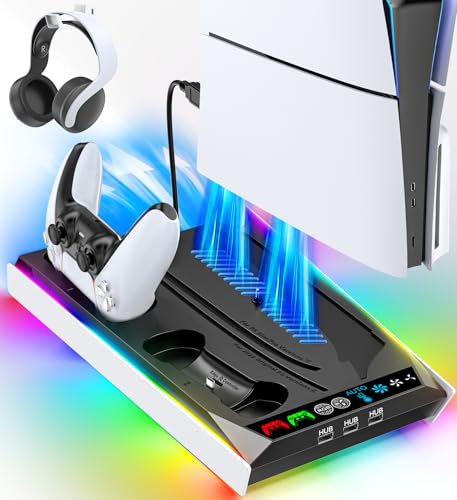
A typical multi-functional vertical cooling stand changes this dynamic by acting as a heavy-duty utility base. When you purchase one of these systems—usually priced between $30 and $38—you are not just buying a fan. You are acquiring a integrated system that typically includes:
- A Weighted Vertical Mount: A secure plastic and metal base (usually measuring around 9.5 by 10.5 inches) that screws directly into the bottom of your PS5, PS5 Slim, or PS5 Pro, preventing accidental tip-overs from pets or vacuum cleaners.
- Dual Controller Charging Docks: Dedicated slots equipped with spring-loaded pogo pins or USB-C adapters that charge two DualSense controllers simultaneously in about 2.5 to 3 hours, drawing power directly from the console’s rear USB ports.
- Auxiliary Cooling Fans: Small, high-RPM centrifugal or axial fans (often running at 3,000 to 5,000 RPM) built into the base. These fans draw hot air away from the bottom of the console or assist the internal intake, controlled by manual or automatic 3-level switches.
- Accessory Storage: Built-in racks for 10 to 15 physical game cases, dedicated slots for media remotes, and detachable hangers for bulky over-ear gaming headsets.
- Visual Indicators & Lighting: LED charging indicators (turning from red to blue or green when fully charged) and customizable RGB accent lighting to match your living room aesthetic.
Pros
- Unmatched Space Efficiency: The primary benefit of these stands is clutter reduction. Instead of having a console, a separate dual-controller charging cradle, a headset stand, and game cases scattered across your TV stand, everything is consolidated into a single 10-inch footprint. This is a massive win for living room aesthetics.
- Reliable Controller Power Management: Good stands feature smart charging chips that pull a modest 5V/2A of power. They automatically shut off power to your DualSense controllers once they reach 100% capacity, protecting their internal lithium-ion batteries from overcharging degradation.
- Enhanced Physical Stability: The original PS5 stands are notoriously finicky to clip on. A screw-in third-party vertical stand provides a rigid, wide structural foundation that lowers the center of gravity of your expensive console.
- Convenient Airflow Assistance: While they do not dramatically lower internal CPU temperatures, the extra fans help circulate stagnant air out of the bottom cavity of your media center, preventing heat pockets from forming around the console’s main intake vents.
Cons
- Ambient Fan Noise: Small cooling fans (typically 30mm to 40mm in diameter) must spin at high speeds to move air. This can produce a noticeable high-pitched hum or whine (ranging from 35 to 45 decibels) that can be distracting during quiet gameplay moments.
- USB Port Dependency: These stands must draw power from your console to operate their fans and chargers. This means occupying one or both of your rear high-speed USB-A ports, leaving less room for external SSDs, VR headsets, or wired audio transmitters.
- Potential for Accelerated Dust Buildup: Active fans pulling or pushing air at the base of the console can act as a vacuum cleaner for your media shelf. If you do not dust your entertainment center regularly, these stands can accelerate the accumulation of lint and pet hair inside your PS5’s dust catchers.
- Rest Mode Power Requirements: For the controllers to charge while you are not playing, you must configure your PS5 system settings to supply power to its USB ports during Rest Mode. If this setting is off, the stand’s charging docks are rendered useless when the console is shut down.
Who Should Buy It
You should buy a vertical cooling stand if you live in a compact apartment, use a narrow media console, or share your gaming space with family members or roommates. It is an exceptional purchase for households with multiple gamers who constantly juggle dead controller batteries. If you appreciate clean cable management and want your entertainment center looking organized and streamlined as we head toward the highly anticipated game releases of 2026, the aesthetic and organizational benefits easily justify the $35 price tag.
Who Should Skip It
You should skip these stands if you prefer to lay your PS5 horizontally, already own a dedicated first-party controller charger, or are highly sensitive to fan noise. Furthermore, if your console is currently shutting down due to overheating, do not buy a cooling stand expecting a cure; you likely need to clean out your console’s internal heatsink with a can of compressed air or move the machine out of a fully enclosed cabinet into an open-air environment.
Cheaper Alternatives
If you do not need all the bells and whistles of a complete cooling and charging station, there are more affordable, minimalist ways to support and organize your console setup.
| Option | Estimated Cost | Key Trade-off |
|---|---|---|
| OEM Vertical Stand | $25 – $30 | Provides excellent physical stability and a sleek look, but offers zero cooling assistance, no controller charging, and no accessory storage. |
| Minimalist Horizontal Feet | $10 – $15 | Simple plastic clips that raise the console slightly off the shelf horizontally to improve passive airflow. It takes up a massive horizontal footprint and lacks any utility features. |
| Standalone Controller Charging Dock | $15 – $25 | Excellent, reliable charging for two controllers using a wall outlet instead of console USB power. However, it does nothing to secure or organize the actual PS5 console. |
FAQ
Does the PS5 actually need extra cooling?
Under normal operating conditions in an open-air space, no. Sony designed the PS5 to run safely within its thermal limits using its built-in internal fan. However, if your room lacks air conditioning or your console is placed in a semi-enclosed entertainment center, a helper stand can assist in dispersing warm ambient air away from the console’s body.
Can a third-party cooling stand damage my PS5?
As long as you buy a reputable stand that draws standard USB power (5V/2A) and do not use uncertified, high-voltage wall adapters to power it, there is no risk of electrical damage. Always ensure the stand is installed securely using the provided mounting screw to prevent physical tipping.
Do these stands work with all versions of the PS5?
Most modern stands on the market are designed with modular plastic inserts or sliding brackets. This allows them to snugly fit the original bulky PS5 (both Disc and Digital editions), the revised PS5 Slim, and the high-performance PS5 Pro.
How much electricity does a vertical cooling stand use?
These stands are highly energy-efficient. They typically draw between 5 to 10 watts of power when actively charging two controllers and running the fans on high. When the controllers are fully charged and the fans are turned off, the standby power draw is virtually zero.
Related guides
- Best Free MMOs on Steam: Subscription Limits, Pay-to-Win and Time Cost (2026)
- Best Free Horror Games on Steam: How to Pick One That Fits Your PC and Your Nerves (2026)
- Black Frame Insertion vs VRR: Which Smoothness Feature Should You Use?
- Best Webcams for Streaming: 11 Listings Compared by Resolution, Focus and Light (2026)








