
The living room is the heart of the modern home, a carefully curated space where mid-century modern credenzas, plush sectional sofas, and state-of-the-art entertainment centers coexist. But for households that love gaming, the sleek lines of a minimalist media console are often interrupted by the stark white, 280-gram silhouette of the PlayStation 5 DualSense controller. While Sony’s controller is a masterpiece of industrial design, its smooth plastic shell can quickly become slippery during intense gaming sessions, leading to accidental drops onto hardwood floors or glass coffee tables.
When looking to improve your grip and protect your gear, you face a classic design and utility dilemma: controller grip tape vs silicone skin ps5 controller. One side of this debate favors a low-profile, semi-permanent adhesive that preserves the original ergonomic shape of the controller. The other side champions a soft, thick, removable sleeve that wraps the entire device in shock-absorbing protection. Choosing the right accessory isn’t just about gaming performance; it’s about how your tech integrates into your home, how easy it is to clean, and how well it protects your furniture from accidental damage.
As an Amazon Associate we earn from qualifying purchases at no extra cost to you.



Our Top Picks



Top 3 picks at a glance
Quick Verdict
For a sleek, minimalist home where controllers are stored neatly on official vertical charging docks, controller grip tape is the superior choice. It adds virtually zero bulk (usually measuring under 0.5 mm in thickness) and preserves the original aesthetic of your living room setup. However, if you have a busy household with kids, pets, or hard tile and wood flooring, a silicone skin is the clear winner. It offers robust drop protection, cushions your furniture from impacts, and can be easily slipped off and washed in the sink to maintain a hygienic living space.
Side by Side
To help you visualize how these two accessory types compare across key home and performance metrics, here is a direct breakdown:
| Feature | Controller Grip Tape | Silicone Skin |
|---|---|---|
| Comfort & Feel | Textured, high-traction, firm grip | Soft, cushioned, slightly bulky feel |
| Durability | 6 to 12 months (edges may fray or peel) | 2 to 3 years (silicone resists tearing) |
| Price Range | $10 to $15 | $15 to $25 |
| Maintenance | Wipe down with a damp cloth; cannot be submerged | Fully removable and washable with soap and water |
| Charging Dock Compatibility | Excellent; fits perfectly in standard docks | Poor; often requires removal to fit charging pins |
| Look & Aesthetic | Minimalist, subtle, stealthy | Bold, customizable, covers original design |
| Furniture Protection | Minimal (protects controller shell only) | High (cushions drops on tables and floors) |
| Best For | Minimalists, competitive gamers, dock users | Families, multi-user households, casual gamers |
Where Controller Grip Tape Wins
Controller grip tape is the darling of the minimalist design world. Because it is applied directly to specific contact points on the controller handles, it does not alter the iconic shape of the DualSense. If you have spent time and money styling a clean, clutter-free media room, grip tape keeps your controllers looking professional and unobtrusive.
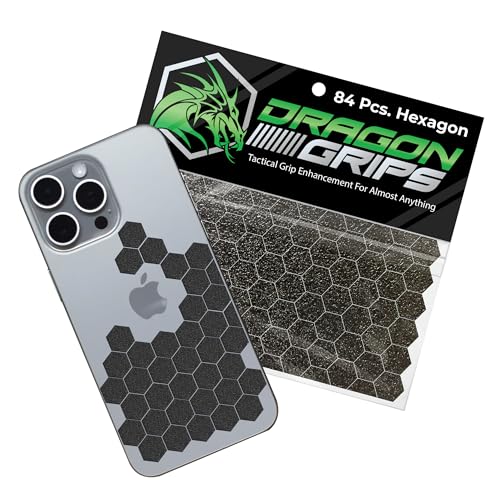
The primary advantage of grip tape is its incredibly thin profile. Products like the Yorwe Rubber Grip Tape, Ultra-Thin for Handles & Tools (1In x 10Ft, Black) (around $10) allow you to cut custom shapes to fit only the areas where your palms make contact, leaving the rest of the controller’s beautiful white chassis exposed. If you prefer a pre-cut, modular approach, the Dragon Grips Black Rubber Grip Tape, 84pc Hexagon Grip Stickers (around $9) offers small, low-profile hexagons that can be arranged in custom patterns. This level of customization ensures that the controller still fits perfectly into official Sony charging docks or tight vertical storage slots without any friction or connectivity issues.
Furthermore, grip tape offers a tactile, high-traction surface that does not slip, even under intense pressure. Because it uses a specialized adhesive, it bonds tightly to the plastic shell, meaning there is no loose material sliding around while you play. For those who value the exact ergonomic weight and balance engineered by Sony, grip tape provides the necessary traction without adding bulk or warmth to your hands.
Where Silicone Skin Ps5 Controller Wins
If grip tape is about precision and minimalism, the silicone skin is about comprehensive protection, comfort, and ease of use. A silicone skin acts as a protective bumper for your controller, wrapping around the entire faceplate and handles. In a home with hard surfaces—such as concrete floors, hardwood, or glass-topped coffee tables—dropping a heavy controller can result in chipped wood, cracked glass, or a broken controller bumper. A thick silicone sleeve absorbs the energy of these drops, protecting both your gaming gear and your furniture.
Hygiene is another area where silicone skins shine. In a shared family room, controllers are passed between multiple hands, often collecting oils, sweat, and snack crumbs. A skin like the SIKEMAY Anti-Slip PS5 Controller Skin, Soft Thicken Non-Slip Studded Silicone Gel Grip Protective Cover Case for PlayStation 5 Controller Grip, 2 Pack with 8 x Thumb Grip Caps (around $24) can be peeled off in seconds, washed under warm water with dish soap, dried, and slipped back on. You cannot do this with adhesive grip tape, which degrades when exposed to heavy moisture.
Silicone skins also offer a fun way to inject personality into your home entertainment setup. Instead of the standard white controller, you can opt for themed designs that match your room’s decor or your favorite games. For example, the GeekShare G.S.TAC Tactical for PS5 Controller Skin Set, Anti-Slip Silicone Protective Cover Skin Case for PS5 Wireless Controller with 2 Thumb Grip Caps and 2 Stickers – for Black Myth: Wukong (around $20) provides a stylized, tactical look that transforms your controller into a decorative display piece when resting on your media console.
Cost Over 5 Years
When budgeting for your home theater or gaming setup, it is helpful to look at the long-term cost of ownership. While both accessories are relatively inexpensive upfront, their lifespans differ significantly, leading to different cumulative costs over a five-year period.
Grip tape relies on pressure-sensitive adhesives. Over time, the oils from your hands, friction, and environmental dust will cause the edges of the tape to lift or fray. On average, heavy gamers need to replace their grip tape every 12 months to maintain a fresh, clean feel. If you purchase a roll of tape or a pack of stickers for around $10 once a year, your total expenditure over five years will be approximately $50. This also requires a small investment of time to clean off old adhesive residue and apply the new tape precisely.
A high-quality silicone skin, on the other hand, is highly durable. Silicone does not lose its grippiness over time, and it does not rely on adhesives. A single silicone skin can easily last two to three years before the material begins to stretch out or lose its snug fit. If you purchase a premium two-pack or a stylized skin set for around $20 to $25, you will likely only need to replace it once over a five-year span. This brings your five-year total to roughly $40 to $50, making the long-term cost of both options nearly identical.
Which One for Your Home
Small Apartment
In a compact apartment where space is at a premium, every item must be highly efficient. You likely use vertical wall mounts or a compact dual-charging stand next to your television to keep surfaces clear of clutter. In this scenario, controller grip tape is the ideal choice. Because it adds no physical bulk, your controller will slide effortlessly into vertical docks and storage pockets, keeping your entertainment center organized and sleek.
Family with Kids and Pets
If your living room doubles as a playroom, durability and cleanliness are your top priorities. Controllers will inevitably be dropped on the floor, stepped on, or covered in sticky fingerprints. A silicone skin is the undisputed champion for families. It provides excellent shock absorption to protect your floors and controllers from high-impact drops, and it can be removed instantly for a thorough cleaning, keeping germs and grime out of your living space.
Rental Home
Living in a rental property means protecting the landlord’s fixtures and furniture to ensure you get your security deposit back. If your rental features delicate glass tables, polished wood built-ins, or easily scratched laminate flooring, a silicone skin is highly recommended. The soft, rubbery exterior of the skin acts as a protective bumper, ensuring that if a controller is knocked off a table, it won’t leave a nasty dent or scratch on the landlord’s property.
Long-Term Home
For those who own their home and have meticulously designed their living space, aesthetics and seamless integration are key. Looking ahead to smart home trends in 2026, the focus is on hiding tech or making it blend beautifully with natural textures like oak, marble, and linen. Bulky, brightly colored silicone skins can make a sophisticated living room look cluttered. In a beautifully styled, permanent home, subtle controller grip tape keeps your gaming setup looking mature, high-end, and integrated into your overall interior design.
FAQ
Does grip tape leave a sticky residue on the PS5 controller when removed?
Most high-quality grip tapes use residue-free adhesives designed to pull away cleanly. However, if the tape has been applied for over a year, some minor sticky residue may remain. This can be easily cleaned off in under two minutes using a microfiber cloth and a small drop of isopropyl alcohol (70% concentration or higher).
Can I charge my PS5 controller on the official Sony charging dock with a silicone skin on?
Generally, no. The official Sony DualSense charging dock requires direct, flush contact with the metal pins on the bottom of the controller. Because even thin silicone skins add 1 to 2 mm of thickness around the port, they usually prevent the controller from seating correctly in the dock. You will either need to charge via a USB-C cable or remove the skin before docking.
How do you clean controller grip tape vs a silicone skin?
To clean silicone skins, simply peel them off the controller and wash them with warm, soapy water. Let them air dry completely before putting them back on. For grip tape, do not submerge the controller or get the adhesive wet. Instead, gently wipe the textured surface of the tape with a slightly damp microfiber cloth or an alcohol prep pad to dissolve hand oils.
Which option is better for players with extremely sweaty hands?
Controller grip tape is generally superior for managing heavy sweat. The rubberized or textured polymer material used in grip tape is designed to wick moisture away from the surface, maintaining high traction. While some silicone skins feature studded textures to help with airflow, smooth silicone can occasionally feel slightly slippery or greasy if hand sweat builds up during long sessions.
Related guides
- Best Free MMOs on Steam: Subscription Limits, Pay-to-Win and Time Cost (2026)
- Best Free Horror Games on Steam: How to Pick One That Fits Your PC and Your Nerves (2026)
- Black Frame Insertion vs VRR: Which Smoothness Feature Should You Use?
- Best Webcams for Streaming: 11 Listings Compared by Resolution, Focus and Light (2026)








