
Our Short List of 3

- Best for: Anyone whose nails catch on square keycap corners and who types across several devices.
- Round, low-profile keys with scissor switches
- Bluetooth connection to up to 3 devices with Easy-Switch keys
- Logitech FLOW cross-computer control
- Works with Windows, Mac, Chrome OS, Android and iPadOS
- Best for: Writers and office users with moderate nail length who type quickly and want standard key spacing.
- Spherically dished, low-profile keys
- Backlit keys with Bluetooth connection to up to 3 devices
- USB-C rechargeable
- Metal build, compact minimalist layout

- Best for: Very long nails, and anyone who types in cafés or on trains with a tablet.
- Ultra-slim flat chiclet keys, zinc-alloy body
- 7-colour backlight with adjustable brightness
- Bluetooth 3.0, works with iOS, iPad, Android, Windows and macOS
- Built-in rechargeable battery, maker-rated for up to 6 months per charge
All 3 Picks at a Glance
| Product | Specs | Action |
|---|---|---|
| Logitech K380 Multi-Device Bluetooth Keyboard |
| Check price on Amazon |
| Logitech MX Keys Mini Wireless Keyboard |
| Check price on Amazon |
| Arteck HB030B Ultra-Slim Bluetooth Keyboard |
| Check price on Amazon |
Typing with long nails changes what a good keyboard is. Tall, sculpted keycaps catch nail tips, deep key travel makes every press a small negotiation, and tightly packed keys turn one intended letter into two. The boards that work are the opposite of gaming hardware: low-profile keys with short travel, flat or gently dished keycap tops that let a fingertip pad land cleanly, and enough space between keys that a nail sliding off one cap does not fire the neighbour.
This guide is for people who type all day with longer natural or acrylic nails — office workers, writers, students and anyone tired of backspacing through nail-related typos. The three picks were chosen on the physical traits named in their Amazon listings: key height, keycap shape, key spacing and travel style. None of them is marketed for nails, because almost nothing is; instead, each listing states the low, flat or round key design that makes the difference in practice.
Our Top Picks
Top 3 picks at a glance
Quick Picks
As an Amazon Associate we earn from qualifying purchases.
| Product | Best for | Key spec from title |
|---|---|---|
| Logitech K380 Multi-Device | Round keys that forgive sliding fingertips | Bluetooth keyboard with Easy-Switch for 3 devices |
| Logitech MX Keys Mini | Dished, low-profile keys for fast typing | Minimalist wireless illuminated keyboard, backlit |
| Arteck HB030B | Flattest, lightest typing on the go | Ultra light slim portable Bluetooth keyboard |
How to Choose
Keycap shape matters more than switch type
With long nails, your fingertip lands on a key at an angle, and the cap’s top surface decides whether that press registers cleanly. Round keycaps, like those on the K380 below, have no sharp corners to catch a nail edge and let the finger roll into the centre of the key. Spherically dished caps, used on the MX Keys Mini, cradle the fingertip pad and guide it to the middle of the key. Tall, cylindrical gaming keycaps are the worst shape here: their height gives nails leverage to slip sideways. When a listing mentions round, dished or low-profile keys, that is the line to look for.
Short travel and low profile reduce nail strikes
Every millimetre of key travel is distance your nail travels before the press registers, and tall boards force your fingers to hover higher. Low-profile keyboards keep the whole hand flatter, so nails point forward rather than down into the keys. Scissor-switch boards, which all three picks here use in some form, combine that flat profile with short, stable travel and a definite bottom-out that tells you the press counted. Deep mechanical travel is not impossible with long nails, but it demands slower, more deliberate typing; for daily work, flat and short is simply easier.
Spacing between keys prevents double presses
Most nail typos are not wrong keys but extra keys: a nail brushes the cap beside the target and both fire. Compact boards vary a lot here. Some shrink the keys themselves, which makes things worse; better compact boards keep full-size key tops and trim the frame and function row instead. The listings below describe compact layouts, so check the stated dimensions against your current keyboard. If your hands are larger, the full-width spacing of a board like the MX Keys Mini will feel calmer than a mini board, even though both are low profile.
Consider your nails’ length honestly, and your desk setup
Very long nails change the ranking. With extreme lengths, the flattest board wins, because even a dished cap can trap a nail that arrives almost horizontally — that is the Arteck’s territory. Moderate lengths do well on dished or round caps. Also think about where you type: all three picks are wireless, so you can pull the board closer and angle it, which helps more than people expect. Finally, remember that no keyboard fixes technique entirely; these boards reduce the friction, and most users find their error rate drops within the first week as their hands relearn the flatter landing.
The 3 Best Options
Logitech K380 Multi-Device Bluetooth Keyboard
- Best for: Anyone whose nails catch on square keycap corners and who types across several devices.
- Round, low-profile keys with scissor switches
- Bluetooth connection to up to 3 devices with Easy-Switch keys
- Logitech FLOW cross-computer control
- Works with Windows, Mac, Chrome OS, Android and iPadOS
Anyone whose nails catch on square keycap corners and who types across several devices.
The compact layout has no number pad, and the round keys take a few days to feel normal if you are used to square caps.
The K380 is the classic recommendation for long nails, and the reason is visible in any photo of it: the keys are round. Its listing describes a compact Bluetooth keyboard that pairs with up to three devices and switches between them with Easy-Switch keys, with Logitech FLOW cross-computer control on this model. The circular, low-profile caps give nails nothing to catch on, and the scissor keys underneath keep travel short and quiet. It runs on two AAA batteries, connects to Windows, Mac, Chrome OS, Android and iPadOS devices, and its small footprint leaves room to angle it on the desk however your hands prefer.
Logitech MX Keys Mini Wireless Keyboard
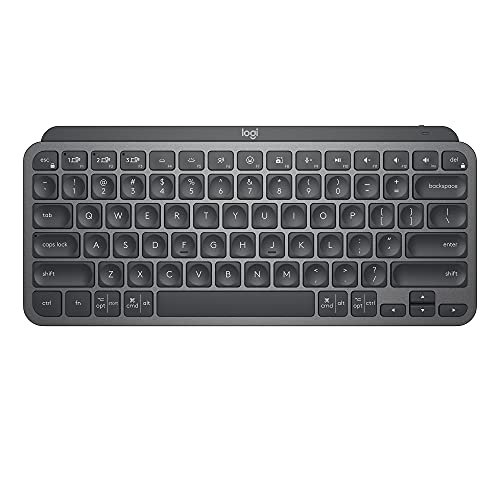
- Best for: Writers and office users with moderate nail length who type quickly and want standard key spacing.
- Spherically dished, low-profile keys
- Backlit keys with Bluetooth connection to up to 3 devices
- USB-C rechargeable
- Metal build, compact minimalist layout
Writers and office users with moderate nail length who type quickly and want standard key spacing.
There is no number pad and no USB receiver in the box for this model, so older desktops without Bluetooth need another solution.
The MX Keys Mini takes the opposite approach to the same problem: instead of round caps, its keys are spherically dished, shaped to match the fingertip so the pad of the finger settles into the key even when a nail extends past it. The listing describes a minimalist wireless illuminated keyboard with backlit keys, Bluetooth pairing for up to three devices, USB-C charging and a metal build, compatible with macOS, iOS, Windows, Linux and Android. The low-profile scissor keys are backlit, which helps in dim rooms, and the standard-width key spacing keeps fast typing accurate. It is the most work-focused board here.
Arteck HB030B Ultra-Slim Bluetooth Keyboard
- Best for: Very long nails, and anyone who types in cafés or on trains with a tablet.
- Ultra-slim flat chiclet keys, zinc-alloy body
- 7-colour backlight with adjustable brightness
- Bluetooth 3.0, works with iOS, iPad, Android, Windows and macOS
- Built-in rechargeable battery, maker-rated for up to 6 months per charge
Very long nails, and anyone who types in cafés or on trains with a tablet.
The compact layout is tighter than a desktop board, and Bluetooth 3.0 is an older standard than the Logitech picks use.
The HB030B is the extreme option: an ultra-light, ultra-slim board just 0.24 inches thick, with flat chiclet keys that sit almost flush with the zinc-alloy body. When nails are very long, this near-flat surface is the easiest of the three to type on, because there is barely a key edge for a nail to strike. The listing states a seven-colour backlight with adjustable brightness, Bluetooth 3.0 connection to iOS, Android, Windows and macOS devices, and a built-in rechargeable battery rated by the maker for months between charges. At about 0.37 lb it is also the travel pick of the three.
Which One Fits Your Situation
Your nails are long and you type at a desk all day
Choose the MX Keys Mini if your length is moderate, or the K380 if your nails regularly catch on keycap corners. Both keep standard typing posture possible without hovering, and both pair with several devices. The dished caps of the Mini reward fast typists; the round caps of the K380 are more forgiving of angled, nail-first landings.
Your nails are very long or freshly done acrylics
Choose the Arteck HB030B. Its keys sit almost flat against the body, so there is very little for a long nail to collide with, and the light, slim board can be angled or pulled close to change your hand position. It is also the cheapest style of board to try if you are experimenting with what works for your nails.
You type on a tablet and phone as much as a computer
Choose the K380. Easy-Switch moves between three paired devices from one key press, the round keys suit the slower, more deliberate typing people do on the go, and AAA batteries mean it is always ready. The Arteck is lighter for travel, but the Logitech is the better multi-device hub at a desk.
You work in a dim room and hate squinting at keys
Choose the MX Keys Mini or the Arteck HB030B, both of which are backlit according to their listings. The Mini’s backlight is the more refined option for a permanent desk, while the Arteck’s seven-colour backlight is a bonus on a travel board. The K380 has no backlight, so it suits lit rooms only.
Common Mistakes
- Buying a tall mechanical gaming keyboard for its looks, then fighting its high sculpted keycaps with every sentence.
- Assuming a smaller keyboard is automatically better for nails, when shrunken key tops make double presses more likely, not less.
- Judging by switch type alone and ignoring keycap shape, when the cap’s top surface is what your nail actually meets.
- Typing with the keyboard flat against the desk’s edge; pulling a wireless board closer and angling it often fixes half the problem for free.
- Giving up after one day — the flatter landing these boards need usually takes most of a week to become automatic.
Frequently Asked Questions
What keyboard shape is best for long nails?
Low-profile boards with round or spherically dished keycaps work best, because the finger pad can land and roll into the key without the nail striking a tall cap edge. All three picks in this guide follow that pattern. Tall, sculpted keycaps designed for gaming are the shape to avoid, whatever switch sits underneath them.
Can I type on a mechanical keyboard with long nails?
You can, especially on low-profile mechanical boards, but the longer travel and taller caps make it slower and more error-prone than the scissor boards here. Most people with long nails who try both end up preferring short-travel boards for work and keeping any mechanical board for gaming sessions where speed of typing does not matter.
Do round keys really make a difference?
Yes, for a specific reason: a round cap has no corners, and corners are what catch a nail sliding off-centre. The K380’s round keys let a slightly mis-aimed press still land as one clean input. The trade-off is a short adjustment period, because your fingers lose the corner references they unconsciously use on square keys.
Will a compact keyboard slow down my typing?
Only briefly, and only if the keys themselves are shrunk. The boards here keep usable key sizes by trimming the frame, the number pad or the function row instead. Expect a few days of adjustment, then normal speed — often with fewer errors than before, because the flatter profile suits nail-first typing better than your old board did.
Related guides
More from Amazon
Programs that pair well with the guide above. Offers and eligibility are set by Amazon and may change.
Free shipping on eligible items, Prime Video and more. Eligible new members can start with a free trial.
Start a Prime free trialAd-free music streaming. Eligible new subscribers can start with a free trial.
Try Music Unlimited freeA Prime membership for ages 18-24 with a trial period. Eligibility is set by Amazon.
See Prime for Young AdultsAudiobooks and podcasts to listen to on the go. Eligible new members can start with a free trial.
Try Audible freeAs an Amazon Associate we earn from qualifying purchases.









