
Our Short List of 3
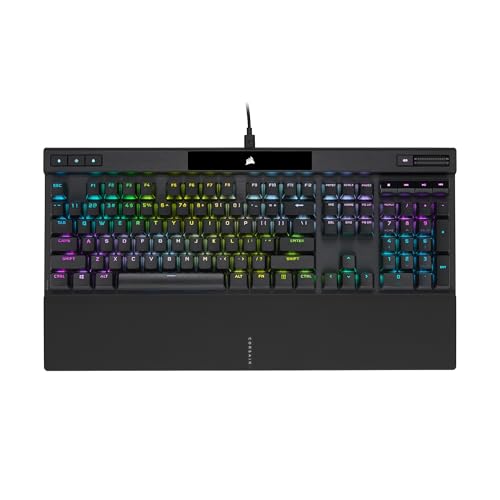
- Best for: Players who want a proven full-size mechanical board with fast polling and durable keycaps.
- Cherry MX Red linear mechanical switches
- Per-key RGB backlighting via Corsair iCUE
- 8,000Hz hyper-polling
- PBT double-shot PRO keycaps
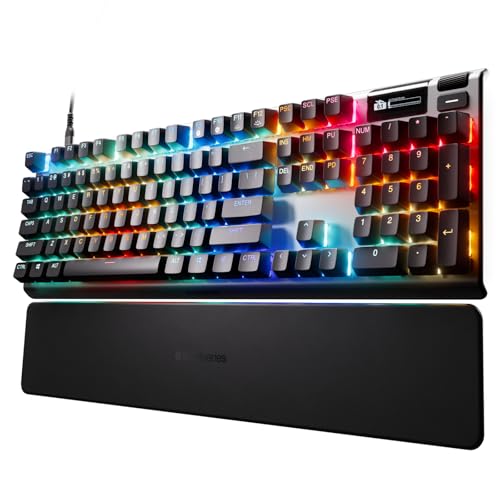
- Best for: Competitive players who want to tune actuation depth and use rapid-trigger behaviour.
- OmniPoint 3.0 HyperMagnetic switches with adjustable actuation
- Rapid Trigger, Rapid Tap (SOCD) and Protection Mode
- OLED smart display
- Per-key RGB lighting

- Best for: MMO, MOBA and streaming players who bind macros and adjust volume constantly.
- Razer Green mechanical switches, tactile and clicky
- Switch lifespan rated at 100 million keystrokes
- 6 dedicated macro keys
- Multi-function roller and media keys
All 3 Picks at a Glance
| Product | Specs | Action |
|---|---|---|
| Corsair K70 RGB PRO Mechanical Gaming Keyboard |
| Check price on Amazon |
| SteelSeries Apex Pro Gen 3 Gaming Keyboard |
| Check price on Amazon |
| Razer BlackWidow V4 X Mechanical Gaming Keyboard |
| Check price on Amazon |
A mechanical RGB keyboard is really two purchases in one: a set of switches you will press millions of times, and a lighting system you will look at every evening. Listings blur the two together, leading with colour and burying the switch details that decide how the board actually feels. The useful way to shop is to settle the switch question first — linear, tactile or adjustable — and then check that the RGB is genuinely per-key rather than a few glowing zones.
The three boards below are for three different players. One is a traditional full-size board built around Cherry MX switches and fast polling. One replaces fixed switches with magnetic ones whose actuation point you can tune per key. The third adds a column of macro keys and a media roller for players who bind everything. Every pick is a mechanical board with RGB named in its Amazon listing, and each section uses only the specifications that listing states.
Our Top Picks
Top 3 picks at a glance
Quick Picks
As an Amazon Associate we earn from qualifying purchases.
| Product | Best for | Key spec from title |
|---|---|---|
| Corsair K70 RGB PRO | Classic full-size mechanical feel | CHERRY MX RGB Red switches, 8,000Hz hyper-polling |
| SteelSeries Apex Pro Gen 3 | Tunable, fastest key response | OmniPoint 3.0 HyperMagnetic switches, adjustable actuation |
| Razer BlackWidow V4 X | Macros and media control | Green Switches, 6 macro keys, Chroma RGB |
How to Choose
Pick your switch behaviour before anything else
Mechanical switches fall into three families, and the listing names which one each board uses. Linear switches, like the Cherry MX Red in the Corsair board here, travel straight down with no bump, which suits rapid repeated presses in games. Tactile and clicky switches, like the Razer Green switches in the BlackWidow V4 X, add a bump and a click you can hear. The third option is the adjustable magnetic switch in the Apex Pro Gen 3, where the actuation point itself can be set per key. There is no best family — only the one that matches your games and whether anyone nearby has to listen to you play.
Understand what per-key RGB actually buys you
All three boards here light each key individually, which is the full version of RGB rather than the zoned lighting found on cheaper boards. Per-key lighting lets software highlight specific keys for a game, react to in-game events, or simply give the WASD cluster its own colour. It also means the lighting is configured per key in the maker’s software — Corsair iCUE, SteelSeries GG or Razer Synapse — so expect to install one of those programs to get the most from the board. If you never open lighting software, a simpler board would serve you just as well, and this level of RGB would be wasted money.
Weigh polling rate and extra controls honestly
Two numbers and features get heavy marketing on mechanical boards. Polling rate describes how often the board reports to the PC: the K70 RGB PRO lists 8,000Hz hyper-polling, far above the standard 1,000Hz, which matters most to competitive players chasing the smallest input delay. Extra controls are the other differentiator — the BlackWidow’s six macro keys and multi-function roller, or the Apex Pro’s OLED display for settings. Decide which you will touch daily. A media roller gets used constantly; a macro column only earns its desk space if you actually bind macros.
Check the keycaps and the layout size
Keycap material decides how a board looks after a year of use. The Corsair and SteelSeries picks use PBT double-shot keycaps, which resist shine and keep legends readable under RGB light. The Razer pick uses doubleshot ABS keycaps, which feel smooth but can develop shine faster. Layout matters too: all three boards here are full-size or near it, keeping the number pad, while compact players should look at tenkeyless versions instead. Finally, confirm the listing’s model number and switch variant before ordering, because each of these families sells in several switch types under near-identical titles.
The 3 Best Options
Corsair K70 RGB PRO Mechanical Gaming Keyboard
- Best for: Players who want a proven full-size mechanical board with fast polling and durable keycaps.
- Cherry MX Red linear mechanical switches
- Per-key RGB backlighting via Corsair iCUE
- 8,000Hz hyper-polling
- PBT double-shot PRO keycaps
Players who want a proven full-size mechanical board with fast polling and durable keycaps.
This listing is the Cherry MX Red linear variant; the same model sells with Speed and Brown switches under different listings, so confirm the switch before ordering.
The K70 RGB PRO is the straightforward enthusiast choice: a full-size wired board built on Cherry MX RGB Red linear switches, with per-key RGB backlighting driven through iCUE. Its listing highlights 8,000Hz hyper-polling for very low input latency, PBT double-shot PRO keycaps that let the lighting through without the legends wearing away, and a soft-touch palm rest in the box. Corsair also lists NKRO with anti-ghosting, a tournament switch that locks down distractions, and SOCD handling among its gaming features. If you want the classic mechanical experience with modern speed, this is the board in this guide that delivers it without experimental switch technology.
SteelSeries Apex Pro Gen 3 Gaming Keyboard
- Best for: Competitive players who want to tune actuation depth and use rapid-trigger behaviour.
- OmniPoint 3.0 HyperMagnetic switches with adjustable actuation
- Rapid Trigger, Rapid Tap (SOCD) and Protection Mode
- OLED smart display
- Per-key RGB lighting
Competitive players who want to tune actuation depth and use rapid-trigger behaviour.
The adjustable switches only show their advantage if you spend time configuring presets; out of the box it behaves like an ordinary fast board.
The Apex Pro Gen 3 replaces ordinary switches with OmniPoint 3.0 HyperMagnetic switches, and its listing leads with what that enables: adjustable actuation per key, Rapid Trigger behaviour that resets keys as soon as they start to release, and features named Rapid Tap and Protection Mode for competitive play. An OLED display on the board shows settings and system information, and the per-key RGB lighting pairs with PBT keycaps. It connects over USB-C and includes game-ready presets through SteelSeries software. This is the pick for players who tune their setup and want key response they can shape rather than accept.
Razer BlackWidow V4 X Mechanical Gaming Keyboard
- Best for: MMO, MOBA and streaming players who bind macros and adjust volume constantly.
- Razer Green mechanical switches, tactile and clicky
- Switch lifespan rated at 100 million keystrokes
- 6 dedicated macro keys
- Multi-function roller and media keys
MMO, MOBA and streaming players who bind macros and adjust volume constantly.
The Green switches are deliberately clicky and audible; they are a poor choice for a shared room or open office.
The BlackWidow V4 X is the control-heavy option. Its listing specifies Razer Green mechanical switches — tactile and clicky, rated for a 100 million keystroke lifespan — plus six dedicated macro keys down the left side and a multi-function roller with media keys along the top. Lighting is Razer Chroma RGB with per-key customisation across 16.8 million colours, and the keycaps are doubleshot ABS. Razer’s Snap Tap feature is also named on the listing for competitive direction changes. Choose this board if your games and streaming setup benefit from extra physical controls more than from switch experimentation.
Which One Fits Your Situation
You play competitive shooters and want every edge
Start with the Apex Pro Gen 3. Adjustable actuation and Rapid Trigger change how movement keys behave in a way fixed switches cannot, and the OLED makes it easy to swap presets between games. If you would rather not configure anything, the K70 RGB PRO’s 8,000Hz polling gives you speed with zero setup instead.
You type and game on the same desk all day
The K70 RGB PRO fits best. Its linear Cherry MX Red switches are easy to live with across documents and games, the PBT keycaps shrug off daily wear, and the palm rest supports long sessions. The full-size layout keeps the number pad that spreadsheet work demands, which the more specialised boards also keep but with louder or more complex switch behaviour.
You run macros, scenes or stream controls from the keyboard
Take the BlackWidow V4 X. Six macro keys plus a roller and media keys put your bindings and volume under your hands, and Chroma lighting can colour-code the macro column so you can find it at a glance. Accept the clicky Green switches as part of the deal, or look at the same family’s quieter switch variant under its own listing.
You are upgrading from a membrane board for the first time
Any of the three is a large step up, but the K70 RGB PRO is the least surprising: standard layout, standard switches, lighting controlled from one program. The Apex Pro’s adjustable switches reward tinkerers, and the BlackWidow’s extra column of keys takes a week to stop hitting by accident, so first-time mechanical buyers usually settle fastest on the Corsair.
Common Mistakes
- Choosing a clicky switch board for a shared room, then discovering the noise is the feature you notice most.
- Paying for adjustable actuation or 8,000Hz polling and never changing a setting or playing a game that benefits from it.
- Ordering the wrong switch variant because the same keyboard family lists several switches under almost identical titles and model names.
- Assuming RGB software is optional, when per-key effects, macros and presets on these boards all live inside the maker’s program.
- Ignoring keycap material, then watching ABS legends shine and fade while a PBT board bought the same week still looks new.
Frequently Asked Questions
Are mechanical RGB keyboards better for gaming than membrane ones?
They offer more consistent actuation, much longer switch lifespans and per-key rollover that membrane boards rarely match, which is why competitive players prefer them. The RGB itself adds nothing to performance; it is the switches, polling and keycap quality in this guide that change how the boards play. A quiet membrane board can still suit casual play better.
What is the difference between linear, tactile and clicky switches?
Linear switches press straight down smoothly, tactile switches add a small bump you can feel at the actuation point, and clicky switches add that bump plus an audible click. The K70 RGB PRO here is linear, the BlackWidow V4 X is tactile and clicky, and the Apex Pro Gen 3 uses magnetic switches whose actuation point you set yourself.
Do I need the maker’s software to use the RGB lighting?
Basic lighting effects usually work without it, but per-key customisation, saved profiles, macros and features like Rapid Trigger are configured in the software named on each listing — iCUE for Corsair, GG for SteelSeries and Synapse for Razer. Budget a few minutes to install one program per brand you own.
Will these keyboards work on a console or a Mac?
The listings aim these boards at PC gaming, and that is where their software and full feature sets live. A keyboard will generally type on other USB devices, but lighting control, macros and adjustable actuation should be treated as PC-only features. Mac and console players should check the specific listing’s compatibility lines before relying on anything beyond basic typing.
Related guides
More from Amazon
Programs that pair well with the guide above. Offers and eligibility are set by Amazon and may change.
Free shipping on eligible items, Prime Video and more. Eligible new members can start with a free trial.
Start a Prime free trialAd-free music streaming. Eligible new subscribers can start with a free trial.
Try Music Unlimited freeA Prime membership for ages 18-24 with a trial period. Eligibility is set by Amazon.
See Prime for Young AdultsAudiobooks and podcasts to listen to on the go. Eligible new members can start with a free trial.
Try Audible freeAs an Amazon Associate we earn from qualifying purchases.









