
Our Short List of 3

- Best for: Everyday typing across an iPhone, an iPad, and a computer.
- Bluetooth multi-device keyboard
- Compatible with Apple iOS, iPadOS, macOS, Windows, Android, and ChromeOS
- Easy-Switch for up to 3 devices
- 2-year battery life on 2 AAA batteries
- Best for: Ultra-portable iPad typing with no charging to manage.
- Bluetooth portable keyboard with built-in cover
- Works with iPad, iPhone, Mac, Android, ChromeOS, and Windows
- Easy-Switch for up to 3 devices
- Up to 3 years of battery life on pre-installed coin cells

- Best for: Slim spill-resistant travel typing for iPhone and iPad.
- Bluetooth keyboard for iPhone, iPad, Mac, and Apple TV
- Sealed keyboard, spill and crumb resistant
- 0.24 inches thick, 9.53 inches long
- 6.3 ounces
All 3 Picks at a Glance
| Product | Specs | Action |
|---|---|---|
| Logitech K380 |
| Check price on Amazon |
| Logitech Keys-to-Go 2 |
| Check price on Amazon |
| Logitech Keys-to-Go |
| Check price on Amazon |
Typing on an iPhone or iPad screen works for short messages, but it slows down real work. A physical keyboard turns an iPad into a writing machine and an iPhone into a pocket notebook, yet not every Bluetooth keyboard plays well with iOS. The right board pairs instantly, shows the right shortcut keys, and switches between phone, tablet, and computer without a re-pairing ritual every time.
This guide is for iPhone and iPad owners who want a real keyboard for writing, study, and work on the move. Every product below was chosen from the name and specifications shown on its Amazon page, and each one lists iOS or iPadOS compatibility, so you can buy knowing the board will pair with your device.
Our Top Picks
Top 3 picks at a glance
Quick Picks
As an Amazon Associate we earn from qualifying purchases
| Product | Best for | Key spec from title |
|---|---|---|
| Logitech K380 | Everyday typing across devices | Bluetooth, 3 devices |
| Logitech Keys-to-Go 2 | Ultra-portable iPad typing | Bluetooth, built-in cover |
| Keychron K2 Version 2 | Mechanical feel for iPad and Mac | Bluetooth 5.1, 84 keys |
| Logitech Keys-to-Go | Slim spill-resistant travel board | Bluetooth, sealed keys |
How to Choose
iOS compatibility and pairing
A keyboard that lists iOS or iPadOS support pairs with an iPhone or iPad through Bluetooth and shows the right on-screen behavior, while a Windows-only board may pair but miss the shortcut keys that iOS users rely on. Check the listing for the supported operating systems and the minimum version, since older boards may need a newer iOS than the device runs. Bluetooth pairing should take seconds and survive sleep, and the board should reconnect automatically when it wakes. If the listing names iOS, iPadOS, and macOS together, the board was designed for Apple devices rather than adapted to them.
Layout and shortcut keys
The layout decides how natural the keyboard feels on an iPad, and iOS shortcut keys matter more than most buyers expect. A board with a dedicated row for volume, brightness, media, and screen lock saves constant trips to Control Center. Compact boards drop the number pad and sometimes the function row, which suits travel but slows heavy editing. Full-size and 75-percent boards keep the arrow keys and the function row, which helps writers and coders. Check the key count and the layout in the listing, and confirm the board includes the Apple-specific keys you use every day.
Battery life and charging
Battery life decides how often the keyboard needs attention, and the range between boards is wide. Coin-cell boards run for years on a single set of batteries, while rechargeable boards need a USB cable every few weeks or months. A keyboard that dies mid-sentence is worse than one that needs charging on a schedule, so read the battery figure on the listing and note whether it assumes light or heavy use. USB-C charging suits current iPads and iPhones, while older boards may use micro-USB or disposable batteries. Pick the power style that fits your habits, not the one with the biggest number.
Size, weight, and travel
A keyboard for iOS usually travels with the iPad, so size and weight decide whether it actually leaves the house. Ultra-slim boards under a quarter inch thick slide into a bag beside a tablet, while a mechanical board weighs close to a kilogram and needs its own space. A built-in cover protects the keys in transit, and a sealed design resists crumbs and spills from a cafe table. Measure the bag the keyboard must fit, and weigh the board against the iPad itself. The best travel keyboard is the one light enough to carry every day.
The 4 Best Options
Logitech K380
- Best for: Everyday typing across an iPhone, an iPad, and a computer.
- Bluetooth multi-device keyboard
- Compatible with Apple iOS, iPadOS, macOS, Windows, Android, and ChromeOS
- Easy-Switch for up to 3 devices
- 2-year battery life on 2 AAA batteries
Everyday typing across an iPhone, an iPad, and a computer.
No backlight, so typing in a dark room is harder.
The Logitech K380 is a compact multi-device Bluetooth keyboard that pairs with iOS, iPadOS, macOS, Windows, Android, and ChromeOS, which makes it the most flexible board in this group. Its Easy-Switch keys hop between three paired devices at a touch, so a phone, a tablet, and a computer share one keyboard without re-pairing. Two AAA batteries last up to two years, and the 80-key layout keeps a full set of hotkeys and media keys. At 0.9 pounds and 10.9 by 4.9 by 0.6 inches, it fits a bag beside an iPad.
Logitech Keys-to-Go 2
- Best for: Ultra-portable iPad typing with no charging to manage.
- Bluetooth portable keyboard with built-in cover
- Works with iPad, iPhone, Mac, Android, ChromeOS, and Windows
- Easy-Switch for up to 3 devices
- Up to 3 years of battery life on pre-installed coin cells
Ultra-portable iPad typing with no charging to manage.
No backlight and no trackpad, so it suits typing rather than full laptop replacement.
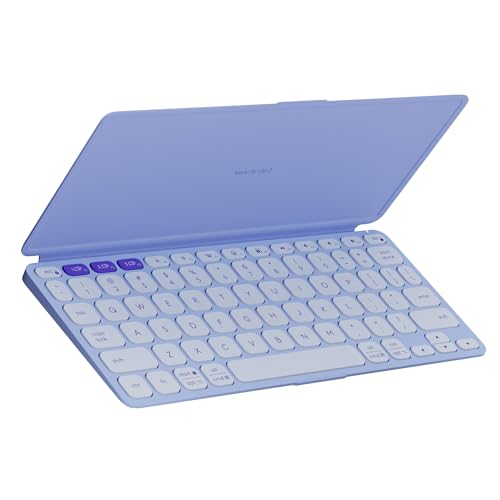
The Logitech Keys-to-Go 2 is the most portable keyboard in this group, built for iPad, iPhone, and Mac use with a built-in cover that protects the keys in a bag. Its Bluetooth connection pairs with up to three devices through Easy-Switch keys, and the scissor keys give a roomy, comfortable typing feel despite the slim body. Pre-installed coin cell batteries last up to three years, so the keyboard needs no charging cable at all. At 9.84 by 4.13 by 0.17 inches and 7.8 ounces, it is thin enough to slip into a magazine or a tablet sleeve.
Keychron K2 Version 2
The Keychron K2 Version 2 is a 75-percent wireless mechanical keyboard for iPad and Mac owners who want real switch feel in a compact board. Its Bluetooth 5.1 connection pairs with up to three devices, and a USB-C wired mode covers sessions where wireless is not wanted. Gateron G Pro Brown switches give a tactile response without a loud click, and the RGB backlight keeps keys visible in dim rooms. A 4000 mAh battery lasts up to 72 hours of typing, and the aluminum frame adds weight and stability on a desk. Mac and Windows keycaps come in the box.
Specs
- 75-percent layout, 84 keys
- Bluetooth 5.1 for up to 3 devices, USB-C wired mode
- Gateron G Pro Brown switches
- RGB LED backlight
- 4000 mAh battery, up to 72 hours of typing
- Aluminum frame
- macOS and Windows keycaps included
Best for: Mechanical typing feel for iPad and Mac work.
Watch out for: Heavier than the slim travel boards, so it suits a desk more than a small bag.
Logitech Keys-to-Go
- Best for: Slim spill-resistant travel typing for iPhone and iPad.
- Bluetooth keyboard for iPhone, iPad, Mac, and Apple TV
- Sealed keyboard, spill and crumb resistant
- 0.24 inches thick, 9.53 inches long
- 6.3 ounces
Slim spill-resistant travel typing for iPhone and iPad.
The older design lacks the three-device switching of its successor.
The original Logitech Keys-to-Go is a super-slim Bluetooth keyboard for iPhone, iPad, Mac, and Apple TV, and it remains the lightest board in this group. Its sealed keyboard protects against crumbs and spills, which suits cafe tables and family use, and the included stand holds an iPhone upright while typing. At a quarter inch thick and 9.5 inches long, it tucks into a magazine or slides into any backpack with room to spare. The rechargeable battery lasts up to three months on two hours of daily use, so charging is an occasional task rather than a weekly one.
Which One Fits Your Situation
Writing on an iPad every day
The K380 fits daily iPad writing because it pairs instantly, switches between the iPad and a phone or computer, and runs for two years on one set of batteries. Its compact layout keeps the arrow keys and the shortcut row within reach, and the round keys are comfortable for long sessions. Choose it when the iPad is a daily writing tool and the keyboard must work across every device you own.
Traveling light with an iPad
The Keys-to-Go 2 fits travel because it is thinner than most phone cases and weighs less than eight ounces. Its built-in cover protects the keys in a bag, and the three-year battery means no charging cable joins the trip. The scissor keys feel roomy despite the slim body. Pick it when the keyboard must disappear into a bag and appear ready to type at a cafe, a classroom, or an airport gate.
Mechanical typing at a desk
The Keychron K2 Version 2 fits desk work where switch feel matters more than portability. Its tactile Brown switches and RGB backlight suit long writing sessions, and the aluminum frame keeps the board planted. Bluetooth pairs it with an iPad, while the USB-C cable covers wired use. Choose it when the iPad sits on a desk stand and the keyboard stays in one place for the working day.
A spill-proof board for family use
The original Keys-to-Go fits a household where crumbs, spills, and small hands are part of daily life. Its sealed surface shrugs off accidents that would ruin an open mechanical board, and the included iPhone stand turns a phone into a tiny workstation. The three-month battery needs only occasional charging. Pick it when durability and a clean surface matter more than multi-device switching or a backlight.
Common Mistakes
- Buying a Windows-only keyboard and discovering the shortcut keys do not match iOS behavior.
- Choosing a heavy mechanical board for travel and leaving it at home because it will not fit the bag.
- Ignoring battery life and ending up with a keyboard that needs charging every week.
- Picking a board without a shortcut row and reaching for Control Center for every volume or brightness change.
- Assuming any Bluetooth keyboard pairs with an iPad, when some older boards need a newer iOS version than the device runs.
Frequently Asked Questions
Do Bluetooth keyboards work with iPhone and iPad?
Yes, if the listing names iOS or iPadOS among the supported systems. Bluetooth keyboards that support the HID profile pair with iPhones and iPads through the Bluetooth settings, and most reconnect automatically after sleep. Check the minimum iOS version on the listing, since an older board may need a newer system than the device runs.
Can one keyboard switch between an iPad and a Mac?
Yes, if the keyboard supports multi-device pairing. Boards with Easy-Switch keys pair with up to three devices and hop between them at a touch, so an iPad, an iPhone, and a Mac can share one keyboard. The K380 and the Keys-to-Go 2 both offer this feature.
Is a mechanical keyboard good for iPad typing?
A mechanical keyboard gives a satisfying tactile feel and suits long writing sessions at a desk, and models with Mac keycaps fit iPad use well. The trade-off is weight and size, since mechanical boards are heavier and thicker than slim travel boards. For desk work, a mechanical board is a pleasure, while a slim board suits travel better.
How long does a Bluetooth keyboard battery last?
It varies widely. Coin-cell boards last for years on one set of batteries, while rechargeable boards last weeks or months per charge depending on backlight use. A backlight drains a battery far faster than the keys alone, so turn it down or off when it is not needed. Check the battery figure on the listing before buying.
Related guides
More from Amazon
Programs that pair well with the guide above. Offers and eligibility are set by Amazon and may change.
Free shipping on eligible items, Prime Video and more. Eligible new members can start with a free trial.
Start a Prime free trialAd-free music streaming. Eligible new subscribers can start with a free trial.
Try Music Unlimited freeA Prime membership for ages 18-24 with a trial period. Eligibility is set by Amazon.
See Prime for Young AdultsAudiobooks and podcasts to listen to on the go. Eligible new members can start with a free trial.
Try Audible freeAs an Amazon Associate we earn from qualifying purchases.









