
Our Short List of 3
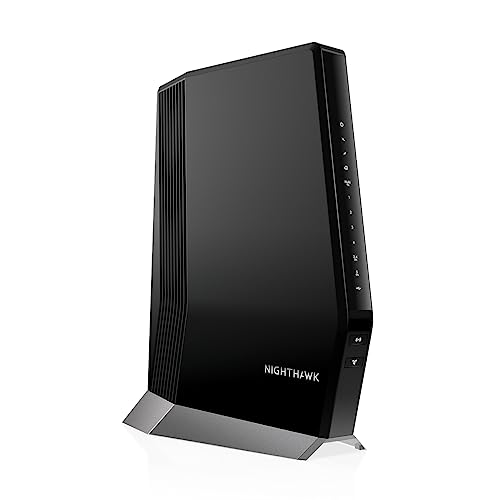
- Best for: Fast Wi-Fi 6 for a large home with many devices.
- AX6000 Wi-Fi 6
- DOCSIS 3.1 cable modem
- Modem-router combo
- Tri-band Wi-Fi

- Best for: Balanced Wi-Fi 6 coverage for a mid-size home.
- AX3000 Wi-Fi 6
- DOCSIS 3.1 cable modem
- 1.2 Gbps maximum modem speed
- 2,500 square foot coverage
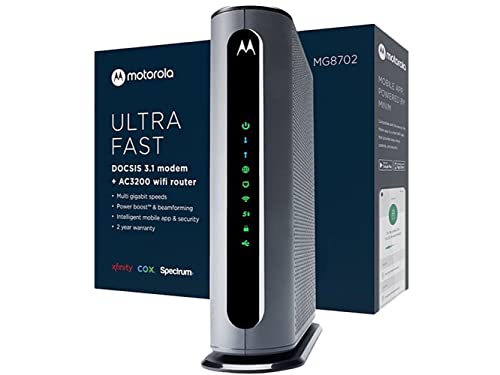
- Best for: Reliable AC Wi-Fi with a proven track record.
- AC3200 Wi-Fi
- DOCSIS 3.1 cable modem
- Intelligent Power Boost
- Approved for Xfinity, Cox and Spectrum
All 4 Picks at a Glance
| Product | Specs | Action |
|---|---|---|
| NETGEAR Nighthawk CAX80 |
| Check price on Amazon |
| ARRIS SURFboard G36 |
| Check price on Amazon |
| Motorola MG8702 |
| Check price on Amazon |
 ARRIS SURFboard SBG8300 |
| Check price on Amazon |
A router for Comcast needs a DOCSIS 3.1 modem built in or paired with one, because Comcast delivers internet over cable and the modem is what talks to the network. A modem-router combo replaces the rented gateway with one box, which simplifies the setup and covers Wi-Fi, wired ports and the modem in a single device. A combo also removes the monthly rental fee, which adds up over the life of the box. Check the approved-device list first, since a modem that is not approved will not activate.
This guide is for Comcast and Xfinity customers who want their own modem-router combo, from apartment dwellers to households with many devices. Every router below was chosen from the name and specifications shown on its Amazon page, with the DOCSIS version, Wi-Fi standard and coverage checked against the listing. The guide below walks through DOCSIS versions, Wi-Fi standards, coverage and ports first, then compares four combos that cover large homes, small apartments and busy households.
Our Top Picks
Top 3 picks at a glance
Quick Picks
As an Amazon Associate we earn from qualifying purchases
| Product | Best for | Key spec from title |
|---|---|---|
| NETGEAR Nighthawk CAX80 | Fast Wi-Fi 6 for large homes | AX6000, DOCSIS 3.1 |
| ARRIS SURFboard G36 | Balanced Wi-Fi 6 combo | AX3000, DOCSIS 3.1 |
| Motorola MG8702 | Reliable AC Wi-Fi combo | AC3200, DOCSIS 3.1 |
| ARRIS SURFboard SBG8300 | Simple DOCSIS 3.1 combo | DOCSIS 3.1, AC2350 |
How to Choose
DOCSIS version first
DOCSIS 3.1 is the modem standard Comcast uses for its fastest plans, so a combo with DOCSIS 3.1 covers current speeds and leaves room for faster tiers later. Older DOCSIS 3.0 modems work on slower plans but cap out sooner, which means a new plan may need a new modem. Check the Comcast approved-device list before buying, because a modem that is not approved will not activate on the network. A combo with DOCSIS 3.1 and a fast Wi-Fi radio covers both the modem and the wireless side in one box.
Wi-Fi standard and speed
Wi-Fi 6 routers handle many devices better than Wi-Fi 5, because they schedule traffic more efficiently and cut congestion when phones, laptops and smart devices all connect at once. AX6000 and AX3000 ratings describe the combined speed across bands, so compare the per-band speeds rather than the headline number. A tri-band router adds a second 5GHz band for busy homes, while a dual-band router suits a smaller household. Check the Wi-Fi standard first, then the coverage.
Coverage and placement
Coverage ratings describe an open space, so a 2,500 square foot rating suits a mid-size home with the router placed centrally, while thick walls and multiple floors cut the real range. Place the combo near the center of the home and away from metal appliances, because a router tucked in a corner leaves the far rooms weak. A mesh system suits a large or multi-floor home better than a single combo, but a strong combo covers most apartments and single-floor homes. Check the number of wired ports too, because a desktop and a console both benefit from a cable.
Ports and extras
Four Gigabit Ethernet ports cover a desktop, a console and a streaming box without a switch, while a multi-gig port suits a plan faster than a gigabit. USB ports matter less on a combo, but they can share a drive or a printer across the network. Parental controls and a guest network keep the household safe and separate, and WPA3 security is the current standard for wireless protection. Some models list voice control support, which suits a home that already runs a voice assistant.
The 4 Best Options
NETGEAR Nighthawk CAX80
- Best for: Fast Wi-Fi 6 for a large home with many devices.
- AX6000 Wi-Fi 6
- DOCSIS 3.1 cable modem
- Modem-router combo
- Tri-band Wi-Fi
Fast Wi-Fi 6 for a large home with many devices.
It is a large unit, so it needs a central spot with room around it.
The Nighthawk CAX80 combines a DOCSIS 3.1 modem with AX6000 Wi-Fi 6, which makes it the fastest combo in this group for a large home with many devices. Its tri-band design separates traffic across bands, so phones, laptops and smart devices stay responsive at once. The modem handles gigabit-plus cable plans, and the router covers a large home from a central spot. It is the pick for a household that wants the fastest Comcast combo available. The multi-gig port suits a plan faster than a gigabit, which covers future speed upgrades.
Watch out for: It is a large unit, so it needs a central spot with room around it.
ARRIS SURFboard G36
- Best for: Balanced Wi-Fi 6 coverage for a mid-size home.
- AX3000 Wi-Fi 6
- DOCSIS 3.1 cable modem
- 1.2 Gbps maximum modem speed
- 2,500 square foot coverage
Balanced Wi-Fi 6 coverage for a mid-size home.
It is a dual-band design, so very busy homes may want a tri-band model.
The SURFboard G36 pairs a DOCSIS 3.1 modem with AX3000 Wi-Fi 6, which covers a mid-size home with solid speed on current Comcast plans. Its 1.2 Gbps maximum modem speed suits gigabit tiers, and the 2,500 square foot coverage rating fits a typical house or large apartment. WPA3 security and parental controls keep the network safe, and voice control support suits a home that already runs a voice assistant. It is the pick for a balanced combo that covers speed, coverage and security in one box. The single-box design replaces two devices, which keeps the setup tidy.
Watch out for: It is a dual-band design, so very busy homes may want a tri-band model.
Motorola MG8702
- Best for: Reliable AC Wi-Fi with a proven track record.
- AC3200 Wi-Fi
- DOCSIS 3.1 cable modem
- Intelligent Power Boost
- Approved for Xfinity, Cox and Spectrum
Reliable AC Wi-Fi with a proven track record.
It uses Wi-Fi 5 rather than Wi-Fi 6, so it handles fewer devices at once.
The MG8702 combines a DOCSIS 3.1 modem with AC3200 Wi-Fi, which suits a household that wants a proven combo without the newest Wi-Fi standard. Intelligent Power Boost tunes the signal for the cable line, and the modem is approved for Xfinity, Cox and Spectrum, so it activates on Comcast without fuss. The AC3200 rating covers many devices at once, and the combo replaces a rented gateway with one box. It is the pick for buyers who want a reliable combo with a long track record. The long track record means the setup steps are well documented, which helps a first install.
Watch out for: It uses Wi-Fi 5 rather than Wi-Fi 6, so it handles fewer devices at once.
ARRIS SURFboard SBG8300
- Best for: Simple DOCSIS 3.1 coverage for an apartment or small home.
- DOCSIS 3.1 cable modem
- AC2350 Wi-Fi
- Four Gigabit Ethernet ports
- Modem-router combo
Simple DOCSIS 3.1 coverage for an apartment or small home.
AC2350 Wi-Fi suits a smaller household, so a busy home may want a faster radio.
The SBG8300 is the simplest combo in this group, pairing a DOCSIS 3.1 modem with AC2350 Wi-Fi in a compact box that suits an apartment or a small home. Its four Gigabit Ethernet ports cover a desktop, a console and a streaming box without a switch, and the modem handles current Comcast plans. The setup is simple, with one box replacing the modem and the router, and the combo works with the Xfinity app for activation. It is the pick for a small household that wants a straightforward replacement for a rented gateway. The Xfinity app walks through activation step by step, so the setup needs no phone call.
Watch out for: AC2350 Wi-Fi suits a smaller household, so a busy home may want a faster radio.
Which One Fits Your Situation
For a large home
The Nighthawk CAX80 leads with AX6000 Wi-Fi 6 and a tri-band design that keeps many devices responsive. The SURFboard G36 is the second choice, with AX3000 speed and 2,500 square feet of coverage for a mid-size home. Both combos need a central spot, so place the box where the signal reaches every room. A large home with thick walls may need a mesh system instead. Thick walls cut the signal, so test each room.
For a small apartment
The SBG8300 fits best, because its compact size and AC2350 Wi-Fi cover a small space without wasted power. The MG8702 is the backup choice, with a stronger AC3200 radio for an apartment with many devices. Either combo replaces a rented gateway, so the choice comes down to speed and size. A small space needs less power, so the simpler combo wins here. A compact combo also fits a shelf without crowding the room.
For many devices
The Nighthawk CAX80 leads with Wi-Fi 6 and tri-band traffic handling, while the SURFboard G36 follows with AX3000 Wi-Fi 6 for a mid-size household. Both combos handle phones, laptops and smart devices better than the Wi-Fi 5 models here. Check the number of wired ports too, since a desktop and a console both benefit from a cable. A wired connection frees Wi-Fi capacity for the devices that need it.
For replacing a rented gateway
Any combo in this guide replaces a rented gateway, but the MG8702 is the simplest swap, because it is approved for Xfinity and activates without fuss. The SBG8300 follows with app-based activation that walks through the setup step by step. Return the rented gateway after the new combo activates, so the rental fee stops. Keep the activation details handy, since Comcast may ask for the modem number.
Common Mistakes
- Buying a router without a DOCSIS modem and finding it cannot connect to Comcast cable at all.
- Choosing a DOCSIS 3.0 modem for a gigabit plan that needs DOCSIS 3.1 speeds.
- Placing the combo in a corner, then wondering why the far rooms have weak Wi-Fi all day.
- Ignoring the approved-device list, then finding the modem will not activate on the network.
- Forgetting wired ports, then needing a switch for a desktop and a console beside it.
Frequently Asked Questions
Do I need a DOCSIS 3.1 modem for Comcast?
Yes, for the fastest Comcast plans, because DOCSIS 3.1 handles gigabit speeds that older DOCSIS 3.0 modems cannot reach. A DOCSIS 3.0 modem works on slower plans, but a faster plan will need a new modem. Check the Comcast approved-device list before buying, because an unapproved modem will not activate. DOCSIS 3.1 also leaves room for faster tiers.
Can a modem-router combo replace the rented gateway?
Yes, a combo replaces both the modem and the router in one box, so it takes the place of a rented gateway. Return the rented gateway after the combo activates, so the rental fee stops. Check the approved-device list first, and keep the activation details from Comcast handy during setup. Write down the modem number, since Comcast may ask for it.
Is Wi-Fi 6 worth it for a Comcast combo?
Yes, when many devices connect at once, because Wi-Fi 6 schedules traffic better and cuts congestion in a busy home. A Wi-Fi 5 combo still works for a smaller household with fewer devices. Match the Wi-Fi standard to the number of devices, not just the internet speed. A Wi-Fi 6 combo also handles smart devices better than Wi-Fi 5.
Where should I place a modem-router combo?
Place it near the center of the home, on an open shelf and away from metal appliances, because walls and metal cut the signal. A central spot covers more rooms than a corner, and a higher shelf beats a floor placement. Avoid a closed cabinet, since it traps heat and blocks the signal. Test each room after setup, then adjust the spot.
Related guides
More from Amazon
Programs that pair well with the guide above. Offers and eligibility are set by Amazon and may change.
Free shipping on eligible items, Prime Video and more. Eligible new members can start with a free trial.
Start a Prime free trialAd-free music streaming. Eligible new subscribers can start with a free trial.
Try Music Unlimited freeA Prime membership for ages 18-24 with a trial period. Eligibility is set by Amazon.
See Prime for Young AdultsAudiobooks and podcasts to listen to on the go. Eligible new members can start with a free trial.
Try Audible freeAs an Amazon Associate we earn from qualifying purchases.









