
Our Short List of 3
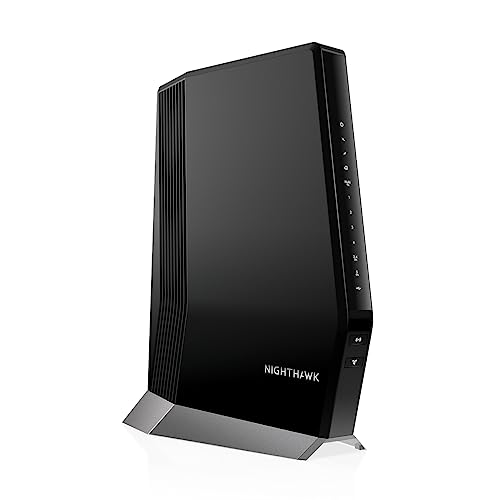
- Best for: Cox cable homes on gigabit tiers who want one box with maximum headroom.
- DOCSIS 3.1 cable modem with built-in WiFi 6 router
- AX6000 Wi-Fi rating
- Certified for Xfinity, Spectrum and Cox
- Supports cable plans up to 6Gbps

- Best for: Mid-tier Cox cable plans in apartments and average family homes.
- DOCSIS 3.1 cable modem with built-in WiFi 6 router
- AX2700 Wi-Fi rating
- Compatible with Xfinity, Spectrum, Cox and more
- NETGEAR Armor security included

- Best for: Cox cable homes on plans at or under 800Mbps in smaller spaces.
- DOCSIS 3.0 cable modem with built-in WiFi 5 router
- AC1900 rating, up to 1.9Gbps wireless throughput
- 24×8 channel bonding
- Certified for Xfinity and Cox
All 4 Picks at a Glance
| Product | Specs | Action |
|---|---|---|
| NETGEAR Nighthawk CAX80 Cable Modem Router |
| Check price on Amazon |
| NETGEAR Nighthawk CAX30S Cable Modem Router |
| Check price on Amazon |
| NETGEAR Nighthawk C7000 Cable Modem Router |
| Check price on Amazon |
 TP-Link Archer AXE75 Tri-Band WiFi 6E Router |
| Check price on Amazon |
Choosing a router for a Cox plan starts with one question most buyers skip: does your home get Cox over coax cable or over fiber? Cable households need a modem that Cox certifies for their speed tier, while fiber households with a separate optical terminal need a standalone router instead. Buying the wrong type leaves you with hardware that cannot connect at all, no matter how fast the Wi-Fi rating looks on the box.
This guide serves cable subscribers who want to stop renting gateway equipment, fiber customers who need a router behind a separate modem or terminal, and gamers who want strong Wi-Fi without giving up wired ports. Every pick below was chosen from the name and specifications on its product page, with Cox compatibility as the first filter.
Our Top Picks
- TP-Link AXE5400 Tri-Band WiFi 6E RouterWiFi 6E, Tri-Band AXE540012.91 x 10.43 x 4.72 inches1.5 poundsCheck on Amazon
Top 3 picks at a glance
Quick Picks
As an Amazon Associate we earn from qualifying purchases
| Product | Best for | Key spec |
|---|---|---|
| NETGEAR Nighthawk CAX80 Cable Modem Router | Fastest cable tiers | DOCSIS 3.1 with WiFi 6 AX6000 |
| NETGEAR Nighthawk CAX30S Cable Modem Router | Mid-tier cable plans | DOCSIS 3.1 with WiFi 6 AX2700 |
| NETGEAR Nighthawk C7000 Cable Modem Router | Smaller cable plans | DOCSIS 3.0 with WiFi 5 AC1900 |
| TP-Link Archer AXE75 Tri-Band WiFi 6E Router | Fiber and separate-modem homes | Tri-band WiFi 6E AXE5400 |
How to Choose
Match the device type to your Cox connection
Cox delivers service two ways, and each way needs different hardware. Cable plans run over coaxial lines, so the device on your shelf must include a cable modem, either built into a modem router combo or as a separate unit. Fiber plans terminate at an optical network terminal, so a standalone router is the right buy and a cable modem combo is useless. Check your bill or the jack your service enters through before ordering anything, because this single decision rules out half the shelf.
Check the modem standard against your speed tier
For cable homes, the DOCSIS version decides which plans a modem router can honestly serve. DOCSIS 3.1 is the current standard and the safe choice for gigabit-class tiers such as Gigablast, with headroom for future speed increases. DOCSIS 3.0 hardware with wide channel bonding still covers lower and midrange plans comfortably, but it caps out sooner and ages faster. Compare the plan speed printed on your Cox statement with the cable plan ceiling in each product’s specifications, and leave yourself room above your current tier.
Pick a Wi-Fi class your devices can use
Wi-Fi generations stack up quickly. WiFi 6 handles crowded homes well and is the sensible default for new purchases, while WiFi 6E adds the 6 GHz band for homes with newer laptops, phones and VR headsets that can use it. Older WiFi 5 gear still serves streaming sticks and smart home devices fine, but it becomes the bottleneck once several people game, call and stream at once. Count your household’s simultaneous users and newest devices, then buy the class that matches them rather than the biggest number on the box.
Plan ports, coverage and security before checkout
A router lives with your whole network, so look past raw speed. Count the wired devices near your setup, such as a gaming PC, console or work computer, and confirm enough Ethernet ports or budget for a small switch. Larger homes may need mesh compatibility to stretch coverage into back rooms. Built-in security services, guest networks and parental controls also differ between models, and some features sit behind subscriptions. Decide which of those you will actually use so you pay for coverage and protection, not for menu items you never open.
The 4 Best Options
NETGEAR Nighthawk CAX80 Cable Modem Router
- Best for: Cox cable homes on gigabit tiers who want one box with maximum headroom.
- DOCSIS 3.1 cable modem with built-in WiFi 6 router
- AX6000 Wi-Fi rating
- Certified for Xfinity, Spectrum and Cox
- Supports cable plans up to 6Gbps
Cox cable homes on gigabit tiers who want one box with maximum headroom.
It is the largest commitment in this group, so smaller plans will not use much of its capacity.
The CAX80 is the heavyweight of this lineup, pairing a DOCSIS 3.1 cable modem with a WiFi 6 router rated AX6000 in a single box. It is certified for Cox alongside Xfinity and Spectrum, and its listing covers cable plans up to 6Gbps, which puts every current Cox cable tier, including Gigablast, comfortably inside its range. For a gaming household that streams, downloads large titles and runs a VR setup at the same time, this is the combo that removes the rental gateway without giving up speed headroom for future plan upgrades.
NETGEAR Nighthawk CAX30S Cable Modem Router
- Best for: Mid-tier Cox cable plans in apartments and average family homes.
- DOCSIS 3.1 cable modem with built-in WiFi 6 router
- AX2700 Wi-Fi rating
- Compatible with Xfinity, Spectrum, Cox and more
- NETGEAR Armor security included
Mid-tier Cox cable plans in apartments and average family homes.
Heavy simultaneous use across many rooms will stretch its AX2700 rating sooner than the CAX80.
The CAX30S takes the same modem router formula and scales it to a more moderate AX2700 WiFi 6 rating, which suits the mid-tier Cox cable plans most households actually subscribe to. It keeps the DOCSIS 3.1 modem that gigabit-ready networks expect, works with Cox as well as Xfinity and Spectrum, and adds NETGEAR Armor security protection. If your home streams in 4K, joins video calls through the day and games in the evening without a house full of competing devices, this is the balanced pick that covers the routine without oversizing the purchase.
NETGEAR Nighthawk C7000 Cable Modem Router
- Best for: Cox cable homes on plans at or under 800Mbps in smaller spaces.
- DOCSIS 3.0 cable modem with built-in WiFi 5 router
- AC1900 rating, up to 1.9Gbps wireless throughput
- 24×8 channel bonding
- Certified for Xfinity and Cox
Cox cable homes on plans at or under 800Mbps in smaller spaces.
DOCSIS 3.0 and WiFi 5 leave little headroom, so a future gigabit upgrade means replacing it.
The C7000 is the elder statesman here, combining a DOCSIS 3.0 cable modem with WiFi 5 at AC1900, up to 1.9Gbps of wireless throughput and 24×8 channel bonding. It is certified for Cox and Xfinity and supports cable plans up to 800Mbps, which keeps it relevant for the many households on midrange tiers rather than gigabit service. It makes sense when the goal is simply to replace a rented gateway on a modest plan, cover a smaller home, and keep the network gear to a single familiar box instead of chasing the newest Wi-Fi generation.
TP-Link Archer AXE75 Tri-Band WiFi 6E Router
- Best for: Cox fiber homes and anyone whose modem stays separate from the router.
- Tri-band WiFi 6E, up to 5400 Mbps combined
- Band split: 6 GHz 2402 Mbps, 5 GHz 2402 Mbps, 2.4 GHz 574 Mbps
- 1.7 GHz quad-core CPU
- OneMesh compatible
Cox fiber homes and anyone whose modem stays separate from the router.
It contains no cable modem, so coax-only homes must pair it with a compatible modem.
The Archer AXE75 covers the other half of the Cox world: homes where the modem or fiber terminal is a separate device and only a router is needed. It is a tri-band WiFi 6E router rated up to 5400 Mbps across its bands, driven by a 1.7 GHz quad-core processor, with OneMesh support for extending coverage and both VPN server and client functions. Its listing states it works with all internet service providers including Cox, with a modem required for most providers, which makes it the natural pick for Cox fiber and Panoramic-style setups.
Which One Fits Your Situation
You rent a Cox gateway on a gigabit cable plan
Replacing a rented gateway with the CAX80 keeps your setup to one box while matching the fastest cable tiers Cox sells. You stop the monthly rental, keep DOCSIS 3.1 headroom for future speed bumps, and gain WiFi 6 capacity for a house full of screens. Confirm your plan name on your statement first, then activate the combo with Cox in place of the rental unit.
Your mid-tier cable plan serves a busy family
The CAX30S fits households whose plan sits in the middle of the Cox range and whose evenings mix streaming, homework and gaming. Its AX2700 WiFi 6 rating covers that load without paying for capacity you will not touch, and the built-in security helps on a network full of kids’ devices. It is also the easier upgrade path if you later move up a tier, thanks to its DOCSIS 3.1 modem.
You have Cox fiber or a modem you already own
When a separate modem or fiber terminal already brings service into the home, the Archer AXE75 is the correct shape of purchase. Its 6 GHz band gives newer laptops and headsets a clear lane, and OneMesh lets you add coverage later if a back room struggles. Skip the modem router combos entirely in this situation, since their built-in cable modems would sit unused behind your existing terminal.
Your plan is modest and the home is small
A lower-speed cable plan in an apartment or small house does not need the newest standards to feel fast. The C7000 covers plans up to 800Mbps, replaces the rental gateway, and keeps the purchase proportionate to the service. Spend the savings on placement instead: a central, elevated spot for the router does more for a small home’s Wi-Fi than a higher rating on the box.
Common Mistakes
- Buying a standalone router for a coax cable line with no modem in the setup, leaving nothing to connect to Cox.
- Choosing a DOCSIS 3.0 combo for a gigabit tier, then blaming the plan when speeds plateau below what you pay for.
- Ignoring Cox certification on cable hardware, since uncertified modems may not activate or may miss firmware support.
- Stacking a new router behind the rented gateway without changing settings, which creates double NAT problems for gaming.
- Judging Wi-Fi by the combined band number alone instead of checking the band split and your devices’ Wi-Fi generation.
Frequently Asked Questions
Do I need a modem router combo or a standalone router for Cox?
It depends on how service enters your home. Coax cable plans need a cable modem, so a certified modem router combo or a separate modem plus router both work. Fiber plans end at an optical terminal that already handles the modem role, so a standalone router such as a WiFi 6E model is the right purchase there.
Will these routers work with Cox Gigablast?
The DOCSIS 3.1 combos in this guide are built for gigabit-class cable tiers, and the CAX80’s listing covers cable plans up to 6Gbps. The older C7000 tops out at plans up to 800Mbps, so it is not the Gigablast pick. Always match the modem’s stated plan ceiling to your tier before ordering, and confirm activation with Cox.
Can I stop renting the Cox Panoramic gateway?
In most cable setups, yes: a certified modem router you own can replace the rented gateway, and you return the rental unit to Cox. Fiber customers typically keep the provider’s terminal and add their own router behind it. Because account details vary, confirm the swap with Cox support and keep the rental until your own hardware is activated and stable.
What should I check before activating a new modem router?
Have your Cox account details ready, connect the coax line firmly, and follow the activation flow in the Cox app or by phone. Place the unit centrally and elevated, update its firmware once it is online, and set a fresh Wi-Fi name and password. Then test wired and wireless speeds near and far from the router before returning any rental equipment.
Related guides
More from Amazon
Programs that pair well with the guide above. Offers and eligibility are set by Amazon and may change.
Free shipping on eligible items, Prime Video and more. Eligible new members can start with a free trial.
Start a Prime free trialAd-free music streaming. Eligible new subscribers can start with a free trial.
Try Music Unlimited freeA Prime membership for ages 18-24 with a trial period. Eligibility is set by Amazon.
See Prime for Young AdultsAudiobooks and podcasts to listen to on the go. Eligible new members can start with a free trial.
Try Audible freeAs an Amazon Associate we earn from qualifying purchases.









