Our Short List of 3

- Best for: Palm and relaxed claw players who want a wired all-rounder with a clear thumb shelf.
- Sensor: Razer Focus+ optical sensor, up to 26,000 DPI
- Buttons: 11 programmable buttons
- Scroll wheel: HyperScroll tilt wheel with free-spin and tactile modes
- Switches: Razer Optical Mouse Switches Gen-2, rated up to 70 million clicks

- Best for: Players who want adjustable weight, many controls and a supportive thumb wing at one desk.
- Sensor: HERO 25K optical sensor, up to 25,600 DPI
- Buttons: 11 programmable buttons
- Weight: 121 g, plus five 3.6 g tuning weights included
- Scroll wheel: Dual-mode hyper-fast scroll wheel
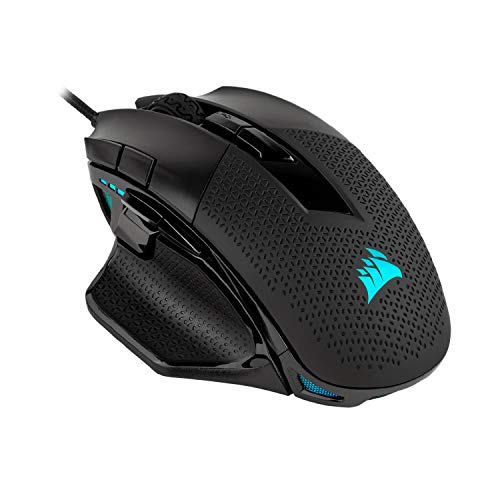
- Best for: Large-handed palm players who want a wide thumb rest and precise balance tuning.
- Sensor: Custom PixArt PMW3391 optical sensor, up to 18,000 DPI in 1 DPI steps
- Buttons: 10 fully programmable buttons
- Weight system: Adjustable between 119 g and 141 g, six mounting locations, 120 configurations
- Switches: Omron switches
All 4 Picks at a Glance
| Product | Specs | Action |
|---|---|---|
| Razer Basilisk V3 |
| Check price on Amazon |
| Logitech G502 HERO |
| Check price on Amazon |
| Corsair Nightsword RGB |
| Check price on Amazon |
 ASUS ROG Spatha X |
| Check price on Amazon |
A thumb rest sounds like a small comfort extra until you play without one. On a plain shell your thumb drags on the pad, steadies the mouse by friction, and tires during long sessions, while a proper wing gives it a shelf to sit on so the hand can relax between movements. The hard part is telling a real, moulded thumb rest from a slight side curve that marketing photos exaggerate, because the two feel completely different after an hour.
This guide is for right-handed palm and relaxed claw players who want that supported feeling in shooters, MOBAs and MMOs. Every pick below has a genuine thumb rest or wing visible in its listing images and described in its specifications, and the details were taken from the Amazon product titles and pages for each model, covering wired and wireless options at very different weights.
Our Top Picks

Top 3 picks at a glance
Quick Picks
As an Amazon Associate we earn from qualifying purchases
| Product | Best for | Key spec from title |
|---|---|---|
| Razer Basilisk V3 | Wired all-round play | 26K DPI optical sensor, 11 programmable buttons |
| Logitech G502 HERO | Tunable weight and many controls | HERO 25K sensor, 25,600 DPI, adjustable weights |
| Corsair Dark Core RGB Pro | Wireless with swappable side grips | 18,000 DPI, Slipstream wireless, 8 buttons |
| Corsair Nightsword RGB | Large hands and balance tuning | 18,000 DPI, 10 buttons, tunable weight system |
| ASUS ROG Spatha X | MMO buttons and a charging dock | 19,000 DPI, 12 programmable buttons, dual-mode |
How to Choose
Check That the Rest Is a Real Wing, Not a Curve
Look at the left side of the shell in the listing photos, viewed from above. A real thumb rest sticks out as a distinct shelf or wing below the side buttons, wide enough for the pad of your thumb to sit on without reaching. The Basilisk V3 and G502 HERO both show this clearly, with a ledge that extends beyond the main body line. If the side simply slopes inward, your thumb will still drag on the pad. Also check where the side buttons sit relative to the shelf, because a rest placed too far forward suits palm grips and can crowd a claw grip.
Match the Shell Size and Weight to Your Hand
Thumb-rest mice are almost always large, right-handed ergonomic shells, and their weights vary far more than their shapes suggest. The Spatha X is a heavy, wide MMO shell, while the G502 HERO starts lighter and lets you add weight only if you want it. Measure your hand from wrist to middle fingertip and compare it with the listed length before ordering. A shell that is too long pushes the side buttons past your thumb, so the rest ends up supporting the wrong part of your hand and the buttons become a stretch instead of a shortcut.
Count the Buttons the Rest Has to Carry
A thumb rest changes how side buttons feel, because your thumb rests below them instead of hovering beside them. Two well-spaced buttons, as on many shooter-focused models, are easy to find by touch. Dense layouts need more care: the Spatha X puts twelve programmable controls around a large shell, and the Nightsword adds a dedicated sniper-style thumb button low on the side. Think about which commands you actually press mid-fight, such as melee, push-to-talk or a DPI shift, and favour spacing you can learn over a raw button count you will never use reliably.
Decide Between Wired, Wireless and Charging Habits
Connection changes the daily routine more than the sensor does at this level. Wired models such as the Basilisk V3, G502 HERO and Nightsword never need charging and keep the desk setup simple. Wireless picks add freedom but bring battery figures that depend heavily on lighting, so compare the stated hours with lighting off against your habits. The Dark Core RGB Pro offers three connection modes, while the Spatha X answers the charging question with a magnetic dock. Pick the routine you will actually keep, not the longest headline battery number.
The 5 Best Options
Razer Basilisk V3
- Best for: Palm and relaxed claw players who want a wired all-rounder with a clear thumb shelf.
- Sensor: Razer Focus+ optical sensor, up to 26,000 DPI
- Buttons: 11 programmable buttons
- Scroll wheel: HyperScroll tilt wheel with free-spin and tactile modes
- Switches: Razer Optical Mouse Switches Gen-2, rated up to 70 million clicks
Palm and relaxed claw players who want a wired all-rounder with a clear thumb shelf.
The wired-only design and mid-heavy shell will not suit players chasing the lightest possible aim feel.
The Basilisk V3 is the easiest starting point for most players because its thumb rest is pronounced, its shape suits palm and relaxed claw grips, and the wired connection removes charging from the equation entirely. Its eleven programmable buttons cover shooter and MOBA needs without turning the side into a keypad, and the tilt wheel adds horizontal scrolling that helps in strategy games and timelines. Choose it if you want one supported, feature-rich mouse for a fixed desk and you prefer optical switches and rich lighting over wireless freedom or a very light shell for fast flicks.
Logitech G502 HERO
- Best for: Players who want adjustable weight, many controls and a supportive thumb wing at one desk.
- Sensor: HERO 25K optical sensor, up to 25,600 DPI
- Buttons: 11 programmable buttons
- Weight: 121 g, plus five 3.6 g tuning weights included
- Scroll wheel: Dual-mode hyper-fast scroll wheel
Players who want adjustable weight, many controls and a supportive thumb wing at one desk.
The large, angular shell is right-handed only and can feel oversized for smaller hands.
The G502 HERO pairs its thumb wing with the most flexible weight system in this group, which makes it a strong fit for players who like a planted, deliberate feel and want to adjust balance themselves. Eleven programmable buttons, a dual-mode scroll wheel and onboard profile storage cover shooters, MMOs and desktop work with the same setup. Its rest carries a thumb button within easy reach, so a DPI shift or push-to-talk bind sits where your thumb already rests. Pick it if you enjoy tuning a mouse to your hand rather than adapting to a fixed weight.
Corsair Dark Core RGB Pro
The Dark Core RGB Pro is the wireless pick for players who want their thumb supported in more than one way, because it ships with two interchangeable side grips that change how the rest feels under your thumb. Its contoured shell, eight programmable buttons and three connection modes suit FPS and MOBA play across a PC and a laptop without swapping mice. Battery life depends on the mode and lighting you choose, so treat it as a flexible everyday wireless mouse rather than a marathon specialist. It fits palm grips and medium to large hands best.
Specs
- Sensor: Custom PixArt PAW3392 optical sensor, up to 18,000 DPI
- Buttons: 8 programmable buttons
- Connection: Slipstream wireless, Bluetooth and wired USB-C
- Polling: Hyper-polling up to 2,000 Hz
- Battery: Up to 50 hours, depending on mode and lighting
- Lighting: Nine-zone dynamic RGB backlighting with light bar
- Design: Contoured shape with two included interchangeable side grips
Best for: Wireless palm-grip players who want to swap side grips to change the thumb rest feel.
Watch out for: Battery life drops sharply with full lighting, and the shell is too large for fingertip grips.
ASIN: B082LVNHW9
Corsair Nightsword RGB
- Best for: Large-handed palm players who want a wide thumb rest and precise balance tuning.
- Sensor: Custom PixArt PMW3391 optical sensor, up to 18,000 DPI in 1 DPI steps
- Buttons: 10 fully programmable buttons
- Weight system: Adjustable between 119 g and 141 g, six mounting locations, 120 configurations
- Switches: Omron switches
Large-handed palm players who want a wide thumb rest and precise balance tuning.
It is one of the heavier wired options here, so fast, low-sensitivity flicks take more effort.
The Nightsword RGB is built around its wide thumb rest and an unusually detailed weight and balance system, which makes it the natural choice for large hands that feel cramped on narrower ergonomic shells. Software detects the centre of gravity in real time while you place weights in six mounting locations, so you can shift the balance forward or back instead of only making the mouse heavier. Ten programmable buttons and a low thumb button cover FPS and MOBA commands comfortably. Choose it if fit and balance matter more to you than wireless convenience.
ASUS ROG Spatha X
- Best for: MMO and MOBA players who want many thumb commands, wireless play and a charging dock.
- Sensor: Optical sensor, up to 19,000 DPI
- Buttons: 12 programmable buttons
- Connection: Dual-mode wired and 2.4 GHz wireless
- Battery: Up to 67 hours of play on a full charge
MMO and MOBA players who want many thumb commands, wireless play and a charging dock.
At 168 g it is by far the heaviest pick here, which rules it out for fast fingertip aiming.
The Spatha X is the specialist in this group: a large, heavy wireless shell with a broad thumb area, twelve programmable buttons and a magnetic charging stand that gives the mouse a permanent home on your desk. Push-fit switch sockets let you swap the main switches to change click feel or replace a worn switch, which extends the life of an expensive mouse. That combination suits MMO and MOBA players who live on thumb commands and keep long sessions at one setup. If you play several genres at one desk, this is the most complete, and most committed, option here.
Which One Fits Your Situation
You Play a Bit of Everything at One Desk
Start with the Razer Basilisk V3. Its thumb shelf, eleven buttons and tilt wheel translate across shooters, MOBAs and everyday desktop use without forcing you into a specialist layout or a charging routine. The wired connection is a limitation only if your desk setup changes often. For a single, settled gaming space, it is the most balanced answer in this list and the one most hands will adapt to within a few sessions.
Your Thumb Commands Decide Fights in an MMO
Choose the ASUS ROG Spatha X if your rotation lives under your thumb. Twelve programmable buttons give abilities, mounts and consumables a physical home, and the broad shell keeps your thumb supported while it works across them. The charging dock removes the usual wireless worry during long sessions. Accept the heavy shell as part of the deal, because that weight and size are exactly what make the button field usable rather than cramped.
You Want Wireless Freedom Without a Huge Shell
The Corsair Dark Core RGB Pro is the lighter, more flexible wireless route. Its three connection modes cover a gaming PC and a second machine, and the interchangeable side grips let you adjust how the thumb rest feels instead of accepting one fixed texture. It gives up the Spatha X button count and dock, but for mixed FPS and MOBA play that trade is sensible, and the mouse feels less like a permanent commitment to one genre.
You Like a Heavy, Planted Feel You Can Tune
Pick between the Logitech G502 HERO and the Corsair Nightsword RGB by hand size and tuning style. The G502 HERO adds simple weights to a proven shape, while the Nightsword goes further with balance placement across six locations and a wider thumb rest for larger hands. Both are wired and deliberate rather than light and twitchy. If your hand is medium sized, start with the G502 HERO; if standard ergonomic shells feel narrow, the Nightsword fits the brief better.
Common Mistakes
- Assuming any curved side is a thumb rest, when only a distinct wing or shelf actually supports the thumb off the pad.
- Buying the largest shell available without checking its length against your hand, then finding the side buttons sit beyond your thumb.
- Choosing a heavy MMO mouse for fast shooters, where the extra weight slows flicks and tires the wrist over a session.
- Ignoring how lighting changes wireless battery figures, then being surprised when real runtime is far below the headline number.
- Mapping every side button at once instead of learning a few essential binds first, which leads to accidental presses mid-fight.
Frequently Asked Questions
Does a thumb rest help with aim, or is it only about comfort?
It is mostly about consistency. With your thumb resting on a shelf instead of dragging on the pad, friction stays the same from one movement to the next, so starts and stops feel more predictable. It will not fix sensitivity settings or technique, but many palm players find their grip relaxes, and a relaxed grip usually tracks more smoothly during long sessions.
Are thumb-rest mice only for palm grip?
Palm grip benefits most, because the whole thumb sits on the wing, but a relaxed claw grip also works on models such as the Basilisk V3 and G502 HERO, where the rest sits fairly far back. A pure fingertip grip gains little, since the thumb barely settles anywhere. If you lift the mouse constantly with your fingertips, a smaller symmetrical shell will probably serve you better.
Why are gaming mice with thumb rests almost always right-handed?
A moulded wing only works on one side of the shell, so building it commits the design to one hand. Making mirrored tooling for a left-handed version doubles the manufacturing cost for a much smaller audience. Left-handed players usually end up choosing ambidextrous shells without a rest, or a small number of dedicated left-handed models, rather than a winged ergonomic design like the ones listed here.
Will a thumb rest get in the way when I lift the mouse?
It can, if the wing is wide and your grip is low, because the thumb must clear the shelf edge during lifts. Most players adapt by lifting with a slightly higher thumb position, and textured grips on models such as the Dark Core RGB Pro help keep control. If you play at very low sensitivity with constant large lifts, check rest width before choosing the widest shells.
Related guides
More from Amazon
Programs that pair well with the guide above. Offers and eligibility are set by Amazon and may change.
Free shipping on eligible items, Prime Video and more. Eligible new members can start with a free trial.
Start a Prime free trialAd-free music streaming. Eligible new subscribers can start with a free trial.
Try Music Unlimited freeA Prime membership for ages 18-24 with a trial period. Eligibility is set by Amazon.
See Prime for Young AdultsAudiobooks and podcasts to listen to on the go. Eligible new members can start with a free trial.
Try Audible freeAs an Amazon Associate we earn from qualifying purchases.