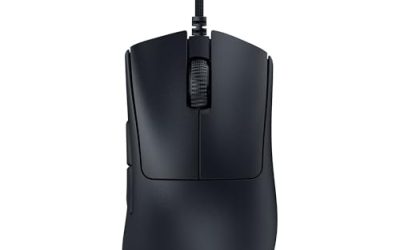
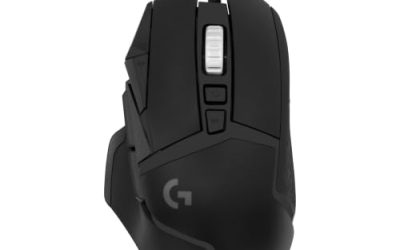
Finding the best MMO gaming mouse for big hands is a different problem from picking a general gaming mouse. Most MMO mice are built around a wide thumb panel with a grid of buttons, and when that panel is squeezed onto a small shell, large hands end up cramped, misclicking, or resting the palm on a hump that never quite fits. A good pick for big hands needs length, width, and height in the right places, plus a thumb grid that stays readable by touch after hours of play.
MMO and MOBA games reward players who can fire off a long bar of abilities without looking at the keyboard. That is why the mice in this guide carry twelve or more thumb buttons, deep palm support, and sensors that track cleanly at low and high sensitivity alike. The four picks below are all full-size mice with generous shells, and each one takes a different approach to the same job: putting a whole ability bar under your thumb while keeping a large hand comfortable through a long raid night.
Top 3 picks at a glance


How to Choose
1. Shell length and width
Hand size is usually described by length, from the wrist crease to the tip of the middle finger, and by width across the knuckles. Hands longer than about 19 cm or wider than about 10 cm generally need a mouse at least 120 mm long and 70 mm wide at the grip. A shell shorter than that forces the fingers to curl tightly and pushes the palm off the back, which leads to fatigue. Check the listed dimensions before anything else, and favor mice that measure close to 120 mm long with a tall palm hump.
2. Thumb panel layout
The thumb panel is the heart of an MMO mouse. A twelve-button grid in two rows of six is the classic layout, and it works because the buttons are large enough to tell apart by touch. Look for a panel that is slightly angled or curved to follow the thumb, with distinct spacing between rows so you can find buttons without looking down. Some panels slide forward or backward, which is a real advantage for big hands because it lets you place the grid where your thumb naturally rests.
3. Button count and software
More buttons are only useful if you can program them. A good MMO mouse ships with software that lets you bind keys, macros, and profiles per game, and stores at least one profile on the mouse itself so your setup survives a move to another computer. Count the total programmable inputs, including the scroll wheel tilt and any extra buttons near the ring finger, and make sure the software runs on your operating system before you commit.
4. Sensor and sensitivity range
Modern optical sensors track accurately across a wide sensitivity range, so the headline DPI number matters less than consistency. What matters is a sensor that holds tracking at the low sensitivity many MMO players use for precise cursor placement, and at the high sensitivity used for fast camera turns. A sensor rated to at least 16,000 DPI with a high polling rate will cover every realistic MMO setup, and optical sensors avoid the acceleration quirks that older laser sensors sometimes showed.
5. Weight and balance
Big hands often prefer a heavier mouse because it feels planted and resists accidental movement during long sessions. Mice in the 120 to 140 gram range suit palm grip players with large hands, while lighter mice under 90 grams favor fast flicks and claw grips. There is no single right weight, so match it to your grip: palm grippers usually want more heft and a longer body, while fingertip grippers want less weight and a narrower waist.
6. Wired versus wireless
Wireless mice have closed the gap on latency, and a good 2.4 GHz connection is now effectively indistinguishable from wired play for MMO games. Wireless brings freedom from cable drag, which matters when you make wide sweeping movements across a large pad. Wired mice are lighter for the same shell, never need charging, and cost less for similar hardware. If you pick wireless, check the battery life in hours and whether the mouse can keep working while plugged in and charging.
7. Grip shape and comfort over long sessions
Shape beats specifications for comfort. A right-handed ergonomic shell with a flared thumb rest and a tall, rounded palm hump supports a large hand far better than a symmetrical low-profile shell. Textured side grips help when palms get warm, and a thumb rest that extends below the side buttons gives the thumb a place to sit between presses. If you play for three or four hours at a stretch, prioritize a shell that fills the palm and lets the fingers rest in a relaxed curve.
Top Picks
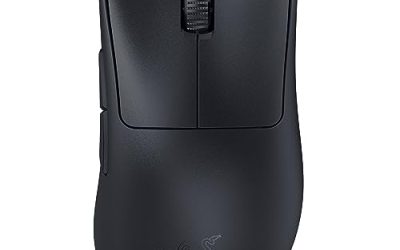
1. Razer Naga V2 Pro

The Razer Naga V2 Pro is the most flexible MMO mouse in this guide, and that flexibility is exactly what makes it a strong pick for big hands. It ships with three swappable side plates, so you can run a full twelve-button grid for MMO ability bars, a seven-button plate for a lighter loadout, or a simple two-button plate when you want a cleaner thumb area. Swapping plates takes seconds and needs no tools, so one mouse can cover raiding, questing, and everyday desktop work.
The shell is a full-size right-handed ergonomic shape measuring about 4.71 inches long, 2.96 inches wide, and 1.71 inches tall, which gives large palms a proper place to rest. At 134 grams it has enough heft to feel planted without dragging, and the Focus Pro 30K optical sensor tracks cleanly across the whole sensitivity range. Connectivity covers HyperSpeed Wireless over 2.4 GHz, Bluetooth, and wired USB, and the battery runs for up to 300 hours on a charge, so charging is a rare interruption rather than a routine chore.
The HyperScroll Pro wheel adds a free-spinning mode for flying through long inventories and chat logs, plus a tactile mode for precise weapon or ability cycling. Optical mouse switches rated for long service life keep clicks consistent, and the onboard memory stores profiles so your bindings travel with the mouse.
Best for: big-handed players who want one mouse that adapts from a full MMO button grid to a simpler layout, and who value long wireless battery life.
Keep in mind: the swappable plates add versatility but also add parts to keep track of, and the wide body can feel bulky for players who switch to a claw grip for fast-paced shooters.
2. Razer Naga V2 HyperSpeed
The Razer Naga V2 HyperSpeed keeps the same full-size shell and twelve-button thumb grid as its Pro sibling, but trims the extras to focus on long wireless sessions. It carries 19 programmable buttons, including the twelve-button thumb panel, and the Focus Pro 30K optical sensor delivers the same precise tracking. The headline difference is battery life: up to 400 hours from a single AA battery, which means months of typical play between changes.
The shell measures about 4.71 inches long, matching the Pro, so large hands get the same palm support and the same relaxed finger curve. Mechanical mouse switches Gen-2 give the main buttons a crisp, defined click, and the HyperScroll wheel handles fast scrolling through bags, banks, and crafting lists. Connection runs over HyperSpeed Wireless or Bluetooth, and the mouse works with the same configuration software as the rest of the Naga line, so profiles and macros carry over if you already use Razer gear.
Because it runs on a standard AA battery, there is no charging cable to manage and no dock to keep on the desk. That simplicity suits players who want to pick up the mouse and play without thinking about power at all.
Best for: big-handed MMO players who want the longest possible time between battery changes and a straightforward wireless setup.
Keep in mind: it uses a replaceable AA battery rather than a rechargeable cell, and it lacks the swappable side plates and free-spinning scroll wheel of the Pro model.
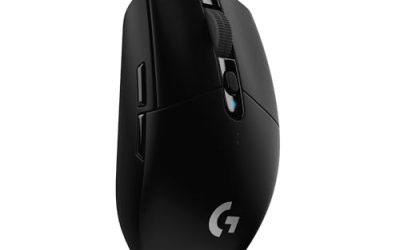
3. Logitech G600 MMO Gaming Mouse
The Logitech G600 is the classic wired MMO mouse, and it has stayed relevant because its core design is so well suited to large hands. The shell measures about 4.6 inches long and 2.9 inches wide, with a broad palm area and a deep thumb rest that keeps a big hand supported through long sessions. At 133 grams it sits in the comfortable middle ground for palm grip players who like a mouse with presence.
Its twenty programmable buttons include a twelve-button thumb panel arranged in two rows of six, with each button shaped so you can find it by touch. The standout feature is the G-Shift ring-finger button: hold it down and every other button takes on a second function, effectively doubling your bindings without adding more buttons to learn. RGB lighting is built in and can be set to show which profile is active, which helps when you switch between characters or games.
The sensor reaches 8,200 DPI, which is more than enough for MMO play at any reasonable sensitivity, and the wired connection means there is no battery to manage and no wireless signal to think about. Onboard memory holds one profile, and the configuration software handles macros and per-game setups.
Best for: players who want a proven wired MMO mouse with a second layer of bindings under one finger, and who prefer a heavier, planted feel.
Keep in mind: this is an older design that has been on the market for years, so check the listing carefully before ordering, and note that it is wired only, with no wireless option.
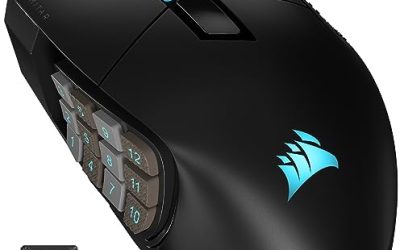
4. Corsair Scimitar RGB Elite

The Corsair Scimitar RGB Elite is built for players who want the thumb panel itself to fit their hand, not the other way around. Its twelve-button side panel sits on a Key Slider mechanism that moves the whole grid forward or back by about 8 mm, so you can position the buttons exactly where your thumb falls. For big hands, that adjustment is the difference between reaching for the back row and resting on it naturally.
The mouse carries 17 programmable buttons in total, driven by an 18,000 DPI optical sensor that tracks accurately at low and high sensitivity alike. Optical switches in the main buttons are rated for 50 million clicks, and the textured side grips hold up when sessions run long. Configuration runs through iCUE software, which handles macros, lighting, and onboard profile storage, and the braided cable is built to survive being dragged across a desk edge day after day.
The shell is a full-size right-handed ergonomic shape with a high palm hump and a flared thumb rest, giving large palms the support they need. Dynamic RGB lighting runs through the logo, scroll wheel, and side panel, and can be set to match the rest of a Corsair setup or turned off entirely.
Best for: big-handed players whose thumbs do not line up with fixed thumb grids, and anyone who wants a wired MMO mouse with a sliding side panel.
Keep in mind: it is wired only, so cable management matters, and the iCUE software is required to unlock the full macro and lighting options.
Comparison Table
| Mouse | Buttons | Sensor | Connection | Weight | Standout feature |
|---|---|---|---|---|---|
| Razer Naga V2 Pro | 19+1 programmable | Focus Pro 30K optical | Wireless 2.4 GHz, Bluetooth, wired | 134 g | Swappable 2, 7, and 12-button side plates |
| Razer Naga V2 HyperSpeed | 19 programmable | Focus Pro 30K optical | Wireless 2.4 GHz, Bluetooth | AA battery powered | Battery life up to 400 hours |
| Logitech G600 | 20 programmable | Up to 8,200 DPI | Wired USB | 133 g | G-Shift button doubles every binding |
| Corsair Scimitar RGB Elite | 17 programmable | 18,000 DPI optical | Wired USB | Full-size ergonomic shell | Key Slider moves the 12-button panel |
Which One Is Right for You?
Pick the Razer Naga V2 Pro if you want the most adaptable mouse here. The swappable plates let one mouse serve as a full MMO controller and a simpler daily driver, and the long wireless battery life means you rarely think about charging. It is the best all-rounder for big hands in this guide.
Pick the Razer Naga V2 HyperSpeed if battery life is your top priority and you are happy with the twelve-button grid as it is. It keeps the same large shell and sensor as the Pro while stretching battery life further, and the AA battery means you are never tethered to a charging cable.
Pick the Logitech G600 if you want a wired mouse with a second layer of controls under your ring finger. The G-Shift button effectively doubles your bindings, and the broad, heavy shell suits palm grip players who like a planted feel. It is also the most affordable route to a true twelve-button MMO layout.
Pick the Corsair Scimitar RGB Elite if fixed thumb panels have never quite fit your hand. The sliding side panel lets you tune the button position to your thumb, which matters more than any specification when you play for hours. It is the best choice for players who have tried other MMO mice and found the back row just out of comfortable reach.
If your hands are on the larger side of the range and you play mostly with a palm grip, start with the Naga V2 Pro or the G600. If you switch between MMO games and fast shooters, the Naga V2 HyperSpeed gives you wireless freedom with the same big shell. And if the thumb grid position has always been the problem, the Scimitar RGB Elite is the one to try first.
FAQ
How do I know if a mouse is big enough for my hands?
Measure from your wrist crease to the tip of your middle finger, and across your knuckles at the widest point. Hands longer than about 19 cm usually need a mouse at least 120 mm long with a tall palm hump. The mice in this guide all measure around 120 mm or more in length, with wide grips that support a relaxed palm position rather than a cramped claw.
Is a twelve-button thumb panel hard to learn?
It takes a few sessions to build muscle memory, but the layout helps: two rows of six buttons with distinct shapes and spacing let you find abilities by touch. Start by binding your most-used abilities to the front row, then add the back row as the positions become familiar. Most players find the grid becomes second nature within a week of regular play.
Do I need a wireless mouse for MMO games?
No. MMO games depend on button access and comfort far more than on the tiny latency differences between wired and wireless connections. Wireless is convenient because it removes cable drag during wide mouse movements, but a wired mouse is lighter, never needs charging, and costs less for the same hardware. Choose based on your desk setup and how much you dislike cables.
Can I use an MMO mouse for other game types?
Yes. A twelve-button panel works well in MOBA games, strategy games, and productivity apps where macros save time. The extra buttons can be bound to anything, from potion slots to push-to-talk. The main trade-off is size and weight: a large MMO mouse is less suited to fast-paced shooters where a light, low-profile shell has the edge.
Disclosure: As an Amazon Associate, we may earn from qualifying purchases.
Related guides
More from Amazon
Programs that pair well with the guide above. Offers and eligibility are set by Amazon and may change.
Free shipping on eligible items, Prime Video and more. Eligible new members can start with a free trial.
Start a Prime free trialAd-free music streaming. Eligible new subscribers can start with a free trial.
Try Music Unlimited freeA Prime membership for ages 18-24 with a trial period. Eligibility is set by Amazon.
See Prime for Young AdultsAudiobooks and podcasts to listen to on the go. Eligible new members can start with a free trial.
Try Audible freeAs an Amazon Associate we earn from qualifying purchases.