As an Amazon Associate we earn from qualifying purchases
If your fingers hang off the front of a normal gaming mouse, your pinky drags on the pad, or your palm never quite settles on the shell, the problem is rarely your aim. It is size. Most popular esports mice are built around medium hands, with lengths near 120 millimetres and narrow grip widths that force larger hands into a cramped claw just to stay in control. The best gaming mouse for big hands fixes that at the shell first: enough length so your fingers rest on the main buttons instead of curling past them, enough width so your hand is not pinched, and a hump placed far enough back to support your palm without pushing your wrist into an awkward angle.
This guide focuses only on genuinely large gaming mice. Every pick below is at least 128 millimetres long, is described by its maker for larger hands or a medium-to-large fit, or has a wide ergonomic shell that gives a big hand real room. Specs are taken from the product listings and manufacturer information for each named model, and each pick is linked to its Amazon US listing so you can confirm the exact variant before you buy.
Top 3 picks at a glance


How to tell whether you actually need a large mouse
Measure before you shop. Lay your hand flat, fingers together, and measure from the tip of your middle finger to the crease at the base of your palm. That is your hand length. Then measure across the knuckles, not counting the thumb, for hand width. As a practical guide used by several mouse makers, a hand around 19 centimetres long or longer, or around 10 centimetres wide or wider, usually falls into the large category. If your hand is in that range, a compact mouse will almost always feel like a compromise, no matter how good its sensor is.
Length matters most for palm and relaxed claw grips, because it decides where your fingertips land. Width matters most for comfort over a long session, because a shell that is too narrow makes you squeeze, and that squeeze turns into forearm fatigue. Height and hump position matter for how supported your palm feels. A taller, rear-weighted hump fills a large palm and lets you steer with your whole hand. A lower, flatter shell suits a fingertip grip, even on a long mouse, because your palm barely touches it.
Grip style should drive your shortlist. Palm grip players with big hands need the longest, most supportive shells, ideally with a thumb rest or a wide right side for the ring finger and pinky. Claw grip players need length too, but they also need a hump that gives their palm a clear anchor without forcing their fingers flat. Fingertip players with long fingers are the exception: they can use a slightly shorter mouse, provided the main buttons are long enough that they are not clicking with the very tips of their fingers overhanging the edge.
The picks at a glance
For a palm grip and the clearest large-hand design brief, start with the Corsair Ironclaw RGB Wireless, which Corsair explicitly designed for larger hands. For a long, wide, feature-rich shell, look at the Logitech G502 X Plus and the Razer Basilisk V3 Pro. For a lighter esports shape that still measures 128 millimetres long, consider the Razer DeathAdder V3 Pro and the Glorious Model D Wireless. The sections below explain who each one suits, and who should skip it.
1. Corsair Ironclaw RGB Wireless — designed for larger hands and palm grip

The Corsair Ironclaw RGB Wireless is the most direct answer to this keyword, because its listing does not treat large hands as an afterthought. Corsair describes it as designed for large hands, with a contoured shape sculpted specifically for palm grips and larger hands. That matters more than a millimetre here or there: the whole shell, including its wide body and textured side areas, is shaped to give a big palm somewhere to rest and a big thumb somewhere to sit without hunting for the side buttons.
The listing gives an 18,000 DPI optical sensor and 10 programmable buttons, configured through Corsair iCUE software. It connects three ways: Slipstream wireless, Bluetooth, and wired USB. For a large-hand player, that flexibility is useful in ordinary ways. Use the fast wireless connection at your main desk, Bluetooth for a laptop or a second machine, and wired mode when you want to charge and keep playing at the same time. The button count also suits players who bind a lot in MOBA, MMO, and shooter games, provided those buttons are reachable — and on a shell this size, a longer thumb has a better chance of reaching them without shifting the whole grip.
Choose the Ironclaw RGB Wireless if you palm your mouse, if narrower mice make your hand cramp, and if you want a mouse whose maker built it for your hand size on purpose. Skip it if you use a strict fingertip grip and prefer a low, flat shell, or if you are chasing the lightest possible mouse for fast flicks. Its strength is support and room, not minimal weight. For many big-handed players, that trade is exactly right: comfort over a three-hour session is a performance feature, because a relaxed hand makes steadier small corrections than a tense one.
2. Logitech G502 X Plus — the longest shell here, with room to spare
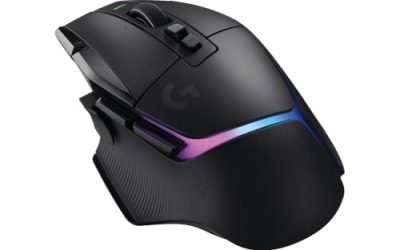
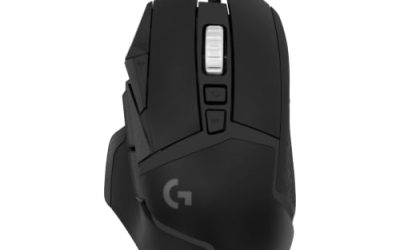
The Logitech G502 X Plus brings the longest dimensions in this guide. Manufacturer information for this model lists dimensions of 131.4 by 79.2 by 41.1 millimetres and a weight of 106 grams. That length gives long fingers a main-button area they can actually rest on, and that width gives a broad hand a shell it does not have to pinch. If you have tried a standard G502-shaped mouse and liked the idea but wanted the modern version, this is the current wireless flagship of that family.
The listing describes LIGHTSPEED wireless, LIGHTFORCE hybrid optical-mechanical switches, LIGHTSYNC RGB, and the HERO 25K sensor, with a resolution range of 100 to 25,600 DPI. It lists 13 programmable controls, up to five onboard memory profiles, PTFE feet, and a USB-C charging port. Battery life is listed at up to 120 hours of constant motion, and up to 37 hours with RGB on. Those numbers are useful for a big-hand buyer for a simple reason: a large mouse you love is no help if it is always on a cable charging, and this one is built for long stretches away from the port when the lighting is off.
On paper this suits palm and relaxed claw players who want many buttons within reach, including a DPI shift control a long thumb can use for scoped shots, and players who split time between shooters and strategy or desktop work.
Skip it if you want the lightest mouse possible, or if you are left-handed. Also pair a long, wide mouse with a generous pad, because low sensitivity means large sweeping movements.
3. Razer DeathAdder V3 Pro — a large esports shell without the extra weight
The Razer DeathAdder V3 Pro proves that large does not have to mean heavy. Its listed size is 128 millimetres long, 68 millimetres wide, and 44 millimetres high, and the black version is listed at 63 grams. That height is important for big hands. The taller hump fills more of a large palm than a low, flat mouse does, so a palm or claw player gets support without needing an especially long shell. Razer and independent size guides consistently place this shape in the medium-to-large hand range, which is exactly the territory where many big-handed players have been underserved by smaller esports mice.
The Amazon listing for this model describes a Focus Pro 30K optical sensor, Razer Optical Mouse Switches Gen-3, and up to 90 hours of battery life, with USB-C charging. It is a wireless ergonomic mouse with a deliberately focused button layout rather than a large cluster of extra controls. That focus is the point. If your games are tactical shooters, battle royales, and other aim-led titles, you probably value a clean right side, an uncluttered grip, and a shell you can lift and reposition without catching extra buttons. The DeathAdder shape, refined over many generations, is built around that idea.
Choose it if you have large hands, use a palm or claw grip, and want an esports-style mouse that still fits. Its ergonomic flare gives long fingers a ledge to rest against, and its light weight makes large arm movements less tiring than a much heavier shell would. Skip it if you need many side buttons for MMO play, if you rely on Bluetooth, or if you are left-handed. It is a right-handed, performance-first design, and it does not pretend to be a button-heavy all-rounder.
4. Razer Basilisk V3 Pro — wide, long, and built for lots of controls

The Razer Basilisk V3 Pro is the wide option. Razer lists its approximate size as 130 millimetres long, 75.4 millimetres in grip width, and 42.5 millimetres high, with an approximate weight of 112 grams excluding the cable. That width is the headline for big hands. A broad palm and widely spaced fingers need lateral room as much as length, and few mainstream gaming mice give you this much of it, along with a pronounced thumb area on the left side.
The listing describes a Focus Pro 30K optical sensor, Razer Optical Mouse Switches Gen-3, a HyperScroll tilt wheel, and 11 programmable buttons. It connects by HyperSpeed wireless, Bluetooth, and wired USB-C. The tilt wheel matters more for big hands than it might sound. In games and in desktop work, side-tilting the wheel gives you two more inputs that your index or middle finger can reach without moving your grip, and on a wide shell your fingers are less likely to feel crowded around the wheel while doing it. The extra programmable controls, including the multi-function trigger area familiar to the Basilisk line, suit players who bind push-to-talk, melee, ping, or ability keys under their thumb.
Choose the Basilisk V3 Pro if width is your main complaint about other mice, if you palm grip, and if you want a feature-rich wireless mouse for mixed gaming rather than a stripped esports model. Skip it if you prioritise low weight above everything else, or if a wide shell makes your ring finger and pinky feel pushed outward — width helps most players with genuinely broad hands, and can feel like too much for a hand that is long but narrow. That distinction, long versus broad, is worth thinking about before you order any mouse in this guide.
5. Glorious Model D Wireless — a long ergonomic shape at 69 grams

The Glorious Model D Wireless in matte black offers another light way into a large shell. Its listing gives dimensions of 12.8 by 6.7 centimetres, a weight of 69 grams, a BAMF sensor with up to 19,000 DPI, and up to 71 hours of battery life over its lag-free 2.4 GHz wireless connection. It has six buttons and an ergonomic right-handed shape. In plain terms, it is nearly as long as the DeathAdder V3 Pro, a little narrower, and still light enough for players who move the mouse with their arm and reset its position often.
That combination suits large-handed claw and palm players who found heavier ergonomic mice sluggish. Its hump supports the palm and its sides let long fingers settle rather than splay. Because it is lighter, it also suits low-sensitivity players who make repeated long swipes, provided the shell still fills the hand enough that you are not gripping harder to compensate.
Choose it if you want length and a light body together, and if six buttons cover your binds. Skip it if you need Bluetooth, a tilt wheel, or a large thumb-button cluster, and note the colour point carefully: this listing is the matte black version, and other colours are separate listings with their own identifiers, so check the variant name on the page matches what you intend to buy.
How to choose among these five
Start with your hand, not the sensor. All five mice here have modern optical sensors with DPI ranges far beyond what most players use in game, so sensor headlines should be the last tiebreaker, not the first filter. Your first filter is fit. If your hand is long and broad and you palm grip, the Ironclaw RGB Wireless, G502 X Plus, and Basilisk V3 Pro give you the most shell. If your hand is long but you play a claw grip in shooters and care about weight, the DeathAdder V3 Pro and Model D Wireless keep the length while cutting the mass.
Next, count your buttons honestly. Two side buttons cover most shooter players, while MMO and MOBA players will use the larger layouts of the Ironclaw, G502 X Plus, and Basilisk. Running out of reachable buttons forces awkward keyboard stretches that a big hand feels more than most.
Then think about connection and charging. Several picks add Bluetooth for a second device, which is convenient at a shared desk. Otherwise prioritise the main wireless connection and a charging routine you will actually keep.
Finally, plan for a short adjustment period. A correctly sized mouse changes where your fingers rest and how your usual sensitivity feels. Give it several sessions before judging, and adjust sensitivity in small steps only if your aim consistently overshoots or undershoots. Fit problems — cramping, pinky drag, fingertips hanging off the buttons — should improve right away.
Common mistakes big-handed players make
The first mistake is sizing down for weight. Ultralight mice are excellent tools, but a shell that is too short forces a fingertip grip you did not choose. If you love a light mouse, pick a light large mouse from this list instead of a light small one. The second mistake is judging by length alone. A long but narrow mouse can still cramp a broad hand, which is why the Basilisk V3 Pro’s grip width and the G502 X Plus’s overall width are called out above. The third mistake is ignoring the right side of the shell. Your ring finger and pinky need a shaped place to rest; if they slide off or drag, you will steer less consistently no matter how well the left side fits your thumb.
The fourth mistake is forgetting the mouse pad. Large mice at lower sensitivity need surface area, and a bigger pad may improve your aim more than any setting change.
Frequently asked questions
What hand size counts as big for a gaming mouse?
As a working guide, a hand about 19 centimetres or longer from middle fingertip to the base of the palm, or about 10 centimetres or wider across the knuckles, is usually treated as large. If you are near those numbers, prioritise mice at least 125 to 128 millimetres long and try palm-friendly ergonomic shapes first.
Is palm grip always best for big hands?
No. Palm grip is the most supported and often the most comfortable for long sessions, which is why so many large mice are built for it. But plenty of large-handed players aim best with a relaxed claw grip, which gives a clearer palm anchor while keeping the fingers more arched for faster clicks. Choose the grip you naturally fall into during a game, then pick a shell that supports that grip at your size.
Should big-handed players avoid light mice?
Not at all. The DeathAdder V3 Pro at a listed 63 grams and the Model D Wireless at a listed 69 grams are both long ergonomic mice. The rule is not heavy versus light; it is large enough versus too small. Pick the lightest mouse that still lets your fingers rest on the buttons and your palm feel supported.
What if a mouse is long enough but still feels narrow?
Look at grip width next, and consider a wider model such as the Basilisk V3 Pro, which Razer lists at 75.4 millimetres in grip width, or the G502 X Plus with its broad shell. Also check how you hold the mouse: a relaxed claw naturally narrows your contact, while a full palm grip uses more of the shell’s width.
Bottom line
The best gaming mouse for big hands is the one whose shell disappears under your hand, so you think about the game instead of your grip. For a purpose-built palm fit, start with the Corsair Ironclaw RGB Wireless. For maximum length and a deep feature set, choose the Logitech G502 X Plus. For a lighter esports feel at a large size, pick between the Razer DeathAdder V3 Pro and the Glorious Model D Wireless. For width and controls, the Razer Basilisk V3 Pro is the standout. Measure your hand, name your grip, and buy the size first — every other feature works better once the shell actually fits.
Related guides
More from Amazon
Programs that pair well with the guide above. Offers and eligibility are set by Amazon and may change.
Free shipping on eligible items, Prime Video and more. Eligible new members can start with a free trial.
Start a Prime free trialAd-free music streaming. Eligible new subscribers can start with a free trial.
Try Music Unlimited freeA Prime membership for ages 18-24 with a trial period. Eligibility is set by Amazon.
See Prime for Young AdultsAudiobooks and podcasts to listen to on the go. Eligible new members can start with a free trial.
Try Audible freeAs an Amazon Associate we earn from qualifying purchases.