As an Amazon Associate, we earn from qualifying purchases made through links on this page.
Buying a wireless keyboard and a wireless gaming mouse separately adds up quickly, which is why combo sets dominate the budget end of the market. A good combo in this segment gives you one box, one receiver, matched styling, and a mouse with a real gaming sensor, all positioned in the entry-level price tier that this keyword targets. The trade-offs are predictable: membrane keyboards instead of mechanical switches, modest polling, and plastic builds. Chosen well, none of those prevent a combo from being genuinely good for everyday gaming.
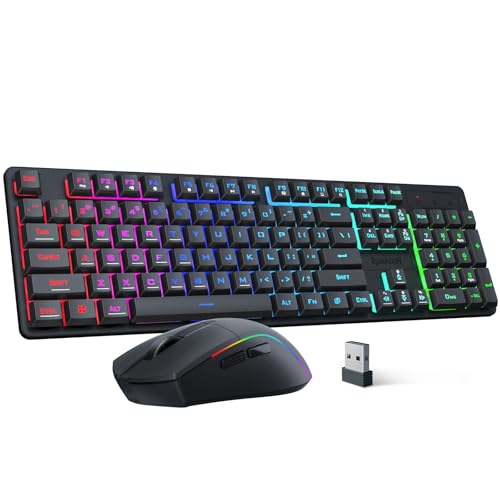
This guide compares three wireless gaming keyboard and mouse combos that sit in this budget segment on Amazon US at the time of writing, verified as currently listed and sold new. A note on method: street pricing in this tier moves constantly, so this guide positions each combo by segment rather than printing figures, and you should confirm the current listing before ordering. The Redragon S101M-KS and S107KS bring tri-mode connectivity that is rare at this level, while the MageGee V560 is the simple, rechargeable 2.4 GHz option.
Top 3 picks at a glance


What to look for in a budget wireless gaming keyboard and mouse combo
One receiver or three connection modes
The cheapest combos connect both devices through a single shared 2.4 GHz USB receiver, which is simple and frees ports, but ties you to that one dongle. Tri-mode combos add Bluetooth and a wired fallback, which matters more than it sounds: Bluetooth lets the keyboard pair with a laptop or tablet without the receiver, and the wired mode rescues you when a battery dies mid-session. If the combo will serve one fixed desk PC, a shared receiver is fine. If it will move between machines, tri-mode is worth prioritizing, and two of the picks below offer it.
The mouse decides gaming quality
In combo sets, the keyboard gets the marketing photos, but the mouse decides whether the set plays games well. Look for an optical sensor with switchable DPI stages that reach at least a few thousand DPI, a shape you can grip for your hand size, and buttons that can be remapped in software if you play MMOs or shooters with keybinds. All three mice below offer adjustable DPI in stages and standard gaming shapes; the S107KS mouse reaches the highest ceiling and the lightest weight of the group.
Keyboard expectations at this level
Every keyboard in this segment is a membrane design, sometimes tuned to feel mechanical-adjacent, and that is acceptable: what matters is anti-ghosting on the keys games actually use, a layout that matches how you play, and backlighting you can tone down. Full-size boards add a numpad and media keys for hybrid work use; compact layouts free desk space for mouse movement, which FPS players often prefer. Check the stated rollover or anti-ghosting figure and whether multimedia keys are dedicated or shared with the function row.
Console and second-machine use
Many budget combos end up in living rooms, spare rooms, and student housing rather than dedicated gaming desks, so it is worth checking where else the set can work. A 2.4 GHz receiver combo will drive a media PC, a laptop on a TV stand, or a work machine without any pairing ritual, and tri-mode sets add Bluetooth for tablets and second laptops. Console support is narrower: keyboard and mouse play on consoles depends on the console and the individual game, so treat any combo here as a PC-first purchase and check your specific titles before assuming a console will accept it. For a set that will migrate between rooms and machines, the tri-mode Redragon sets are the flexible picks; for one machine that never moves, the MageGee’s single receiver is all you need.
Battery approach
Combos split into rechargeable designs with built-in cells and battery-powered designs that take replaceable cells. Rechargeable sets are cleaner and cheaper to run, but both devices need cable time eventually; long stated runtimes, like the S101M-KS keyboard’s endurance with lighting off, reduce how often that happens. Also confirm how the set charges and whether the mouse and keyboard can be used while charging, because a combo that goes dark during a session is a combo you will replace.
The best wireless gaming keyboard and mouse combos in this segment
Redragon S101M-KS Wireless Gaming Keyboard and Mouse Combo (ASIN: B0DXTV9BGJ)
See the Redragon S101M-KS combo on Amazon
The S101M-KS is the most complete package in this guide. Both the full-size keyboard and the mouse connect three ways: a shared 2.4 GHz receiver that runs both devices from one USB port, Bluetooth for a second machine, or a wired USB-C connection that doubles as charging. The keyboard is a membrane design with RGB backlighting, ten dedicated multimedia keys, and a stated battery endurance of up to 300 hours with the lighting off. The mouse offers five DPI stages up to 4,800, seven programmable buttons, and software support for remapping and lighting on both devices.
- Connection: tri-mode (2.4 GHz shared receiver, Bluetooth, wired USB-C)
- Keyboard: full-size membrane, RGB backlit, 10 dedicated multimedia keys
- Mouse: optical sensor, 5 DPI stages up to 4,800, 7 programmable buttons
- Battery: rechargeable, keyboard up to 300 hours with backlight off
- Software: Redragon software for macros, DPI, and lighting
Who it is for: players building a first wireless desk setup who want one purchase to cover a gaming PC and a laptop, with a full-size keyboard for work and study between sessions.
Limitations: the membrane keys will not satisfy players who already know they want mechanical switches, and the mouse sensor ceiling is the lowest here, which competitive FPS players may outgrow. The full-size layout also eats desk space that low-sensitivity players would rather give to the mouse.
Redragon S107KS Wireless Gaming Keyboard and Mouse Combo (ASIN: B0FDVZ5X38)
See the Redragon S107KS combo on Amazon
The S107KS is the gamer-leaning sibling in Redragon’s budget combo line. It also connects three ways, wired, 2.4 GHz, or Bluetooth, but it spends its budget on the input hardware: the mouse reaches up to 10,000 DPI with software adjustment and weighs a light 65 grams, which is proper gaming-mouse territory, and the RGB keyboard emphasizes 25-key anti-ghosting so chords and movement keys register together during play. For players whose priority split is mostly gaming with some everyday typing, that allocation makes sense.
- Connection: tri-mode (wired, 2.4 GHz, Bluetooth)
- Keyboard: RGB backlit, 25-key anti-ghosting
- Mouse: optical sensor up to 10,000 DPI, 65 g
- Software: supported for mouse settings and customization
- Design: lightweight mouse aimed at gaming use
Who it is for: FPS and action players on a strict budget who care more about the mouse than the keyboard, and who want tri-mode flexibility without leaving the segment.
Limitations: the keyboard is still a membrane board, and its feature set is plainer than the S101M-KS for office-style use. As a newer listing, its long-term track record is shorter than its sibling’s, and players with large hands should check the mouse dimensions before ordering.
MageGee V560 Wireless Gaming Keyboard and Mouse Combo (ASIN: B0D1MGVRR8)
See the MageGee V560 combo on Amazon
The MageGee V560 is the straightforward option: one 2.4 GHz receiver, a rechargeable keyboard and mouse, RGB backlighting, and a mechanical-feel membrane keyboard tuned to be quieter than most gaming boards. MageGee lists compatibility across Windows and Mac machines and laptops, which makes the V560 an easy recommendation for mixed households and shared computers. The receiver stores in the base of the mouse, a small detail that matters for a set that may travel between rooms or machines.
- Connection: 2.4 GHz wireless via a single shared receiver
- Keyboard: mechanical-feel membrane, RGB backlit, quieter key action
- Mouse: rechargeable wireless gaming mouse with adjustable sensitivity
- Battery: rechargeable on both devices
- Compatibility: listed for PC, laptop, and Mac
Who it is for: casual gamers and families who want a tidy wireless set for a shared PC or a living-room machine, with simple setup and no software required to enjoy it.
Limitations: there is no Bluetooth and no wired fallback, so the receiver is a single point of failure and the set cannot pair directly with a tablet or a port-limited laptop without an adapter. Customization is minimal compared with the Redragon sets, and the mouse is a general gaming design rather than a high-specification one.
Comparison table
| Combo | Connection modes | Keyboard | Mouse sensor | Mouse weight | Battery type |
|---|---|---|---|---|---|
| Redragon S101M-KS | 2.4 GHz, Bluetooth, wired | Full-size membrane, RGB, media keys | Up to 4,800 DPI | Standard combo mouse | Rechargeable |
| Redragon S107KS | Wired, 2.4 GHz, Bluetooth | RGB, 25-key anti-ghosting | Up to 10,000 DPI | 65 g | Rechargeable |
| MageGee V560 | 2.4 GHz only | Mechanical-feel membrane, RGB | Adjustable DPI | Standard combo mouse | Rechargeable |
Frequently asked questions
Are budget wireless combos good enough for gaming?
For casual and mid-level play, yes. The mice in these sets use real optical sensors with sensible DPI ranges, and 2.4 GHz wireless latency is not a practical problem outside competitive play. The compromises are in keyboard switch feel, polling ceilings, and build materials, not in whether the set can play games.
Is a membrane keyboard a problem for games?
Not for most players. Membrane boards in this segment add anti-ghosting on gaming keys, which covers simultaneous movement and action inputs. Mechanical switches feel better and last longer, and players who type all day may prefer them, but a membrane combo is a reasonable starting point rather than a mistake.
Why do listings in this segment change so often?
Budget combos are revised frequently, and sellers update bundles, receivers, and even model variants under similar names. Confirm the exact model code, connection modes, and what is in the box on the listing before ordering, and prefer the manufacturer’s own storefront listing where one exists.
Can one receiver really run both the keyboard and the mouse?
Yes. Shared-receiver combos pair both devices to a single USB dongle, which is standard practice for mainstream wireless sets as well. It frees a port and simplifies setup; the only downside is that losing the receiver affects both devices, which is why tri-mode sets with Bluetooth are a useful hedge.
Conclusion
The Redragon S101M-KS is the most complete budget wireless combo here, with tri-mode connections, a full-size keyboard, and long battery endurance. It is the set to buy when one purchase has to cover gaming, homework or office work, and a second machine over Bluetooth, and its shared-receiver design keeps setup to a single plug. Players who already know their next upgrade will be a mechanical keyboard may still start here for the mouse and connectivity, then replace the board later. The S107KS is the better choice when the mouse matters most, thanks to its lighter body and higher sensor ceiling. The MageGee V560 keeps things simple for shared and casual setups. All three sit in the entry-level segment this keyword targets; check the live listing for the current position before you buy, and any of them will start a wireless desk off properly.
Related guides
More from Amazon
Programs that pair well with the guide above. Offers and eligibility are set by Amazon and may change.
Free shipping on eligible items, Prime Video and more. Eligible new members can start with a free trial.
Start a Prime free trialAd-free music streaming. Eligible new subscribers can start with a free trial.
Try Music Unlimited freeA Prime membership for ages 18-24 with a trial period. Eligibility is set by Amazon.
See Prime for Young AdultsAudiobooks and podcasts to listen to on the go. Eligible new members can start with a free trial.
Try Audible freeAs an Amazon Associate we earn from qualifying purchases.