Side buttons turn a gaming mouse from a pointing device into a control panel. A thumb cluster puts reload, crouch, push-to-talk, healing, weapon swaps, and ability casts within reach of one digit, so the left hand can stay on movement keys while the right hand handles actions that used to demand a keyboard stretch. For MMO and MOBA players, a full side grid can hold an entire hotbar. For shooter players, two or three well-placed thumb buttons cover the commands that matter most in a firefight. For everyone else, forward and back thumb buttons make desktop work smoother too, since the same buttons that throw a grenade in game can step through a browser or a document outside it.
The catch is that not every mouse with extra buttons puts them where a thumb can actually use them. Some side buttons sit too far forward, some sit too high on the shell, and some are so small or so stiff that they go untouched after the first week. A good side-button mouse earns its place through placement first and button count second. This guide covers four wired gaming mice whose listings state side buttons outright, with the sensor, weight, and layout details that decide whether the thumb cluster helps or gets in the way.
Our Top Picks


Top 3 picks at a glance

What to Look for in a Gaming Mouse With Side Buttons
Count the side buttons, then count the ones you will use. Two thumb buttons cover forward and back plus one spare command. Four to six thumb buttons suit players who bind abilities, items, and voice chat to the mouse. Twelve side buttons in a grid belong on an MMO mouse, where a full hotbar lives under the thumb. More buttons are not better on their own: a grid that is too dense leads to wrong-button presses in fast moments, while a sparse pair of large buttons stays reliable under pressure.
Check the placement and the shape of the thumb area. A thumb rest, a flared side wall, or a sculpted groove keeps the thumb parked in the same spot every time, so each button falls under the same part of the digit. Mice with a sliding side panel let the whole cluster move forward or back to match hand length, which matters more than most buyers expect: a button that sits a few millimeters too far forward becomes a stretch instead of a reflex. Right-handed ergonomic shells usually give the best thumb access, since the cluster is molded into the left flank of the body.
Match the sensor to the game. A modern optical sensor with a wide sensitivity range, high tracking speed, and no smoothing keeps aim consistent when the mouse moves fast. Sensitivity is measured in DPI, and the headline number matters less than clean tracking at the sensitivity you actually play at. A mouse that tracks well at low sensitivity suits arm-aiming shooter players, while a high ceiling helps players who run fast sensitivity on a small pad.
Weigh the mouse with the buttons in mind. Side buttons add mass, and a heavy mouse can tire the wrist in long sessions. Competitive weight for a wired gaming mouse sits around 85 grams, while 120 grams feels planted and steady. Neither is wrong: light mice flick faster, heavier mice hold a line better. Removable tuning weights let a mouse shift between the two, which is useful when one mouse serves both fast shooters and slower strategy games.
Look at the software and the onboard memory. Side buttons only earn their keep when each one can hold a command, a macro, or a DPI step. Companion software from the maker handles the mapping, and onboard memory carries those assignments to another computer without reinstalling anything. A mouse with onboard profiles keeps its bindings when it moves between a desktop and a laptop.
Remember the cable. Every mouse in this guide is wired, which means no battery to charge and no wireless link to manage. A flexible braided or paracord-style cable resists dragging across the pad, and a mouse that glides freely makes its side buttons easier to hit, since the hand never fights the cord mid-flick.
The Picks
Logitech G502 HERO

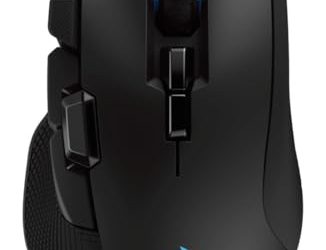
The G502 HERO is the long-running anchor of the side-button category, and its listing states the case plainly: a gaming mouse with side buttons, built around 11 programmable buttons and a dual-mode hyper-fast scroll wheel. The thumb cluster sits on the left flank of a right-handed ergonomic shell, within easy reach of the thumb, and each button can hold a macro, a secondary function, or a DPI step through Logitech G HUB software. Five onboard profiles can live in the mouse memory, so bindings travel with the hardware.
The HERO 25K sensor tracks from 100 to 25,600 DPI with zero smoothing, filtering, or acceleration in its published specifications, and the dual-mode scroll wheel switches between a notched ratchet and a free spin for fast scrolling through inventories and menus. Five removable 3.6-gram weights sit in the body, so the balance can shift toward the palm or toward the front depending on grip. At 4.3 ounces, the HERO is a steady, planted mouse, and the right-handed shape suits palm and claw grips.
RGB lighting runs through LIGHTSYNC, with color that can sync across other Logitech G gear. The wired USB connection keeps input consistent, and the listing notes the mouse works with PC and Mac. For players who want a proven thumb cluster without paying for a full MMO grid, the HERO covers the middle ground: enough side buttons for shooters, MOBAs, and action games, plus the weight tuning to make the shell feel like it belongs to the hand holding it.
- Sensor: HERO 25K optical, 100 to 25,600 DPI
- Buttons: 11 programmable, with a thumb-side cluster
- Weight: 4.3 ounces, plus five removable 3.6-gram weights
- Connection: Wired USB
- Lighting: LIGHTSYNC RGB, customizable through G HUB
- Memory: Onboard profiles for bindings
SteelSeries Rival 5
The Rival 5 is a nine-button mouse built for players who jump between genres, and its listing leads with the feature that matters here: five quick action side buttons arranged in a thumb panel, with a two-way toggle switch in the mix for fast reaction plays. The side panel is the heart of the design, giving Battle Royale, FPS, MOBA, and MMO players a compact cluster that stays reachable without crowding the shell.
The TrueMove Air sensor tracks at 18,000 CPI with true one-to-one tracking, 400 IPS, and 40 G acceleration, so fast flicks and slow tracking movements read the same way. Golden Micro IP54 switches are rated for 80 million clicks and sealed against dust and splashes, and the 85-gram shell is light enough for quick repositioning while still feeling solid in the hand. Ten zones of PrismSync RGB lighting run across the body, and SteelSeries Engine software handles button mapping and lighting.
The shape is ergonomic and right-handed, with a length of 128.8 mm and a height of 42 mm at the back, which suits claw and fingertip grips. A super mesh cable connects over USB, and the mouse works with Windows, Mac, Xbox, and Linux. For players who want a proper side panel without the bulk of a twelve-button MMO grid, the Rival 5 is the balanced pick: five thumb buttons, a light body, and a sensor that keeps up across genres.
- Sensor: TrueMove Air optical, up to 18,000 CPI
- Buttons: 9 programmable, including 5 quick action side buttons
- Weight: 85 grams
- Connection: Wired USB with super mesh cable
- Switches: Golden Micro IP54, rated for 80 million clicks
- Lighting: 10-zone PrismSync RGB
Razer Basilisk V3
The Basilisk V3 is a right-handed ergonomic mouse with a thumb rest and 11 programmable buttons, built for players who want a full set of controls without moving to an MMO grid. The side cluster sits beside a sculpted thumb rest, so the thumb parks in the same place every time and each button falls under the same part of the digit. A multi-function trigger in the cluster adds one more input for push-to-talk, ping, or a quick ability cast.
The Focus Plus 26K DPI optical sensor tracks with zero smoothing in its published specifications, and the dual-mode HyperScroll tilt wheel switches between a tactile notched mode and a free spin, with left and right tilt adding two more inputs. Optical mouse switches drive the primary clicks, and 11 Chroma RGB lighting zones run across the shell, reacting with Chroma-integrated games. The wired USB connection keeps the link steady, and the mouse works with PC and Mac.
The Basilisk V3 suits players who spend long sessions in one game and want every common command on the mouse. The thumb rest reduces fatigue by giving the digit a place to sit between actions, and the 11-button layout covers shooters, MOBAs, and action games without demanding that the player memorize a twelve-button grid. Confirm the current listing before buying, since the direct product page was not reachable during this check and availability rests on the Amazon listing plus recent mirrors.
- Sensor: Focus Plus 26K DPI optical
- Buttons: 11 programmable, including a multi-function trigger
- Connection: Wired USB
- Scroll wheel: Dual-mode HyperScroll tilt wheel
- Lighting: 11 Chroma RGB zones
- Shape: Right-handed ergonomic with thumb rest
Corsair Scimitar RGB Elite

The Scimitar RGB Elite is the MMO pick in this guide, and its side panel is the largest here: 12 mechanical side buttons in a grid, repositionable through a patented Key Slider control system that slides the whole panel forward or back to fit the hand and the grip. Seventeen programmable buttons in total cover a full hotbar, and onboard profile storage carries the bindings to another machine.
The custom PixArt PMW3391 sensor tracks natively at 18,000 DPI, adjustable in 1 DPI steps for fine sensitivity tuning. Omron switches are rated for 50 million clicks, and the braided cable holds up through long sessions. Four zones of RGB backlighting run through iCUE software, which also handles macro programming, surface calibration, and lighting sync with other Corsair gear. At 122 grams, the Scimitar is the heaviest mouse in this guide, and that mass suits a planted palm grip more than a fast flicking style.
The Key Slider is the feature that separates the Scimitar from other grid mice: instead of adapting the thumb to a fixed panel, the panel adapts to the thumb. Players with shorter or longer thumbs can shift the grid until the back row falls naturally under the digit. For MMO and MOBA players who bind abilities, items, and macros to the mouse, the Scimitar puts the most commands within thumb reach of any mouse in this guide.
- Sensor: Custom PixArt PMW3391 optical, native 18,000 DPI
- Buttons: 17 programmable, including 12 mechanical side buttons
- Weight: 122 grams
- Connection: Wired USB with braided cable
- Switches: Omron, rated for 50 million clicks
- Lighting: 4-zone RGB through iCUE software
Side-by-Side Comparison
| Mouse | Side buttons | Total buttons | Sensor | Weight | Connection |
|---|---|---|---|---|---|
| Logitech G502 HERO | Thumb cluster | 11 programmable | HERO 25K, 25,600 DPI | 4.3 oz | Wired USB |
| SteelSeries Rival 5 | 5 quick action | 9 programmable | TrueMove Air, 18,000 CPI | 85 g | Wired USB |
| Razer Basilisk V3 | Thumb cluster with trigger | 11 programmable | Focus Plus, 26,000 DPI | Not stated in listing | Wired USB |
| Corsair Scimitar RGB Elite | 12 mechanical, sliding panel | 17 programmable | PixArt PMW3391, 18,000 DPI | 122 g | Wired USB |
Frequently Asked Questions
How many side buttons do I need on a gaming mouse?
Two thumb buttons cover forward and back plus one spare command, which is enough for most shooter players. Four to six thumb buttons suit MOBA and action players who bind abilities, items, and voice chat to the mouse. Twelve side buttons in a grid suit MMO players who keep a full hotbar under the thumb. The right count depends on the games played most: a shooter player gains little from a twelve-button grid, while an MMO player runs out of room with only two thumb buttons.
Do side buttons work for left-handed players?
Most gaming mice with side buttons are right-handed, with the cluster molded into the left flank of the shell for the right thumb. Left-handed players should look for an ambidextrous mouse with side buttons on both flanks, or a model whose side buttons can be mirrored through software. The four mice in this guide are right-handed designs, so left-handed players will want a different shape with the same button idea.
Can side buttons be used outside games?
Yes. Every button on these mice can hold a command beyond the game, since the mapping lives in the maker software and onboard memory. Common non-game bindings include browser forward and back, copy and paste, media play and pause, and push-to-talk for voice chat. The same thumb buttons that throw a grenade in a shooter can step through a document or switch tabs on the desktop.
How to Choose
Begin with the games played most. Shooter players should favor a light mouse with two to five thumb buttons and a sensor that tracks cleanly at low sensitivity. MMO and MOBA players should favor a larger side panel, with the Scimitar grid or a five-button cluster covering the abilities used most. Action and Battle Royale players sit in the middle, where the G502 HERO and Rival 5 give enough buttons without a grid to memorize.
Next, match the shell to the hand. A right-handed ergonomic shape with a thumb rest suits palm grips, while a narrower body suits claw and fingertip grips. If the thumb is short, a sliding side panel or a compact cluster matters more than the total button count. Check the listing for the dimensions and the weight, and compare them with the mouse currently on the desk.
Finally, confirm the listing before buying. Button counts, sensor figures, and weights in this guide come from the Amazon product pages, and listings change over time. Open the product page, confirm the model number and the side-button layout, and make sure the buttons shown match the commands planned for them. A side-button mouse earns its place when the thumb finds every button without looking, and that fit is worth checking before the mouse arrives.
Disclosure: As an Amazon Associate, we may earn a commission from qualifying purchases made through links in this article, at no additional cost to you.
Related guides
More from Amazon
Programs that pair well with the guide above. Offers and eligibility are set by Amazon and may change.
Free shipping on eligible items, Prime Video and more. Eligible new members can start with a free trial.
Start a Prime free trialAd-free music streaming. Eligible new subscribers can start with a free trial.
Try Music Unlimited freeA Prime membership for ages 18-24 with a trial period. Eligibility is set by Amazon.
See Prime for Young AdultsAudiobooks and podcasts to listen to on the go. Eligible new members can start with a free trial.
Try Audible freeAs an Amazon Associate we earn from qualifying purchases.