A loud mouse click carries further than most players expect. In a shared bedroom, a flat with thin walls, or a late-night session beside a sleeping partner, every click lands twice: once in the game, and once in the room. The real decision is therefore not simply which mouse is quietest on a specification sheet, but which one stays quiet while still tracking well enough for gaming, holding a stable wireless connection, and fitting the hand for hours.
This guide is for PC players and casual gamers who need a wireless mouse that keeps click noise down without giving up on everyday play, including relaxed Minecraft sessions, strategy games, and slower-paced multiplayer. Every product below is identified by the name and specifications shown on its Amazon product page, with the quiet-click mechanism stated exactly as the listing describes it.
Top 3 picks at a glance

Quick Picks
As an Amazon Associate we earn from qualifying purchases.
| Product | Best for | Key spec from title |
|---|---|---|
| Logitech MX Master 3S | A quiet desk mouse for long sessions and precise work between games | 8K DPI, Track on Glass, Quiet Clicks, USB-C, Bluetooth |
| Logitech MX Anywhere 3S | Travel and small desks where a compact quiet mouse matters | 8K DPI Any-Surface Tracking, Quiet Clicks, Programmable Buttons, USB C |
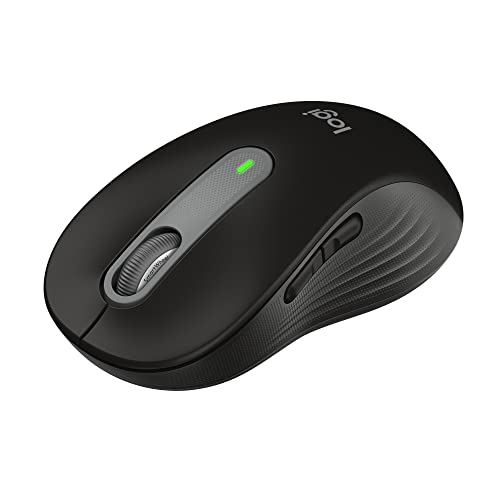
| Logitech Signature M650 | Smaller hands and shared rooms that need silent clicks | 2-Year Battery, Silent Clicks, Customizable Side Buttons, Bluetooth |
| Logitech Signature M650 L | Larger hands that want the same silent clicks in a full-size shell | 2-Year Battery, Silent Clicks, Customizable Side Buttons, Bluetooth |
| Logitech M330 Silent Plus | A simple, low-fuss quiet mouse for a second PC or family setup | 2.4GHz with USB Receiver, Optical Tracking, Quiet and Lightweight |
How to Choose
Start with the quiet mechanism, not the marketing word
Quiet mice reduce click noise in different ways, and the listing usually names the mechanism. Logitech describes Quiet Clicks on the MX Master 3S and MX Anywhere 3S as offering the same click feel with 90 percent less click noise, while SilentTouch on the Signature M650, M650 L, and M330 Silent Plus is described as reducing click noise by over 90 percent. Both figures are manufacturer claims measured against a standard mouse, not a promise of silence. A mouse that only says quiet in its title, without naming such a mechanism, deserves a closer look before buying.
Check the wireless connection before the battery claim
A quiet mouse still needs a steady link, because a dropped connection interrupts a game far more than a loud click ever could. The MX models here connect by Bluetooth and by a Logi Bolt receiver, while the Signature M650 pair and the M330 Silent Plus use Bluetooth or a 2.4 GHz USB receiver. For gaming, use the receiver rather than Bluetooth when one is included, and keep it close to the mouse. Battery life then becomes a convenience question: the MX models recharge by USB-C, while the others run for months on a single battery.
Match the size to the hand, because quiet clicks still need a steady grip
A mouse that is too small forces the fingers to curl, and a mouse that is too large forces the palm to stretch, and both make clicks uneven and tiring. Logitech sizes this range deliberately: the MX Anywhere 3S is compact for travel and small desks, the Signature M650 suits small to medium hands, the M650 L is the full-size version for large hands, and the MX Master 3S is a large ergonomic shape. Hold the hand relaxed over the shape in mind, and choose the size that lets the fingers rest level on the buttons.
Accept the trade-off between silence and competitive speed
None of these mice is built for high-level competitive shooters, and that trade-off should be stated plainly. Their sensors reach 8,000 DPI on the MX models, which is ample for casual and mid-paced games, yet their polling rates and click designs prioritise low noise over the fastest possible response. Players who mainly compete in fast shooters should look at a dedicated esports mouse instead, while players who value a quiet room will find the compromise here is the right one.
The 5 Best Options
Logitech MX Master 3S

The MX Master 3S is the most capable mouse in this list, and its quiet design is built into a large ergonomic shell rather than added as an afterthought. Logitech describes its Quiet Clicks as giving the same satisfying feel with 90 percent less click noise, and the MagSpeed scroll wheel is described as near-silent as well, so scrolling through inventories and menus stays discreet. An 8,000 DPI Darkfield sensor tracks on most surfaces, including glass at least 4 mm thick, which makes it forgiving about where it is used.
Specs
- Sensor: Darkfield high-precision sensor, 8,000 DPI
- Quiet mechanism: Quiet Clicks, 90 percent less click noise
- Scroll wheel: MagSpeed electromagnetic wheel, near-silent
- Buttons: 7 customizable buttons, including a gesture button and thumb wheel
- Connection: Logi Bolt USB receiver and Bluetooth, up to 3 devices
- Battery life: Up to 70 days per charge, USB-C charging
- Weight: 141 grams
Best for: A main desk mouse for players who want quiet clicks, a precise sensor, and a comfortable ergonomic shape.
Watch out for: At 141 grams it is the heaviest mouse here, and its polling rate and click design suit relaxed play rather than competitive shooters. The Bluetooth edition sold separately has no receiver or charging cable in the box, so choose the Standard Edition listing for this ASIN.
Logitech MX Anywhere 3S
The MX Anywhere 3S takes the same Quiet Clicks idea and puts it in a compact body that fits a laptop bag or a crowded desk. Its 8,000 DPI sensor also tracks on glass, and the MagSpeed wheel gives fast, quiet scrolling in a much smaller package. Bluetooth and Logi Bolt connections let it switch between up to three devices, which suits players who move between a gaming PC, a laptop, and a work machine during the day.
Specs
- Sensor: 8,000 DPI any-surface tracking
- Quiet mechanism: Quiet Clicks, less click noise than the MX Anywhere 3
- Scroll wheel: MagSpeed scrolling
- Buttons: Programmable buttons
- Connection: Bluetooth and Logi Bolt USB receiver, up to 3 devices
- Battery life: Up to 70 days per charge, USB-C charging
- Compatibility: Windows PC, Linux, Chrome, Mac
Best for: Players who travel or play at a small desk and want a compact quiet mouse that still tracks precisely.
Watch out for: The compact shape can cramp larger hands during long sessions, and like the MX Master 3S it is tuned for quiet, precise use rather than high-speed competitive play.
Logitech Signature M650
The Signature M650 is the quietest-value pick for smaller hands. Logitech describes its SilentTouch technology as delivering 90 percent less click noise, and the listing pairs that with a two-year battery life, so the mouse can sit on a shared desk for months without attention. Customizable side buttons cover forward and back in a browser or in a game menu, and Bluetooth plus a USB receiver give two ways to connect.
Specs
- Quiet mechanism: SilentTouch technology, 90 percent less click noise
- Battery life: 2-year battery life
- Buttons: Customizable side buttons
- Connection: Bluetooth and USB receiver
- Size: For small to medium sized hands
- Compatibility: PC, Mac, multi-device, Chromebook
Best for: Smaller hands in a shared room, where silent clicks and a long battery life matter most.
Watch out for: The sensor range and polling rate are modest next to the MX models, so fast competitive games will feel less responsive than relaxed or mid-paced titles.
Logitech Signature M650 L

The M650 L is the same mouse in a full-size shell, and that single change matters more than it sounds. Large hands get the same SilentTouch clicks with 90 percent less click noise, the same two-year battery life, and the same customizable side buttons, but without the cramped grip that a small mouse forces on a large palm. It is the pick for players who tried a compact quiet mouse, liked the silence, and found the shape too small.
Specs
- Quiet mechanism: SilentTouch technology, 90 percent less click noise
- Battery life: 2-year battery life
- Buttons: Customizable side buttons
- Connection: Bluetooth and USB receiver
- Size: For large sized hands, full-size shell
- Compatibility: PC, Mac, multi-device, Chromebook
Best for: Larger hands that want silent clicks in a full-size wireless mouse for a shared desk.
Watch out for: Players with small hands should choose the standard M650 instead, because the larger shell can stretch the fingers and make clicks less controlled.
Logitech M330 Silent Plus

The M330 Silent Plus is the simplest mouse here, and its simplicity is the point. Logitech describes its SilentTouch technology as reducing over 90 percent of clicking sounds, while keeping the same click feel as a standard mouse. A 2.4 GHz nano receiver plugs in and works at once, the optical sensor tracks at 1,000 DPI, and the battery lasts up to 24 months on the listing. There is little to configure, which suits a second PC, a family setup, or a player who just wants the noise gone.
Specs
- Quiet mechanism: SilentTouch technology, over 90 percent less click noise
- Sensor: Optical tracking, 1,000 DPI
- Connection: 2.4 GHz wireless with USB nano receiver, up to 10 metres
- Battery life: Up to 24 months
- Shape: Full-size, right-handed
- Compatibility: PC, Mac, laptop, Chromebook
Best for: A second PC or a family setup where a simple, quiet wireless mouse is needed without extra buttons or software.
Watch out for: The 1,000 DPI sensor and basic button layout suit relaxed play and everyday use, not fast-paced competitive games, and there are no side buttons for extra in-game actions.
Which One Fits Your Situation
You play late at night beside someone sleeping
Choose the Logitech Signature M650 or the M650 L, depending on hand size. SilentTouch cuts click noise by 90 percent on the listing, and the two-year battery means no charging cable rattling on the desk at night. Keep a spare battery nearby, so a low battery never ends a session early. Use the USB receiver for the steadiest connection during play.
You want one quiet mouse for work, study, and relaxed games
Choose the Logitech MX Master 3S. Its ergonomic shape, 8,000 DPI sensor, MagSpeed wheel, and seven customizable buttons handle long desk sessions well, and Quiet Clicks keep both work calls and late games discreet. The thumb wheel also helps with horizontal scrolling in spreadsheets and timelines between games. Accept its weight and its relaxed-play tuning.
You play on a laptop, a small desk, or while travelling
Choose the Logitech MX Anywhere 3S. The compact body fits a bag, the sensor tracks on glass and other awkward surfaces, and Quiet Clicks keep hotel rooms and libraries calm. Pack the receiver safely when travelling, so it is never left behind in a hotel room. Larger hands should test the size first, because long sessions can feel cramped.
You need a quiet mouse for a second PC without fuss
Choose the Logitech M330 Silent Plus. Plug in the nano receiver, and SilentTouch handles the noise while the 24-month battery handles the maintenance. Its right-handed full-size shape also suits shared use, since most family members can pick it up without adjusting settings. It is the right pick when the goal is simply a quieter room, not extra buttons or software.
Common Mistakes
- Buying a mouse labelled quiet without checking whether the listing names a mechanism such as SilentTouch or Quiet Clicks.
- Playing over Bluetooth when the mouse includes a receiver, then blaming the mouse for lag.
- Choosing the compact MX Anywhere 3S for large hands, or the full-size M650 L for small hands, and then fighting the shape.
- Expecting a silent office-style mouse to match a dedicated esports mouse in a fast shooter.
- Picking the MX Master 3S Bluetooth edition by mistake and finding no receiver or charging cable in the box.
Frequently Asked Questions
Are quiet wireless mice really silent?
No, and the listings do not claim that they are. Logitech describes Quiet Clicks and SilentTouch as reducing click noise by about 90 percent compared with a standard mouse, which leaves a soft click that is far less likely to carry across a room. The scroll wheel and the desk surface still make some sound, so the goal is quieter play, not total silence.
Is a quiet wireless mouse good enough for gaming?
It is good enough for relaxed and mid-paced games, including Minecraft, strategy titles, and slower multiplayer modes, where the MX models offer an 8,000 DPI sensor. For fast competitive shooters, a dedicated esports mouse with a higher polling rate will respond sooner, so match the mouse to the games played most often rather than to the quietest claim.
Should I use Bluetooth or the USB receiver for gaming?
Use the USB receiver whenever one is included, because it gives a more stable connection for gaming than Bluetooth. Bluetooth suits switching between devices and saving a USB port, and it works well for everyday use. Keep the receiver close to the mouse, with a clear path between the two, for the best result.
How long do the batteries last on these quiet mice?
The MX Master 3S and MX Anywhere 3S list up to 70 days per charge and recharge by USB-C, while the Signature M650, M650 L, and M330 Silent Plus list up to two years on a single battery. Actual life depends on use, and a low battery can cause missed clicks, so replace or recharge before a long session rather than during one.
Related guides
More from Amazon
Programs that pair well with the guide above. Offers and eligibility are set by Amazon and may change.
Free shipping on eligible items, Prime Video and more. Eligible new members can start with a free trial.
Start a Prime free trialAd-free music streaming. Eligible new subscribers can start with a free trial.
Try Music Unlimited freeA Prime membership for ages 18-24 with a trial period. Eligibility is set by Amazon.
See Prime for Young AdultsAudiobooks and podcasts to listen to on the go. Eligible new members can start with a free trial.
Try Audible freeAs an Amazon Associate we earn from qualifying purchases.