Minecraft PvP rewards the player who lands the first clean hit, keeps the crosshair steady through a strafe, and clicks again before the opponent recovers. A slow sensor, a heavy shell, or a switch that misses a fast second click can turn a winning trade into a lost fight, even when the aim itself is sound. The real decision is therefore not which mouse looks fastest on a box, but which one keeps up with rapid clicking, repeated flicks, and long sessions without dragging the hand down.
This guide is for Minecraft players who fight in Bed Wars, SkyWars, duels, and other PvP modes on Java Edition, and who want a mouse chosen for click response, weight, shape, and sensor consistency rather than for looks alone. Every product below is identified by the name and specifications shown on its Amazon product page, so the comparison rests on what the listing actually states.
Top 3 picks at a glance


Quick Picks
As an Amazon Associate we earn from qualifying purchases.
| Product | Best for | Key spec from title |
|---|---|---|
| Logitech G PRO X Superlight 2 | Competitive duels where every gram matters | 60g Pro-Grade with 5 Programmable Buttons, 44k DPI Sensor, 8kHz Report Rate |
| Razer DeathAdder V3 Pro | Palm-grip players who want a large ergonomic shape | 63g Ultra Lightweight, Focus Pro 30K Optical Sensor, Optical Switches Gen-3 |
| Razer Viper V2 Pro | Ambidextrous players who flick and strafe constantly | 58g Ultra Lightweight, Optical Switches Gen-3, 30K DPI Optical Sensor |
| Glorious Model O Wireless | Players who want a light honeycomb shell with RGB lighting | 69g Lightweight Wireless Gaming Mouse, RGB, Lag Free 2.4GHz Wireless |
| Logitech G305 LIGHTSPEED | A first serious PvP mouse on a tighter setup | HERO 12K Sensor, 12,000 DPI, Lightweight, 6 Programmable Buttons, 250h Battery Life |
How to Choose
Click response comes before raw DPI
In Minecraft PvP, the left click is the weapon. Optical switches, such as the Gen-3 switches on the Razer models below or the LIGHTFORCE hybrid switches on the Superlight 2, actuate with light rather than a metal contact, which the listings present as a faster and more consistent click. That matters for butterfly clicking and jitter clicking, where two rapid inputs must both register. A mouse with a very high DPI ceiling but a mushy or inconsistent main button will still lose trades, so read the switch description on the listing before looking at the sensor number.
Weight changes how long fast clicking stays accurate
A 58-gram mouse and a 99-gram mouse feel similar for the first minute, then very different after an hour of duels. Lighter shells let the hand change direction sooner and make repeated flicks less tiring, which is why four of the five picks here sit under 70 grams. The G305, at 99 grams, is the exception, and it suits players who prefer a slightly planted feel or who already play with a heavier mouse. If the wrist tires before the match ends, the mouse is too heavy for that grip, whatever its sensor claims.
Shape and grip decide whether the clicks stay clean
A mouse that forces the fingers into an awkward angle will produce uneven clicks, especially during butterfly clicking, where two fingers alternate on the same button. Ergonomic right-handed shells such as the DeathAdder V3 Pro support the palm and keep the index and middle fingers level, while symmetrical shells such as the Viper V2 Pro and the Model O suit claw and fingertip grips that lift and reposition often. Measure the choice against the hand, not against a favourite streamer: a shape that fits lets the fingers strike straight down instead of sliding sideways.
Polling rate and connection keep movement and clicks in sync
Polling rate is how often the mouse reports its position to the PC. The Superlight 2 lists an 8kHz report rate, while the other wireless picks here list a 1,000 Hz-class wireless link through their 2.4 GHz receivers. In practice, a stable 1,000 Hz connection is enough for most Minecraft PvP, because the game itself does not demand the extreme report rates of some modern shooters. What matters more is a dedicated 2.4 GHz receiver rather than Bluetooth alone, since Bluetooth can add delay at the worst moment. Keep the receiver close, with a clear line to the mouse, and charge or swap the battery before a long session.
The 5 Best Options
Logitech G PRO X Superlight 2

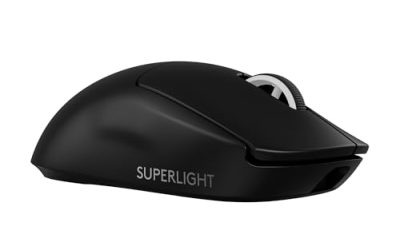
The Superlight 2 is the most single-minded pick in this list: almost everything about it is aimed at removing weight and delay. Its symmetrical shell suits claw and fingertip grips, and at 60 grams it changes direction with very little effort, which helps when a duel turns into a fast strafe battle. The HERO 2 sensor tracks up to 44,000 DPI, and the listing pairs it with an 8kHz report rate, so rapid flicks and small aim corrections stay closely tied to hand movement.
Specs
- Weight: 60 grams
- Sensor: HERO 2, up to 44,000 DPI
- Report rate: up to 8kHz
- Switches: LIGHTFORCE hybrid switches
- Buttons: 5 programmable buttons
- Connection: LIGHTSPEED wireless, USB-C charging
- Compatibility: PC and Mac
Best for: Players who duel often and want the lightest, fastest-reporting mouse in this guide.
Watch out for: The minimal shape has no side buttons beyond the standard pair and no RGB lighting, so players who rely on many thumb buttons will feel short of controls.
Razer DeathAdder V3 Pro
The DeathAdder V3 Pro takes the opposite route to the same goal, wrapping a fast sensor in a large ergonomic shell that fills the palm. At 63 grams it is remarkably light for its size, and the Focus Pro 30K optical sensor gives it the tracking headroom for both close-range sword fights and longer bow shots. Its Gen-3 optical switches are built for rapid repeated clicks, which is exactly what Minecraft PvP asks of the left button.
Specs
- Weight: 63 grams
- Sensor: Focus Pro 30K optical sensor
- Switches: Optical Switches Gen-3
- Buttons: 5 programmable buttons
- Connection: HyperSpeed wireless, USB-C charging
- Battery life: Up to 90 hours
- Compatibility: PC
Best for: Palm-grip players who want a full-size ergonomic mouse that still feels light in long fights.
Watch out for: The standard listing runs at a 1,000 Hz polling rate; the 8,000 Hz HyperPolling dongle is a separate bundle, so check the exact listing before assuming the higher rate is included.
Razer Viper V2 Pro
The Viper V2 Pro is the lightest mouse here, and its symmetrical shape makes it a natural fit for players who switch between claw and fingertip grips mid-fight. The 58-gram shell lifts and resets easily, which helps when a missed hit needs an instant correction. Its Focus Pro 30K sensor and Gen-3 optical switches match the DeathAdder V3 Pro on paper, so the choice between the two comes down to shape rather than raw speed.
Specs
- Weight: 58 grams
- Sensor: Focus Pro 30K optical sensor
- Switches: Optical Switches Gen-3
- Buttons: 5 programmable buttons, with on-mouse DPI controls
- Connection: HyperSpeed wireless, USB-C cable included
- Battery life: Up to 90 hours
- Compatibility: PC
Best for: Ambidextrous and claw-grip players who want the lightest shell in this list for constant flicks.
Watch out for: The symmetrical shell has no thumb rest, so players who rest their thumb on the mouse for support may find long sessions less comfortable than on an ergonomic shape.
Glorious Model O Wireless
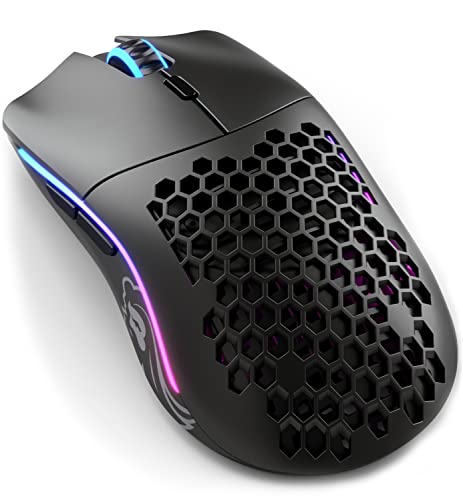
The Model O Wireless stands out for its honeycomb shell, which keeps the weight down to 69 grams while leaving the RGB lighting visible through the body. Its ambidextrous shape suits right-handed players who use a claw or fingertip grip, and the 2.4 GHz wireless link is presented on the listing as lag-free, which is the connection to use for PvP rather than Bluetooth. The BAMF sensor gives it enough sensitivity range for both low-sensitivity strafing and higher-sensitivity inventory work.
Specs
- Weight: 69 grams
- Sensor: BAMF sensor, up to 19,000 DPI
- Connection: Lag-free 2.4 GHz wireless
- Battery life: Up to 71 hours
- Lighting: RGB
- Shape: Ambidextrous honeycomb shell
- Compatibility: PC
Best for: Players who want a light, ventilated shell with visible RGB lighting and a straightforward wireless setup.
Watch out for: The honeycomb holes can collect dust and skin oils over time, so the shell needs more regular cleaning than a solid-body mouse.
Logitech G305 LIGHTSPEED

The G305 is the practical entry point in this list. It uses a single AA battery, which keeps the design simple and gives it up to 250 hours of battery life on the listing, and its HERO sensor reaches 12,000 DPI with a 1 ms LIGHTSPEED report rate. At 99 grams it is heavier than the other picks, but that weight also makes it feel planted for players who are still learning to control fast flicks. Six programmable buttons cover the essentials without crowding the shell.
Specs
- Weight: 99 grams
- Sensor: HERO sensor, up to 12,000 DPI
- Report rate: 1 ms with LIGHTSPEED wireless
- Buttons: 6 programmable buttons
- Battery life: Up to 250 hours
- Memory: On-board memory
- Compatibility: PC and Mac
Best for: Players buying a first dedicated PvP mouse who want long battery life and a simple wireless setup.
Watch out for: The AA battery sits toward the rear, so the balance feels back-heavy compared with rechargeable mice, and the 12,000 DPI ceiling is lower than the other picks here.
Which One Fits Your Situation
You duel for hours and your wrist tires first
Choose the Razer Viper V2 Pro or the Logitech G PRO X Superlight 2. Both sit close to 60 grams, so repeated flicks and strafes cost less effort over a long session. The Viper suits symmetrical grips, while the Superlight 2 suits players who want the higher report rate listed on its page.
You play palm grip and want a mouse that fills the hand
Choose the Razer DeathAdder V3 Pro. Its ergonomic shell supports the palm through long fights, and at 63 grams it avoids the heavy feel that usually comes with a full-size shape. That support keeps the fingers level, so repeated clicks stay even through a long Bed Wars match. Confirm whether the listing includes the HyperPolling dongle if the higher polling rate matters to the setup.
You want RGB lighting and a light shell without a premium build
Choose the Glorious Model O Wireless. The honeycomb body keeps it at 69 grams and shows off the lighting, while the 2.4 GHz link keeps the connection suited to PvP. The open shell also keeps the hand cooler during long sessions, although it does collect dust sooner. Accept that the open shell needs cleaning more often than a closed one.
You are buying a first PvP mouse and want the simplest ownership
Choose the Logitech G305 LIGHTSPEED. A single AA battery lasts up to 250 hours on the listing, the receiver stores inside the mouse, and the six-button layout is easy to learn. The receiver storage also makes the mouse easy to carry to a friend’s setup without losing parts. Its extra weight is a fair trade for that simplicity at this level.
Common Mistakes
- Choosing the highest DPI number on the page instead of the switch, weight, and shape that affect every click.
- Using Bluetooth for PvP when the mouse includes a dedicated 2.4 GHz receiver with lower delay.
- Picking a heavy mouse for butterfly clicking, then blaming the technique when the hand tires.
- Buying the DeathAdder V3 Pro bundle by mistake and expecting the 8,000 Hz dongle in the standard box.
- Ignoring hand size and grip, then discovering that a symmetrical shell offers no support for a palm grip.
Frequently Asked Questions
What DPI should I use for Minecraft PvP?
Most players settle somewhere in the 400 to 1,600 DPI range with in-game sensitivity adjusted to taste, because lower sensitivity gives steadier aim during strafes. The high ceilings on these mice are headroom, not a target, so start low, test a few duels, and raise the value only if turning feels slow.
Does polling rate matter in Minecraft?
It matters less than in some modern shooters, because Minecraft does not demand extreme report rates to feel responsive. A stable 1,000 Hz wireless connection is enough for most PvP, while the Superlight 2 lists up to 8kHz for players who want the extra margin. A dropping or distant receiver causes more harm than a lower polling rate.
Is a wireless mouse fast enough for Minecraft PvP?
Yes, when it uses its dedicated 2.4 GHz receiver rather than Bluetooth. Every wireless pick here lists a 2.4 GHz-class wireless link, and the G305 lists a 1 ms LIGHTSPEED report rate. Keep the receiver close to the mouse and charged or fresh batteries ready before a long session.
Can I butterfly click with these mice?
The optical switches on the Razer picks and the LIGHTFORCE switches on the Superlight 2 are designed for fast repeated clicks, which suits butterfly clicking. Technique still matters, and some servers limit clicking methods, so check the rules of the server before relying on any fast-clicking style in a competitive match.
Related guides
More from Amazon
Programs that pair well with the guide above. Offers and eligibility are set by Amazon and may change.
Free shipping on eligible items, Prime Video and more. Eligible new members can start with a free trial.
Start a Prime free trialAd-free music streaming. Eligible new subscribers can start with a free trial.
Try Music Unlimited freeA Prime membership for ages 18-24 with a trial period. Eligibility is set by Amazon.
See Prime for Young AdultsAudiobooks and podcasts to listen to on the go. Eligible new members can start with a free trial.
Try Audible freeAs an Amazon Associate we earn from qualifying purchases.