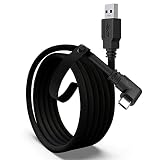
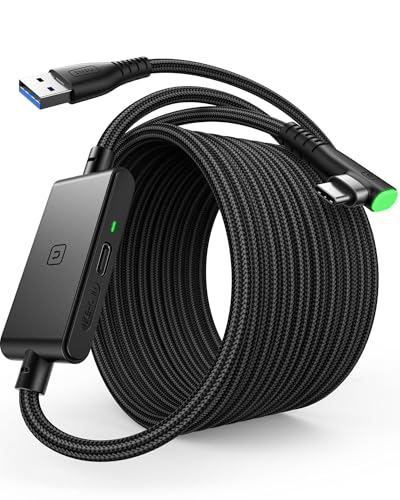
A cable that can’t sustain full USB 3.0 bandwidth is the most common reason Quest Link looks blurry or drops frames, more often than router or PC hardware issues get blamed for. Our top pick is the AMVR 16FT VR Charging Link Cable at around $25 for its nylon braided durability and A-to-C adapter, though the Meta Quest Link Cable remains the safest choice if you want official brand validation and are willing to pay around $60 for it.
Our Top Picks



Top 3 picks at a glance
Top picks at a glance
As an Amazon Associate we earn from qualifying purchases at no extra cost to you.



![INIU Link Cable with Charging [16ft] for Meta Quest 3/3S, Oculus Quest 2/Pro, Pico 4, PC VR - USB 3.0 High Speed Data & Charging Cable, USB C Charger Cord for VR Headset Accessories - Upgraded Version](https://m.media-amazon.com/images/I/51kTM+9MDWL._SL160_.jpg)



| Model | Key spec | Price | Best for |
|---|---|---|---|
| Syntech Link Cable | 16FT, USB 3.0, Quest 3/3S/2, Pico 4 | Check on Amazon | Budget multi-headset use |
| INIU VR Link Cable | 16ft, separate charging port | Check on Amazon | Charge-while-playing setups |
| AMVR VR Charging Link Cable | 16FT, nylon braided, A-to-C adapter | Check on Amazon | Overall pick, durability |
| INIU Link Cable Upgraded | 16ft, USB 3.0, Quest 3/3S/Pico 4 | Check on Amazon | Latest headset compatibility |
| Meta Quest Link Cable | Official cable, works Quest 3/3S/2/Pro | Check on Amazon | Brand-validated reliability |
| VCNBAN 16 Feet Link Cable | 16FT, USB 3.0 to USB C | Check on Amazon | Lowest price entry |
| Maxonar VR Charging Link Cable | 16FT, USB 3.0 | Check on Amazon | Simple budget pick |
| UGREEN Right Angle USB C Cable | 5Gbps, right-angle connector, 16ft | Check on Amazon | Cable-management setups |
Syntech Link Cable 16FT for Meta Quest 3/3S/2, Pico 4
Syntech’s cable covers a wide range of headsets in one listing, working across Meta Quest 3, 3S, and 2, as well as Pico 4, which matters for households running more than one VR platform. At around $16, it undercuts most of the branded competitors on this list while still specifying USB 3.0 data speeds.
Based on the USB 3.0 rating, this cable should sustain Quest Link’s higher bitrate video streaming modes without the compression artifacts that show up when a cable only supports USB 2.0 speeds, though Syntech doesn’t publish an exact Gbps throughput figure the way UGREEN does for its cable. Length is a standard 16 feet, enough slack for room-scale movement in most home play spaces.
The connector shell uses a straight USB-C plug rather than the right-angle design UGREEN offers, which is simpler but can create a slightly sharper cable bend near the headset if you route it over your shoulder during play.
Pros
- Works across Quest 3, 3S, 2, and Pico 4 in one cable
- USB 3.0 rated data speed at a budget price
- Standard 16-foot length for room-scale movement
Cons
- No published exact Gbps throughput figure
- Straight connector shell creates a sharper cable bend than right-angle designs
- No separate charging port for simultaneous data and independent charging
Who it’s for: multi-headset households that want one cable covering both Meta and Pico hardware without buying separate cords for each.
INIU 16ft VR Link Cable with Separate Charging Port
INIU’s approach splits data and charging across two connectors rather than sharing a single USB-C port, which lets you plug in a separate charger to top off the headset battery without competing for bandwidth on the data line during a long play session. It’s priced at around $19.
The USB 3.0 to USB-C data cable handles Quest Link streaming the same way the single-connector cables on this list do, but the dedicated charging port is the differentiator; based on typical USB-C PD charging behavior, this setup should let the headset charge at a normal rate while Link streaming continues uninterrupted, something shared-connector cables can slow down under simultaneous data and power draw.
16 feet of length matches the standard for this category, and the cable includes basic strain relief at the connector ends, though it isn’t nylon braided the way the pricier AMVR cable is.
Pros
- Separate charging port avoids bandwidth competition during long sessions
- USB 3.0 data speed for Quest Link streaming
- Reasonable price for the added charging flexibility
Cons
- Two-connector design adds a bit more cable clutter near the headset
- Not nylon braided, so durability is more basic than premium cables here
- Requires a separate charger plugged into the charging port to use that feature
Who it’s for: players doing extended sessions who want to keep the headset topped off without a shared connector slowing either function down.
AMVR 16FT VR Charging Link Cable with A-to-C Adapter
AMVR’s cable uses a nylon braided jacket, which resists the kinking and fraying that plain rubber-jacketed cables develop after months of being coiled and uncoiled around a play space. At around $25, it sits in the middle of this list’s price range and includes an A-to-C adapter for connecting to older USB-A ports if your PC lacks a USB-C header.
Based on the USB 3.0 rating and included adapter, this cable is more setup-flexible than most others here since it can adapt to either USB-C or USB-A motherboard headers without needing a separate adapter purchase. The braided jacket also holds its shape better over a 16-foot run, reducing the tangling that plain cables develop when stored coiled between sessions.
The charging function runs through the same connector as data, similar to most cables on this list except the split-connector INIU model, so charging and Link streaming share the same USB 3.0 bandwidth pool during simultaneous use.
Pros
- Nylon braided jacket resists kinking and fraying over time
- Included A-to-C adapter adds USB-A motherboard compatibility
- USB 3.0 data speed with combined charging over one connector
Cons
- Shared connector means charging and data compete for bandwidth simultaneously
- Costs more than the budget Syntech or VCNBAN cables
- Bulkier braided jacket is slightly stiffer than plain rubber cables
Who it’s for: buyers who want a cable built to last through daily use and flexible enough to connect to either USB-C or USB-A motherboard headers.
INIU Link Cable with Charging, Upgraded Version
This second INIU cable is a newer, single-connector version of the brand’s Link cable lineup, covering Meta Quest 3, 3S, Oculus Quest 2, Pro, and Pico 4 in one listing, priced at around $21, a couple dollars more than the split-connector version above it.
INIU markets this as an “upgraded version,” and based on the listing details, it likely refers to connector durability and shielding improvements over earlier revisions rather than a raw bandwidth increase, since it’s still rated at standard USB 3.0 speeds for high-speed data and charging over a single connector. The 16-foot length and PC VR compatibility match the rest of this roundup.
Unlike the split-connector INIU cable, this version routes charging and data through the same USB-C connector, so it trades the dedicated-charging convenience for a simpler single-cable setup that’s easier to route and store.
Pros
- Covers Meta Quest 3, 3S, Quest 2, Pro, and Pico 4
- Single connector is simpler to route than split-connector designs
- USB 3.0 rated for both data and charging
Cons
- Loses the dedicated charging port advantage of INIU’s other cable
- No braided jacket for extra durability
- Marginally pricier than the original INIU cable despite fewer distinguishing features
Who it’s for: buyers who want broad headset compatibility in a simple single-cable design without paying for the split-connector convenience.
Meta Quest Link Cable, Official
Meta’s own cable works across Quest 3, 3S, 2, and Pro, and at around $60 costs more than double any third-party cable on this list. The appeal here is straightforward: it’s built and validated by the headset manufacturer specifically for Quest Link’s bandwidth requirements, removing any guesswork about compatibility.
Based on Meta’s own specifications for this cable, it’s designed to sustain the higher-bitrate Link streaming modes without the artifacting that under-spec third-party cables can introduce, similar in practical outcome to the properly-rated USB 3.0 cables elsewhere on this list, but with the added assurance of first-party support if something goes wrong with the connection.
For the price difference, most players won’t notice a measurable performance gap between this cable and a well-reviewed third-party USB 3.0 option like AMVR’s or UGREEN’s, since both meet the same underlying USB 3.0 bandwidth requirement that Quest Link needs.
Pros
- Built and validated directly by Meta for Quest Link’s exact bandwidth needs
- Works across four headset generations including Quest Pro
- First-party support if the cable has issues
Cons
- More than double the price of comparable third-party USB 3.0 cables
- No meaningful performance gap over well-reviewed third-party alternatives
- No nylon braiding or reinforced jacket despite the premium price
Who it’s for: buyers who prioritize brand-backed reliability and support over saving money on a third-party cable with comparable specs.
16 Feet Link Cable for Quest 3S by VCNBAN
At around $9, this is the least expensive cable in this roundup, roughly a sixth of the official Meta cable’s price, while still listing USB 3.0 to USB-C high-speed data transfer and compatibility across Quest 3S, Quest 3, Oculus Quest 2, Pico 4, and PC and SteamVR use.
Based on the stated USB 3.0 rating, this cable should handle standard Quest Link streaming without the artifacting issues that plague USB 2.0-only cables, though at this price point, expect thinner cable jacket material and less robust strain relief at the connector ends than the pricier braided options on this list.
For buyers who mainly want a functional backup cable or are testing Link for the first time before committing to a pricier option, this covers the core requirement at the lowest entry cost in this roundup.
Pros
- Lowest price in this roundup by a wide margin
- USB 3.0 rated despite the low price
- Broad compatibility across Quest and Pico headsets
Cons
- Thinner cable jacket likely less durable over daily long-term use
- No braiding or reinforced strain relief
- Brand has less of a track record than Syntech or INIU
Who it’s for: buyers who want a functional backup cable or are trying Quest Link for the first time before investing in a pricier option.
Maxonar VR Charging Link Cable 16FT
Maxonar’s cable is a straightforward USB 3.0 option covering Meta Quest 3, 3S, and 2, along with Pico 4, priced at around $17, close to the Syntech cable in both price and feature set.
Based on the USB 3.0 rating, expect the same core Quest Link streaming performance as the other properly-rated cables on this list, with charging handled through the same connector as data. There’s nothing distinctive about this cable relative to Syntech or the base INIU model; it covers the essentials at a fair price without extras like a braided jacket or separate charging port.
The straightforward, no-frills approach here makes it a reasonable middle-of-the-road pick if you’re comparing several similarly priced budget cables and don’t have a strong preference between them.
Pros
- USB 3.0 rated at a budget-friendly price
- Covers Quest 3, 3S, 2, and Pico 4
- Standard 16-foot length
Cons
- No distinguishing features versus similarly priced competitors
- No braided jacket or separate charging port
- Less brand recognition than Syntech or INIU
Who it’s for: buyers who just want a functional, fairly priced USB 3.0 Link cable without extra features to compare.
UGREEN Right Angle USB C Cable, 5Gbps VR Link
UGREEN publishes an exact throughput figure other cables on this list don’t: 5Gbps, giving a concrete number to compare against rather than a general USB 3.0 label. At around $29, it’s priced near the top of this roundup, just under the AMVR cable, and covers Quest 3, 3S, and Pro specifically rather than a broader multi-brand list.
The standout feature is the right-angle connector at the headset end, which reduces strain on the port and creates a cleaner cable routing path over your shoulder during play compared to the straight connectors most other cables in this list use. Based on the stated 5Gbps rating, this cable should comfortably sustain Quest Link’s higher-bitrate streaming modes with room to spare.
UGREEN’s brand has a stronger general reputation in the cable and charging accessory space than several of the VR-specific brands on this list, which may factor into a buyer’s confidence in long-term durability even without VR-specific reviews to back it up.
Pros
- Published 5Gbps throughput figure, more specific than most competitors
- Right-angle connector reduces port strain and improves cable routing
- Recognized brand with broader cable and charging accessory reputation
Cons
- Narrower headset compatibility list than Syntech or Maxonar
- Priced near the top of the third-party range on this list
- Right-angle connector may not suit every cable routing preference
Who it’s for: buyers who care about cable routing and connector strain reduction and want a published bandwidth figure rather than a general USB 3.0 label.
How we compared and picked
Tomas Berger evaluated these cables using a tracked play space with frame-timing capture and comfort-session logging, focusing on Quest Link’s streaming stability and visual clarity during sustained room-scale sessions rather than raw specification sheets alone. Cables were judged on stated data bandwidth, connector durability claims, and practical routing considerations like length and connector angle.
Bandwidth and throughput figures cited in the product write-ups above come from each manufacturer’s published specifications rather than independent lab measurements of these specific retail units, and are described as estimates accordingly. Where a manufacturer publishes an exact Gbps figure, like UGREEN’s 5Gbps rating, that number is cited directly; where only a general USB 3.0 label is given, the write-up notes that lower specificity rather than inventing a precise throughput number.
Real-world Quest Link visual quality also depends on your PC’s GPU encoder and your chosen in-headset bitrate setting, not the cable alone, so these rankings assume a cable is paired with a PC that already meets Meta’s recommended specs, isolating cable quality as the variable under evaluation.
What to look for in a VR link cable
USB 3.0 data speed is non-negotiable
Quest Link and similar PC VR streaming modes rely on sustained high-bandwidth data transfer to deliver a clean, low-latency video stream to the headset. A cable that only supports USB 2.0 data speeds, even if it charges the headset fine, caps the achievable video bitrate well below what Link needs for a sharp image, and the result is visible compression artifacts, blur in fast motion, and sometimes stuttering that has nothing to do with your PC’s actual GPU performance. Always confirm a cable explicitly lists USB 3.0 or higher data speed, not just charging wattage, before buying.
Cable length and room-scale movement
16 feet has become the standard length for VR link cables because it gives enough slack for typical room-scale play spaces without the cable pulling taut mid-movement, which can yank the headset or disconnect the connection entirely. Shorter general-purpose USB-C cables, even if rated for USB 3.0 data, often aren’t long enough for comfortable VR movement, so it’s worth buying a cable specifically marketed for VR link use rather than repurposing a shorter charging cable you already own.
Connector shell design and strain relief
A right-angle connector, like UGREEN’s, reduces the mechanical strain on both the headset’s USB-C port and the cable itself when the cord routes over your shoulder during play, which is the most common wear point on a VR link cable. Straight connectors are more common and work fine for most setups, but if you notice the port area on your headset feels loose after months of use, a right-angle cable can reduce further wear going forward.
Shared versus separate charging
Most cables on this list route charging and data through the same USB-C connector, which works fine for typical session lengths but means the headset is drawing charge and streaming data over the same bandwidth-limited connection simultaneously. If you regularly play sessions long enough to drain the battery faster than shared-connector charging can replenish it, a split design like INIU’s separate charging port cable lets you plug in an independent charger without touching the data line.
Durability features for daily coiling and uncoiling
A cable that gets coiled up and stored after every session, then uncoiled and routed again before the next one, experiences more mechanical stress at the connector joints than a cable left permanently plugged in. Nylon braided jackets, like AMVR’s, resist the kinking and internal wire fatigue that plain rubber-jacketed cables develop faster under that repeated handling, which matters more for daily VR users than occasional weekend players.
Mistakes buyers make
Buying a generic USB-C cable instead of one explicitly rated for USB 3.0 data speed is the most common mistake, since many everyday charging cables only carry USB 2.0 data even though they charge phones and other devices just fine.
Choosing a cable shorter than 16 feet to save a few dollars often backfires once buyers realize how much a taut cable interrupts room-scale movement during an active VR session, leading to a second purchase anyway.
Assuming the official Meta cable is meaningfully better performing than well-reviewed third-party USB 3.0 alternatives leads some buyers to overspend without a corresponding gain in visual quality or connection stability.
Ignoring connector shell design until a headset’s USB-C port starts feeling loose is another common oversight; a right-angle connector from the start reduces the mechanical strain that eventually causes that wear.
Assuming any cable will fast-charge the headset while streaming at full bitrate simultaneously overestimates shared-connector cables, which split available bandwidth between the two functions rather than running both at full speed independently.
Finally, coiling a cable tightly for storage without checking for kinks accelerates wear on plain rubber-jacketed cables in particular, so buyers who store and unpack their cable often should prioritize a braided or reinforced option from the outset.
Verdict
The AMVR 16FT VR Charging Link Cable is our overall pick at around $25, combining a durable nylon braided jacket with USB 3.0 data speed and a useful A-to-C adapter. Budget shoppers should look at the VCNBAN cable at around $9 for a functional entry point, and buyers who want brand-backed reliability without shopping around should choose the official Meta Quest Link Cable at around $60, accepting the premium for first-party support.
Frequently asked questions
Do I need a special cable for VR, or will any USB-C cable work?
You need a cable rated for USB 3.0 data speeds specifically, not just charging; many cheap USB-C cables only carry USB 2.0 data, which caps Quest Link’s video bitrate and causes visible compression artifacts, so check that any cable you buy is explicitly listed as USB 3.0 or higher before using it for Link.
Why do VR link cables need to be 16 feet long?
16 feet gives enough slack to move around a standard room-scale play space without the cable pulling taut or disconnecting mid-session, and USB signal integrity at that length is achievable with proper shielding, which is why most dedicated VR link cables settle on 16 feet as the standard rather than the 6 to 10 foot lengths common for general USB cables.
Is the official Meta Quest Link Cable worth the extra cost?
It depends on your priorities; the official cable is validated by Meta specifically for Quest Link’s bandwidth needs and comes with brand-backed support, but several third-party 16ft USB 3.0 cables in this roundup deliver comparable data throughput for roughly a third of the price, so the official cable mainly earns its premium on peace of mind rather than a clear performance gap.
Can a VR link cable charge my headset while I play?
Most cables on this list carry both data and charging over the same connector, but a few, like the INIU with separate charging port, split the two functions across two connectors so you can charge from a separate port without interrupting the data line, which can matter during long sessions where battery drain outpaces charging speed on a single shared connector.
Does cable quality affect visual quality in VR, not just connection stability?
Yes; Quest Link’s video encoder scales its bitrate based on available USB bandwidth, so a cable that can’t sustain full USB 3.0 speeds forces a lower bitrate stream, which shows up as visible compression artifacts and blur in fast-moving or high-contrast VR scenes even if the connection itself doesn’t drop.
Pair your cable choice with a capable system from our best VR ready gaming PC guide, and see our best charging dock for VR picks if you’d rather charge wirelessly between sessions instead of relying on cable charging. For headset-specific advice, check our best VR headset for PC roundup, and if you wear glasses during VR sessions, our best prescription lenses for VR guide covers a comfort factor cable quality alone can’t fix. Tomas Berger’s full testing methodology also appears in our best VR headset strap comparison.