A 3440×1440 ultrawide pushes roughly a third more pixels than a standard 2560×1440 monitor, and that gap decides which graphics cards make sense. A card that feels comfortable on a regular 1440p panel can run out of headroom on an ultrawide in demanding games, while a card with plenty of video memory and a wide memory bus tends to hold its frame rate better as settings climb. The goal is not to chase the biggest number on the box but to find the point where your favorite games stay smooth at your monitor’s refresh rate.
This guide is for players who just bought, or are about to buy, a 21:9 monitor and want a graphics card that fits both the screen and the case. Seven cards from several generations are compared, from a compact 12GB card to 16GB models built for high settings. Every assessment uses only the specs listed in the product titles, so confirm card length, power connectors, and driver support on the listing. In 2026, last-generation cards still show up in plenty of listings, which makes a careful spec comparison worthwhile.
Our Top Picks
 ASUS ROG Strix GeForce RTX 4060 OC EditionRTX4060|OC12.26 x 5.26 x 2.44 inches2.3 poundsCheck on Amazon



Top 3 picks at a glance
Quick Picks
As an Amazon Associate we earn from qualifying purchases at no extra cost to you.



| Product | Best for | Key spec from the title |
|---|---|---|
| PNY RTX 4070 Ti Super XLR8 | High settings on a wide screen | 16GB GDDR6X, 256-bit, DLSS 3 |
| XFX Mercury RX 9070 XT OC | Newest AMD architecture | 16GB GDDR6, RDNA 4, 3 DisplayPort outputs |
| ZOTAC RTX 4070 Twin Edge OC | Compact builds | 12GB GDDR6X, 192-bit, DLSS 3, compact design |
| PowerColor Fighter RX 6700 XT | Value 12GB option | 12GB GDDR6, RDNA 2, PCIe 4.0, HDMI 2.1 |
| MSI RTX 3060 12GB | Entry ultrawide play | 12GB GDDR6, 192-bit, Torx twin fans |
| ASUS ROG Strix RTX 4060 OC | Lower-power builds | 8GB GDDR6, DLSS 3, HDMI 2.1a |
| EVGA RTX 2080 Ti XC Ultra | Older high-end card | 11GB GDDR6, dual HDB fans |
How to Choose
Video memory matters more on a wide screen
For 3440×1440, 8GB of video memory is the floor for modern games at medium settings, 12GB is a comfortable middle, and 16GB offers room for high-resolution textures and ray tracing. Running out of VRAM causes stutter that no amount of raw speed fixes, so read the memory figure in the title before the brand name. A wider memory bus, such as 256-bit versus 192-bit, also helps bandwidth at high resolutions.
Match the card to your monitor’s refresh rate
If your ultrawide runs at 100Hz to 144Hz, you need a card that can hold at least 100 frames in the games you play. Esports titles are easy, but open-world games with high settings can drop below 60 on mid-range hardware. Upscaling features such as DLSS 3 (listed on the Nvidia cards here) can raise frame rates in supported games, though support varies by title, so check which of your games use it.
Check size, power, and ports before you buy
Triple-fan cards are quieter but long; a compact dual-fan card suits small cases. Check the card length against your case, the power connectors against your power supply, and the number of display outputs against your monitor. Ultrawides usually connect over DisplayPort or HDMI 2.1, so confirm that the card lists the version your monitor needs. A bigger card also needs a power supply with enough rated capacity for the whole system.
Know where used and older cards cut corners
Older flagship cards can look attractive, but they may lack newer upscaling, efficiency features, and driver longevity. Lower-end cards with 4GB of memory struggle on ultrawides even at modest settings, which is why a few listings were left out of this roundup. Be cautious about unusually cheap listings and verify warranty terms, because graphics cards are common targets for resale and counterfeit problems.
The 7 Best Options
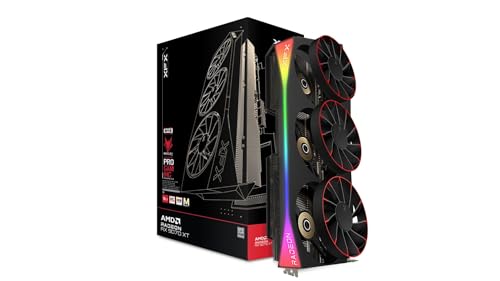
PNY GeForce RTX 4070 Ti Super 16GB XLR8 Verto Epic-X
PNY’s card pairs 16GB of GDDR6X on a 256-bit bus with DLSS 3, an ARGB triple-fan cooler, PCIe 4.0, and HDMI plus DisplayPort outputs. For ultrawide players, the memory capacity and bus width are the headline features.
- Strength: 16GB of GDDR6X and a 256-bit bus suit high-resolution textures.
- Strength: DLSS 3 support listed in the title for supported games.
- Trade-off: a triple-fan design is longer than compact models, so measure the case before ordering.
Skip it if you play mostly lighter titles at 60Hz, where a smaller card handles the same job. It is built for players who want high settings and a headroom buffer across several years of releases, and who already own a power supply with room for a high-end card. Buyers should read the listing for the exact card length, the power connector type, and the recommended supply capacity, since large triple-fan boards can also crowd front-mounted radiators and drive cages in compact cases.
XFX Mercury AMD Radeon RX 9070 XT OC Magnetic Air
XFX’s Mercury edition carries 16GB of GDDR6 on AMD’s RDNA 4 architecture with HDMI and three DisplayPort outputs. It speaks to buyers who want the newest AMD design and generous memory for wide displays.
- Strength: 16GB of memory and RDNA 4 architecture.
- Strength: three DisplayPort outputs plus HDMI for multi-monitor desks.
- Trade-off: the title does not list card dimensions or power connectors, so confirm both on the listing.
Skip it if you depend on Nvidia-specific features such as DLSS or have software tied to Nvidia hardware. It is a natural match for players who want strong ultrawide performance and prefer AMD drivers and features, especially those running a multi-display desk. Because the title describes a magnetic fan design and an OC edition, look at the listing for noise, size, and warranty details, and confirm that your motherboard slot and power supply connectors match what the card requires.
ZOTAC Gaming GeForce RTX 4070 Twin Edge OC
ZOTAC’s Twin Edge OC is a compact RTX 4070 with 12GB of GDDR6X, a 192-bit bus, DLSS 3, and IceStorm 2.0 cooling. It is the choice for small cases that still need a capable 1440p card.
- Strength: compact dual-fan design with 12GB of fast GDDR6X.
- Strength: DLSS 3 listed for supported games.
- Trade-off: 12GB and a 192-bit bus leave less headroom than 16GB cards at the highest texture settings.
Skip it if you plan to push every setting to ultra on a 144Hz ultrawide in the newest games. It suits players with a mid-sized case and a modest power supply who want the best card that stays quiet and manageable without major cooling concerns. The listing mentions an advanced cooling design and a compact build, but exact length and power connector needs are not in the title, so check the specification tab and your case clearance before ordering.
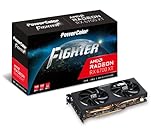
PowerColor Fighter AMD Radeon RX 6700 XT
The Fighter RX 6700 XT offers 12GB of GDDR6 on RDNA 2, with ray tracing support, PCIe 4.0, and HDMI 2.1. It sits in the value segment for players who want generous memory without paying for the latest generation.
- Strength: 12GB of GDDR6 at a lower tier than the new generation.
- Strength: HDMI 2.1 helps if you connect to a TV or high-refresh monitor.
- Trade-off: RDNA 2 is an older architecture, so it lacks some newer upscaling and efficiency features.
Skip it if you want the latest ray tracing performance or upscaling options. It is a reasonable fit for budget-aware players who mainly want smooth 1440p ultrawide frame rates in a mix of older and newer games without extreme settings. Pair it with a monitor that supports adaptive sync, and check the listing for the card’s length and its power connector type so it fits your case and power supply without surprises.
MSI Gaming GeForce RTX 3060 12GB
MSI’s RTX 3060 carries 12GB of GDDR6 on a 192-bit bus with Torx twin fans and HDMI plus DisplayPort. It is an entry point for ultrawide gaming, with enough memory to avoid the worst texture limits.
- Strength: 12GB of memory at a modest tier.
- Strength: twin-fan cooling on a standard-size card.
- Trade-off: raw speed is limited, so high settings in new releases may require lower quality or upscaling.
Skip it if you want consistent high frame rates on a 144Hz ultrawide. It fits a first ultrawide upgrade where the monitor is the main purchase and the player is happy to tune settings, especially for older libraries and esports titles. Many buyers pair a card like this with a monitor at a modest refresh rate and rely on in-game sliders for the heaviest effects. Check the listing for the card’s length, fan count, and power connector before ordering, and consider whether a newer card might serve you longer.
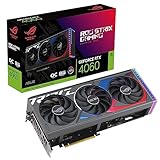
ASUS ROG Strix GeForce RTX 4060 OC Edition
The ROG Strix RTX 4060 offers 8GB of GDDR6, DLSS 3, HDMI 2.1a, DisplayPort 1.4a, and an Axial-tech fan design. It targets compact builds and lower-power systems.
- Strength: DLSS 3 and modern display outputs.
- Strength: Axial-tech fan design for cooling.
- Trade-off: 8GB of memory is the weakest point for an ultrawide, where texture memory fills quickly.
Skip it if you want to run high texture settings in new releases. It makes sense for players with limited power supplies, lighter game libraries, or a plan to rely on upscaling and medium settings to keep frame rates high on a wide screen. If you do pick it, set realistic goals for texture quality, enable the upscaling mode in games that support it, and check the listing for card length and power connector requirements so the build stays simple and quiet.
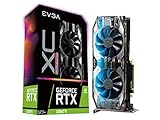
EVGA GeForce RTX 2080 Ti XC Ultra Gaming
EVGA’s 2080 Ti has 11GB of GDDR6, dual HDB fans, and RGB lighting. It was a flagship in its day and appeals to buyers who find one at a good value.
- Strength: 11GB of GDDR6 and a strong older-generation foundation.
- Strength: dual-fan cooling with RGB lighting.
- Trade-off: it lacks newer upscaling and frame generation features listed on the Nvidia 40-series cards.
Skip it if you want warranty support or modern efficiency, since an older card may draw more power for its speed. It is best for tinkerers who find a verified card at a low price and understand the trade-offs. Confirm the card’s condition, return window, and seller details, and verify your power supply has the connectors the listing calls for. Anyone who wants a card with a long runway of driver updates and modern features is usually better served by a newer model on this list.
Which One Fits Your Situation
High settings on a 144Hz ultrawide
The PNY RTX 4070 Ti Super has the most memory and bandwidth in the list, which matters when textures and resolution rise together.
Small case, moderate power supply
The ZOTAC RTX 4070 Twin Edge OC keeps the footprint down and delivers 12GB of GDDR6X.
AMD fan with a multi-monitor desk
The XFX Mercury RX 9070 XT OC provides three DisplayPort outputs and 16GB of memory.
Budget upgrade for a new ultrawide
The PowerColor Fighter RX 6700 XT or MSI RTX 3060 12GB gives the most memory for a budget tier, with the 6700 XT usually offering more speed.
Common Mistakes
- Buying an 8GB card for an ultrawide and running into texture limits.
- Ignoring card length and thickness until the box arrives.
- Assuming every game supports DLSS or frame generation.
- Forgetting that your power supply needs enough rated capacity and the right connectors.
- Choosing an older flagship without checking warranty terms and condition.
Related guides
- How To Check Motherboard Vrm Temperature In Hwinfo
- How To Clean Quest 3 Lenses And Facial Interface
- Prebuilt Gaming Desktops Under 1000 Dollars
Frequently Asked Questions
How much VRAM is enough for 3440×1440?
Twelve gigabytes is a comfortable middle, and 16GB is better for high texture settings. Eight gigabytes works for medium settings but runs out sooner in new games.
Is an ultrawide harder to run than a standard 1440p monitor?
Yes, because it renders roughly a third more pixels. Expect lower frame rates at the same settings, which is why a stronger card helps.
Does DLSS matter for ultrawide gaming?
It can raise frame rates in supported games, which helps at wide resolutions. Support varies, so check your own library.
Which port should the card use for an ultrawide?
DisplayPort is common for high refresh rates, and HDMI 2.1 suits TVs and some monitors. Match the card’s outputs to your monitor’s inputs.
Related guides
More from Amazon
Programs that pair well with the guide above. Offers and eligibility are set by Amazon and may change.
Free shipping on eligible items, Prime Video and more. Eligible new members can start with a free trial.
Start a Prime free trialAd-free music streaming. Eligible new subscribers can start with a free trial.
Try Music Unlimited freeA Prime membership for ages 18-24 with a trial period. Eligibility is set by Amazon.
See Prime for Young AdultsAudiobooks and podcasts to listen to on the go. Eligible new members can start with a free trial.
Try Audible freeAs an Amazon Associate we earn from qualifying purchases.