
Setting up a PlayStation 5 is an exciting upgrade for any home entertainment space, but integrating this massive console into your existing living room furniture requires some careful planning. Beyond finding a shelf that can accommodate the console’s generous footprint, you must also select the correct cable lengths. The right HDMI cable size ensures your system operates at peak performance while keeping your media console neat, organized, and free of tangled wires.
Our Top Picks
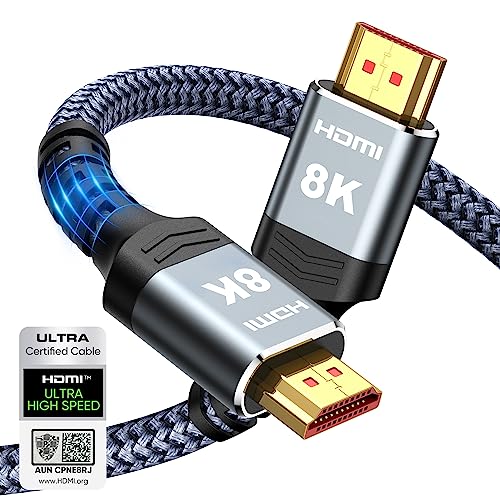


Top 3 picks at a glance
The Short Answer
For the vast majority of home entertainment setups, a 6.6-foot (2-meter) HDMI cable is the ideal size for the PS5. This length provides the perfect balance of flexibility and performance, allowing you to route the cable through furniture cutouts and around corners without creating a cluttered nest of excess cord behind your TV stand.
The PlayStation 5 comes packaged with a standard 4.9-foot (1.5-meter) HDMI cable. While this stock cable works perfectly if your console sits directly next to your TV, it is often too short for clean cable management inside larger media consoles or wall-mounted setups.
When purchasing a replacement or longer cable, it must be an Ultra High Speed HDMI (HDMI 2.1) cable capable of supporting a 48Gbps bandwidth. This specification is required to transmit 4K resolution at 120Hz, HDR, and Variable Refresh Rate (VRR) from your PS5 to your display. High-quality certified cables in the standard 6.6-foot length are highly affordable, generally ranging in price from around $6 to around $20 depending on the materials and brand.
Standard Sizes
HDMI cables are manufactured in standardized lengths to accommodate various room layouts. Because the high-frequency signals of HDMI 2.1 are sensitive to distance, understanding these standard dimensions helps you choose the shortest possible cable for your layout, preserving maximum signal integrity.
| Cable Length (Feet) | Cable Length (Meters) | Cable Length (Inches) | Best Use Case for PS5 | Average Price Range |
|---|---|---|---|---|
| 3 Feet | 0.9 Meters | 36 Inches | Desktop setups, monitor mounts, or PS5 placed directly behind the TV. | around $5 – around $10 |
| 4.9 Feet | 1.5 Meters | 59 Inches | Stock PS5 cable size. Good for simple TV stands where the console is next to the display. | Included with console (Replacements: around $8 – around $15) |
| 6.6 Feet | 2.0 Meters | 79.2 Inches | Standard media consoles, credenzas, and basic routing through cabinet grommets. | around $6 – around $20 |
| 10 Feet | 3.0 Meters | 120 Inches | Wall-mounted TVs with surface-mounted covers or shallow in-wall conduits. | around $9 – around $25 |
| 15+ Feet | 4.5+ Meters | 180+ Inches | Large home theaters, projectors, and long-run in-wall routing (requires active optical cables). | around $30 – around $80+ (for Active/Fiber) |
How to Measure Your Space
To avoid the frustration of buying a cable that is too short to reach or too long to hide, follow these steps to measure your media setup accurately before making a purchase.
- Locate the Ports: Identify exactly where the HDMI output port is on the back of your PS5, and locate the HDMI 2.1 input port on your TV or AV receiver. Note that on many modern TVs, only specific ports (often labeled HDMI 3 or HDMI 4) support the full HDMI 2.1 120Hz standard.
- Map the Cable Path: Do not measure in a straight, diagonal line from the console to the TV. Cables must run along the contours of your furniture, through routing holes, and down wall channels. Trace the exact path the cable will take.
- Use the String Trick: Take a long piece of string, yarn, or a flexible sewing measuring tape. Hold one end at the TV’s HDMI port, trace the exact path through your media console’s grommets, and run it to the back of the PS5.
- Measure the String: Lay the string flat on the floor and measure its length with a standard metal tape measure.
- Add a Slack Buffer: Always add 1 to 1.5 feet (12 to 18 inches) of extra length to your final measurement. This buffer prevents the cable from being pulled taut, protects the physical ports from strain, and allows you to slide your PS5 forward on its shelf for occasional dusting or cleaning without unplugging it.
By Room or Use Case
Designing a modern living room in 2026 means balancing high-performance gaming hardware with clean, clutter-free interior design. The physical layout of your room determines the exact HDMI cable size and style you should select.
Minimalist Living Room Media Consoles
If your PS5 sits inside or on top of a standard media console (typically measuring 18 to 24 inches deep and 60 to 72 inches wide), a 6.6-foot (2-meter) cable is your best option. Excellent examples of this size include the Silkland Certified HDMI 2.1 Cable (around $8) or the Highwings Ultra High Speed HDMI Cable (around $6). These cables feature durable braided outer jackets that easily slide through wooden furniture cutouts without snagging or fraying. The 6.6-foot length gives you enough slack to neatly bundle the excess cord with hook-and-loop fasteners behind the cabinet, keeping it completely hidden from view.
Wall-Mounted TVs and Hidden Conduits
For a clean look where the TV is mounted to the wall and the PS5 sits on a credenza below, you will need a 10-foot (3-meter) cable. When routing cables inside a wall cavity, safety is paramount; you must use a cable rated for in-wall use (look for CL2 or CL3 ratings). A robust option like the Ubluker 10K/8K/4K HDMI Cable (around $9) offers the heavy-duty shielding required to prevent signal interference when run alongside in-wall power lines. If your TV mount features an articulating or full-motion swivel arm, the 10-foot length is crucial because it ensures the cable will not pull tight or snap when the TV is pulled away from the wall or angled toward a different seating area.
As an Amazon Associate we earn from qualifying purchases at no extra cost to you.


Desktop Gaming Setups and Monitors
When the PS5 is integrated into a home office or dedicated bedroom gaming desk, space is at a premium. Because the console typically sits right next to a 27-inch or 32-inch gaming monitor, a long cable will simply bunch up on your desktop, collecting dust and eating up workspace. In this scenario, a shorter 3-foot (0.9-meter) cable or the officially licensed Hori Ultra High Speed HDMI Cable for PlayStation 5 (around $19) is ideal. The shorter length keeps the back of your desk tidy and ensures that your high-refresh-rate monitor receives a pristine, zero-latency signal directly from the console.
Common Sizing Mistakes
Many homeowners run into connectivity and aesthetic issues by overlooking a few physical realities of modern high-speed cabling.
- The “Guitar String” Trap: Buying a cable that is exactly the measured distance with zero slack. This puts severe physical tension on the PS5’s internal HDMI port. Over time, this tension can crack the solder joints on the console’s motherboard, resulting in a costly repair.
- Ignoring Cable Thickness and Bend Radius: Certified HDMI 2.1 cables are significantly thicker (often 0.28 to 0.35 inches in diameter) than old HDMI 2.0 cables because of the heavy internal copper shielding required for 48Gbps bandwidth. These cables do not bend at sharp 90-degree angles. If your media console sits flush against the wall, you must leave at least 3 to 4 inches of clearance behind the console to accommodate the natural bend radius of the cable.
- Buying Long, Cheap Copper Cables: Standard copper HDMI cables experience signal degradation over long distances. If you buy a cheap, unamplified 20-foot copper cable to run across a room, your PS5 will likely suffer from screen flickering, audio dropouts, or an inability to display in 4K at 120Hz. For runs longer than 15 feet, always invest in an active optical fiber HDMI 2.1 cable.
FAQ
Does the PS5 come with an HDMI 2.1 cable?
Yes, the PlayStation 5 comes packaged with an official Ultra High Speed HDMI cable. It measures 4.9 feet (1.5 meters) in length and is fully certified for HDMI 2.1 performance, supporting 4K resolution at 120Hz. If this length fits your furniture layout, there is no need to purchase an aftermarket replacement.
Can I use a 15-foot or 20-foot HDMI cable with my PS5?
Yes, but you must choose the correct cable technology. Standard copper HDMI 2.1 cables struggle to maintain the required 48Gbps bandwidth over distances greater than 10 to 12 feet. If your setup requires a 15-foot or 20-foot run, you should purchase an Active Optical HDMI 2.1 Cable (AOC), which uses fiber optics to transmit the signal over long distances without any quality loss.
What happens if my HDMI cable is too long?
If a standard copper HDMI cable is too long, the digital signal degrades before reaching the TV. This does not result in a blurry picture like old analog cables; instead, it causes “sparkles” (tiny white pixels flashing on screen), frequent audio dropouts, temporary black screens, or a complete loss of signal when trying to play games at 4K/120Hz.
Are braided HDMI cables better for home media furniture?
Yes, braided nylon HDMI cables are highly recommended for home media consoles. The braided exterior is highly resistant to friction, protecting the delicate internal wiring when pulled through rough wooden grommets or metal wall studs. Additionally, braided cables are much less prone to tangling and kink-damage compared to cheap PVC-jacketed alternatives.
Related guides
- Best Free MMOs on Steam: Subscription Limits, Pay-to-Win and Time Cost (2026)
- Best Free Horror Games on Steam: How to Pick One That Fits Your PC and Your Nerves (2026)
- Black Frame Insertion vs VRR: Which Smoothness Feature Should You Use?
- Best Webcams for Streaming: 11 Listings Compared by Resolution, Focus and Light (2026)








