
Our Top Picks

The Short Answer
Yes, but with one major condition: it depends entirely on how much you value first-party conveniences like Amiibo scanning (NFC) and instant console wake-up.
If you are staring at your shopping cart wondering, is a third party wireless switch controller worth it, the quick answer is that for 90% of gamers, yes, it is. Modern third-party alternatives offer exceptional value, often solving the dreaded “stick drift” issue for a fraction of the cost of official hardware. However, if you are a purist who demands HD Rumble, frequent Amiibo scanning, and the ability to wake your console from sleep mode with a single button press, you may find yourself frustrated by cheaper alternatives.
As an Amazon Associate we earn from qualifying purchases at no extra cost to you.

What You Actually Get
The market for Nintendo Switch controllers has evolved dramatically. It is no longer a choice between a $70 official Nintendo Switch Pro Controller and a cheap, flimsy wired controller that breaks in two weeks. Today, the third-party ecosystem spans an impressive spectrum of price points, build qualities, and feature sets.
On the budget end of the spectrum, options like the VOYEE Switch Controller (priced around $16) provide a traditional layout, dual-motor vibration, and a standard 3-axis gyro sensor. These controllers typically weigh around 200 grams (approx. 7 ounces)—slightly lighter than the official Pro Controller’s 246 grams—and utilize standard analog joysticks. They are ideal for casual multiplayer sessions, kids, or as a backup controller for guests.
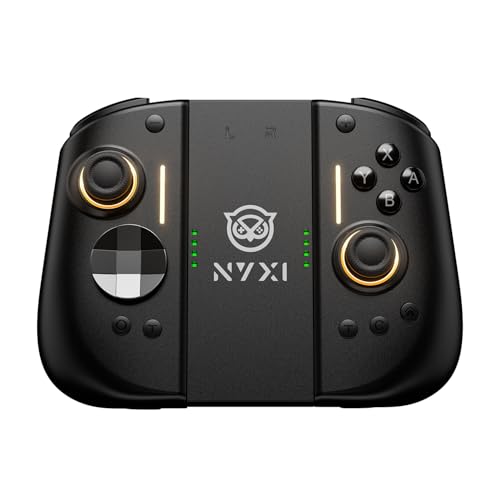
On the premium end, third-party manufacturers are pushing the boundaries of what gaming hardware can do. For example, the NYXI Hyperion 3 Switch 2 Controller (priced around $99) is marketed as a forward-looking, high-end peripheral. This class of controller introduces features that even Nintendo’s first-party controllers lack, such as magnetic Hall Effect joysticks that physically cannot drift, mechanical microswitch buttons with a crisp tactile click, a 9-axis gyroscope, and customizable rear back buttons. Weighing in at approximately 290 grams with an ergonomic design, these premium controllers are built for enthusiast gamers who spend hours in competitive titles.
As we look ahead toward 2026 and the inevitable expansion of next-generation hybrid consoles, third-party manufacturers are already designing hardware that bridges the gap between current and future systems. This means buying a high-quality third-party controller today is often a smarter, more future-proof investment than buying aging first-party stock.
Pros
- Incredible Cost Savings: The most obvious benefit is financial. While a pair of official Joy-Cons costs around $79 and a Pro Controller costs around $69, you can easily find highly competent third-party wireless controllers in the $15 to $35 price range. This makes local four-player Mario Kart sessions much more affordable to set up.
- Immunity to Stick Drift (with Hall Effect): Many mid-to-high-end third-party controllers now feature Hall Effect joysticks. Unlike Nintendo’s official controllers, which use physical contact sensors that wear down and cause “drift,” Hall Effect sensors use magnets to detect position, meaning they virtually never wear out.
- Advanced Customization: Many third-party options feature rear macro buttons, turbo functions, and adjustable vibration levels (ranging from 0% to 100% intensity). These features are entirely absent on Nintendo’s official offerings.
- Ergonomic Variety: Standard Joy-Cons are notoriously flat and cramp-inducing for hands larger than average. Third-party controllers come in various shapes and sizes, from bulky, ergonomic grips to classic retro layouts, allowing you to choose a controller that fits your hands perfectly.
Cons
- Missing Proprietary Features: To keep costs down, many third-party controllers omit NFC reader capabilities (meaning you cannot scan Amiibo figures). They also rarely feature true “HD Rumble,” instead relying on standard asymmetric dual-motors which can feel loud and buzzy rather than subtle and precise.
- Console Wake-Up Limitations: Many budget-tier third-party controllers cannot wake the Nintendo Switch from sleep mode. You will have to physically walk over to the console, press the power button, and then sync the controller.
- Variable Battery Life: While the official Pro Controller boasts an incredible 40-hour battery life, third-party wireless controllers generally range from 8 to 20 hours on a single charge of their built-in lithium-ion batteries (typically 500mAh to 1000mAh).
- Quality Control Roulette: At the ultra-budget level, plastic quality can feel cheap, buttons can feel mushy, and Bluetooth connection drops can occasionally interrupt your gameplay.
Who Should Buy It
You should buy a third-party wireless controller if you are a casual gamer, a parent looking to equip a household for family game nights, or an enthusiast looking for specialized features. If you are tired of replacing drifting Joy-Cons every year, investing in a mid-range third-party controller with Hall Effect sticks is a financial no-brainer.
It is also highly recommended for those who find the official Joy-Cons uncomfortable during long handheld gaming sessions. Ergonomic third-party split pads and controllers provide much deeper grips, wider button layouts, and a far more comfortable gaming posture for your wrists and fingers.
Who Should Skip It
You should skip third-party controllers if you are a dedicated collector of Amiibos, as you will lose the ability to scan your figures directly into games like The Legend of Zelda: Tears of the Kingdom or Super Smash Bros. Ultimate.
You should also skip them if you are highly sensitive to haptic feedback. The subtle, textured vibrations of Nintendo’s HD Rumble (like feeling virtual ice cubes clinking in a glass) cannot be replicated by the standard weight-based motors found in most third-party alternatives. Finally, if you want a seamless, zero-friction user experience where the controller instantly wakes the TV and console from across the room every single time, stick with first-party gear.
Cheaper Alternatives
If you are looking to expand your controller collection but aren’t sure which direction to go, consider this breakdown of alternative routes:
| Option Type | Estimated Cost Range | Major Trade-offs |
|---|---|---|
| Budget Third-Party Wireless (e.g., VOYEE Red-Blue Pro style) | $15 – $25 | Lacks NFC/Amiibo support; basic vibration; slightly cheaper plastic build; shorter battery life (approx. 8-10 hours). |
| Wired Third-Party Controller | $12 – $20 | Tethered to the Switch dock via an 8-foot or 10-foot USB cable; no motion controls; no rumble features at all. |
| Mid-Tier Wireless Joy-Con Replacements | $35 – $50 | Larger and bulkier than standard Joy-Cons; will not fit in standard travel cases; can drain the console battery slightly faster when attached. |
| Premium Third-Party (e.g., NYXI Hyperion 3) | $80 – $100 | Higher upfront cost than even first-party options; may feature complex mapping software that takes time to learn. |
FAQ
Do third-party wireless Switch controllers have input lag?
Most modern third-party controllers use Bluetooth 5.0 or 2.4GHz wireless connections, resulting in latency that is imperceptible to the average gamer (usually under 15 milliseconds). However, ultra-budget controllers under $15 may occasionally experience brief interference or dropouts in rooms with many active wireless devices.
Can a third-party controller wake up the Nintendo Switch?
It depends on the model. Premium third-party controllers often include a home-button wake-up feature. However, many budget models (such as those under $20) cannot send the specific Bluetooth signal required to wake the console from a deep sleep, requiring you to turn the console on manually first.
Do these controllers support motion controls (gyro)?
Yes, almost all reputable third-party wireless controllers built for the Switch feature at least a 6-axis gyroscope. This ensures that motion-aiming in games like Splatoon 3 or steering in Mario Kart 8 Deluxe works seamlessly, though the precision may vary slightly compared to first-party sensors.
How do I charge a third-party wireless controller?
Nearly all third-party Switch controllers charge via a standard USB-C port, which is the same port used by the Nintendo Switch console itself. They typically ship with a USB-A to USB-C charging cable that can be plugged directly into the Switch dock or any standard 5-watt phone charger wall adapter.
Related guides
- Best Free MMOs on Steam: Subscription Limits, Pay-to-Win and Time Cost (2026)
- Best Free Horror Games on Steam: How to Pick One That Fits Your PC and Your Nerves (2026)
- Black Frame Insertion vs VRR: Which Smoothness Feature Should You Use?
- Best Webcams for Streaming: 11 Listings Compared by Resolution, Focus and Light (2026)








