
Our Top Picks


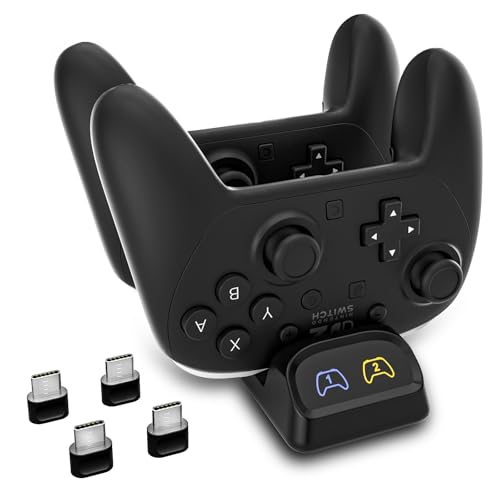
Top 3 picks at a glance

The Short Answer
If you are shopping for a dual controller charging dock, most models need very little power. The standard requirement is 10 watts (5V/2A), which is enough to charge two controllers simultaneously at full speed. Some docks with faster charging or additional features may request up to 15 watts (5V/3A), but anything higher is unnecessary and will not charge your controllers faster.
For most households, a basic 10W USB wall adapter or a USB port on a power strip that can deliver 5V/2A is all you need. Using a 5W phone charger (5V/1A) will work but charges much slower and may struggle to charge two controllers at once, while using a 30W or 65W adapter is safe but provides no extra benefit because the dock only draws what it needs. Check the bottom of the dock or its manual for the exact input rating and match that rating when choosing your adapter.
As an Amazon Associate we earn from qualifying purchases at no extra cost to you.

Standard Sizes
Dual controller docks are compact by design, but footprint varies significantly between universal multi-platform docks and platform-specific cradles. Measurements below reflect common retail models in this category and will help you plan shelf or tabletop space. Prices for this category typically range from $14 to $25 for standard dual docks.
| Dock Type | Dimensions (Inches) | Dimensions (Centimeters) | Weight | Power Input |
|---|---|---|---|---|
| Universal Multi-Platform Dock (Switch Pro / PS5 / Xbox Series X|S) | 6.3 x 3.5 x 2.4 in | 16.0 x 8.9 x 6.1 cm | 6.2 oz (176 g) | 5V/2A (10W) |
| Compact Xbox Dual Dock (PowerA Style) | 6.0 x 3.3 x 2.0 in | 15.2 x 8.4 x 5.1 cm | 5.1 oz (145 g) | 5V/2A (10W) |
| Magnetic Xbox Dual Dock | 5.7 x 3.1 x 1.8 in | 14.5 x 7.9 x 4.6 cm | 4.6 oz (130 g) | 5V/2A (10W) |
| Dual USB-C Switch Pro Dock | 4.7 x 2.6 x 2.2 in | 11.9 x 6.6 x 5.6 cm | 3.9 oz (111 g) | 5V/2A (10W) to 5V/3A (15W) |
Universal docks are the largest because they need wider cradles and adjustable contacts to fit different controller shapes, from the bulkier PS5 DualSense to the Xbox Elite Series 2. Magnetic and single-platform docks are slimmer because the controllers snap directly onto low-profile pins. Height listed is for the dock alone. Add approximately 4 to 5 inches (10 to 13 cm) of vertical clearance for controllers when docked upright.
Cable length also affects placement. Most docks include a 3 to 3.9 foot (90 to 120 cm) USB-A to USB-C or USB-C to USB-C cable. If your outlet or console USB port is farther away, you will need a longer cable rated for at least 2A.
How to Measure Your Space
Before you buy, take two minutes to measure where the dock will live. Controller docks look small in product photos but need breathing room for cables and for lifting controllers on and off.
- Measure depth and width of the surface. Use a tape measure to record the usable flat area of your media console, nightstand, or desk. Leave at least 1 inch (2.5 cm) of clearance on the sides and 2 inches (5 cm) behind the dock for the USB cable and wall clearance.
- Check vertical clearance. Measure from the surface to the bottom of the shelf above. You need at least 9 to 10 inches (23 to 25 cm) of open height to dock and remove controllers comfortably without hitting a shelf.
- Locate your power source. Measure the distance to the nearest outlet or console USB port. Confirm you have a 5V/2A (10W) adapter available. If you plan to power the dock from a TV USB port, verify it outputs at least 0.9A to 1.5A, though a dedicated wall adapter is more reliable for dual charging.
- Account for ventilation and LED glare. Docks with LED indicators run slightly warm and should not be enclosed in a tight cabinet cubby. If the dock will sit in a bedroom, note that LEDs stay on while charging and may be distracting on a nightstand.
- Test controller removal. With the tape measure, mark the footprint on the surface with painter’s tape. Practice mimicking the motion of lifting a controller straight up. If you have to angle your wrist or bump a wall, you need more side clearance.
By Room or Use Case
Living Room Entertainment Center
This is the most common spot. Media consoles are typically 14 to 18 inches (35 to 46 cm) deep, so any dual dock will fit depth-wise. The constraint is often width between a console and soundbar. A universal dock at 6.3 inches wide fits easily, but if your console shelf is crowded, choose a compact Xbox-style dock under 6 inches wide. Power is simple here: use the included cable with a 10W wall adapter plugged into your surge protector, not the TV’s USB port, to avoid slow charging when the TV is off.
Bedroom Nightstand
Nightstands are tighter, often only 16 to 20 inches (41 to 51 cm) wide. A magnetic dock with a 5.7 x 3.1 inch footprint saves the most space and keeps controllers floating neatly. Plan for cable management so the cord does not hang off the edge. Since many people charge overnight, a dock with auto shut-off or dim LEDs is preferable. A 10W adapter is still the correct wattage; any standard phone charger rated 5V/2A on the nightstand will work.
Desk or Gaming Setup
On a desk, depth matters more than width. If your desk is against a wall, measure the gap between monitor stand and wall. A dual USB-C Switch-style dock at just 4.7 inches wide can sit beside a keyboard without dominating the desk. Desk users often power docks from a PC or powered USB hub. Make sure the hub port delivers 5V/2A per port. Unpowered hubs or front-panel ports rated only for 5V/0.9A will charge one controller slowly and may fail to charge two at once.
Small Apartment, Dorm, or Enclosed Cabinet
In small spaces or inside a media cabinet with doors, choose the smallest single-platform dock that matches your controllers and confirm ventilation. Enclosed cabinets trap heat, so leave the door open while charging or choose a low-profile dock under 2 inches tall without a cover. Stick to the manufacturer-recommended 10W input; in tight spaces it is tempting to use whatever spare charger is nearby, but a low-rated 5W charger will double charge time to 5 to 6 hours for two controllers versus the typical 2.5 to 3.5 hours with 10W.
Common Sizing Mistakes
1. Buying a universal dock for limited shelf space. Universal docks are convenient but are the widest and heaviest option. If you only own one console family, a dedicated dock saves 1 to 1.5 inches of width and looks less bulky.
2. Forgetting vertical clearance. Shoppers measure width and depth but forget controllers add 4 to 5 inches of height. In a low media cabinet with 7-inch cubbies, you cannot lift controllers out. Always measure to the top of a docked controller.
3. Using the wrong wattage adapter. The most frequent error is pairing a dual dock with an old 5W (5V/1A) cube. The dock may light up but will charge slowly or charge only one slot. Conversely, assuming a 20W+ fast charger will speed things up is also a mistake. The dock regulates input, so extra wattage is simply not used.
4. Ignoring third-party controller compatibility. Docks molded for official controllers, such as official PS5 DualSense or Xbox Series X|S controllers, often do not fit PowerA or other third-party pro controllers with different shell shapes or battery covers. If you use third-party controllers, verify fit before buying and consider a dock explicitly listed as compatible.
5. Not planning cable slack. A dock placed at the back edge of a 15-inch deep console may require a 4-foot cable to reach the outlet neatly along the back. The 3-foot cable included in the box may pull taut or lift the lightweight dock when you remove a controller.
FAQ
How many watts does a dual controller charging dock need to charge two controllers at once?
Most dual docks need 10 watts, listed as 5V/2A. This powers both bays at once and charges two depleted controllers in about 2.5 to 3.5 hours. If your dock specifies 5V/3A (15W), use a 15W adapter to get the same speed. Using a higher-wattage adapter is safe but does not charge faster, as the dock limits current draw. Early in 2026, 10W remains the industry standard for this category.
Can I power a dual dock from my console or TV USB port?
Sometimes, but a wall adapter is more reliable. PS5 and Xbox Series X|S front USB ports typically provide 5V/1.5A to 5V/3A and can power a dock, but they only supply power when the console is on or in rest mode depending on settings. Most TV USB ports are rated 5V/0.5A to 0.9A, which is not enough for two controllers. For consistent overnight charging, use a dedicated 5V/2A wall adapter.
What size dock do I need for Xbox Elite Series 2 controllers?
Elite Series 2 controllers are heavier at about 12.1 oz (343 g) and come with a slightly different weight distribution, but they fit standard Xbox dual docks sized around 6.0 x 3.3 inches. Look for docks that specifically list Elite Series 2 compatibility. Magnetic docks include a small battery cover replacement for Elite controllers; standard drop-in docks use the existing contacts and require no modification.
Will a 10W charger work if I only charge one controller?
Yes. A 10W (5V/2A) adapter will charge a single controller efficiently, usually in 2 to 3 hours, and will simply draw less current. You do not need a smaller adapter for single-controller charging. If you regularly charge only one, you could use a 5W adapter, but keeping the 10W adapter plugged in ensures you are ready to charge two without swapping adapters.
Related guides
- Best Free MMOs on Steam: Subscription Limits, Pay-to-Win and Time Cost (2026)
- Best Free Horror Games on Steam: How to Pick One That Fits Your PC and Your Nerves (2026)
- Black Frame Insertion vs VRR: Which Smoothness Feature Should You Use?
- Best Webcams for Streaming: 11 Listings Compared by Resolution, Focus and Light (2026)








