
Our Top Picks
 SANDISK 512GB microSD Express Card for Nintendo Switch512GB0.59 x 0.43 x 0.1 inches0 PoundsCheck on Amazon

Top 3 picks at a glance


The Short Answer
For a 50-game Nintendo Switch library, most players should buy a 256GB microSD card, which typically costs between $45 and $60. The math is straightforward: average first-party Nintendo titles run 7GB to 16GB (The Legend of Zelda: Tears of the Kingdom is about 16.7GB; Mario Kart 8 Deluxe is about 6.7GB), while many digital indie games sit under 2GB. A realistic 50-game mix averages out to roughly 6GB to 8GB per game, putting you at 300GB to 400GB of raw demand — but few players install all 50 games at once, and you can archive and redownload titles whenever you like. A 256GB card comfortably holds around 30 to 40 average games installed at a time. If you hoard installs or lean heavily on massive third-party titles (Call ofyty: Warzone-style games can exceed 60GB on their own), jump straight to 512GB.
One critical compatibility note for 2026 shoppers: the Nintendo Switch 2 requires microSD Express cards for expanded storage, not the standard microSD UHS-I cards that work in the original Switch and Switch OLED. Express cards are faster but cost more per gigabyte, so size your budget accordingly.
As an Amazon Associate we earn from qualifying purchases at no extra cost to you.

Standard Sizes
microSD cards come in four storage capacities you will actually encounter, and every one of them shares the same physical footprint, so there are no fitment surprises inside the console. Here is how the capacities compare:
| Capacity | Approx. Games Held (7GB avg.) | Physical Dimensions | Typical Price Range |
|---|---|---|---|
| 128GB | 15–18 games | 0.59 x 0.43 x 0.04 in (1.5 x 1.1 x 0.1 cm) | $20–$40 |
| 256GB | 32–38 games | 0.59 x 0.43 x 0.04 in (1.5 x 1.1 x 0.1 cm) | $45–$60 |
| 512GB | 65–75 games | 0.59 x 0.43 x 0.04 in (1.5 x 1.1 x 0.1 cm) | $100–$160 |
| 1TB | 130–150 games | 0.59 x 0.43 x 0.04 in (1.5 x 1.1 x 0.1 cm) | $150–$250 |
Because physical size is identical across capacities, the real “sizing” question is about storage capacity, write speed, and card format. The Switch 2 specifically needs a microSD Express card (marked “EX” on licensed products), which supports PCIe/NVMe transfer speeds. The original Switch and Switch OLED accept standard microSD, microSDHC (up to 32GB), and microSDXC (64GB and up) cards with UHS-I speeds. A card rated U3, V30, or better is recommended so game loads and saves do not stutter.
How to Measure Your Space
You cannot see your storage headroom from the outside of the console, so measure it digitally before you buy. Here is the five-step process:
- Check your internal storage baseline. On the Switch 2, go to System Settings, then Data Management. The console shows total internal storage (32GB on Switch 2, 32GB on OLED) and free space remaining.
- Tally your game sizes. The eShop lists every game’s download size in GB on its store page. Write down the 50 games you own or plan to own, or check installed sizes under Data Management, then Software.
- Add the numbers and apply a buffer. Multiply your total by 1.25. Game updates and patches commonly add 10% to 30% to a title’s launch size, and save data plus screenshots eat another few gigabytes.
- Compare against card capacities. If your buffered total lands under 220GB, 256GB works. Between 220GB and 420GB, go 512GB. Above that, 1TB.
- Verify the slot type before checkout. The Switch 2’s microSD Express slot sits under the adjustable kickstand. The original Switch and OLED use a standard microSD slot under the kickstand as well. Match the card format to the console, and consider a licensed card (SanDisk and Samsung both make Switch-branded models) to remove all guesswork.
By Room or Use Case
The Family Living Room Switch
A docked console shared by several household members tends to accumulate large multiplayer and party titles — Mario Kart 8 Deluxe (6.7GB), Super Smash Bros. Ultimate (16.0GB plus DLC), Minecraft (about 1GB with updates), and download-only picks. With three or four users toggling profiles, install churn is high. A 256GB microSD Express card at around $59 covers most families, and 512GB makes sense if two players each maintain 20-plus installs. Weight and size are non-issues here; the card lives inside the console permanently.
The Travel and Commute Console
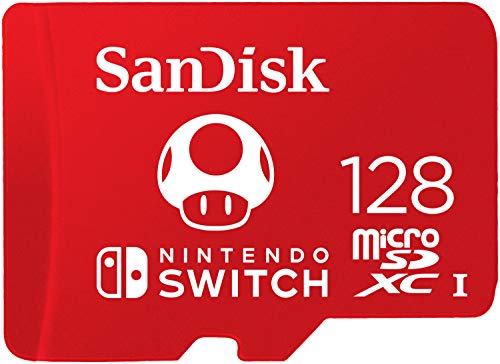
Handheld-first players usually rotate a smaller install list — five to ten games swapped seasonally. Because you may want to archive games in a hotel Wi-Fi dead zone and cannot redownload, carrying a second card is smart. Two 128GB cards (about $40 each for licensed editions, such as the SanDisk Super Mario collection) cost less than one 256GB Express card in some cases and let you organize by genre. Keep cards in a rigid microSD case; at 0.5 grams each, they are easy to lose in a backpack.
The Switch OLED or Original Switch Owner
If you are not upgrading to Switch 2, you do not need Express pricing. Standard microSDXC UHS-I cards with U3/V30 ratings cost roughly half as much per gigabyte. A 256GB standard card runs $25 to $35 and holds the same 30 to 40 games. Note that if you plan to transfer your library to a Switch 2 later, data can be moved through system transfer tools, but the Express-only slot means your old UHS-I cards will not work in the new console.
The Repair and Upgrade Shop
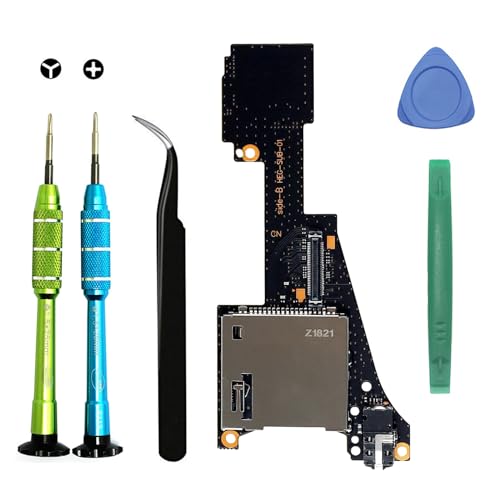
If your console will not read cards at all, the problem is often hardware, not the card. A replacement game card reader and microSD slot daughterboard for the Switch OLED — including the cartridge slot, tray, and headphone jack assembly — costs about $25 and comes with repair tools. A failed slot is worth diagnosing before you spend $100-plus on a large card you suspect is defective.
The Collector With a Massive Backlog
If your 50-game library is a floor, not a ceiling, go straight to 512GB or 1TB. The SanDisk 512GB microSD Express card runs about $160, which is steep, but it eliminates archive-and-redownload friction for roughly 65 to 75 average installs. One 1TB card is usually cheaper than buying multiple smaller cards over time.
Common Sizing Mistakes
- Buying UHS-I for a Switch 2. Standard microSD cards physically fit the Switch 2’s slot but will not work. Look for the “microSD Express” label or a Nintendo Switch 2 compatibility mark before you buy.
- Counting internal storage twice. The Switch 2’s 32GB internal drive fills fast, but many players forget it exists when adding up card capacity. Any game installed internally frees equal space on your card budget.
- Ignoring update bloat. A 7GB launch game can grow past 10GB with patches and DLC. Always add that 25% buffer.
- Oversizing to save money later. Prices per gigabyte drop steadily; a 1TB card bought now may cost $80 in a year. Size to your next 12 to 18 months, not forever.
- Buying no-name cards. Counterfeit microSD cards frequently report inflated capacity and corrupt saves. Stick to Samsung, SanDisk, Kingston, or Nintendo-licensed editions even if they cost $5 more.
- Forgetting screenshots and video. Capture clips at 1080p add up — an hour of footage can consume 8GB to 12GB. Factor in a few gigabytes if you record gameplay.
FAQ
Is 256GB enough for 50 Switch games?
For raw ownership, no — 50 average games at 6GB to 8GB each need 300GB to 400GB. For practical play, yes — most people actively play 10 to 20 titles at a time, and 256GB holds 32 to 38 average installs with room for updates. Archive the rest; your purchases stay tied to your Nintendo Account and can be redownloadd free.
Do I need a microSD Express card for the original Switch or OLED?
No. Only the Switch 2 requires microSD Express. The original Switch and Switch OLED accept standard microSDXC cards with UHS-I speeds, which cost roughly half as much per gigabyte. Check the model number on the back of your console before buying.
How much does a 256GB Switch-compatible card cost?
Standard UHS-I 256GB cards run $25 to $35, while licensed microSD Express 256GB cards for Switch 2, such as the Samsung model, run around $59. Licensed novelty editions, like SanDisk’s Super Mario-themed 128GB card at around $39, cost a small premium over plain equivalents.
Can I use two smaller cards instead of one large card?
Yes. The Switch supports swapping cards, and each card keeps its own game archive independent of the console. Two 128GB cards let you organize libraries by household member or genre, though you must power down or safely remove the card when swapping. Verify a game’s install location before archiving, since saves stay on internal storage regardless of which card holds the game.
Related guides
- Best Free MMOs on Steam: Subscription Limits, Pay-to-Win and Time Cost (2026)
- Best Free Horror Games on Steam: How to Pick One That Fits Your PC and Your Nerves (2026)
- Black Frame Insertion vs VRR: Which Smoothness Feature Should You Use?
- Best Webcams for Streaming: 11 Listings Compared by Resolution, Focus and Light (2026)








