
Our Top Picks
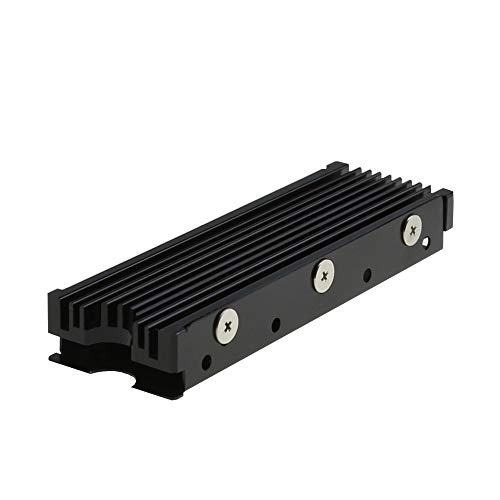 MHQJRH M.2 2280 SSD heatsink for PC /Double Side Heatsink(black)3 x 0.95 x 0.4 Inches0.1 poundsCheck on Amazon


Top 3 picks at a glance


The Short Answer
To fit inside the PlayStation 5 console’s internal expansion bay, an M.2 SSD heatsink must meet strict physical dimensions specified by Sony. The maximum size limit for a compatible heatsink and SSD combination is 110 mm (length) x 25 mm (width) x 11.25 mm (height). In imperial measurements, this translates to 4.33 inches x 0.98 inches x 0.44 inches.
Crucially, this total height of 11.25 mm is not measured from the bottom of the slot; it is divided relative to the SSD’s circuit board (PCB). You are allowed a maximum of 8.00 mm (0.31 inches) of clearance above the SSD, and a maximum of 2.45 mm (0.09 inches) of clearance below the SSD. If your heatsink exceeds any of these specific thresholds, the metal slot cover will not close, or the drive will not sit flat in the PCIe socket, potentially damaging your console’s hardware.
As an Amazon Associate we earn from qualifying purchases at no extra cost to you.

Fortunately, the standard 2280-form-factor SSD (22 mm wide by 80 mm long) is the industry default, and aftermarket heatsinks designed specifically for the console generally range in price from around $6 to around $15, making it easy and affordable to find a perfect fit.
Standard Sizes
When shopping for a heatsink, you will encounter various physical form factors. While the PS5 accommodates multiple SSD lengths (such as 2230, 2242, 2260, 2280, and 22110), almost all high-performance PCIe Gen4 NVMe drives utilize the 2280 standard. The table below outlines the absolute maximum dimensions permitted by Sony alongside standard aftermarket heatsink physical sizes.
| Dimension Parameter | Maximum Allowed (Metric) | Maximum Allowed (Imperial) | Typical Aftermarket Range |
|---|---|---|---|
| Total Width | 25.00 mm | 0.984 in | 22.00 mm to 24.00 mm |
| Total Length | 110.00 mm | 4.330 in | 70.00 mm to 80.00 mm |
| Total Thickness (Combined) | 11.25 mm | 0.442 in | 8.00 mm to 10.50 mm |
| Top-Side Clearance | 8.00 mm | 0.314 in | 3.00 mm to 7.50 mm |
| Bottom-Side Clearance | 2.45 mm | 0.096 in | 0.50 mm to 1.50 mm |
How to Measure Your Space
If you are assembling a custom drive and cooling setup, measuring your components beforehand prevents installation headaches. Follow these steps to verify your hardware clearance:
- Measure the SSD Width: Use a digital caliper to check the bare SSD. Most bare drives are exactly 22 mm wide. Ensure your heatsink does not flare out beyond 25 mm at its widest point (including any mounting clips, screws, or silicone bands).
- Check the Top-Side Height: Place the SSD flat on a table. Measure from the top surface of the green or black SSD circuit board (PCB) to the highest peak of the heatsink fins. This measurement must be 8.00 mm or less.
- Verify the Bottom-Side Thickness: If your heatsink features a wrap-around “sandwich” design with a metal backplate, measure the thickness of the metal and thermal pad underneath the SSD’s PCB. This layer must not exceed 2.45 mm, otherwise, the SSD cannot be screwed down flush into the mounting standoff.
- Account for the Thermal Pads: Thermal pads compress when installed, but they still add height. A typical pad ranges from 0.5 mm to 1.5 mm in thickness. Always measure your heatsink height with the thermal pads fully installed and lightly compressed under the heatsink’s mounting clips.
- Test the Metal Expansion Cover: After physical installation inside the console, the original metal plate must lay perfectly flat over the bay. If the cover bows or resists screwing down, your heatsink is too tall.
By Room or Use Case
Use Case 1: Standard Low-Profile Aluminum Heatsinks
If you are looking for a universal, budget-friendly cooling method, low-profile aluminum heatsinks are the most common solution. Products like the MHQJRH M.2 heatsink or the GLOTRENDS 2-Pack (typically priced between around $6 and around $8) fall into this category. These designs use simple aluminum fins held in place by silicone bands, metal clips, or tiny screws. Because they sit entirely on top of the SSD, they easily clear the bottom-side limit of 2.45 mm. They typically add 3 mm to 6 mm of height to the top side, fitting comfortably beneath the stock PS5 metal bay cover while keeping temperatures down during intense gaming sessions.
Use Case 2: Custom Expansion Cover-Replacement Heatsinks
For maximum cooling efficiency, specialized heatsinks replace the console’s stock metal expansion slot cover entirely. Examples include the SABRENT M.2 NVMe PS5 Heatsink (priced around $13) and the GRAUGEAR Metal Heat Dissipation Cover (priced around $9). Instead of trapping heat inside the small metal compartment, these products feature a massive aluminum block molded to fit the exact contours of the PS5’s bay opening. The cooling fins are exposed directly to the negative pressure airflow generated by the console’s main intake fan. This design bypasses the 8.00 mm top-side limit because the heatsink *is* the cover, providing unmatched thermal dissipation for high-capacity drives.
Use Case 3: Double-Sided High-Capacity SSDs (4TB to 8TB)
As storage demands grow, high-capacity drives are becoming essential. Looking ahead to 2026, the file sizes of advanced games will require larger 4TB and 8TB drives, which often feature memory chips soldered onto both sides of the SSD board. For this use case, you must select a double-sided heatsink that includes cooling pads for both the top and bottom of the PCB. You must be highly precise here: the bottom metal tray of the heatsink must be ultra-thin (under 1.5 mm) to ensure that the combined thickness of the bottom flash chips, thermal pad, and metal plate does not exceed the absolute 2.45 mm bottom clearance limit of the PS5’s M.2 slot.
Common Sizing Mistakes
- Buying Standard PC Heatsinks: Many high-performance desktop PC heatsinks feature massive cooling towers or integrated fans that stand 15 mm to 25 mm tall. These are far too large for the cramped quarters of the console and will prevent you from reattaching the outer plastic shell.
- Ignoring the Bottom Clearance: Many buyers focus exclusively on the top-side height limit of 8.00 mm and purchase a bulky, wrap-around aluminum enclosure. If the bottom plate is too thick, the SSD’s golden contact pins will be forced into the PCIe slot at an angle, which can permanently damage the motherboard connector.
- Leaving the Expansion Cover Off: To bypass height restrictions, some gamers install an oversized heatsink and simply leave the internal metal expansion slot cover off. This is a mistake. The PS5’s cooling system relies on negative pressure; leaving the slot open disrupts the intended airflow path, causing the SSD and surrounding motherboard components to run hotter over time.
- Using Too Many Thermal Pads: Adding extra thermal pads “for better contact” actually increases the physical stack height and acts as an insulator if compressed too tightly. Stick to the manufacturer’s recommended thickness (typically 1.0 mm for single-sided drives and 0.5 mm for double-sided drives).
FAQ
Can I use an SSD that already has a built-in heatsink?
Yes, you can use an SSD with a pre-installed factory heatsink, provided the entire assembly adheres to Sony’s official dimensions (110 mm x 25 mm x 11.25 mm). Popular drives sold with pre-fitted heatsinks are specifically designed to meet these dimensions, but you should always double-check the product specifications before purchasing.
What happens if my heatsink is slightly taller than 11.25 mm?
If the heatsink is even 1 mm too tall, the metal expansion slot cover will not sit flush. Forcing the cover down will apply dangerous bending pressure to the SSD’s circuit board and the PCIe slot. If it does not fit easily, you must exchange the heatsink for a lower-profile model or use a specialized replacement cover heatsink.
Do I really need a heatsink for the PS5 SSD, or is it optional?
A heatsink is mandatory. Modern PCIe Gen4 x4 M.2 SSDs transfer data at speeds exceeding 5,500 MB/s, which generates immense heat. Without a heatsink, the drive will quickly exceed its safe operating temperature (usually around 70°C to 80°C), triggering thermal throttling that drastically slows down your game loading speeds and shortens the lifespan of the drive.
Is a copper heatsink better than an aluminum heatsink for the PS5?
Pure copper has a higher thermal conductivity than aluminum, meaning it transfers heat away from the SSD chips faster. However, copper heatsinks are much heavier and generally more expensive. Because the PS5 expansion slot has limited airflow, a well-designed aluminum heatsink with ample surface area (or a replacement-cover style heatsink) is perfectly adequate and highly cost-effective.
Related guides
- Best Free MMOs on Steam: Subscription Limits, Pay-to-Win and Time Cost (2026)
- Best Free Horror Games on Steam: How to Pick One That Fits Your PC and Your Nerves (2026)
- Black Frame Insertion vs VRR: Which Smoothness Feature Should You Use?
- Best Webcams for Streaming: 11 Listings Compared by Resolution, Focus and Light (2026)








